Sign In
Upload
Manuals
Brands
Citizen Manuals
Printer
CT-E651
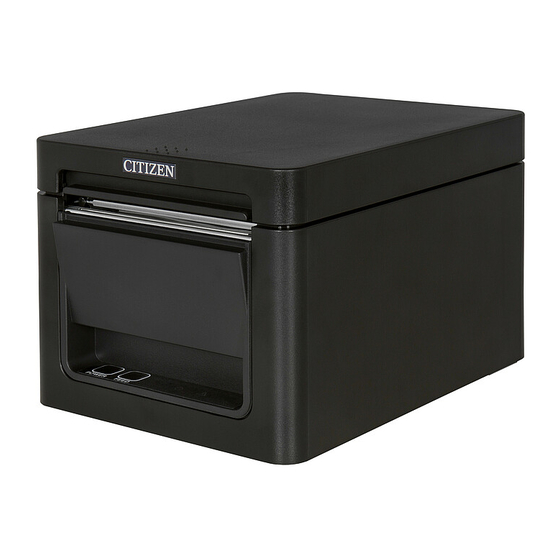
User Manuals: Citizen CT-E651 Thermal POS Printer
Manuals and User Guides for Citizen CT-E651 Thermal POS Printer. We have
4
Citizen CT-E651 Thermal POS Printer manuals available for free PDF download: Command Reference Manual, User Manual, Programming Manual
Citizen CT-E651 Command Reference Manual (512 pages)
Brand:
Citizen
| Category:
Printer
| Size: 7 MB
Table of Contents
Command Reference
1
Table of Contents
3
1 Outline
9
Operation Mode
9
Character Set
9
Control Commands
9
Control Command Details
9
How to Send Control Commands
9
2 Detail
10
Esc/Pos Command List 2.1.1 Ct-S280
10
Ct-S281
13
Ct-S300
16
Ct-S310
19
Ct-S310Ii
22
Ct-S2000
25
Ct-S4000
29
Ct-S601/651/801/851
33
Ct-S601 II/Ct-S651 II/Ct-S801 II/Ct-S851 II
37
Ct-S251
41
CT-P29X Series
45
Ct-D150
48
Ct-E351
51
Ct-D151
54
Ct-E651
58
Command Details
62
Description of Items
62
Print Control Commands
63
FF (at Selection of
65
FF (Valid Only for Black Mark/Label Specification)
66
Esc Ff
67
ESC J N
68
ESC D N
69
Print Character Commands
70
Can
70
ESC SP N
71
ESC ! N
72
ESC % N
74
ESC & S N M [ a [P] S X a ] M-N+1
75
ESC - N
77
ESC ? N
78
ESC E N
79
ESC G N
80
ESC M N
81
ESC R N
82
ESC V N
83
ESC T N
84
ESC { N
85
ESC ˜ J N (Valid in CBM-270-Compatible Mode)
86
ESC ˜ J N (Valid in CBM1000-Compatible Mode)
87
DC3 N (Valid in CBM-270-Compatible Mode)
88
DC3 N (Valid in CBM1000-Compatible Mode)
90
GS ! N
91
GS B N
93
GS B N
94
Print Position Commands
95
ESC $ N1 N2
96
ESC D [N] K NULL
97
ESC T N
98
ESC W Xl Xh Yl Yh Dxl Dxh Dyl Dyh
99
ESC \ Nl Nh
101
ESC a N
102
GS $ Nl Nh
103
GS L Nl Nh
104
GS W Nl Nh
105
GS \ Nl Nh
107
Line Feed Span Commands
108
Esc 2
108
ESC 3 N
109
Bit Image Commands
110
ESC * M N1 N2 [D] K
110
GS * N1 N2 [D] N1Xn2X8
112
GS / M
113
GS V 0 M Xl Xh Yl Yh D1
114
Status Commands
116
DLE EOT N
116
ESC U N(Valid in CBM1000-Compatible Mode)
139
ESC V
140
GS a N
141
GS R N
145
Paper Detecting Commands
147
ESC C 3 N
147
ESC C 4 N
148
Panel Switch Commands
149
ESC C 5 N
149
Macro Commands
150
GS ^ N1 N2 N3
151
Cutter Commands
152
ESC I
152
ESC M
153
GS V M
154
GS V M N
154
Bar Code Commands
155
GS H N
155
GS F N
156
GS H N
157
GS K M N [D1
158
GS K M [D1
158
GS W N
164
Commands for Non-Volatile Memory
165
GS 8 L P1 P2 P3 P4 M Fn [Parameter]
165
Fn=0, 48: Function 48 Sending NV Graphics Memory Capacity
167
Fn=2, 50: Function 50 Printing Graphics Data Stored in Print Buffer
167
Fn=3, 51: Function 51 Sending the Remaining Amount of NV Graphics Memory
168
Fn=4,52: Function 52 Sending the Remaining Amount of Download Graphics Memory
168
Fn=64: Function 64 Sending Key Code List of Defined NV Graphics
169
Fn=65: Function 65 Erasing All Data of NV Graphics in a Lump
170
Fn=66: Function 66 Erasing Specified NV Graphics Data
170
Fn=67: Function 67 Defining Raster Type Graphics Data to NV Memory
171
Fn=69: Function 69 Printing Specified Graphics
172
Fn=80: Function 80 Sending Key Code List of Defined Download Graphics
173
Fn=81: Function 81 Erasing All Data of Download Graphics in a Lump
174
Fn=82: Function 82 Erasing Specified Download Graphics Data
174
Fn=85: Funciton 85 Printing Specified Download Grahics Data
175
Fn=112: Function 112 Storing Raster Type Graphics Data to Print Buffer
176
GS D M Fn a Kc1 Kc2 B C D1
177
Fn=67: Function 67 Defining Windows Bitmap to NV Memory
178
Fn=83: Function 83 Defining Windows Bitmap to Download Memory
179
FS P N M
180
FS Q N [Xl Xh Yl Yh D1
181
Kanji Control Commands
183
FS ! N
183
FS - N
185
FS 2 A1 A2 [D] K
187
FS C N
189
FS S N1 N2
192
FS W N
193
Fn=48: Function 48 Set Kanji Fonts
194
Black Mark Control Commands
195
Gs Ff
195
GS a M N
198
GS C 0 M N
199
GS C 1 N1 N2 N3 N4 N5 N6
200
GS C 2 N1 N2
201
GS C ; N1 ; N2 ; N3 ; N4 ; N5
202
GS C
203
GS L N1L N1H N2L N2H
204
GS P N
205
Fs Ff
206
Printer Function Setting Commands
207
Fn=1: Function 1 Transferring to Printer Function Setting Mode
208
Fn=2: Function 2 End of Printer Function Setting Mode
208
Fn=3: Function 3 Setting Memory Switch Value
209
Fn=4: Function 4 Sending the Set Memory Switch Value
239
Fn=5: Function 5 Setting Customized Value
240
Fn=6: Function 6 Sending the Set Customized Value
299
Fn=7: Function 7 Copying User-Defined Page
355
Fn=8: Function 8 Defining Data by the Column Format to Character Code Page of Work Area
356
Fn=9: Function 9 Defining Data in the Raster Format to the Character Code Page of Work Area
357
Fn=10: Function 10 Erasing Data of Character Code Page Data in Work Area
358
Fn=11: Function 11 Setting Communication Conditions
359
Fn=12: Function 12 Sending the Set Communication Conditions
360
Fn=101: Function 101 Changing Bluetooth Setting
361
Fn=102: Function 102 Sending Setting of Bluetooth
362
Fn=255: Function 255 Setting All Contents Set by Printer Function Setting Mode to the State at Shipment
363
Fn=49: Function 49 Setting Printing Density
365
Fn=50: Function 50 Setting Printing Speed
366
Fn=97: Function 97 Setting Number of Divisions for Head Conducting
367
Fn=48: Function 48 Selects Character Color
368
2-Dimensional Code Commands
369
Fn=65: Function 65 Setting the Number of Digits of PDF417
371
Fn=66: Function 66 Setting the Number of Steps of PDF417
371
Fn=67: Function 67 Setting Module Width of PDF417
372
Fn=68: Function 68 Setting the Height of Step of PDF417
372
Fn=69: Function 69 Setting Error Correction Level of PDF417
373
Fn=70: Function 70 Setting Options for PDF417
374
Fn=80: Function 80 Storing Received Data to 2D Code Data Storage Area
374
Fn=81: Function 81 Printing 2D Code Data in 2D Code Data Storage Area
375
Fn=65: Function 165 Specifying Qrcode Model
376
Fn=67: Function 167 Sets the Module Width of Qrcode
376
Fn=69: Function 169 Setting Qrcode Error Correction Level
377
Fn=80: Function 180 Storing Received Data to 2D Code Data Storage Area
377
Fn=81: Function 181 Printing 2D Code Data in 2D Code Data Storage Area
378
Fn=67: Function 367 Setting Module Width of 2D GS1 Databar
379
Fn=71: Function 371 Setting Maximum Width of 2D GS1 Databar Expanded Stacked
379
Fn=80: Function 380 Storing 2D GS1 Databar Data to 2D Code Data Storage Area
380
Fn=81: Function 381 Printing 2D GS1 Databar Data in 2D Code Data Storage Area
380
Gray Scale Commands
381
Other Commands
385
DLE ENQ N
385
DLE DC4 Fn M T (Specification of Fn = 1)
386
DLE DC4 Fn D1
387
ESC = N
388
Esc
389
Esc L
390
Esc S
391
ESC P M N1 N2
392
GS I N
395
GS P X y
412
Esc Rs
414
GS R 2 N T1 T2
415
3 Character Code Table
416
Ode Age
416
Codepage 00H to 7FH & PC437 (USA, Europe Standard)
416
Codepage 00H to 7FH & Katakana
417
Codepage 00H to 7FH & PC850 (Multilingual)
418
Codepage 00H to 7FH & PC860 (Portuguese)
419
Codepage 00H to 7FH & PC863 (Canadian-French)
420
Codepage 00H to 7FH & PC865 (Nordic)
421
Codepage 00H to 7FH & PC852 (Eastern Europe)
422
Codepage 00H to 7FH & PC866 (Russian)
423
Codepage 00H to 7FH & PC857 (Turkish)
424
Codepage 00H to 7FH & PC864 (Arabic)
425
Codepage 00H to 7FH & WPC1252
426
Codepage 00H to 7FH & Thai Code 11
427
Codepage 00H to 7FH & Thai Code 18
428
Codepage 00H to 7FH & TCVN-3 (Vietnamese)
429
International Character Code Table
430
4 Memory Switch
431
Memory Switches 4.1.1 Ct-S280
431
Ct-S281
433
Ct-S300
435
Ct-S310
436
Ct-S310Ii
438
Ct-S2000
440
Ct-S4000
442
Ct-S801/851
444
Ct-S601/651
446
Ct-S801 II/Ct-S851 II
448
Ct-S601 II/Ct-S651 II
451
Ct-S251
453
CT-P29X Series
455
Ct-D150
457
Ct-E351
459
Ct-D151
461
Ct-E651
463
Details of Memory Switches
465
Msw1
465
Msw2
468
Msw3
471
Msw4
474
Msw5
478
Msw6
481
Msw7
483
Msw8
485
Msw9
488
Msw10
490
Msw11
492
Msw13
492
5 Appendix
494
Xplanation
494
Overview
494
Values Set by each Command in STANDARD MODE and
494
Mapping of Print Data in the Print Area
495
Example of Using
497
Bidirectional Parallel Interface
501
Parallel Interface Communication Mode
501
Interfacing Phases
502
Negotiation
503
Nibble Mode
505
Byte Mode
507
Identification of Send Status
510
Cautions on Black Mark/Label Paper
511
Advertisement
Citizen CT-E651 User Manual (273 pages)
line thermal printer
Brand:
Citizen
| Category:
Printer
| Size: 35 MB
Table of Contents
English
13
Compliance Statement for European Users
3
General Precautions
5
Daily Maintenance
12
Table of Contents
13
1 General Outline
14
Features
14
Unpacking
15
Model Classification
16
Basic Specifications
16
2 Explanation of Printer Parts
18
Printer Appearance
18
Operation Panel
19
Inside the Paper Cover
20
Other Built-In Functions
21
3 Setup
23
Connecting the AC Power Cord
23
Connecting Interface Cables
24
Bluetooth Interface Board
26
Ethernet (Lan)/Wireless LAN Interface Board
29
Led Functions
30
Connecting the Cash Drawer
33
Precautions for Installing the Printer
35
Adjusting the Paper Near-End Sensor
36
Loading Paper
37
58-MM Width Roll Paper Partition
39
Setting the Long Life Printing (LLP) Function
40
Mounting the Cable Cover
41
Precautions for Creating Applications and Practical Operations
42
Download Site for Various Electronic Files
42
4 Maintenance and Troubleshooting
43
Periodic Cleaning
43
Clearing a Cutter Error
44
Self Test
45
Hexadecimal Dump Printing
46
Error Indications
47
Paper Jams
49
Precautions for Performing Printing for Which Printing Speed Changes
49
5 Other
50
External Views and Dimensions
50
Printing Paper
51
Manual Setting of Memory Switches
52
Français
67
1 Présentation Générale
68
Fonctionnalités
68
Déballage
69
Classification des Modèles
70
Spécifications de Base
70
2 Explication des Composants de L'imprimante
72
Apparence Extérieure de L'imprimante
72
Panneau de Commande
73
À L'intérieur du Capot Papier
74
Autres Fonctions Intégrées
75
3 Installation
77
Branchement du Cordon D'alimentation Secteur
77
Branchement des Câbles D'interface
78
Carte D'interface Bluetooth
80
Ethernet (Lan)/Carte D'interface LAN Sans Fil
83
Branchement du Tiroir-Caisse
87
Précautions D'installation de L'imprimante
89
Réglage du Capteur de Fin de Papier Proche
90
Chargement du Papier
91
Séparateur Pour Rouleau de Papier de 58 MM de Large
93
Réglage de la Fonction Long Life Print (LLP)
94
Montage du Cache du Câble
95
Précautions Pour la Création D'applications Et Les Opérations Pratiques
96
Site de Téléchargement de Divers Fichiers Électroniques
96
4 Entretien Et Dépannage
97
Nettoyage Périodique
97
Correction D'une Erreur de Découpe
98
Auto-Test
99
Impression D'un Vidage Hexadécimal
100
Indications D'erreur
101
Bourrages Papier
103
Précautions Relatives À L'impression Avec des Changements de Vitesse D'impression
103
5 Divers
104
Vues Et Dimensions Externes
104
Papier D'impression
105
Réglage Manuel des Commutateurs de Mémoire
106
Deutsch
121
1 Allgemeine Übersicht
122
Funktionen
122
Auspacken
123
Modellklassifizierung
124
Grundlegende Technische Daten
124
2 Erläuterung der Druckerkomponenten
126
Ansicht des Druckers
126
Unter der Papierabdeckung
128
Weitere Integrierte Funktionen
129
3 Einrichtung
131
Anschließen des Netzkabels
131
Anschließen von Schnittstellenkabeln
132
Bluetooth-Schnittstellenkarte
134
Ethernet (LAN)/WLAN-Schnittstellenkarte
137
Anschließen der Geldlade
141
Hinweise zum Installieren des Druckers
143
Einstellen des Papiermengen-Sensors
144
Einlegen von Papier
145
Trennvorrichtung für 58 MM Breite Papierrollen
147
Einstellungen für die Funktion „Long Life Printing" (LLP)
148
Anbringen der Kabelabdeckung
149
Vorsichtshinweise für die Erstellung von Anwendungen und Praktische Nutzung
150
Download-Website für Verschiedene Elektronische Dateien
150
4 Wartung und Fehlerbehebung
151
Regelmäßige Reinigung
151
Beheben eines Cutterfehlers
152
Selbsttest
153
Hexdump-Ausdruck
154
Fehleranzeige
155
Papierstau
157
Vorsichtshinweise Beim Drucken mit sich Ändernder Druckgeschwindigkeit
157
5 Sonstiges
158
Äußere Ansicht und Abmessungen
158
Druckpapier
159
Manuelle Einstellung von Speicherschaltern
160
Italiano
175
1 Descrizione Generale
176
Caratteristiche
176
Rimozione Dell'imballo
177
Classificazione Dei Modelli
178
Specifiche DI Base
178
2 Spiegazione Dei Componenti Della Stampante
180
Aspetto Esterno Della Stampante
180
Pannello DI Comando
181
All'interno del Coperchio Carta
182
Altre Funzioni Integrate
183
3 Configurazione
185
Collegamento del Cavo DI Alimentazione CA
185
Collegamento Dei Cavi DI Interfaccia
186
Scheda D'interfaccia Bluetooth
188
Ethernet (Lan)/Scheda D'interfaccia Wireless LAN
191
Collegamento del Cassetto-Cassa
195
Precauzioni Per L'installazione Della Stampante
197
Regolazione del Sensore DI Quasi-Fine Carta
198
Caricamento Della Carta
199
Divisorio Per Rotolo Carta DI Larghezza 58 MM
201
Impostazione Della Funzione Long Life Printing (LLP)
202
Montaggio del Coperchio del Cavo
203
Precauzioni Per la Creazione DI Applicazioni E Funzioni Pratiche
204
Sito Per Il Download DI File Utili
204
4 Manutenzione E Assistenza
205
Pulizia Periodica
205
Eliminazione Degli Errori Della Taglierina
206
Autodiagnosi
207
Stampa Della Copia del Contenuto Memoria Esadecimale
208
Indicazioni DI Errore
209
Inceppamenti Carta
211
Precauzioni Per L'esecuzione Della Stampa a Velocità Variabile
211
5 Altro
212
Viste E Dimensioni Esterne
212
Carta Per la Stampa
213
Impostazione Manuale Dei Memory Switch
214
Precauciones Generales
220
Mantenimiento Diario
228
Español
229
1 Nociones Generales
230
Características
230
Desembalaje
231
Clasificación del Modelo
232
Especificaciones Generales
232
2 Explicacion de las Partes de la Impresora
234
Aspecto de la Impresora
234
Interior de la Tapa del Papel
236
Otras Funciones Integradas
237
3 Instalación
239
Conexión del Cable de Alimentación de CA
239
Conexión de Los Cables de Interfaz
240
Placa de Interfaz Bluetooth
242
Ethernet (Lan)/Placa de Interfaz de LAN Inalámbrica
245
Conexión del Cajón Portamonedas
249
Precauciones para la Instalación de la Impresora
251
Ajuste del Sensor de Papel casi Agotado
252
Carga del Papel
253
Separador de Papel en Rollo de 58 MM de Anchura
255
Ajuste de la Función Impresión de Larga Duración (LLP)
256
Fijación de la Tapa de Los Cables
257
Precauciones para la Creación de Aplicaciones y Operaciones Prácticas
258
Sitio de Descarga de Varios Archivos Electrónicos
258
4 Mantenimiento y Localizacion de Averias
259
Limpieza Periódica
259
Subsanar un Error de Cizalla
260
Autotest
261
Impresión de Volcado Hexadecimal
262
Indicaciones de Error
263
Atascos de Papel
265
Precauciones al Realizar Impresiones en las que Cambia la Velocidad de Impresión
265
5 Otros
266
Vistas Externas y Dimensiones
266
Papel de Impresión
267
Ajuste Manual de Los Interruptores de Memoria
268
Citizen CT-E651 Programming Manual (114 pages)
Brand:
Citizen
| Category:
Printer
| Size: 0 MB
Table of Contents
Table of Contents
4
Introduction
7
Document Target Range
7
System Summary
7
Supported Printer Models
7
Printer Setting
9
Supported Peripheral Devices Models
18
Install Instruction
20
Definition Method
22
Printer Control
25
Program Structure
25
Functions List
26
Library Interfaces
28
Return Value
28
Constructor
29
Connectasync Method
30
Disconnectasync Method
32
Setencoding Method
33
Printercheckasync Method
34
Status Method
35
Printtextasync Method
37
Printbitmapasync Method
38
Printnvbitmapasync Method
40
Printbarcodeasync Method
41
Printpdf417Async Method
43
Printqrcodeasync Method
44
Printgs1Databarstackedasync Method
45
Cutpaperasync Method
46
Unitfeedasync Method
47
Markfeedasync Method
48
Opendrawerasync Method
49
Transactionprintasync Method
50
Rotateprintasync Method
51
Pagemodeprintasync Method
52
Clearprintarea Method
54
Clearoutputasync Method
55
Printdataasync Method
56
Printnormalasync Method
57
Getversioncode Method
58
Getversionname Method
59
Watermarkprintasync Method
60
Setprintcompletedtimeout Method
61
Setlog Method
62
Pagemodearea Property
63
Pagemodeprintarea Property
64
Pagemodeprintdirection Property
65
Pagemodehorizontalposition Property
66
Pagemodeverticalposition Property
67
Reclinespacing Property
68
Mapmode Property
69
Notes
70
Function to Detect the Completion of Printing
70
Log Function
70
About Printing UTF-8 Encode Characters
71
List of Constants Predefined
73
Linedisplay Control
76
Program Structure
76
Functions List
77
Library Interfaces
78
Return Value
78
Constructor
79
Connectasync Method
80
Disconnectasync Method
81
Displaytextasync Method
82
Cleardisplayasync Method
83
Blinkdisplayasync Method
84
Setdisplaymodeasync Method
85
Setdisplayconfigasync Method
86
Setcursorpositionasync Method
87
Movecursorasync Method
88
Setcursortypeasync Method
89
Initializedisplayasync Method
90
Displaydataasync Method
91
Setencoding Method
92
Setcodepageasync Method
93
Setinternationalcharactersetasync Method
94
Displaycheckasync Method
95
Getversioncode Method
96
Getversionname Method
97
Setlog Method
98
Notes
99
Logging Function
99
List of Constants Predefined
100
Barcode Scanner Control
101
Program Structure
101
Functions List
102
Library Interfaces
103
Return Value
103
Constructor
104
Connectasync Method
105
Disconnectasync Method
106
Getversioncode Method
107
Getversionname Method
108
Setlog Method
109
Dataevent Event
110
Statusupdate Event
111
Notes
112
Advertisement
Citizen CT-E651 User Manual (54 pages)
line thermal printer
Brand:
Citizen
| Category:
Printer
| Size: 7 MB
Table of Contents
General Precautions
2
Daily Maintenance
9
Table of Contents
10
1 General Outline
11
Features
11
Unpacking
12
Model Classification
13
Basic Specifications
13
2 Explanation of Printer Parts
15
Printer Appearance
15
Operation Panel
16
Inside the Paper Cover
17
Other Built-In Functions
18
3 Setup
20
Connecting the AC Power Cord
20
Connecting Interface Cables
21
Bluetooth Interface Board
23
Ethernet (Lan)/Wireless LAN Interface Board
26
Led Functions
27
Connecting the Cash Drawer
30
Precautions for Installing the Printer
32
Adjusting the Paper Near-End Sensor
33
Loading Paper
34
58-MM Width Roll Paper Partition
36
Setting the Long Life Printing (LLP) Function
37
Mounting the Cable Cover
38
Precautions for Creating Applications and Practical Operations
39
Download Site for Various Electronic Files
39
4 Maintenance and Troubleshooting
40
Periodic Cleaning
40
Clearing a Cutter Error
41
Self Test
42
Hexadecimal Dump Printing
43
Error Indications
44
Paper Jams
46
Precautions for Performing Printing for Which Printing Speed Changes
46
5 Other
47
External Views and Dimensions
47
Printing Paper
48
Manual Setting of Memory Switches
49
Advertisement
Related Products
Citizen CT-E351
Citizen CT-E601
Citizen CT-E301 Series
Citizen CT-E301TR
Citizen CTE351XEEBX
Citizen CTE351XXEBX
Citizen CT-P290
Citizen CT-S310APAU
Citizen CT-S601A
Citizen CTS751XNEBX
Citizen Categories
Watch
Printer
Calculator
Blood Pressure Monitor
Label Maker
More Citizen Manuals
Login
Sign In
OR
Sign in with Facebook
Sign in with Google
Upload manual
Upload from disk
Upload from URL