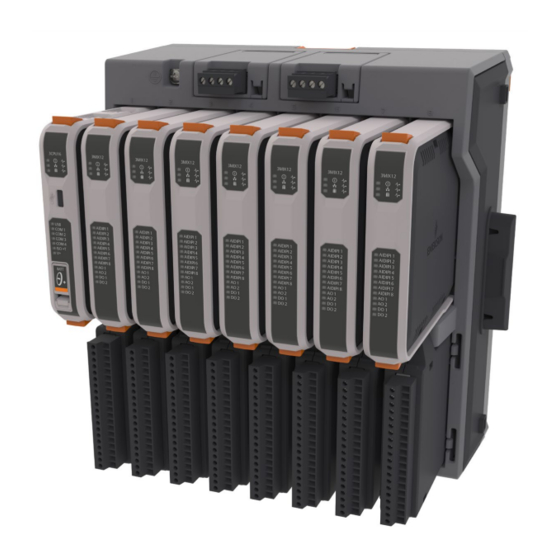
Emerson FB3000 Instruction Manual
Remote terminal unit (rtu)
Hide thumbs
Also See for FB3000:
- Instruction manual (132 pages) ,
- Safe use instructions (51 pages) ,
- User manual (44 pages)

Related Manuals for Emerson FB3000


Summary of Contents for Emerson FB3000
- Page 1 FB3000 RTU Instruction Manual D301851X012 November 2023 FB3000 Remote Terminal Unit (RTU) Instruction Manual Energy and Transportation Solutions...
- Page 2 Emerson office. You can also receive the same quality training via our live, interactive Emerson Virtual Classroom and save on travel costs.
- Page 3 CSA Approval Information SAFETY FIRST Read this document carefully before installing an Emerson FB3000 RTU. Refer to the other sections of the instruction manual for general information. In the event of a conflict between the other sections of this manual and this document, always follow the instructions in this document.
- Page 4 FB3000 - CSA Approval Information CD9411N Issued: November 3, 2023 FB3000 4 Channel HART I/O Logic 510114-01-0 3HRT04 Module FB3000 4 Channel HART I/O Personality 510115-01-0 3HTSG4 Module FB3000 8 Channel Output 400253-01-0, 510142-01-0 3AODO8 (spare) (Analog/Digital) Logic Module OUT08...
- Page 5 1.0 g for 10 to 150 Hz for 30 minutes; 0.5 g for 150 to 2000 Hz for 30 minutes Locations: The Emerson FB3000 Remote Terminal Unit (RTU) is listed by the Canadian Standards Association (CSA) as suitable for use in Class I,...
- Page 6 When using DIN-rail mounting as the method of installation for the extended backplane configuration, use DIN-rail end brackets at the two ends of the extended backplane to prevent side movements of the equipment on the DIN-rail. Refer to the Emerson FB3000 RTU Instruction Manual (D301851X012) for details.
- Page 7 FB3000 - CSA Approval Information CD9411N Issued: November 3, 2023 ANSI/UL 60079-7 Explosive atmospheres – Part 7: Equipment protection by increased safety “e” CAN/CSA 22.2 No. 60079-0 Explosive atmospheres – Part 0: Equipment – General Requirements ANSI/UL 60079-0 Explosive atmospheres – Part 0: Equipment – General Requirements CAN/CSA 22.2 No.
- Page 8 FB3000 - CSA Approval Information CD9411N Issued: November 3, 2023 WARNING EXPLOSION HAZARD – DO NOT REMOVE OR REPLACE FUSE WHEN ENERGIZED. AVERTISSEMENT RISQUE D’EXPLOSION : NE PAS RETIRER OU REMPLACER LE FUSIBLE LORSQU’IL EST SOUS TENSION. DANGER EXPLOSION HAZARD: BATTERIES MUST ONLY BE CHANGED IN AN AREA FREE OF...
- Page 9 FB3000 - CSA Approval Information CD9411N Issued: November 3, 2023 CSA-7...
-
Page 11: Table Of Contents
November 2023 Contents Chapter 1. Introduction Safety Labels ......................... 2 Features ..........................2 FB3000 RTU Chassis ......................3 Central Processing Unit (CPU) ..................... 4 Memory ..........................4 I/O ............................4 1.6.1 Example – 12 Channel Mixed I/O Module (3MIX12/3MSG12) ......4 Power ............................. -
Page 12: Hart
FB3000 RTU Instruction Manual D301851X012 November 2023 2.11 Connecting Additional Serial Communication Ports (COM04 / 3SERL4 / 3SRSG4 Module) ..........................40 2.11.1 Wiring the Ports on the 3SRSG4 Personality Module ........40 2.11.2 Connecting a serial port to an RS-232 Device (3SRSG4) ........41 2.11.3 Connecting a serial port to an RS-485 (4-wire) Device (3SRSG4) ..... - Page 13 FB3000 RTU Instruction Manual D301851X012 November 2023 Removing/Replacing the SRAM Batteries ................ 84 5.4.1 Battery in Power Module ..................85 5.4.2 Battery in CPU Module ..................85 Removing/Replacing the CPU Logic Module (3CPU16) ..........86 Removing/Replacing an I/O or Communications Logic Module ........88 Removing/Replacing a Personality Module ..............
- Page 14 FB3000 RTU Instruction Manual D301851X012 November 2023 Contents...
-
Page 15: Chapter 1. Introduction
You can also purchase the FB3000 as an I/O-only device (FBxRemote I/O™) where control runs in a separate host FB3000 RTU. This manual describes how to install and configure the FB3000 hardware. -
Page 16: Safety Labels
Failure to do so may result in injury to personnel or cause damage to the equipment. DANGER MAY CAUSE DEATH Observe all precautionary signs posted on the equipment. Failure to do so may result in death or serious injury to personnel. Features The FB3000 RTU includes the following key features: Introduction... -
Page 17: Fb3000 Rtu Chassis
Provides Micro A-B USB connector to support DNP3 communications. FB3000 RTU Chassis The FB3000 RTU has either a four-slot or an eight-slot chassis. The CPU is always in slot one of the base chassis. Figure 1-2. Chassis – 8 Slot Version (with/without slot covers) Each slot includes an upper section and a lower section. -
Page 18: Central Processing Unit (Cpu)
CPU module in the first slot of the first chassis; all other chassis hold only I/O modules. There are two CPU versions available: 3CPU16 – FB3000 RTU with full control and I/O capabilities 3IOCPU – FBxRemote I/O for I/O only with no control, no calculation support, and no ... -
Page 19: Power
FB3000 RTU Instruction Manual D301851X012 November 2023 AIs are software-selectable as either 1VDC to-5VDC or 4 mA to 20 mA. Two (2) analog output channels. Two (2) digital output channels. Power You power the RTU using an external DC input. The 8-slot chassis includes two power supply modules;... -
Page 20: Software Tools
FB3000 RTU Instruction Manual D301851X012 November 2023 supports DNP3 communication. The serial ports allow communication using DNP3, Modbus slave and Modbus master protocols. If you require additional serial communication ports, you can install 4-Port Communication Module(s) in any base chassis slot except Slot 1. The 4-Port Serial Communication Module (COM04) cannot reside in an expansion chassis. -
Page 21: Rohs Compliance
Secure Gateway For enhanced data security when using an IP/Ethernet connection or a serial connection into an IP terminal server, Emerson Energy and Transportation Solutions recommends adding an industrial router with VPN and firewall security. Recommended solutions include the MOXA EDR‐810, the Hirschman Eagle One, or the Phoenix mGuard rs4000 (or equivalents). - Page 22 FB3000 RTU Instruction Manual D301851X012 November 2023 Introduction...
-
Page 23: Chapter 2. Installation
Hazardous Locations For North America the FB3000 has certifications for Class I Division 2 (Groups A, B, C & D) non-incendive and non-hazardous locations only. For other world areas the FB3000-has ATEX and IEC Ex certifications for Ex ec Zone 2 non-sparking installations and non- hazardous locations only. -
Page 24: Site Considerations
The RTU must reside in an accessible location for configuration and service. Refer to the dimensional drawings for information on the space required. Figure 2-1. FB3000 Dimensions – 8 Slot (with/without DIN Rail mounting plate assembly No DIN mounting plates in this view... - Page 25 FB3000 RTU Instruction Manual D301851X012 November 2023 Figure 2-2. FB3000 Dimensions – 4 slot (with/without DIN rail mounting plate assembly) No DIN mounting plate in this view Installation...
-
Page 26: Connecting Extension Chassis
The FB3000 base chassis cannot support an extension chassis using the left-hand connector. The FB3000 4-slot chassis can serve as a single base chassis, or as the last extension chassis in an 8-slot chassis assembly. The FB3000 4-slot chassis cannot have an extension chassis since it has no right-hand connector. - Page 27 FB3000 RTU Instruction Manual D301851X012 November 2023 Squeeze hard to remove connector covers on the two mating chassis. You may need to use both hands. Figure 2-3. Removing Chassis Connector Cover Press the two chassis together. If mounting on a DIN rail, slide both chassis onto the DIN rail first to ensure proper alignment and place clamps/brackets at both ends of assembly on DIN rail to ensure side connectors between chassis remain fully engaged.
-
Page 28: General Wiring Guidelines
(RFI) and transients. When using shielded cable, ground all shields at a suitable Instrument Earth connection point. This prevents circulating ground current loops that can cause signal errors. See the FB3000 product data sheet for information about applicable standards for EMI and RFI emissions and susceptibility. -
Page 29: Grounding
November 2023 Grounding There are four separate and distinct ground references within the FB3000 architecture. The chassis ground lug (also known as Protective Earth or PE), internal system bus ground, isolated ground, and the 24V loop ground (for modules that support loop power). -
Page 30: Internal System Bus Ground
FB3000 RTU Instruction Manual D301851X012 November 2023 Run the ground wire so that any routing bend in the cable has a minimum radius of 30.48 cm (12 inches) below ground and 20.32 cm (8 inches) above ground. Note If your installation includes multiple chassis, you must individually ground each chassis. -
Page 31: 24V Loop Ground On 3Mix12/3Msg12 Module
FB3000 RTU Instruction Manual D301851X012 November 2023 2.5.4 24V Loop Ground on 3MIX12/3MSG12 Module Pin 20 on TB1 of the 12-channel mixed I/O module serves as the return side of the +24V loop power supply. It is completely isolated from the other three ground systems his is body text. - Page 32 FB3000 RTU Instruction Manual D301851X012 November 2023 Figure 2-8. Chassis Mounting Upper tab; retracts DIN rail clips Lower tab; extends DIN rail clips so they snap back into place If the RTU includes one or more extension chassis on the DIN rail, ensure all chassis are pressed together tightly so that side connectors between chassis are fully engaged.
-
Page 33: Panel Or Wall Mounting The Chassis
November 2023 Note As previously noted, when mounting an FB3000 with one or more extension chassis in an enclosure, ensure that you mount the racks in a left to right horizontal direction (wall mount on DIN-rails) inside the end user system enclosure to allow for adequate heat dissipation. - Page 34 FB3000 RTU Instruction Manual D301851X012 November 2023 Figure 2-11. Panel or Wall Mounting Screw Locations 8-Slot Chassis Left, 4-Slot Chassis Right 4. Slide the mounting plate off the chassis. Figure 2-12. Sliding Off the Mounting Plate 5. Insert longer screws (screw length depends on the wall/panel) in the holes shown in to mount the device to a wall or panel.
- Page 35 FB3000 RTU Instruction Manual D301851X012 November 2023 Figure 2-13. Screw holes – From Back (8-Slot Chassis) Installation...
-
Page 36: Removing Battery Saver Tabs
FB3000 RTU Instruction Manual D301851X012 November 2023 Figure 2-14. Screw Holes – From Back (4-Slot Chassis) Removing Battery Saver Tabs When you are ready to install the RTU and place it into operation, you must remove the battery saver tabs for the SRAM coin cell batteries. Each power module, as well as the CPU battery, has a similar tab. -
Page 37: Connecting Power
FB3000 RTU Instruction Manual D301851X012 November 2023 Connecting Power Power comes from an external power source. The device supports both 12V and 24V power supplies. It accepts DC voltage from 10.5 to 30V; the amount of power required varies depending upon the options used. -
Page 38: Power Planning
If your installation includes multiple chassis, wire power only to the left-most (base) chassis. Note If your FB3000 does not power on, check that the polarity of the DC input voltage wiring connections match 2‐16. If you accidentally reversed the polarity, it triggers an Figure internal fuse and switch to protect the device from damage. -
Page 39: Extended Backplane Supported Configurations
12V≤ V < 24V 10.5V≤ V < 12V The number of mixed I/O modules that can be supported by the FB3000 loop power connectors varies depending upon the RTU’s external power supply. For example, if you have a 12V installation, you can see by referring to... -
Page 40: Power Fail And Shutdown Trip Points
5A limit . 2.8.3 Power Fail and Shutdown Trip Points If FB3000 power falls below certain levels (trip points), the RTU stops operating and shuts down. If power drops to the power fail trip point, the RTU firmware initiates an orderly shutdown procedure. -
Page 41: Removing/Replacing The I/O Cover
FB3000 RTU Instruction Manual D301851X012 November 2023 Removing/Replacing the I/O Cover DANGER EXPLOSION HAZARD - MAY CAUSE DEATH Ensure the area in which you perform this operation is non-hazardous. Performing this operation in a hazardous area could result in an explosion. -
Page 42: Communication Terminal Blocks On The Cpu Module
FB3000 RTU Instruction Manual D301851X012 November 2023 The communication ports allow you to connect to a PC or laptop running FBxConnect software or to other devices. Table 2-6. Communication Terminal Blocks on the CPU Module Port RS-232 4-Wire RS-485 2-Wire RS-485... -
Page 43: Connecting To Com1 (3Cpu16/3Cpusg)
FB3000 RTU Instruction Manual D301851X012 November 2023 Figure 2-19. Configuring a Port in FBxConnect 2.10.1 Connecting to COM1 (3CPU16/3CPUSG) You can configure the COM1 port on the CPU personality module for RS-232, RS-485 (4- wire), or RS-485 (2-wire) communications. When connecting COM1 to another device using RS-232, use a cable with configurations... - Page 44 FB3000 RTU Instruction Manual D301851X012 November 2023 When connecting COM1 to another device using RS-485 (4-wire), use a cable with configurations as shown in Figure 2-21: Figure 2-21. Wiring COM1 on the CPU Module for RS-485 (4-wire) RS-485 (4-wire) port on device...
- Page 45 FB3000 RTU Instruction Manual D301851X012 November 2023 When connecting COM1 to another device using RS-485 (2-wire), use a cable with configurations as shown in Figure 2-22: Figure 2-22. Wiring COM1 on the CPU Module for RS-485 (2-wire) RS-485 (2-wire) port on device Connect cable shields to suitable Instrument Earth connection point Regardless of the interface standard –...
-
Page 46: Connecting To Com2 (3Cpu16/3Cpusg)
FB3000 RTU Instruction Manual D301851X012 November 2023 2.10.2 Connecting to COM2 (3CPU16/3CPUSG) You can configure the COM2 port on the CPU personality module for RS-232, RS-485 (4- wire), or RS-485 (2-wire) communications. When connecting COM2 to an RS-232 port on another device (a PC or another... - Page 47 FB3000 RTU Instruction Manual D301851X012 November 2023 When connecting COM2 to an RS-485 (4-wire) port on another device use a cable with configurations as shown in Figure 2-24: Figure 2-24. Wiring COM2 on the CPU Module for RS-485 (4-wire) RS-485 (4-wire) port on device...
- Page 48 FB3000 RTU Instruction Manual D301851X012 November 2023 When connecting COM2 to an RS-485 (2-wire) port on another device use a cable with configurations as shown in Figure 2-25: Figure 2-25. Wiring COM2 on the CPU Module for RS-485 (2-wire) RS-485 (2-wire) port on device Connect cable shields to suitable Instrument Earth connection point Regardless of the interface standard –...
-
Page 49: Connecting To Com3 (3Cpu16/3Cpusg)
FB3000 RTU Instruction Manual D301851X012 November 2023 2.10.3 Connecting to COM3 (3CPU16/3CPUSG) You can configure the COM3 port on the CPU personality module for RS-485 (2-wire) communications. When connecting COM3 to an RS-485 port on another device (such as a... - Page 50 Enable AC termination using switches on last multi-dropped 4088B transmitter RS-485 bus; twisted pair required Up to ten 4088B transmitters allowed per port; FB3000 only provides power for a maximum of four transmitters. Any other transmitters require an external power supply.
-
Page 51: Connecting To Com4 (3Cpu16/3Cpusg)
FB3000 RTU Instruction Manual D301851X012 November 2023 2.10.4 Connecting to COM4 (3CPU16/3CPUSG) You can configure COM4 on the CPU personality module for RS-485 (2-wire) communications. When connecting COM4 to an RS-485 port on another device (such as a Rosemount 4088B transmitter), use a cable with configurations as shown below. - Page 52 Enable AC termination using switches on last multi-dropped 4088B transmitter RS-485 bus; twisted pair required Up to ten 4088B transmitters allowed per port; FB3000 only provides power for a maximum of four transmitters. Any other transmitters require an external power supply.
-
Page 53: Ethernet And Micro Usb Port (Cpu Module)
FB3000 RTU Instruction Manual D301851X012 November 2023 2.10.5 Ethernet and Micro USB Port (CPU module) Located on the top of the CPU logic module, the two Ethernet ports are standard 8-pin 10/100Base-T RJ -45 8P8C sockets. Connect to an Ethernet switch using the appropriate Category 5 shielded patch cable. -
Page 54: Connecting Additional Serial Communication Ports (Com04/3Serl4/3Srsg4 Module)
FB3000 RTU Instruction Manual D301851X012 November 2023 2.11 Connecting Additional Serial Communication Ports (COM04/3SERL4/3SRSG4 Module) The 4-Port Serial Communications Module (COM04) consists of a logic module (3SERL4) and a personality module (3SRSG4). Each COM04 module provides 4 additional serial MVS communication ports. -
Page 55: Connecting A Serial Port To An Rs-232 Device (3Srsg4)
FB3000 RTU Instruction Manual D301851X012 November 2023 Port RS-232 4-wire RS-485 2-wire RS-485 RxD3 RxD3+ CTS3 RxD3- GND3 GND3 GND3 COM4 TxD4 TxD4+ TxRxD4+ RTS4 TxD4- TxRxD4- RxD4 RxD4+ CTS4 RxD4- GND4 GND4 GND4 X = N/C Use FBxConnect software to choose the port usage for each of the four COM ports on the 4-port Communications module. -
Page 56: Connecting A Serial Port To An Rs-485 (4-Wire) Device (3Srsg4)
FB3000 RTU Instruction Manual D301851X012 November 2023 For COM2, n=2, pin numbers as follows: a=6, b=7, c=8, d=9, e=10 For COM3, n=3, pin numbers as follows: a=11, b=12, c=13, d=14, e=15 For COM4, n=4, pin numbers as follows: a=16, b=17, c=18, d=19, e=20 ... -
Page 57: Connecting A Serial Port To An Rs-485 (2-Wire) Device (3Srsg4)
FB3000 RTU Instruction Manual D301851X012 November 2023 2.11.4 Connecting a serial port to an RS-485 (2-wire) Device (3SRSG4) You can wire any of the four serial ports for communication with an RS-485 (2-wire) device. When connecting a COM port to another device using RS-485 (2-wire), follow this configuration: Figure 2-33. -
Page 58: Connecting A Serial Port To A Rosemount 4088B Transmitter (3Srsg4)
FB3000 RTU Instruction Manual D301851X012 November 2023 2.11.5 Connecting a serial port to a Rosemount 4088B Transmitter (3SRSG4) You can wire any of the four serial ports for communication with a Rosemount 4088B transmitter using RS-485 (2-wire). When connecting a COM port to a Rosemount 4088B transmitter follow this configuration: Figure 2-34. -
Page 59: Connecting A Serial Port To Multiple Rosemount 4088B Transmitter (Multi-Drop) (3Srsg4)
FB3000 RTU Instruction Manual D301851X012 November 2023 2.11.6 Connecting a serial port to Multiple Rosemount 4088B Transmitter (Multi-Drop) (3SRSG4) You can wire any of the four serial ports for communication with multiple multi-dropped Rosemount 4088B transmitters using RS-485 (2-wire). When wiring to multiple Rosemount 4088B transmitters (multi-drop) using 2-wire RS-485, follow this configuration: Figure 2-35. - Page 60 FB3000 RTU Instruction Manual D301851X012 November 2023 Installation...
-
Page 61: Chapter 3. I/O Configuration And Wiring
8-Channel Output Module Configuration (3AODO8/3OTSG8/OUT08) I/O in the FB3000 RTU comes from I/O modules installed in the I/O slots. The upper bay holds the “logic” module. All wiring is made to the lower bay “personality” modules. DANGER EXPLOSION HAZARD - MAY CAUSE DEATH Connect or disconnect only in a non-hazardous area. -
Page 62: 12-Channel Mixed I/O Module Configuration (3Mix12/3Msg12/Mio12)
12-Channel Mixed I/O Module Configuration (3MIX12/3MSG12/MIO12) The FB3000 RTU supports a twelve-channel mixed I/O module which includes two analog output channels, two digital output channels, and eight channels you can individually configure as either analog inputs (AI), digital inputs (DI) or pulse inputs (PI). - Page 63 FB3000 RTU Instruction Manual D301851X012 November 2023 AIDIPI_06 is configured as a current input and is shown connected to an external current source. Pin 5 is the ISO_GND connection for AIDIPIs 1 through 4; Pin 10 is the ISO_GND connection for AIDIPIs 5 through 8. Pins 5 and 10 are internally connected together.
-
Page 64: Analog Outputs (3Mix12/3Msg12)
FB3000 RTU Instruction Manual D301851X012 November 2023 Figure 3-2. Analog Input (AI) Wiring Using Loop Power External current source 3.1.2 Analog Outputs (3MIX12/3MSG12) The 12-channel mixed I/O module includes two dedicated analog output channels, with the following characteristics: Table 3-3. Analog Output Characteristics... - Page 65 FB3000 RTU Instruction Manual D301851X012 November 2023 shows how to wire the analog output. In the figure, AO_1 is configured for Figure 3-3 current output mode and is shown connected to an external current field device. AO_2 is configured for voltage output mode and is shown connected to an external voltage field device.
-
Page 66: Digital Inputs (3Mix12/3Msg12)
FB3000 RTU Instruction Manual D301851X012 November 2023 3.1.3 Digital Inputs (3MIX12/3MSG12) The 12-channel mixed I/O module includes eight channels you can individually configure as either analog inputs (AI), digital inputs (DI) or pulse inputs (PI). When configured as digital inputs, the channels have the following characteristics: Table 3-4. -
Page 67: Digital Outputs (3Mix12/3Msg12)
FB3000 RTU Instruction Manual D301851X012 November 2023 shows how to wire the digital input. Figure 3-4 In the figure, AIDIPI_6 is shown configured as a digital input. ISO_GND (pin 10) is the ground connection for AIDIPI_6. Figure 3-4. Digital Input (DI) Wiring (internal pull-up enabled) 3.1.4... -
Page 68: Digital Output Characteristics
FB3000 RTU Instruction Manual D301851X012 November 2023 Table 3-5. Digital Output Characteristics Type Number Characteristics Supported Contact closure by solid state relay Digital 2 dedicated Output channels Maximum current of 500mA at 31VDC (DO) Can be configured to fail at last output value or ... - Page 69 FB3000 RTU Instruction Manual D301851X012 November 2023 shows typical wiring with low-side switch (LSS) enabled for DO1 and DO2. You Figure 3-5 enable the low side switch for either or both DOs in FBxConnect. Figure 3-5. Digital Output (DO) Wiring – Low Side Switch (LSS) Enabled...
- Page 70 FB3000 RTU Instruction Manual D301851X012 November 2023 shows typical DO wiring using the internal loop power output. Figure 3-6 Note The maximum load for the loop power output is 200 mA. Figure 3--6 Digital Output (DO) Wiring using the internal Loop Power Output...
- Page 71 FB3000 RTU Instruction Manual D301851X012 November 2023 shows how to wire a digital output as a dry contact closure. Figure 3-7 Figure 3--7. Digital Output (DO) Wiring – Dry Contact Closure 500 mA load max field device 30VDC Max Power Supply...
-
Page 72: Pulse Inputs (3Mix12/3Msg12)
FB3000 RTU Instruction Manual D301851X012 November 2023 shows how to wire a digital output as a contact closure using the internal 24V Figure 3-8 loop supply. The total current for all devices connected to a DO channel must not exceed 500 mA. - Page 73 FB3000 RTU Instruction Manual D301851X012 November 2023 Type Number Characteristics Supported You can configure pulse inputs for either a 2mA pull-up to 24VDC or a 2mA pull-down to ISO_GND. Configurable as either medium speed 1 ms filter (0 – 300Hz) or a high speed 30µs input filter (0- 10.5kHz).
-
Page 74: Hart ® Input/Output Channels (3Hrt04/3Hrtsg4/Hrt04)
The FB3000 RTU supports a 4-Channel HART (Highway Addressable Remote Transducer) ® module. This allows the FB3000 to communicate with external HART devices such as transmitters. Insert the 3HRT04 module in any base chassis slot except slot 1 and insert its corresponding 3HTSG4 module below it. - Page 75 FB3000 RTU Instruction Manual D301851X012 November 2023 shows how to wire all four HART channels in point-to-point mode. In this case, Figure 3-10 each HART channel only communicates to a single HART device. You choose whether a given channel serves as an input or output in FBxConnect. The 24V internal loop power supply powers the HART devices.
-
Page 76: Multi-Drop Mode
FB3000 RTU Instruction Manual D301851X012 November 2023 3.2.2 Multi-Drop Mode In multi-drop mode, only the HART digital signaling (FSK – Frequency Shift Keying) is present and no 4-20mA analog current communication is permitted since the current is fixed at 4mA. Each device must be set in multidrop mode, drawing a maximum of 4mA to support HART communications. - Page 77 FB3000 RTU Instruction Manual D301851X012 November 2023 shows how to wire a HART channel for multi-drop mode with power from an Figure 3-13 external supply. Multi-drop mode only supports inputs, you cannot have multi-drop outputs. Figure 3-13. HART Wiring – Multi-Drop Mode on Channel 1 – External Supply...
-
Page 78: Analog Input Mode (Hart Communications Disabled)
FB3000 RTU Instruction Manual D301851X012 November 2023 3.2.3 Analog Input Mode (HART Communications Disabled) If you have an unused HART channel, you can use it as a 4-20mA analog input (AI current mode). In FBxConnect, you must Enable the 250-Ohm Termination Resistor and set the HART Comm Mode to Disabled. -
Page 79: Analog Output Mode (Hart Communications Disabled)
FB3000 RTU Instruction Manual D301851X012 November 2023 3.2.4 Analog Output Mode (HART Communications Disabled) If you have an unused HART channel, you can use it as a 4-20mA current sinking analog output. In FBxConnect, you must Disable the 250 Ohm Termination Resistor and set the HART Comm Mode to Disabled. -
Page 80: Software Configuration
FB3000 RTU Instruction Manual D301851X012 November 2023 3.2.5 Software Configuration Consult the FBxConnect online help for full details. What follows is an overview of the steps: 1. From the Configure tab in FBxConnect, click I/O Setup > HART. 2. Select the HART channel you want to configure; there are four HART channels per module. -
Page 81: 8-Channel Output Module Configuration (3Aodo8/3Otsg8/Out08)
10. If this channel uses multi-drop, repeat steps 8 and 9 for any unconfigured devices. 8-Channel Output Module Configuration (3AODO8/3OTSG8/OUT08) The FB3000 supports an 8-channel output module. Each channel can be individually configured as either an analog output or a digital output. 3.3.1... - Page 82 FB3000 RTU Instruction Manual D301851X012 November 2023 shows how to wire the analog output. Figure 3-16 In the figure, AO_4 is configured for current output mode and is shown connected to an external current field device. AO_7 is configured for voltage output mode and is shown connected to an external voltage field device.
-
Page 83: Digital Outputs (3Aodo8/3Otsg8/Out08)
FB3000 RTU Instruction Manual D301851X012 November 2023 For current mode, the minimum load impedance driven by any AO channel to allow detection of a short-circuit is 40 ohms. If the load impedance is less than 40 ohms, the firmware detects a short circuit even though it might not exist. The maximum load impedance in current mode is 500 ohms. - Page 84 FB3000 RTU Instruction Manual D301851X012 November 2023 shows how to wire a digital output (DO_02) to drive an inductive load (such as Figure 3-17 a relay coil). Figure 3-17. Digital Output (DO) Wiring Suppression Diode Relay coil or inductive load...
-
Page 85: Chapter 4. Operation
FB3000 RTU Instruction Manual D301851X012 November 2023 Chapter 4. Operation This chapter describes day-to-day operation of the RTU including how to turn it on and off, and how to communicate with it. Powering Up/Powering Down the Device Establishing Communications ... -
Page 86: Communicating With A Laptop Using A Serial Port
DNP3 Protocol Specifications Manual (for Emerson FB3000 RTUs) (D301858X012) FBxConnect Configuration Software User Manual (for the FB3000 RTU) (D301882X012) 3. Provide the SCADA host with information about the various parameters it needs to extract from the application running in the RTU. Typically, the SCADA host software includes a utility that allows you to identify this information so it can be incorporated into the database at the SCADA host. -
Page 87: Maintaining Backups
FB3000 RTU Instruction Manual D301851X012 November 2023 DANGER EXPLOSION HAZARD - MAY CAUSE DEATH Connect or disconnect only in a non-hazardous area. Connect a Category 5 shielded cable between an Ethernet port on your laptop and an Ethernet switch for your network. -
Page 88: Backing Up Your Solution
FB3000 RTU Instruction Manual D301851X012 November 2023 Connect your laptop to one of the available ports on the RTU. Launch Field Tools and use FBxConnect to connect to the RTU. Click Services > Firmware Update. Click Configuration Save to save the RTU’s configuration in a file on your laptop. -
Page 89: Chapter 5. Service And Troubleshooting
Important Only use batteries supplied with the RTU or sold by Emerson Remote Energy and Transportation Solutions as spare parts for this RTU. If you substitute a battery you obtain elsewhere you will void your hazardous location certification unless it is the identical part from the same manufacturer as that supplied with the RTU from Emerson. -
Page 90: Returning The Unit For Repairs
Only certain field replacement procedures are allowed under warranty and hazardous location certification. Other types of repairs cannot be performed in the field. In those cases, you must ship the unit to an Emerson-authorized repair facility. Contact Emerson Remote Automation Solutions for a return authorization number and instructions for where to ship the unit. -
Page 91: Interpreting The Status Leds
FB3000 RTU Instruction Manual D301851X012 November 2023 WARNING International safety regulations restrict the shipment of lithium batteries. If you need to return the RTU, remove the lithium batteries before you ship the unit. Failure to remove the lithium batteries may delay or prevent shipment of the RTU. - Page 92 FB3000 RTU Instruction Manual D301851X012 November 2023 Color/State Meaning Termination GREEN Personality module OK Board Status Personality module missing or mismatched type. Flashes at 5-second interval when CPU SRAM battery power low. Flashes at 1-second interval when CPU SRAM battery power is low and personality module is invalid.
- Page 93 FB3000 RTU Instruction Manual D301851X012 November 2023 Table 5-2. LED Descriptions – 12-Channel Mixed I/O Module Color/State Meaning Module Status GREEN Power good Failure No power Communication Flashing GREEN Message send to CPU in progress Status No communications with CPU...
- Page 94 FB3000 RTU Instruction Manual D301851X012 November 2023 Special LED Sequence: Communication Status and Termination Status alternating flashing GREEN rapidly indicates power for the module has fallen to power trip point; there is not enough power for the module – I/O held at current state.
-
Page 95: Led Descriptions - 8-Channel Output Module
FB3000 RTU Instruction Manual D301851X012 November 2023 Color/State Meaning firmware so CPU and I/O module firmware revisions are compatible. HART1, HART2, HART3, GREEN Normal HART4 Flashing RED In alarm Failure Flashing ORANGE Override and failure ORANGE Override Disabled Table 5-4. LED Descriptions – 8-Channel Output Module... - Page 96 FB3000 RTU Instruction Manual D301851X012 November 2023 Color/State Meaning I/O module firmware revisions are compatible. AO1 through AO8 GREEN Normal (when a channel Flashing RED In alarm is configured as an AO) Failure Flashing ORANGE Override and failure ORANGE Override...
-
Page 97: Removing/Replacing The Power Module
FB3000 RTU Instruction Manual D301851X012 November 2023 Color/State Meaning Failure – for example, personality module missing or incorrect type. No activity for this port. Removing/Replacing the Power Module DANGER EXPLOSION HAZARD - MAY CAUSE DEATH Ensure the area in which you perform this operation is non-hazardous. Performing this operation in a hazardous area could result in an explosion. -
Page 98: Removing/Replacing The Sram Batteries
FB3000 RTU Instruction Manual D301851X012 November 2023 2. Press the module in as you rotate it down and it snaps into place. Figure 5-3. Replacing Power Module 3. Attach the terminal block. Removing/Replacing the SRAM Batteries A 3V lithium coin cell battery in each of the two power supply modules provides backup power for the SRAM and the real time clock. -
Page 99: Battery In Power Module
FB3000 RTU Instruction Manual D301851X012 November 2023 DANGER EXPLOSION HAZARD - MAY CAUSE DEATH Ensure the RTU is in a non-hazardous area. Never open the enclosure in a hazardous area. DANGER EXPLOSION HAZARD - MAY CAUSE DEATH Do not disconnect equipment unless power has been removed or the area is known to be non-hazardous. -
Page 100: Removing/Replacing The Cpu Logic Module (3Cpu16)
FB3000 RTU Instruction Manual D301851X012 November 2023 Figure 5-4. Removing the SRAM Battery Safely dispose of the old battery according to local regulations. Slide the replacement battery in. The positive (+) side with the label must be facing to the right side of the RTU. Push the battery access door back on. - Page 101 Backup data in the CPU (See and Section 5.10). Section 5.9 Remove power from the FB3000 (See Chapter Depress the orange tabs at the top and bottom of the CPU module to release the module and slide it straight out of the slot.
-
Page 102: Removing/Replacing An I/O Or Communications Logic Module
FB3000 RTU Instruction Manual D301851X012 November 2023 Removing/Replacing an I/O or Communications Logic Module DANGER EXPLOSION HAZARD - MAY CAUSE DEATH Ensure the RTU is in a non-hazardous area. Never open the enclosure in a hazardous area. Performing this operation in a hazardous area could result in an explosion. -
Page 103: Removing/Replacing A Personality Module
FB3000 RTU Instruction Manual D301851X012 November 2023 Removing/Replacing a Personality Module DANGER EXPLOSION HAZARD - MAY CAUSE DEATH Ensure the RTU is in a non-hazardous area. Never open the enclosure in a hazardous area. Performing this operation in a hazardous area could result in an explosion. -
Page 104: Upgrading System Firmware
If this personality module is for an I/O module, wire I/O connections as described in Chapter 3. Upgrading System Firmware Periodically Emerson releases new system firmware for the RTU to introduce new features or update system functions. You must know a valid username/password combination for the RTU to complete this process. DANGER EXPLOSION HAZARD - MAY CAUSE DEATH Ensure the area in which you perform this operation is non-hazardous. - Page 105 FB3000 RTU Instruction Manual D301851X012 November 2023 Figure 5-12. Firmware Update dialog box Select the checkbox in the Selected column to choose the firmware. If you are downloading the same version that is already installed on the device, select Download selected packages even if they are unchanged. If you want to update the RTU’s clock so that it agrees with your PC clock, click Time Sync device after the...
- Page 106 FB3000 RTU Instruction Manual D301851X012 November 2023 Service and Troubleshooting...
-
Page 107: Index
FB3000 RTU Instruction Manual D301851X012 November 2023 Index COM2 on CPU 12-Channel Mixed I/O Module wiring ............... 32 LED meanings ..........79 COM3 on CPU 24V Loop Ground on 3MIX12/3MSG12 Module wiring ............... 35 ................17 COM4 on CPU wiring ............... 37... - Page 108 2-31. COMn Port Configured for RS-232 ..41 1-2. Chassis – 8 Slot Version ......3 2-32. COMn Configured for RS-485 (4-wire) 42 2-1. FB3000 Dimensions – 8 Slot ....10 2-33. COMn Configured for RS-485 (2-wire) 43 2-2. FB3000 Dimensions – 4 slot ....11 2-34.
- Page 109 FB3000 RTU Instruction Manual D301851X012 November 2023 5-2. Removing Power Module ....... 83 5-3. Replacing Power Module ....... 84 Memory ..............4 5-4. Removing the SRAM Battery ....86 Flash ..............4 5-5. Replacing the SRAM Battery ....86 SDRAM ..............4 5-6.
- Page 110 FB3000 RTU Instruction Manual D301851X012 November 2023 5-2. LED Descriptions – 3MIX12 ....79 5-3. LED Descriptions Tables 3HRT04 ............80 1-1. Memory ............4 5-4. LED Descriptions – 8-Channel Output 1-2. Power ............5 Module ............81 1-3. Serial Ports ..........6 5-5.
- Page 114 1 Pandan Crescent Automation Solutions, Emerson, and the Emerson logo are trademarks and Singapore 128461 service marks of Emerson Electric Co. All other marks are the property of their T +65 6777 8211| F +65 6777 0947 respective owners. Energy and Transportation Solutions...
Need help?
Do you have a question about the FB3000 and is the answer not in the manual?
Questions and answers