Table of Contents
Advertisement
Quick Links
Fiber Receiver and Room Controller (FRC-P100-00)
Quick Reference Guide
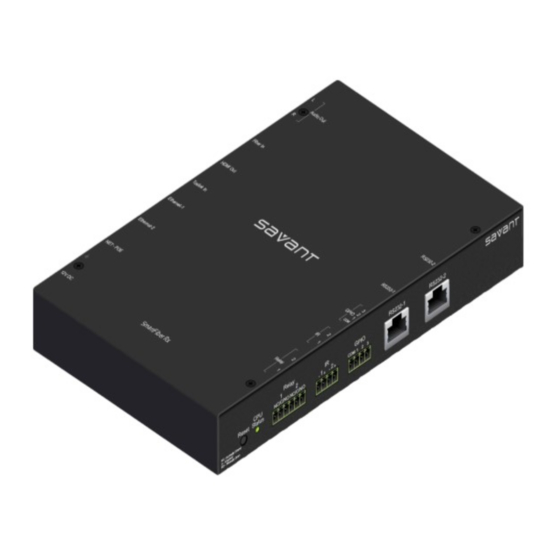
The Savant Fiber Receiver and Room Controller (FRC-P100)
Quick Reference Guide provides the information necessary to
install the FRC-P100 and associated components.
Box Contents
(1) Fiber Receiver and Room Controller (FRC-P100)
(1) Installation Kit (075-0114-xx)
(2) 4-Pin connectors – GPIO and IR ports (028-9395-xx)
(1) 6-Pin connector - Relay ports (028-9352-xx)
(4) Screw M3 x 8MM Flat Phil Blk (039-0017-xx)
(2) Side Mounts Chassis Brackets
(1) Quick Reference Guide (this document)
Note: The 3-Pin and 6-Pin connectors described above are a
screw down plug-in female type connector
Optional Accessories
120/230V AC to 12V DC Power Supply (PWR-12025-xx)
Specifications
Environments
Operating Temperature
Operating Humidity
Maximum BTU
Cooling
(Recommended)
Dimensions and Weight
Height
Width
Depth
Weight
Power
Power Over Ethernet
(POE)
Power Supply (Optional)
Power Supply
(PWR-12025-xx)
Power Draw
Maximum
Nominal
Regulatory
Safety and Emissions
RoHS
Minimum Supported Release
da Vinci
FRC-P100-00 | 009-0490-01 | 151030
Copyright © 2015 Savant Systems, LLC
32° to 104° F (0° to 40°C)
5% to 95% Non-condensing
51 BTU per hour
3 cubic feet per minute (CFM)
8.87 in (22.53 cm)
7.18 in (18.24 cm)
1.25 in (4.18 cm)
Net: 2.3 lb (0.45 kg)
Shipping: 4.0 lb (1.81 kg)
IEEE 802.3af
IEEE 802.3at
Input: 120-230V AC 50/60Hz
Output: 12V DC
15 watts
12 watts
FCC Part 15 | CE Mark | C-Tick
Compliant
5.1.0
A
RCA jacks for analog audio outputs.
Fiber Status LED
B
• Green – Indicates a valid fiber link exists.
• Off – Indicates NO fiber link present.
The Fiber In port receives an A/V signal over a single
OM3 multimode fiber cable from a VOM card installed
into a Savant matrix switcher chassis.
C
• Audio Res – Resolutions up to 1080p@60Hz
• Video Res – Resolutions up to 1920x1200@60Hz
• HDMI Audio – S/PDIF, I2S, and HD Audio formats
HDMI Out - Type A (Audio/Video).
• Audio Res – Resolutions up to 1080p@60Hz
D
• Video Res – Resolutions up to 1920x1200@60Hz
• HDMI Audio – S/PDIF digital audio, I2S, and HD Audio
E
Toslink In - Reserved for Future Use
Ethernet-1 and Ethernet-2 (RJ-45). Supports 10/100
Base T and auto negotiation.
Left LED
• Green – Ethernet link activity
F
• Off – No Ethernet activity
Right LED
• Green – 100 Mbps
• Off – 10 Mbps
Ethernet-3 (RJ-45). Supports 10/100 Base T, auto
negotiation, and PoE.
Left LED
• Green – Ethernet link activity
G
• Off – No Ethernet activity
Right LED
• Green – 100 Mbps
• Off – 10 Mbps
IMPORTANT!
The Power Over Ethernet port can not supply
power to other POE supported devices. The Power
over Ethernet port uses the voltage on the PoE line
for powering only the FRC-P100.
Power Status
• Off – FRC-P100 is not receiving power.
• Red – FRC-P100 is receiving power but not powered On
H
• Green – FRC-P100 is receiving power and powered On.
Gnd - Connect to external ground when using PoE.
12V DC – (Optional) System can be powered through the
12V DC power input port when not utilizing PoE.
WARNINGS!
• Fiber optic transceivers emit laser light that can cause eye
damage. Never look directly into a fiber optic transceiver or
into the ends of a fiber optic cable connected to a
transceiver.
• Do not stare directly into the laser beam or view it with
optical instruments even if the interface is disabled.
CAUTIONS!
• Do not bend fiber optic cables beyond their minimum bend
radius. Bending the cables beyond their minimum bend
radius can damage the cables and cause problems that are
difficult to diagnose.
• To reduce the stress on the fastening point of a fiber optic
cable, do not let fiber optic cables hang free from the
connector and do not allow fastened loops to dangle.
1 of 3
For Product Info
45 Perseverance Way, Hyannis, MA 02601
Savant.com
| 508.683.2500
Advertisement
Table of Contents

Related Manuals for Savant FRC-P100-00


Summary of Contents for Savant FRC-P100-00
- Page 1 For Product Info Fiber Receiver and Room Controller (FRC-P100-00) Quick Reference Guide The Savant Fiber Receiver and Room Controller (FRC-P100) Quick Reference Guide provides the information necessary to install the FRC-P100 and associated components. Box Contents (1) Fiber Receiver and Room Controller (FRC-P100) RCA jacks for analog audio outputs.
- Page 2 These two ports are used for controlling an external device via serial binary data card located in a Savant matrix switcher chassis. Allow for communication. Each RS-232 port can be configured proper bend radius when making this connection.
- Page 3 Connect the (+) port of IR pair port 1 on the FRC-P100 to Refer to diagram below when wiring the GPIO ports. the positive terminal on the IR Device. If using the Savant IRB-1000-xx IR Emitter, the black wire with white stripe connects to the (+) port.
Need help?
Do you have a question about the FRC-P100-00 and is the answer not in the manual?
Questions and answers