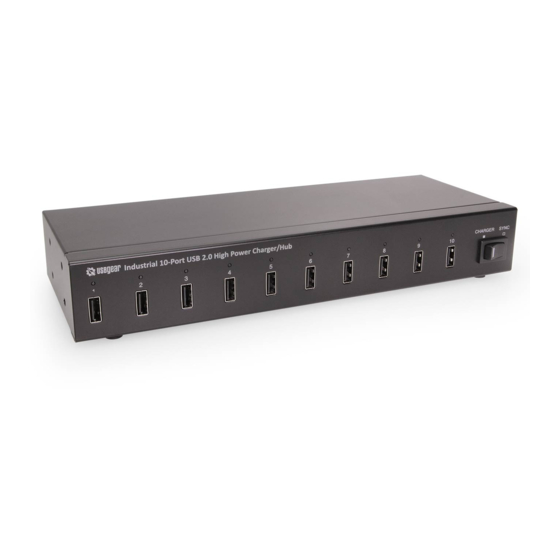

Related Manuals for CoolGear USBG-10XU1


Summary of Contents for CoolGear USBG-10XU1
- Page 1 USB 2.0 10-Port Industrial High Power 2.1A Charger Product Manual Coolgear, Inc. Version 1.1 September 2017 Model Number: USBG-10XU1 www.coolgear.com...
-
Page 2: Revision History
Coolgear New Manual Format About this document This product manual outlines installation and features of the USBG-10XU1 USB 2.0 10- Port Industrial High Power 2.1A Charger Hub. Scope The scope of this manual is to give the user of the product an understanding of its use with detailed diagrams and verbiage. -
Page 3: Table Of Contents
USBG-10XU1 – Product Manual Table of Contents 1. Introduction ......................4 Features ........................4 Specifications ......................5 2. Package Contents ....................6 Physical Diagram ..................... 6 Rack Mounting ......................7 Connection ......................8 Charging Mode ...................... 10 Sync Mode ......................11 Daisy Chain (Cascade) Connection ................ -
Page 4: Introduction
USBG-10XU1 – Product Manual 1. Introduction CM-10XU1 is a 10-port USB Hub with Charger, a smart solution for charging or sync of several iPads, iPhones, iPods and USB charging devices operating simultaneously. This is a perfect tool to eliminate the jumble of wires and chargers and also is ideal for large capacity USB station in-house for automated duplication tasks. -
Page 5: Specifications
USBG-10XU1 – Product Manual 1.2 Specifications Model No. USBG-10XU1 Chip Terminus USB Specification USB 1.1 / 2.0 Compliant Connector Upstream USB Type-B Female Connector Downstream USB Type-A x10 Connector Cascade USB Type-A LED Charge Mode Red Color x10 Power Mode... -
Page 6: Package Contents
USBG-10XU1 – Product Manual 2. Package Contents 1) USB 2.0 Charge Hub 2) 24VDC 6.25A Power adaptor with power cord 3) USB 2.0 A/M to B/M cable 4) Mounting brackets with screws 5) User manual 2.1 Physical Diagram Figure 1 Figure 2 1) USB Ports (Hub) –... -
Page 7: Rack Mounting
USBG-10XU1 – Product Manual 3) LED Indicators • LED lights up: indicates which tablet or USB device is connected successfully. • The LED may not light up when the unit is connecting with some specific USB devices, but it is still working on charging or synchronizing. -
Page 8: Connection
USBG-10XU1 – Product Manual 2.3 Connection 1) To turn off power switch. (Rear Panel) Figure 5 2) Plug the power adapter to the unit’s power jack. • The power jack is threaded with nut, so user may put power DC plug into the power jack without losing connection. - Page 9 USBG-10XU1 – Product Manual 5) Using the USB A to B cable provided and connects the USB B end on the unit. 6) Using the USB A end and connects on your host computer. Figure 8 7) In according to the previous instruction of connection with host computer, and connects host computer with the unit.
-
Page 10: Charging Mode
10 USBG-10XU1 – Product Manual Figure 10 2.4 Charging Mode Please follow below ways for charging USB devices. 1) In according to the previous instruction of connection with host computer, and connects host computer with the unit. 2) Turn the switch of CHARGER / SYNC to [CHARGER], and LED lights up. -
Page 11: Sync Mode
USBG-10XU1 – Product Manual 2.5 Sync Mode Please follow below ways for synchronizing. 1) In according to the previous instruction of connection with host computer, and connects host computer with the unit. 2) Turn the switch of CHARGER / SYNC to [SYNC], and LED lights off. -
Page 12: Daisy Chain (Cascade) Connection
12 USBG-10XU1 – Product Manual • This unit does not contain accessory set of cables for iPad, tablet. It is especially important to use appropriate cables (USB-A to device-specific connector) provided by the device manufacturer. • Get started synchronizing automatically once you connect the unit. - Page 13 USBG-10XU1 – Product Manual Figure 14 Plug the power adaptor to the power jack of the 2nd unit. • The power jack is threaded with nut, so user may fix power DC plug into the power jack without losing. Put the plug of the power adapter into the wall socket. (Rear Panel)
-
Page 14: Regulatory Compliance
14 USBG-10XU1 – Product Manual Figure 17 2.7 Regulatory Compliance Disclaimer Information in this document is subject to change without notice. The manufacturer does not make any representations or warranties (implied or otherwise) regarding the accuracy and completeness of this document and shall in no event be liable for any loss of profit or any other commercial damage, including but not limited to special, incidental, consequential, or other damages. -
Page 15: Environmental Specifications
USBG-10XU1 – Product Manual Operation is subject to the following two conditions: 1. This device may not cause harmful interference. 2. This device must accept any interference received, including interference that may cause undesired operation. WEEE (Waste of Electrical and Electronic Equipment),... -
Page 16: Notes, Tips, Warnings, And Safety
16 USBG-10XU1 – Product Manual 3. Notes, Tips, Warnings, and Safety Note1: In order to prevent damaged data that may be cause by unsuitable operation, beware of the below issues when user is switching from sync mode to charging mode: •... -
Page 17: Supporting References
© 2017 Coolgear, Inc. All Rights Reserved. All products and accompanying digital documentation including images are the property and / or trademarks of Coolgear Inc. Coolgear Inc. are continuously improving upon its products. Product specifications are subject to change without notice.
Need help?
Do you have a question about the USBG-10XU1 and is the answer not in the manual?
Questions and answers