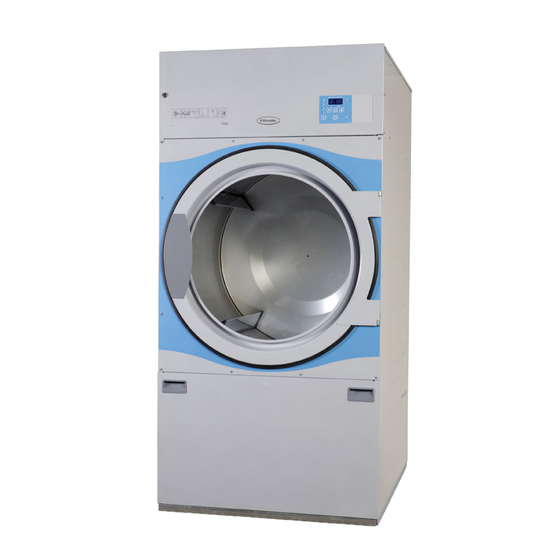
Electrolux T4290 Operating Manual

Electrolux T4290 Operating Manual

Hide thumbs Also See for T4290:

Advertisement

Operating manual
T4290, T4530, T4650
Selecta Control
487 05 44 31.00
EN

Advertisement

Table of Contents
loading

Frequently Asked Questions (13)

  • Why is my Electrolux T4290 dryer not drying clothes properly?

    If your dryer has Residual Moisture Control (RMC), a lack of cleaning the lifters can reduce the automatic residual moisture control in the clothes, resulting in the clothes being moister than requested when the program has ended. To resolve this, wipe off/clean drum and lifters A with citric acid. If soap/softener residue remains, it is recommended to also use a coarse sponge.

    Was this helpful?
  • Why is my Electrolux T4290 dryer not starting a cycle?
    Your dryer may not start a cycle for the following reasons:
    Was this helpful?
  • Why does my Electrolux T4290 dryer shut off unexpectedly?
    The dryer may shut off for several reasons:
    • The dryer stops automatically when the clothes are dry or when the selected time has expired.
    • If the dryer operates with the loading door or the filter door open, it must be placed out of order until repairs are made.
    • If error code E05 or E06 is displayed, the motor might be too hot. In this case, stop the dryer and wait for 5 minutes, then start again and choose a program. If the error reappears, a service technician must be contacted.
    Was this helpful?
  • What routine maintenance should I perform on my Electrolux T4290 dryer beyond cleaning the lint filter?
    Beyond cleaning the lint filter, routine maintenance includes:
    • Daily:
      • Check that the drum stops when the loading door is opened.
      • Check that the drum stops when the filter door is opened.
      • Ensure the dryer does not start until the start/stop button is activated.
      • Check whether the door gasket has been cleaned (use a moist cloth).
      • Clean the filter compartment using a hand-held broom or vacuum-cleaner.
      • Check that the lint filter is unbroken.
    • Weekly (Steam heated dryers only):
      • Open the front panel.
      • Remove the filter.
      • Clean the filter with water or compressed air.
      • Replace the filter and close front panel.
    • Quarterly:
      • Check that the fresh-air intake on the back of the dryer, the area surrounding the dryer, the exhaust duct, and the fresh-air intake to the room are not clogged by lint, dust, or otherwise blocked.
      • Check that the exhaust system connections are tight.
      • For dryers with Residual Moisture Control (RMC), wipe off/clean drum and lifters A with citric acid (Acidum citricum). If soap/softener residue remains, use a coarse sponge.
    • Quarterly/Semi-annually (To be carried out by qualified personnel):
      • Disconnect power to the dryer.
      • Check and clean the fan wheel.
    • Annually (To be carried out by qualified personnel):
      • Disconnect power to the dryer.
      • Dismount front panel and finger protector; clean for lint/dust.
      • For T4650, check and tighten the support rollers.
      • At least once a year, inside wearing parts should be checked by a skilled expert and cleaned for lint.
      • Check and clean the non-return flap A.
    Was this helpful?
  • What do the common error codes on my Electrolux T4290 dryer indicate?
    The dryer has automatic error indication, displayed as a flashing code:
    • E05 or E06: The motor may be too hot. Stop the dryer, wait 5 minutes, then restart with a new program. If the error persists, contact a service technician.
    • E12: The dryer may be overfilled. Remove some clothes, close the door, and press the start button. If the error persists, contact a service technician.
    • E14 (OPL laundries only): Gas error. The dryer must be in operation on a program with heat, and the heating indicator must be on to reset. The dryer can only be reset 3 times. If it needs more resets, it must be put out of order and a service technician called.
    • E15: The dryer may be overfilled. Remove some clothes, close the door, and press the start button. If the error persists, contact a service technician.
    • E16: The start button was pressed while the vacuum switch was already closed. Reset by opening/closing the door and pressing the start button.

    For more information, see page 16 of the manual.
    Was this helpful?
  • How can I optimize the energy consumption of my Electrolux T4290 dryer?

    To optimize energy consumption, it is recommended to use full loads to achieve the best result.

    Was this helpful?
  • How do I prevent clothes from wrinkling excessively when using the Electrolux T4290 dryer?
    To prevent clothes from wrinkling excessively:
    Was this helpful?
  • How do I start a drying cycle on my Electrolux T4290 dryer?
    Was this helpful?
  • How can I extend the lifespan and maintain the efficiency of my Electrolux T4290 dryer?
    To extend the lifespan and maintain efficiency, perform routine maintenance:
    • Daily:
      • Check that the drum stops when the loading door is opened.
      • Check that the drum stops when the filter door is opened.
      • Ensure the dryer does not start until the start/stop button is activated.
      • Check whether the door gasket has been cleaned (use a moist cloth).
      • Clean the filter compartment using a hand-held broom or vacuum-cleaner.
      • Check that the lint filter is unbroken.
    • Weekly (Steam heated dryers only):
      • Open the front panel.
      • Remove the filter.
      • Clean the filter with water or compressed air.
      • Replace the filter and close front panel.
    • Quarterly:
      • Check that the fresh-air intake on the back of the dryer, the area surrounding the dryer, the exhaust duct, and the fresh-air intake to the room are not clogged by lint, dust, or otherwise blocked.
      • Check that the exhaust system connections are tight.
      • For dryers with Residual Moisture Control (RMC), wipe off/clean drum and lifters A with citric acid (Acidum citricum). If soap/softener residue remains, use a coarse sponge.
    • Quarterly/Semi-annually (To be carried out by qualified personnel):
      • Disconnect power to the dryer.
      • Check and clean the fan wheel.
    • Annually (To be carried out by qualified personnel):
      • Disconnect power to the dryer.
      • Dismount front panel and finger protector; clean for lint/dust.
      • For T4650, check and tighten the support rollers.
      • At least once a year, inside wearing parts should be checked by a skilled expert and cleaned for lint.
      • Check and clean the non-return flap A.
    Was this helpful?
  • How do I clean the moisture sensor inside my Electrolux T4290 dryer?

    For dryers with Residual Moisture Control (RMC), clean the moisture sensing area by wiping off the drum and lifters A with citric acid (Acidum citricum). If soap/softener residue remains, it is recommended to also use a coarse sponge.

    Was this helpful?
  • Does the Electrolux T4290 dryer require an external vent for operation?

    Yes, the Electrolux T4290 dryer requires an external vent for operation, as indicated by references to an exhaust duct in the maintenance instructions.

    Was this helpful?
  • How do I properly install my Electrolux T4290 dryer?

    Mechanical, electrical, and gas installations for the dryer must only be carried out by authorised personnel. Adequate ventilation must be provided to avoid the backflow of gases into the room from appliances burning other fuels, including open fires. The machine must not be installed in rooms containing cleaning machines with perchloroethylene, TRICHLOROETHYLENE, or CHLOROFLUOROCONTAINING HYDROCARBONS as cleaning agents.


    For more information, see page 3 of the manual.
    Was this helpful?
  • What is the typical load capacity of the Electrolux T4290 dryer?

    The typical load capacity for the Electrolux T4290 dryer is 13.5 kg of dry textile.

    Was this helpful?
Need help?

Need help?

Do you have a question about the T4290 and is the answer not in the manual?

Questions and answers

Summary of Contents for Electrolux T4290

  • Page 1 Operating manual T4290, T4530, T4650 Selecta Control 487 05 44 31.00...
  • Page 3: Tumble Dryer

    Tumble dryer Safety instructions This machine is only intended for drying water-washed garments. Clothes that have been cleaned with chemicals/flammable liquids, must NOT be dried in the machine. Remove clothes from the tumble dryer as soon as they are dry. This prevents them from becoming creased, and reduces the risk of spontaneous ignition.
  • Page 5: Table Of Contents

    Contents Contents: Glossary ..........7 Operating panel.
  • Page 7: Glossary

    Glossary Glossary Auto Stop The tumble dryer stops automatically when the clothes are dry. AHL (Apartment House Laundry) Example: Communal laundries / Housing block laundries. OPL (On Premises Laundry) Example: Institutional laundries. RMC (Residual Moisture Control) The tumble dryer has residual moisture control.
  • Page 8: Operating Panel

    Operating panel Operating panel AHL - Tumble dryer with manual operation SELECTA CO N TRO L 487 09 10 00.00 487 22 93 40.00 487 22 93 41_00 OPL - Tumble dryer with manual operation SELECTA CO N TRO L 487 22 93 41_00 487 22 93 40.00 Coin-operated laundries...
  • Page 9: Buttons And Symbols

    Operating panel Buttons and symbols P button Reversing Program selection button. Reversing on/off. Not active on pay machines. OPL laundries only. With RMC: Push button during operation, display shows: the residual moisture in the clothes. Cool-down time Time button Setting of cool-down time. Setting of drying time.
  • Page 10: Instructions For Use

    Instructions for use Programs AHL Programs P 01 - P 02 Program Process Textiles P 01 Extra dry Denim P 02 Ready to put away 100% cotton / poly cotton mixture / terry Programs P 01 - P 03 on dryers with RMC Program Process Textiles...
  • Page 11: Tumble Dryer With Manual Operation - Ahl

    Instructions for use Tumble dryer with manual operation - AHL Clean fi lter Fill garments into the drum Close the door P 01 Extra dry Select programme P 02 Ready to put away P 03 Ironing dry (15% moisture) set the drying time Select The last minutes temperature...
  • Page 12: Programs Opl

    Instructions for use Programs OPL Programs P 01 - P 09 on dryers with RMC Program Process Textiles P 01 Extra dry Denim P 02 Ready to put away 100% cotton / poly cotton mixture / terry P 03 Ironing dry (5% moisture) Polyester / nylon P 04 Ironing dry (10% moisture) Wool / silk...
  • Page 13: Tumble Dryer With Manual Operation - Opl

    Instructions for use Tumble dryer with manual operation - OPL Clean fi lter Fill garments into the drum Close the door P 01 Extra dry Select programme P 02 Ready to put away P 03 Ironing dry (5% moisture) P 04 Ironing dry (10% moisture) P 05 Ironing dry (15% moisture) set the drying time P 06 Ironing dry (20% moisture)
  • Page 14: Programs - Coin Operated Laundries

    Instructions for use Programs - Coin operated laundries Temperature Program Process Textiles High Non-iron/normal wash Cotton and mixed fabrics Medium Non-iron/normal wash Cotton and mixed fabrics Fine wash/mild wash Delicate fabrics No heat Airing bedspreads, duvets and bedclothes Load Full loads are recommended in order to achieve the best result. Full load is indicated in kilos of dry textile.
  • Page 15: Tumble Dryer With Payment

    Instructions for use Tumble dryer with payment Clean fi lter Fill garments into the drum Close the door Select temperature High Medium No heat Pay with coins / card Press start Wait for the dryer to stop or press stop. If the tumble dryer is not emptied To prevent immediately after the drying time has...
  • Page 16: Error Codes

    Error codes Error codes The dryer has automatic error indication. Error indication is displayed as a flashing code. Please refer to the Programming manual for Selecta Control for an explanation of error codes. A service technician must be contacted should an error be displayed. The user can, however, try to correct some error codes himself.
  • Page 17: Maintenance

    Maintenance Maintenance The following should be carried out at regular intervals, depending on the operating frequency. Daily • Check that the drum stops when the loading door is opened. • Check that the drum stops when the filter door is opened.
  • Page 18 Maintenance Weekly Steam heated dryers only Fig. 1 Cleaning the filter in front of steam calo- drifier. 1. Open the front panel. 2. Remove the filter as shown (A). 3. Clean the filter with water or with com- pressed air. 4.
  • Page 19 Maintenance Quarterly Check that the following are not clogged by lint and dust or otherwise blocked: • Fresh-air intake on the back of the dryer • The area surrounding the dryer • Exhaust duct • Fresh-air intake to the room Check that the exhaust system connections are tight.
  • Page 20 Maintenance To be carried out by qualified personnel. Quarterly/Semi-annually Disconnect the power to the dryer. • Check and clean the fan wheel, fig. 1. Annually Disconnect the power to the dryer. • Dismount front panel and finger protector. Clean for lint/dust, fig. 2. T4650: Check and tighten the support rollers.
  • Page 21 Skrotning av maskin När maskinen inte längre skall användas måste den lämnas till en återvinningsstation för destruktion. Många detaljer i maskinen går att återanvända, men den innehåller även annat material som måste tas om hand på ett korrekt sätt. Lämna därför aldrig maskinen eller delar av maskinen i hushållsavfallet, eftersom det kan leda till hälsorisker eller skador på...
  • Page 23 HYDRO-EXTRACTORS N4..E. , N4..G2. , N4..S. Product standard: EN 60335 Försäkran om överensstämmelse EG-Conformiteitsverklaring Electrolux Laundry Systems Sweden AB Wij, Electrolux Laundry Systems Sweden AB SE-341 80 Ljungby, Zweden SE-341 80 Ljungby, Sverige försäkrar under eget ansvar att denna produkt, med typbeteckning och enl. ovan, verklaren hierbij op eigen verantwoordelijkheid dat het produkt van het type en met är tillverkad i överensstämmelse med följande direktiv:...
  • Page 24 Share more of our thinking at www.electrolux.com...

This manual is also suitable for:

T4650T4530T3290T3530T3650

Table of Contents

Save PDF