Sign In
Upload
Manuals
Brands
MacDon Manuals
Tractor
M155E4 2016
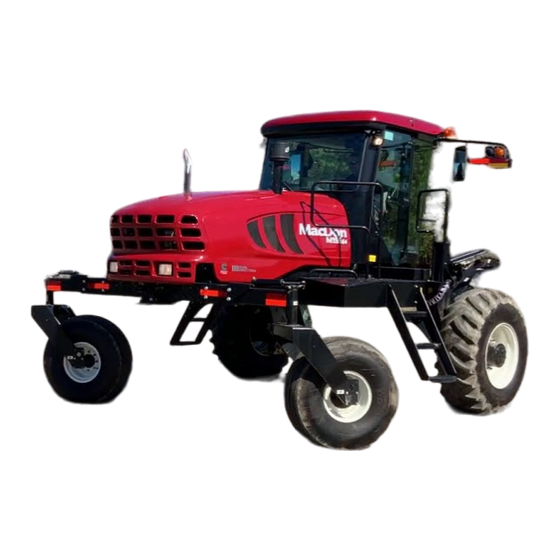
MacDon M155E4 2016 Manuals
Manuals and User Guides for MacDon M155E4 2016. We have
1
MacDon M155E4 2016 manual available for free PDF download: Manual
MacDon M155E4 2016 Manual (184 pages)
Self-Propelled Windrower
Brand:
MacDon
| Category:
Tractor
| Size: 8 MB
Table of Contents
Table of Contents
5
Safety
9
Signal Words
9
General Safety
10
Safety Signs
12
Unloading the Windrower
13
Using Two Forklifts to Unload Windrower
13
Using One Forklift to Unload Windrower
15
Method 1: Pulling from Trailer Deck
15
Method 2: Lifting from Trailer Deck
16
Assembling the Windrower
17
Repositioning Right Leg
17
Installing Drive Wheel
19
Repositioning Caster Wheels
21
Unpacking Ignition Keys
23
Installing Steps
24
Connecting Batteries
25
Starting Engine
26
Installing AM/FM Radio
29
Installing the Slow Moving Vehicle (SMV) Sign
33
Attaching Headers
34
Attaching a D-Series Header
34
Attaching Header Boots
34
Attaching a D-Series Header: Hydraulic Center-Link with Optional Self-Alignment
35
Attaching a D-Series Header: Hydraulic Center-Link Without Self-Alignment
40
Attaching an A-Series Header
46
Attaching an A-Series Header: Hydraulic Center-Link with Optional Self-Alignment
47
Attaching an A-Series Header: Hydraulic Center-Link Without Self-Alignment
52
Attaching an R-Series Header
58
Attaching an R-Series Header: Hydraulic Center-Link with Optional Self-Alignment
58
Attaching an R-Series Header: Hydraulic Center-Link Without Self-Alignment
63
Lubricating the Windrower
69
Lubrication Procedure
69
Lubrication Points
70
Fuel and Diesel Exhaust Fluid (DEF) Display Module
71
Cab Display Module (CDM)
75
Cab Display Module (CDM) Programming
75
Cab Display Options
77
Setting the Cab Display Language
77
Changing the Windrower Display Units
78
Adjusting the Cab Display Buzzer Volume
79
Adjusting the Cab Display Backlighting
80
Adjusting the Cab Display Contrast
81
Calibrating the Header Sensors
83
Calibrating the Header Height Sensor
83
Calibrating the Header Tilt Sensor
85
Calibrating the Header Float Sensors
87
Programming the Windrower
89
Activating the Hydraulic Center-Link
89
Activating the Rotary Header Drive Hydraulics
89
Setting the Header Knife Speed
90
Setting the Knife Overload Speed
91
Setting the Rotary Disc Overload Speed
92
Setting the Hydraulic Overload Pressure
93
Setting the Header Index Mode
94
Setting the Return to Cut Mode
95
Setting the Header Cut Width
96
Activating the Double Windrow Attachment (DWA)
96
Setting the Auto Raise Height
98
Activating the Hay Conditioner
99
Displaying Reel Speed
100
Setting the Windrower's Tire Size
101
Setting the Engine Intermediate Speed Control (ISC) RPM
102
Clearing Sub-Acres
103
Activating Cab Display Lockouts
104
Activating Knife Speed Control Lockout
104
Activating Rotary Disc Speed Control Lockout
105
Activating the Header Float Control Lockout
106
Activating the Draper Speed Control Lockout
107
Activating the Auger Speed Control Lockout
109
Activating the Reel Speed Control Lockout
110
Activating the Reel Fore-Aft Control Lockout
111
Activating the Header Tilt Control Lockout
112
Displaying Activated Cab Display Lockouts
113
Troubleshooting Windrower Problems
115
Displaying the Windrower and Engine Error Codes
115
Switching the Installed Header Sensors on or off
116
Displaying Header Sensor Input Signals
118
Forcing a Header ID
119
Troubleshooting Header Problems
121
Testing the Header Up/Down Activate Function Using the Cab Display Module (CDM)
121
Testing the Reel Up/Down Activate Function Using the Cab Display Module (CDM)
122
Testing the Header Tilt Activate Function Using the Cab Display Module (CDM)
124
Testing the Reel Fore-Aft Activate Function Using the Cab Display Module (CDM)
126
Activating the Hydraulic Purge Using the Cab Display Module (CDM)
127
Testing the Knife Drive Circuit Using the Cab Display Module (CDM)
129
Testing the Draper Drive Circuit Activate Function Using the Cab Display Module (CDM)
131
Testing the Reel Drive Circuit Activate Function Using the Cab Display Module (CDM)
132
Testing the Rotary Disc Drive Circuit Activate Function Using the Cab Display Module (CDM)
134
Testing the Double Windrower Attachment (DWA) Drive Activate Function Using the Cab Display Module (CDM)
136
Performing Predelivery Checks
139
Recording Serial Numbers
139
Checking Wheel Drive Lubricant Level
140
Checking Tire Pressures and Adding Tire Ballast
141
Checking Tire Pressures
141
Adding Tire Ballast
141
Checking Engine Air Intake
143
Checking Hydraulic Oil
145
Checking Fuel Separator
146
Checking Engine Coolant
147
Checking Gearbox Lubricant Level
148
Checking Air Conditioning (A/C) Compressor Belt
149
Checking Safety System
150
Performing Operational Checks
152
Checking Engine Warning Lights
153
Checking Engine Startup
153
Checking Engine Speed
154
Checking Gauges and Cab Display Module (CDM) Display on an M155E4
154
Checking Electrical System
155
Checking Operator's Presence System
155
Checking Exterior Lights
157
Auto Road Light
159
Checking Horn
160
Checking Interior Lights
160
Checking Air Conditioning (A/C) and Heater
161
Checking Manuals
162
Performing Final Steps
163
Reference
165
Torque Specifications
165
SAE Bolt Torque Specifications
165
Metric Bolt Specifications
167
Metric Bolt Specifications Bolting into Cast Aluminum
170
Flare-Type Hydraulic Fittings
170
O-Ring Boss (ORB) Hydraulic Fittings (Adjustable)
172
O-Ring Boss (ORB) Hydraulic Fittings (Non-Adjustable)
174
O-Ring Face Seal (ORFS) Hydraulic Fittings
175
Conversion Chart
177
Definitions
178
Predelivery Checklist
181
Advertisement
Advertisement
Related Products
MacDon M155E4 2022
MacDon M200
MacDon M150
MacDon M Series
MacDon M105
MacDon M155
MacDon M1170
MacDon M100
MacDon M150 2009
MacDon M200 2009
MacDon Categories
Farm Equipment
Tractor
Tractor Accessories
Lawn Mower
Lawn and Garden Equipment
More MacDon Manuals
Login
Sign In
OR
Sign in with Facebook
Sign in with Google
Upload manual
Upload from disk
Upload from URL