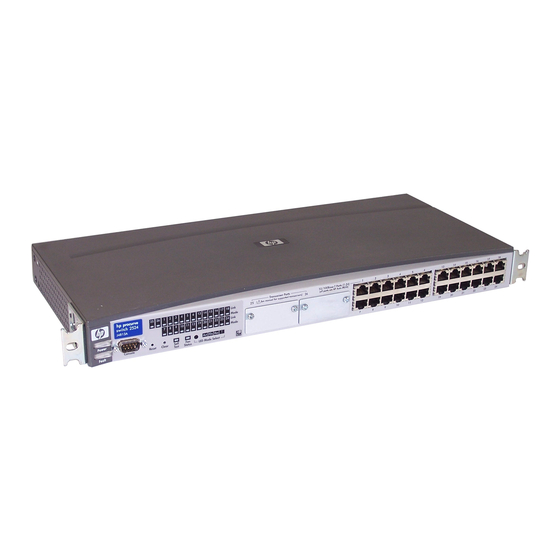
HP J4818A Installation And Getting Started Manual
Procurve 2300 & 2500 series
Hide thumbs
Also See for J4818A:
- Specifications (1 page) ,
- Product end-of-life disassembly instructions (2 pages)

Related Manuals for HP J4818A


Summary of Contents for HP J4818A
- Page 1 installation and getting started guide hp procurve series 2300 and 2500 switches www.hp.com/go/procurve...
- Page 3 HP ProCurve Series 2300 and 2500 Switches Installation and Getting Started Guide...
- Page 4 5969-2353 performance, or use of this material. Edition 2 March 2001 Hewlett-Packard assumes no responsibility for the use or reliability of its software on equipment that is not furnished by Hewlett-Packard. Applicable Products Series 2300: ·...
-
Page 5: Table Of Contents
Contents 1 Introducing the HP ProCurve Series 2300 and 2500 Switches Front of the Switches ......... . 1-2 Network Ports . - Page 6 5. Connect the Switch to a Power Source ..... . 2-13 6. Connect the Network Cables ....... 2-14 Using the RJ-45 Connectors (10/100Base-TX ports) .
- Page 7 Downloading New Code (Series 2300 switches only) ........3-12 To Perform the Download: .
-
Page 9: Introducing The Hp Procurve Series 2300 And 2500 Switches
Switches” and “Series 2500 Switches”, or when common features are being described, as the “Series 2300 and 2500 Switches”. Series 2300 Switches HP ProCurve Switch 2312 (J4817A) HP ProCurve Switch 2324 (J4818A) Series 2500 Switches HP ProCurve Switch 2512 (J4812A) HP ProCurve Switch 2524 (J4813A) -
Page 10: Front Of The Switches
Introducing the HP ProCurve Series 2300 and 2500 Switches Front of the Switches Front of the Switches Slots for Link and Mode LEDs Gigabit or 100 Mbps for switch ports transceivers HP ProCurve Switch 2324 Download Mode Select button port 10/100Base-TX RJ-45 ports* and indicator LEDs Power... -
Page 11: Leds
Introducing the HP ProCurve Series 2300 and 2500 Switches Front of the Switches LEDs Table 1-1. Switch LEDs Switch LEDs State Meaning Power The switch is receiving power. (green) The switch is NOT receiving power. Fault The normal state; indicates that there are no fault conditions on the switch. (orange) †... - Page 12 Introducing the HP ProCurve Series 2300 and 2500 Switches Front of the Switches Table 1-2. Switch and Transceiver Port LEDs Port LEDs State Meaning Link Indicates the port is enabled and receiving a link indication from the connected device. One of these conditions exists: •...
-
Page 13: Mode Led Select Button And Indicator Leds
Introducing the HP ProCurve Series 2300 and 2500 Switches Front of the Switches Mode LED Select Button and Indicator LEDs To optimize the amount of information that can be displayed for each of the switch ports without overwhelming you with LEDs, the Series 2300 and 2500 switches use a Mode LED for each port. -
Page 14: Console Port (Series 2500 Switches Only)
Introducing the HP ProCurve Series 2300 and 2500 Switches Front of the Switches Console Port (Series 2500 Switches only) This port is available on the Series 2500 switches, and is used to connect a console to the switch by using the serial cable supplied with the switch. This connection is described under “Connect a Console to the Switch”... -
Page 15: Clear Button (Series 2500 Only)
Introducing the HP ProCurve Series 2300 and 2500 Switches Back of the Switches Clear Button (Series 2500 only) This button is used for these purposes: Deleting Passwords - When pressed by itself for at least one second, the button deletes any switch console access passwords that you may have configured. -
Page 16: Switch Features
Introducing the HP ProCurve Series 2300 and 2500 Switches Switch Features Switch Features The features of the Series 2300 and 2500 switches include: 12 or 24 autosensing 10/100Base-TX RJ-45 ports with Auto MDI/MDI-X. two slots for installing supported gigabit or 100Base-FX transceivers. plug-and-play networking—all ports are enabled—just connect the network cables to active network devices and your switched network is operational. -
Page 17: Switch Operation Overview
Introducing the HP ProCurve Series 2300 and 2500 Switches Switch Operation Overview support for up to 30 IEEE 802.1Q-compliant VLANs so you can divide the attached end nodes into logical groupings that fit your business needs. support for many advanced features to enhance network performance and network traffic control—described in the Management and Config- uration Guide that came with your Series 2500 switch. -
Page 18: Effect Of Vlans (Series 2500 Only)
Introducing the HP ProCurve Series 2300 and 2500 Switches Switch Operation Overview Network Moves and Changes. When a PC, server, printer, or other network device is moved in the network, and becomes connected to a different switch port, the Series 2300 and 2500 switches automatically recognize the change and update their address table with the new port location of the device. -
Page 19: Installing The Series 2300 And 2500 Switches
Installing the Series 2300 and 2500 Switches The HP Series 2300 and 2500 switches are easy to install. They each come with an accessory kit that includes the brackets for mounting the switch in a standard 19-inch telco rack, in an equipment cabinet, or on a wall, and with rubber feet that can be attached so the switch can be securely located on a horizontal surface. -
Page 20: Installation Procedures
Installing the Series 2300 and 2500 Switches Installation Procedures Installation Procedures Summary Follow these easy steps to install your switch. The rest of this chapter provides details on these steps. Prepare the installation site (page 2-4). Make sure that the physical environment into which you will be installing the switch is properly prepared, including having the correct network cabling ready to connect to the switch and having an appropriate location for the switch. -
Page 21: Installation Precautions
Installing the Series 2300 and 2500 Switches Installation Procedures Installation Precautions: Follow these precautions when installing your HP Series 2300 and 2500 switches. W a r n i n g The rack or cabinet should be adequately secured to prevent it from becoming unstable and/or falling over. -
Page 22: Prepare The Installation Site
Installing the Series 2300 and 2500 Switches Installation Procedures 1. Prepare the Installation Site Cabling Infrastructure - Ensure that the cabling infrastructure meets the necessary network specifications. See the following table for cable types and lengths, and see appendix B, “Cables and Connectors” for more information: Table 2-1. - Page 23 Installing the Series 2300 and 2500 Switches Installation Procedures Port Type Cable Type Length Limits Fiber Optic Cables 62.5/125 µm or 50/125 µm core/cladding 100Base-FX • 2 kilometers for full-duplex connections (on the 100-FX diameter, graded-index, multimode fiber-optic Transceiver) cables that are fitted with SC connectors 62.5/125 µm or 50/125 µm core/cladding •...
-
Page 24: Install Transceivers (Optional)
Installing the Series 2300 and 2500 Switches Installation Procedures 2. Install Transceivers (optional) Install a transceiver into one or both of the slots as shown in the illustration below. For installation details, see the instructions in the Installation Guide that comes with the transceiver. The slot cover can be removed with either a flat-bladed or Torx T-10 screw- driver. -
Page 25: Verify The Switch Passes Self Test
Installing the Series 2300 and 2500 Switches Installation Procedures Installing a Transceiver in the Switch 1. Insert transceiver into the guides and slide it in until it stops. 2. Press in firmly until the transceiver is flush with the face of the switch. 3. -
Page 26: Led Behavior
Installing the Series 2300 and 2500 Switches Installation Procedures Check the LEDs on the switch as described below. switch port LEDs Power and Self Test LED Fault LEDs When the switch is powered on, it performs its diagnostic self test. Self test takes approximately 40 seconds to complete. -
Page 27: Mount The Switch
Installing the Series 2300 and 2500 Switches Installation Procedures 4. Mount the Switch After you have verified that the switch passes self test, you are ready to mount the switch in a stable location. The Series 2300 and 2500 switches can be mounted in these ways: in a rack or cabinet on a horizontal surface... - Page 28 Installing the Series 2300 and 2500 Switches Installation Procedures N o t e Steps 2, 3, and 4 below describe a convenient method of mounting the switch in a rack by placing it on two screws that you first install in the rack. You may, instead, just hold the switch with attached brackets up to the rack and move it vertically until rack holes line up with the bracket notches, then insert and tighten the four screws holding the brackets to the rack.
- Page 29 Installing the Series 2300 and 2500 Switches Installation Procedures Place the switch in the rack and lower it so the notches in the bottom of the bracket slide onto the screws, then tighten these screws. lower switch with mounting brackets onto the partially installed screw Install the other number 12-24 screw through the hole in each bracket.
-
Page 30: Horizontal Surface Mounting
Installing the Series 2300 and 2500 Switches Installation Procedures Horizontal Surface Mounting Place the switch on a table or other horizontal surface. The switch comes with rubber feet in the accessory kit that can be used to help keep the switch from sliding on the surface. -
Page 31: Connect The Switch To A Power Source
Installing the Series 2300 and 2500 Switches Installation Procedures Attach the switch to the wall or wood surface with two 5/8-inch number 12 wood screws (not included). For “Bookshelf” Wall Mounting For “Flat” Wall Mounting 5/8-inch wood screw 5/8-inch wood screws second 5/8-inch wood screw (hidden) 5. -
Page 32: Connect The Network Cables
Installing the Series 2300 and 2500 Switches Installation Procedures 6. Connect the Network Cables Connect the network cables, described under “Cabling Infrastructure” (page 2-4), from the network devices or your patch panels to the fixed RJ-45 ports on the switch or the ports on any transceivers you have installed in the switch. Using the RJ-45 Connectors (10/100Base-TX ports) To connect: Push the RJ-45 plug into the RJ-45... -
Page 33: Optional) Connect A Console To The Switch 2500
Installing the Series 2300 and 2500 Switches Installation Procedures 7. (Optional) Connect a Console to the Switch 2500 The Series 2500 switches have a full-featured, easy to use console interface for performing the following tasks: Monitor switch and port status and observe network activity statistics Modify the switch’s configuration to optimize switch performance, enhance network traffic control, and improve network security Read the event log and access diagnostic tools to help in troubleshooting... -
Page 34: Connecting A Console
Installing the Series 2300 and 2500 Switches Installation Procedures If you want to operate the console using a different configuration, make sure you change the settings on both the terminal and on the switch so they are compatible. Change the switch settings first, then change the terminal settings, then reboot the switch and reestablish the console session. -
Page 35: Getting Started With Switch Configuration (Series 2500 Switches Only)
Installing the Series 2300 and 2500 Switches Getting Started With Switch Configuration (Series 2500 Switches Only) Getting Started With Switch Configuration (Series 2500 Switches Only) This section is a guide for using the console Switch Setup screen to quickly assign an IP (Internet Protocol) address and subnet mask to the switch, set a Manager password, and, optionally, configure other basic features. -
Page 36: Using The Console Setup Screen
Installing the Series 2300 and 2500 Switches Getting Started With Switch Configuration (Series 2500 Switches Only) Using the Console Setup Screen The quickest and easiest way to minimally configure the switch for manage- ment and password protection in your network is to use a direct console connection to the switch, start a console session, and access the Switch Setup screen. - Page 37 Installing the Series 2300 and 2500 Switches Getting Started With Switch Configuration (Series 2500 Switches Only) Here is some information on the fields in the Setup screen. For more informa- tion on these fields, see the Management and Configuration Guide that came with your switch: Parameter Default...
-
Page 38: Where To Go From Here
Installing the Series 2300 and 2500 Switches Using the IP Address for Remote Switch Management (Series 2500 Switches Only) Where to Go From Here The above procedure configures your switch with a Manager password, IP address, and subnet mask. With the proper network connections, you can now manage the switch from a PC equipped with Telnet and/or a web browser or from an SNMP network management station. -
Page 39: Starting A Web Browser Session
Installing the Series 2300 and 2500 Switches Using the IP Address for Remote Switch Management (Series 2500 Switches Only) Starting a Web Browser Session Your Series 2500 switch can be managed through a graphical interface that you can access from any PC or workstation on the network by running your web browser and typing in the switch’s IP address as the URL. -
Page 40: Sample Network Topologies
Installing the Series 2300 and 2500 Switches Sample Network Topologies Sample Network Topologies This section shows you a few sample network topologies in which the Series 2300 and 2500 switches are implemented. For more topology information, see the HP network products World Wide Web site, http://www.hp.com/go/hpprocurve. -
Page 41: As A Segment Switch
Installing the Series 2300 and 2500 Switches Sample Network Topologies As a Segment Switch Server with category 5 twisted-pair “straight-through” or “Gigabit” “crossover” cable for 1000 Mbps connection to server Ethernet NIC twisted-pair “straight- through” or “crossover” Switch 2512 cables to hubs Gigabit fiber-optic cable to backbone... -
Page 42: Connecting To A Backbone Switch
Installing the Series 2300 and 2500 Switches Sample Network Topologies Connecting to a Backbone Switch Switch 2524 to Gigabit-Ethernet Gigabit backbone fiber-optic cable Switch 2512 Switch 8000M The simpler desktop and segment networks shown in the previous two examples can easily be combined and expanded. For example, you could use an HP ProCurve Switch 8000M to interconnect each of your smaller switched workgroups to form a larger switched network. -
Page 43: Stacking The Switches (Series 2500 Only)
Installing the Series 2300 and 2500 Switches Sample Network Topologies Stacking the Switches (Series 2500 only) The Series 2500 switches can be connected together, through standard network connections, and managed through a single IP address. Up to 16 switches can be connected together in such a “virtual stack”. You identify one of the switches as the “Commander”... -
Page 45: Troubleshooting
Troubleshooting This chapter describes how to troubleshoot your HP ProCurve Series 2300 and 2500 switches. Note that this document describes troubleshooting mostly from a hardware perspective. You can perform more in-depth troubleshooting on the Series 2500 switches using the software tools available with the switch, including the full-featured console interface, the built-in web browser inter- face, and HP TopTools for Hubs &... - Page 46 Troubleshooting Basic Troubleshooting Tips Improper Network Topologies. It is important to make sure you have a valid network topology. Common topology faults include excessive cable length and excessive repeater delays between end nodes. If you have network problems after recent changes to the network, change back to the previous topology.
- Page 47 Troubleshooting Basic Troubleshooting Tips Make sure that all devices connected to the Series 2300 and 2500 switches are configured to auto negotiate, or are configured to connect at half duplex (all hubs are configured this way, for example). Check the port configuration (Series 2500 Switches only). A port on your Series 2500 switch may not be operating as you expect because it has been put into a “blocking”...
-
Page 48: Diagnosing With The Leds
Troubleshooting Diagnosing with the LEDs Diagnosing with the LEDs Tables 3-1 shows LED patterns on the switch and the switch modules that indicate problem conditions. Check in the table for the LED pattern that you see on your switch. Refer to the corresponding diagnostic tip on the next few pages. Table 3-1. - Page 49 Troubleshooting Diagnosing with the LEDs Diagnostic Tips: Problem Solution – The switch is not 1. Verify that the power cord is plugged into an active power source and to the switch. plugged into an Make sure these connections are snug. active AC power 2.
- Page 50 Troubleshooting Diagnosing with the LEDs Problem Solution › The network Try the following procedures: connection is not • For the indicated port, verify that both ends of the cabling, at the switch and the working connected device, are connected properly. properly.
- Page 51 Troubleshooting Diagnosing with the LEDs Problem Solution A transceiver When you install transceivers in the transceiver slots, you must reset or reboot the switch was installed and so the switch processor can properly initialize and configure the transceiver. The flashing the switch has LED informs you that the transceiver is not initialized.
-
Page 52: Proactive Networking
Troubleshooting Proactive Networking Proactive Networking The HP ProCurve Series 2500 switches have built-in management capabilities that proactively help you manage your network including: finding and helping you fix the most common network error conditions (for example, faulty network cabling, and non-standard network topolo- gies) informing you of the problem with clear, easy-to-understand messages recommending network configuration changes to enhance the perfor-... -
Page 53: Hardware Diagnostic Tests
Troubleshooting Hardware Diagnostic Tests Hardware Diagnostic Tests Testing the Switch by Resetting It If you believe that the switch is not operating correctly, you can reset the switch to test its circuitry and operating code. To reset a switch, either: Unplug and plug in the power cord (power cycling) Press the reset button on the front of the switch Power cycling the switch and pressing the Reset button both cause the switch... -
Page 54: Testing Twisted-Pair Cabling
Troubleshooting Hardware Diagnostic Tests Testing Twisted-Pair Cabling Network cables that fail to provide a link or provide an unreliable link between the switch and the connected network device may not be compatible with the IEEE 802.3 Type 10Base-T, 100Base-TX, or 1000Base-T standards. The twisted-pair cables attached to the Series 2300 and 2500 switches must be compatible with the appropriate standards. -
Page 55: Restoring The Factory Default Configuration (Series 2500 Switches Only)
Troubleshooting Restoring the Factory Default Configuration (Series 2500 switches only) Restoring the Factory Default Configuration (Series 2500 switches only) As part of your troubleshooting process on the Series 2500 switches, it may become necessary to return the switch configuration to the factory default settings. -
Page 56: Downloading New Code (Series 2300 Switches Only)
Troubleshooting Downloading New Code (Series 2300 switches only) Downloading New Code (Series 2300 switches only) If product enhancements occur for the Series 2300 switches, even though they are unmanaged devices, it is possible to download new code to the switch through the Download Port on the front of the switch. -
Page 57: Hp Customer Support Services
HP Customer Support Services HP Customer Support Services If you are still having trouble with your switch, Hewlett-Packard offers support 24 hours a day, seven days a week through the use of a number of automated electronic services. See the Customer Support/Warranty booklet that came with your switch for information on how to use these services to get technical support. -
Page 59: Physical
Specifications The following specifications apply to both the Series 2300 and 2500 switches. Physical Width: 44.2 cm (17.4 in) Depth: 20.5 cm (8.1 in) Height: 4.4 cm (1.7 in) Weight: 2.8 kg (6.2 lbs) Electrical The switches automatically adjust to any voltage between 100-127 and 200-240 volts and either 50 or 60 Hz. -
Page 60: Acoustic
Specifications Acoustic Geraeuschemission LwA=54 dB am fiktiven Arbeitsplatz nach DIN 45635 T.19 Noise Emission LwA=54 dB at virtual workspace according to DIN 45635 T.19 Connectors The 10/100 Mbps RJ-45 twisted-pair ports are compatible with the IEEE 802.3u 100Base-TX and IEEE 802.3 Type 10Base-T standards. The 1000 Mbps RJ-45 twisted-pair port on the 100/1000-T transceiver is compatible with the IEEE 802.3ab standard. -
Page 61: B Switch Ports And Network Cables
Switch Ports and Network Cables This appendix includes switch connector information and network cable information for cables that should be used with the Series 2300 and 2500 switches, including minimum pin-out information and specifications for twisted-pair cables. N o t e Incorrectly wired cabling is the most common cause of problems for LAN communications. -
Page 62: Cables
Switch Ports and Network Cables Cables Twisted-Pair 10 Mbps Operation Category 3, 4, or 5 100-ohm unshielded twisted-pair (UTP) or shielded twisted-pair (STP) cable, complying with IEEE 802.3 Type 10Base-T specifications, fitted with RJ-45 connectors 100 Mbps Operation Category 5 100-ohm UTP or STP cable, complying with IEEE 802.3u 100Base-TX specifications, fitted with RJ-45 connectors 1000 Mbps Operation Category 5 100-ohm 4-pair UTP or STP cable, complying... -
Page 63: Twisted-Pair Cable/Connector Pin-Outs
Switch Ports and Network Cables Twisted-Pair Cable/Connector Pin-Outs Fiber-Optic 62.5/125 µm or 50/125 µm (core/cladding) diameter, graded- 100Base-FX index, multimode fiber-optic cables, complying with the ITU-T G.651 and ISO/IEC 793-2 Type A1b or A1a respec- tively, fitted with MT-RJ connectors 62.5/125 µm or 50/125 µm (core/cladding) diameter, graded- Gigabit-SX index, multimode fiber-optic cables, complying with the... - Page 64 Switch Ports and Network Cables Twisted-Pair Cable/Connector Pin-Outs If you happen to use a correctly wired crossover cable, though, the switch will still be able to automatically detect the MDI/MDI-X operation and link correctly to the connected device. If the port configuration is changed to any of the fixed configurations though, for example 100 Mbps/full duplex, the port operates as MDI-X only and the correct cable type must be used: for connections to MDI ports, such as end nodes, use a “straight-through”...
-
Page 65: Straight-Through Twisted-Pair Cable For 10 Mbps Or 100 Mbps Network Connections
Switch Ports and Network Cables Twisted-Pair Cable/Connector Pin-Outs Straight-Through Twisted-Pair Cable for 10 Mbps or 100 Mbps Network Connections Because of the HP Auto-MDIX operation of the 10/100 ports on the switches, for all network connections, to PCs, servers or other end nodes, or to hubs or other switches, you can use “straight-through”... -
Page 66: Crossover Twisted-Pair Cable For 10 Mbps Or 100 Mbps Network Connection
Switch Ports and Network Cables Twisted-Pair Cable/Connector Pin-Outs Crossover Twisted-Pair Cable for 10 Mbps or 100 Mbps Network Connection The HP Auto-MDIX operation of the 10/100 ports on the switches also allows you to use “crossover” cables for all network connections, to PCs, servers or other end nodes, or to hubs or other switches. -
Page 67: Straight-Through Twisted-Pair Cable For 1000 Mbps Network Connections
Switch Ports and Network Cables Twisted-Pair Cable/Connector Pin-Outs Straight-Through Twisted-Pair Cable for 1000 Mbps Network Connections 1000Base-T connections require that all four pairs or wires be connected. Cable Diagram N o t e Pins 1 and 2 on connector “A” must be wired as a twisted pair to pins 1 and 2 on connector “B”. -
Page 69: C Safety And Emc Regulatory Statements
Safety and EMC Regulatory Statements Safety Information Documentation reference symbol. If the product is marked with this symbol, refer to the product documentation to get more information about the product. WARNING A WARNING in the manual denotes a hazard that can cause injury or death. - Page 70 Safety and EMC Regulatory Statements Informations concernant la sécurité Informations concernant la sécurité Symbole de référence à la documentation. Si le produit est marqué de ce symbole, reportez-vous à la documentation du produit afin d'obtenir des informations plus détaillées. WARNING Dans la documentation, un WARNING indique un danger susceptible d'entraîner des dommages corporels ou la mort.
-
Page 71: Hinweise Zur Sicherheit
Safety and EMC Regulatory Statements Hinweise zur Sicherheit Hinweise zur Sicherheit Symbol für Dokumentationsverweis. Wenn das Produkt mit diesem Symbol markiert ist, schlagen Sie bitte in der Produktdokumentation nach, um mehr Informationen über das Produkt zu erhalten. WARNING Eine WARNING in der Dokumentation symbolisiert eine Gefahr, die Verletzungen oder sogar Todesfälle verursachen kann. -
Page 72: Considerazioni Sulla Sicurezza
Safety and EMC Regulatory Statements Considerazioni sulla sicurezza Considerazioni sulla sicurezza Simbolo di riferimento alla documentazione. Se il prodotto è contras- segnato da questo simbolo, fare riferimento alla documentazione sul prodotto per ulteriori informazioni su di esso. WARNING La dicitura WARNINGdenota un pericolo che può causare lesioni o morte. -
Page 73: Consideraciones Sobre Seguridad
Safety and EMC Regulatory Statements Consideraciones sobre seguridad Consideraciones sobre seguridad Símbolo de referencia a la documentación. Si el producto va marcado con este símbolo, consultar la documentación del producto a fin de obtener mayor información sobre el producto. WARNING Una WARNING en la documentación señala un riesgo que podría resultar en lesiones o la muerte. -
Page 74: Safety Information
Safety and EMC Regulatory Statements Safety Information (Japan) Safety Information (Japan) - Page 75 Safety and EMC Regulatory Statements Safety Information (China) Safety Information (China)
-
Page 76: Emc Regulatory Statements
Safety and EMC Regulatory Statements EMC Regulatory Statements EMC Regulatory Statements U.S.A. FCC Class A This equipment has been tested and found to comply with the limits for a Class A digital device, pursuant to Part 15 of the FCC Rules. These limits are designed to provide reasonable protection against interference when the equipment is operated in a commercial environment. - Page 77 Safety and EMC Regulatory Statements EMC Regulatory Statements Korea Taiwan...
-
Page 78: European Community
Safety and EMC Regulatory Statements EMC Regulatory Statements European Community C-10... - Page 79 Index Symbols basic switch configuration IP address … 2-18 ! (attention) LED … 1-3, 1-5 manager password … 2-18 use in troubleshooting … 3-7 subnet mask … 2-18 Switch Setup screen … 2-18 Numerics basic troubleshooting tips … 3-1 blinking LEDs 10/100Base-TX ports error indications …...
- Page 80 cables, twisted pair console port category 3, 4, 5 … B-4 description … 1-6 cross-over cable pin-out … B-6 location on switch … 1-2, 1-6 MDI-X to MDI connections … B-5, B-7 cross-over cable MDI-X to MDI-X connections … B-6 pin-out …...
- Page 81 features installation console … 2-15 connecting the switch to a power source … 2-13 switch … 1-8 horizontal surface mounting … 2-12 fiber-optic cables … B-3 location considerations … 2-5 100Base-FX … B-3 network cable requirements … 2-4 Gigabit-LX … B-3 optional transceivers …...
- Page 82 length limitations network devices 100/1000Base-T connections … 2-4 connecting to the switch … 2-14 100Base-FX connections … 2-5 network ports 100Base-TX connections … 2-4 connecting to … 2-14 10Base-T connections … 2-4 LEDs for … 1-4 Gigabit-LX connections … 2-5 location on switch …...
- Page 83 precautions specifications mounting the switch … 2-3 connectors … A-2 power requirements … 2-3 electrical … A-1 preparing the installation site … 2-4 environmental … A-1 Proactive Network tools physical … A-1 diagnostics with … 3-8 safety … A-2 straight-through cable pin-out …...
- Page 84 twisted-pair cable cross-over cable pin-out … B-6 telnet access to the console … 2-20 pin-outs … B-3, B-5, B-7 terminal configuration … 2-15 straight-through cable pin-out … B-5, B-7 testing switch-to-computer connection … B-5, B-7 checking the console messages … 3-9 switch-to-switch or hub connection …...
- Page 88 Technical information in this document is subject to change without notice. ©Copyright Hewlett-Packard Company 2000, 2001. All right reserved. Reproduction, adaptation, or translation without prior written permission is prohibited except as allowed under the copyright laws. Printed in Singapore Edition 2, March 2001...
Need help?
Do you have a question about the J4818A and is the answer not in the manual?
Questions and answers