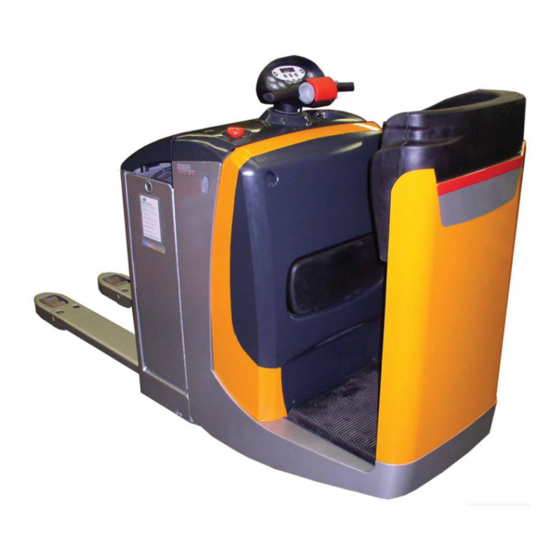

Related Manuals for Still EXU-S 24


Summary of Contents for Still EXU-S 24
- Page 1 Original instructions Electric pallet truck EXU-S 22 EXU-S 24 0177 0178 50018043464 EN - 10/2017...
- Page 3 • Information on transport, initial commis- sioning and storage of industrial trucks Internet address and QR code The information can be accessed at any time by pasting the address https://m.still.de/vdma in a web browser or by scanning the QR code. 50018043464 EN - 10/2017...
-
Page 5: Table Of Contents
Table of contents Introduction Forklift data ............2 General information . - Page 6 Table of contents Overview Technical description ..........22 Overviews .
- Page 7 Table of contents Check of brake and presence area ........51 Checking the emergency brake button .
- Page 8 VDI data sheet for standard EXU-S 22 ........
-
Page 9: Introduction
Introduction... -
Page 10: Forklift Data
Introduction Forklift data Forklift data We recommend that you record the principal forklift data in the following table so that they are available if required by the sales network or authorised service centre. Type Serial number Date of delivery General information •... - Page 11 Introduction How to Consult the Manual CAUTION ENVIRONMENT NOTE Failure to observe the instructions highlighted with Failure to observe the instructions highlighted this symbol may cause damage to the forklift and, with this symbol may cause environmental in some cases, result in warranty invalidity. damage.
-
Page 12: Date Of Edition And Latest Update Of This Manual
Introduction Date of edition and latest update of this manual Date of edition and latest update of this manual The publication date of these operating instructions is printed on the cover sheet. The manufacturer makes continuous efforts to improve its industrial trucks, and therefore reserves the right to implement changes and to accept no claims concerning the information provided in this manual. -
Page 13: Ce Labelling
Introduction CE labelling CE labelling The manufacturer uses CE labelling to indi- cate that the truck complies with the standards and regulations valid at the time of marketing. This is confirmed by the issued EC declaration of conformity. The CE labelling is attached to the nameplate. -
Page 14: Ec Declaration Of Conformity In Accordance With Machinery Directive
Introduction EC declaration of conformity in accordance with Machinery Directive EC declaration of conformity in accordance with Machinery Di- rective Declaration STILL GmbH Berzeliusstraße 10 D-22113 Hamburg Germany We declare that the according to these operating instructions Industrial truck according to these operating instructions Model conforms to the latest version of the Machinery Directive 2006/42/EC. -
Page 15: Technical Service And Spare Parts
Introduction Technical service and spare parts Technical service and spare parts For scheduled maintenance and any repairs to the technical characteristics of the forklift over the forklift, contact only the authorised service time. network. Only original spare parts provided by the man- The authorised service network has personnel ufacturer may be used for forklift maintenance trained by the manufacturer, original spare... -
Page 16: Modifications To Forklift
Introduction Modifications to Forklift Do not use beyond the limits of the climatic use precautions are necessary. Contact the conditions indicated below: authorised sales network for more informa- tion. • Maximum ambient temperature: +40°C • Minimum ambient temperature: +5°C DANGER •... -
Page 17: Environmental Considerations
Introduction Environmental considerations Environmental considerations Disposal of components and batteries The truck is composed of different materials. If components or batteries need to be replaced and disposed of, they must be: • disposed of, • treated or • recycled in accordance with regional and national regulations. -
Page 18: Packaging
Introduction Environmental considerations Packaging During delivery of the truck, certain parts are packaged to provide protection during transport. This packaging must be removed completely prior to initial start-up. ENVIRONMENT NOTE The packaging material must be disposed of properly after delivery of the truck. 50018043464 EN - 10/2017... -
Page 19: Safety
Safety... -
Page 20: Safety Guidelines
Safety Safety guidelines Safety guidelines General Precautions regulations integrate those in the manual NOTE "Rules for approved use of industrial vehicles". Some safety regulations to be followed when using the forklift are listed below. These General Safety Rules • Only allow qualified, trained and authorized •... -
Page 21: Battery Connection Cables
Safety Safety guidelines CAUTION Passing over cracks or damaged parts of the floor with the truck is prohibited. Dirt and any objects in the work path must be removed immediately. Battery connection cables CAUTION Using sockets with NON-ORIGINAL battery con- nection cables can be dangerous (see purchase references in the parts catalogue) Requirements for the traction-battery... -
Page 22: Safety Regulations Relative To Operating Materials
Safety Safety guidelines Safety Regulations Relative to Operating Materials Rules for handling and disposing of Oils operating materials • Do not allow to come into contact with the skin. ENVIRONMENT NOTE • Do not inhale oil vapors. Improper use and disposal of operating and •... -
Page 23: Residual Risks
Safety Residual risks and disposal of the life-expired battery must NOTE be carried out as required by law. We advise For greater information, consult the specific you to contact the authorised service network battery manual that comes with the battery. that is equipped for eco-friendly disposal in accordance with current regulations. - Page 24 Safety Residual risks • Human error resulting from failure to observe the safety guidelines. • Unrepaired damage or defective and worn components. • Insufficient maintenance and testing • Use of incorrect consumables • Maintenance intervals exceeded The manufacturer shall not be held responsi- ble for accidents involving the truck caused by the failure of the operating company to comply with these regulations either intentionally or...
-
Page 25: Electromagnetic Radiation
Safety Electromagnetic radiation Electromagnetic radiation The limit values for electromagnetic emissions and for immunity relative to the forklift are those provided by the EN 12895 standard. Non-ionised radiation If the forklift is equipped at the factory or later with devices that emit non-ionising radiation (such as radio transmitters, RFID players, data terminals, scanners, etc), the compatibility of such devices must be verified... -
Page 26: Vibrations
Safety Vibrations Vibrations Vibrations to which the hands and arms CAUTION are exposed The value expressed above can be used to com- pare forklift trucks of the same category. It cannot The following value is valid for all truck models: be used to determine the operator's daily expo- •... -
Page 27: Safety Tests
Safety tests Regular safety inspection of the truck Safety inspection based on time and extraordinary incidents STILL GmbH Hamburg The operating company must ensure that the truck is checked at least once a year, or Regelmäßige Prüfung following noteworthy incidents. - Page 28 Safety Safety tests 50018043464 EN - 10/2017...
-
Page 29: Overview
Overview... -
Page 30: Technical Description
Overview Technical description Technical description This robust stand-on electric pallet truck is ideal for loading and unloading lorries, and its high driving speed also makes it easy to transport over longer distances. Chassis • The EXU-S was designed for loading and unloading lorries and has excellent handling on slopes and in the confined spaces of lorries. - Page 31 Overview Technical description features variable wheel pressure on the ground proportional to the load on the forks. • For lateral stability, two exclusive STILL twin-wheels have been specially designed for the EXU-S for extreme reliability in the most arduous applications.
- Page 32 Overview Technical description Driver rides standing on "sprung" platform • Depending on the application, the EXU-S is available with two platform types that are ergonomically suited to the operator’s needs. These needs are very different from one type of job to another, so we have designed two different platforms.
- Page 33 Overview Technical description • With each mode, the drive characteristics can be adjusted (speed, acceleration, braking) to precisely match the application or driver preference. • Thanks to the controller's speed control system, the EXU-S will start smoothly and accelerate to maximum travel speed, regardless of the load on the forks.
-
Page 34: Overviews
Overview Overviews vertically with a sling, or from the side using rollers, if used for 2 or 3 work shifts. • Two different battery compartments allow batteries with 450 Ah or 600 Ah capacities to be used. Overviews 0148_003-001 Forks Brake Battery compartment Drive motor... -
Page 35: Definition Of Directions
Overview Definition of directions Drive controller Load wheel Mounting bracket for accessories (option) Definition of directions The references forwards (1), backwards (3), right (2) and left (4) when describing the position are relative to the driver's seat. The load is at the front. 0249_003-001 Sample graphics This documentation explains the (usually... -
Page 36: Control And Display Elements
Overview Control and display elements Control and display elements View of the control elements 0148_003-002 Battery cover Battery compartment lock Cockpit Document holder Diagnostic connector Glove compartment Emergency isolator button 50018043464 EN - 10/2017... -
Page 37: Cockpit
Overview Control and display elements Cockpit 6 7 8 0148_003-003 Lower button Numbers button Lift button button Hare Horn button Horn button button Lift button Tortoise (scrolling) button Lower button PRG ↑ Numbers button Handle Display Travel control (ON) button Emergency brake switch Numbers button... -
Page 38: Dead Man's Zone
Overview Control and display elements Dead man's zone CAUTION The pallet truck has a foot interlock zone which can cause the truck to be braked. Method of operation The driver must stand with one foot on the foot interlock zone (1) of the driver’s platform. The feet must stay in the area of this platform. -
Page 39: Markings
Overview Markings Markings Location of designation plates and labels 2329 "Danger of crushing hands" label Nominal value designation plate "No hooking" label "Cold store" label (on cold store version only) "Operating and maintenance manual" label "Danger of crushing feet" label Annual testing label (Germany only) "Hook"... -
Page 40: Chassis Frame Labelling
Overview Markings (2) This label indicates that you must not lift the truck by hooking onto the cockpit (3) This label indicates that you should consult the operating and maintenance manual before using the truck and before carrying out any maintenance work. -
Page 41: Data Plate
Overview Markings Data plate NOTE Please indicate the serial number for all technical enquiries. 2327 Model Rated capacity in kg Manufacturer Serial no. Unladen weight (without battery) in kg Year of manufacture EC conformity symbol QR code Battery voltage V Nominal power rating in kW Minimum battery weight Maximum battery weight... -
Page 42: Options
Overview Options Options Models 1 Platform, access on left side 0148_003-006 2 Platform, access at rear 0148_003-007 Options • Single load wheels • Continuous operation hour meter (with own battery in the tiller head) • Battery charge indicator (for gel battery) •... -
Page 43: Accessories
Overview Options • Cold store version • Document holder • Preparation for data input terminal • FleetManager • Tray 71 • Various fork gauges and fork lengths • Various load rack sizes • Various types of tyre for the drive wheel •... - Page 44 Overview Options 50018043464 EN - 10/2017...
-
Page 45: Application
Application... -
Page 46: Authorised And Safe Use
Application Authorised and safe use Authorised and safe use Intended use of the trucks CAUTION This machine is intended for the transport of loads packed on pallets or in industrial containers de- signed for this purpose, as well as for placing pallets into and removing pallets from stock. - Page 47 Application Authorised and safe use • The truck has not been designed to trans- port anyone other than the operator and must not be used for this purpose. • The operator must always stay within the truck clearance. • Stay in the safety area (working area defined by the manufacturer).
-
Page 48: Truck Transport And Lifting
Application Truck transport and lifting There must be sufficient distance between the highest part of the truck or the load and the surrounding fixed installations. The height depends on the lift height and the dimensions of the load. Refer to the technical characteristics. -
Page 49: Climatic Conditions For Transport And Storage
Application Breaking-In Chocking the truck – Secure the truck against rolling and sliding 0148_003-027 with chocks (1). Lashing down the truck – Attach the lashing ropes (2) at the frame. Climatic Conditions for Transport and Storage The forklift must be protected from atmo- spheric agents during transport and storage. -
Page 50: Checks And Actions Prior To Use
Application Checks and actions prior to use Checks and actions prior to use Visual checks WARNING Damage or other faults on the truck or attachments (special equipment) can result in accidents. If damage or other faults are noticed on the truck or attachments (special equipment) during the following checks, do not use the truck until it has been properly repaired. - Page 51 Application Checks and actions prior to use – No visible damage (e.g. deformation, cracks, heavy wear, hairline cracks) to forks (1) and other lifting devices. – Inspect the wheels and load wheels (2) for strings, fibres and any other objects that could hinder their free rotation.
- Page 52 Application Checks and actions prior to use – The battery cover (5) must be closed. – The cover (3) must be fitted. • Check that the warning and safety labels are complete and intact; see ⇒ Chap- ter "Location of designation plates and la- bels", P.
- Page 53 Application Checks and actions prior to use condition. Check that they are working correctly • Check that the start/stop key works cor- rectly • Check that the horn works correctly • Check that the buttons and the control throttles on the tiller are working correctly •...
-
Page 54: Connecting The Battery Plug (Charging Station)
Application Start-up Connecting the battery plug (charg- ing station) – Disconnect the battery socket (1) from the charging station and insert into the plug on the truck. – The latch (2) must be closed. – Close the battery cover (3). 0148_003-011 Start-up Turning on the truck... -
Page 55: Entering The User Code
Application Start-up Entering the user code – Press the key (on) (6). The display (4) shows the message (8). This Code message switches off after approximately one second. You can then enter the 4-digit user code. The digits are entered in the same way as on a mobile phone. -
Page 56: Starting With Fleetmanager (Optional)
Application Start-up – The digit will be deleted and the flashing line (9) will reappear. It is now possible to enter digits again. – After the fourth digit has been entered, confirm this code by pressing (5). PRG ↲ The name of the truck manufacturer is displayed. -
Page 57: Hour Meter
Application Start-up Hour meter The operating hours (1) appear approx. 4 to 5 seconds after starting the truck, accom- panied by the hourglass symbol (2). The total hours are indicated from when the truck is first commissioned. The hour meter totals during travel. -
Page 58: Display Of Time To Next Servicing
Application Start-up CAUTION Deep discharging damages the battery. The battery must immediately be charged as deep discharging begins. Display of time to next servicing – Press the (scrolling) button (4) to PRG ↑ display the time remaining until the next scheduled servicing. -
Page 59: Operating The Horn
Application Start-up Operating the horn – Press the horn button (2) on the cockpit. 1047_003-008 Check of brake and presence area – Start the truck slowly with the throttle (1). 0148_003-012 50018043464 EN - 10/2017... -
Page 60: Checking The Emergency Brake Button
Application Start-up – Step off the presence area (2) while leaving the throttle actuated. 0148_003-013 Checking the emergency brake button – Drive the truck slowly using the traction control (4). – Press the emergency brake button (5). The truck will be braked and remains stationary. signal appears on the display –... -
Page 61: Driving
Do not sit on the truck when driving. EXU-S 22/24 trucks are designed for opera- tion in ride-on mode, therefore: • Do not operate the truck when sitting. • Never use the truck as a climbing aid. -
Page 62: Before Driving
Application Driving Before driving Persons in the danger area Before and during operation of the truck, the driver must ensure that no person is standing in the danger area of the truck. A warning signal must be given in the event of danger to persons. -
Page 63: Dimensions Of Roads And Working Aisles
Observe your local and national regulations. Please see ⇒ Chapter "VDI data sheet for 0148_003-014 standard EXU-S 22", P. 6-101. The truck may only be used on roadways without any tight curves, excessive slopes or passages that are too narrow or too low. -
Page 64: Emergency Stop Procedure
Application Driving representative must ensure that unauthorized persons keep away from the working area. Hazard areas Hazardous areas on roadways must be marked with the usual traffic signs or, if necessary, by additional warning signs. Emergency stop procedure In an emergency, all truck functions can be cut off. -
Page 65: Driving In Rider Mode
Application Driving Driving in rider mode – Step on the platform with both feet and step on the presence area (1). NOTE The pallet truck is turned on. WARNING There should be no objects lying on the floor of the driver’s platform, whose weight could activate the dead man’s switch under the mat. -
Page 66: Selecting The Driving Mode
The truck is steered by turning the cockpit in range (1). The turning radius (Wa) depends on the fork length and the battery. (See ⇒ Chapter "VDI data sheet for standard EXU-S 22", P. 6-101) 0148_003-017 Brakes WARNING The surface finish influences the driving and bra- king behaviour of the truck. - Page 67 Application Driving Soft braking NOTE The truck is braked electrically. – Release throttle (3) or (4) when driving. 0148_003-018 – Leave the presence area (5). Average braking – Operate the throttle (3) or (4) in the opposite direction. Emergency braking CAUTION This type of braking may only be used in an emer- gency.
-
Page 68: Automatic Shutdown
Application Lifting The truck is braked by the electromagnetic brake. Automatic shutdown NOTE If you leave the truck with the control turned on, it will be shut off automatically after approx. 15 minutes. The truck can only be operated again after the driver code is entered. The delay time is adjustable. - Page 69 Application Lifting Lowering the forks – Press the lower button (1). The forks are lowered. Their movement can be stopped at any time by releasing the button. 0148_003-020 50018043464 EN - 10/2017...
-
Page 70: Load Placement
Application Load placement Load placement Safety regulations when handing loads DANGER DANGER Wear protective footwear. Risk of injury and crushing for the operator and for any pedestrians! Risk of damage to the truck and the goods CAUTION During movement of the truck and the loads, espe- cially in reverse gear, be careful not to hit any obst- Transporting passengers is strictly prohibited. -
Page 71: Before Picking Up A Load
Before picking up a load Load capacity Do not exceed the load capacity of the truck. See ⇒ Chapter "VDI data sheet for standard EXU-S 22", P. 6-101. WARNING Never exceed the stated maximum load capacities! Otherwise truck stability will not be ensured. -
Page 72: Taking Up Load
Application Load placement Taking up load – Approach the load with caution and with as inserted far enough in that the load is resting much precision as possible. against the fork carriage. The load centre of gravity must be centred between the forks. –... -
Page 73: Depositing A Load On The Ground
Application Load placement DANGER When travelling and transporting the load, be aware of the side clearance of the load, particularly when cornering. Avoid hitting shelving and objects in your path. DANGER Danger of load tipping over Avoid sudden starts and stops. Approach corners slowly and carefully. -
Page 74: Driving Up And Down On An Incline
Application Load placement Driving up and down on an incline When driving up and down on an incline, the load must always be carried uphill. It is only permitted to drive on inclines which are identified as suitable for traffic and which can be safely negotiated according to the technical data of the truck. -
Page 75: Driving On Loading Bridges
Application Load placement Driving on loading bridges Before crossing a loading bridge, the operator must make sure it is properly attached and secured and its load capacity is sufficient. Cross the loading bridge slowly and carefully. The driver must be sure that the vehicle to be entered is secured sufficiently against movement and that it can support the load of the forklift truck. -
Page 76: Using The Truck On Inclines, Loading Bridges And Lifts
Application Load placement Using the truck on inclines, loading bridges and lifts. Driving on inclines Using the truck on a lift When driving the truck up or down inclines, Using the truck on lifts is only allowed if the you must not exceed the values for inclines lift has sufficient load capacity (check the indicated in the chapter "Technical data". -
Page 77: Cold Store Usage (Optional)
Application Cold store usage (optional) Cold store usage (optional) Designation Your truck is fitted with special equipment for use in cold stores. It can be used for two operating ranges and carries a cold store label. The cold store equipment for the truck consists of using specialised oils (for the hydraulic installation and the gears) suitable for cold stores. - Page 78 Application Cold store usage (optional) – Drive the truck for approximately 5 minutes and operate the brakes several times to ensure the truck operates safely. – Operate all the lifting functions several times. This warming up phase is required to allow the oil to reach operating temperature.
-
Page 79: Digicode
Application Digicode Digicode Digicode control Access to the electronic control is granted with three different codes: • Driver's code • master code • service code Driver's code The driver's code consists of four digits and must be created by the Pool Manager. It is used for the regular utilisation and opera- tion of the truck by the driver and operator. -
Page 80: Adding The Master Code
Application Digicode Service code The service code is only intended for the after-sales service. It allows the diagnosis of the truck for inspections and the access to the driver's and master code. Adding the master code NOTE The truck is turned off, the battery is connec- ted. -
Page 81: Deleting A Master Code
Application Digicode – Confirm with the (enter) button (4). PRG ↲ 1044_505-012 A flashing line cursor (8) will appear in the display. – Enter the desired new 4-digit master code with the buttons (1), (2) or (3) as described above. NOTE The controller can store a maximum of five master codes. - Page 82 Application Digicode – Press the (ON) button (5). – Enter the valid 4-digit master code with the buttons (1), (2) and (3). 1044_505-009 – Scroll with the (scrolling) button (6) PRG ↑ 1044_505-010 until (7) appears in the display. – Confirm with the (enter) button (4) PRG ↲...
-
Page 83: Adding A Driver's Code
Application Digicode – Confirm with the (enter) button (4) PRG ↲ 1044_505-013 until the master code (9) to be deleted blinks (an example is shown). – Then release the button. (10) will 1044_505-015 appear again in the display. – Press the (scrolling) button (6) until PRG ↑... - Page 84 Application Digicode – Scroll with the (scrolling) button (6) PRG ↑ 1044_505-016 until (7) appears in the display. USEr – Confirm with the (enter) button (4) PRG ↲ 1044_505-011 until (10) appears in the display. – Confirm with the (enter) button (4). PRG ↲...
-
Page 85: Deleting A Driver's Code
Application Digicode Deleting a driver's code NOTE The truck is turned off, the battery is connec- ted. – Press the (ON) button (5). – Enter the valid 4-digit master code with the buttons (1), (2) and (3). 1044_505-009 – Scroll with the (scrolling) button (6) PRG ↑... - Page 86 Application Digicode – Confirm with the (enter) button (4) PRG ↲ 1044_505-013 until the driver's code (9) to be deleted blinks (an example is shown). – Then release the button. (10) will 1044_505-015 appear again in the display. – Press the (scrolling) button (6) until PRG ↑...
-
Page 87: Error Codes
Application Error codes Error codes Error code 11 12 If an error code such as (15) appears, E380 shut the truck off by pressing button (10) and repeat the start-up ⇒ Chapter "Start-up", P. 46. If the error code persists, call your Service. 1044_505-024 1044_505-019 Error code Description... -
Page 88: Battery Electrolyte Level Indicator Led (Optional)
Application Battery electrolyte level indicator LED (optional) Error code Description Action Right button operated at power-up. Release the right button (12). Horn Horn E380 Release the right button Lowering Right button operated at power-up. Lowering E381 (13). Right button operated at power-up. Release the right button (14). -
Page 89: Hoisting The Truck
Danger to life! Do not step or stand under a suspended load. 0148_003-026 Towing procedure Towing the truck is only possible if there is still a power supply, otherwise the electric brake is still applied. NOTE The brake can be released. Please contact your after-sales service. -
Page 90: Handling The Battery
Application Handling the battery Handling the battery Battery type The pallet stacker can be equipped with different types of batteries. Observe the information on the nattery type plate. Also refer to ⇒ Chapter "Technical data", P. 99 for this purpose. WARNING The weight and dimensions of the battery affect truck stability. -
Page 91: Opening/Closing The Battery Compartment
Application Handling the battery Safe parking Park the truck securely before carrying out work on the battery. The truck can only be operated when the battery cover is closed and the battery outlet is inserted. If the truck is enabled for side removal of the battery, the truck can only be operated once the battery is fixed in place properly using the battery locking system. -
Page 92: Changing The Battery
Application Handling the battery – Disconnect the battery connector (3). WARNING Switch the truck and charger off before disconnec- ting the male and female connectors. – Connect the battery connector to the charger connector. NOTE Observe the information in the operating instructions for your battery and battery charger (equalising charge). -
Page 93: Changing The Battery With Crane
Application Handling the battery DANGER Danger to life! No-one should be under a raised load. Changing the battery with crane Maintain a safe distance for battery removal to avoid damaging the truck. – Open the battery compartment (1). – Unplug the battery connector. In order to avoid short-circuits,it is recom- mended that batteries with polar terminals or unprotected connections be covered with a... -
Page 94: Changing The Battery With Lateral Removal Trolley
Application Handling the battery Changing the battery with lateral removal trolley CAUTION When removing or installing the battery keep your hands away from chassis and battery! There is an increased risk of squeezing your hands! – Open the battery cover (1). –... -
Page 95: Decommissioning
Application Decommissioning Decommissioning Safe parking of the truck – Park the truck in a dry, clean and well- ventilated area. WARNING Do not park the truck on gradients. In exceptional cases, secure the truck with chocks. – Lower the forks (1) on the ground. WARNING –... -
Page 96: Storage
Application Storage Storage Measures when storing the stacker for a longer period of time If the stacker is to be held in storage for a longer longer period of time, carry out the following corrosion protection measures. If the stacker is to be stored for over two months, park it in a clean and dry storage area, which is also well ventilated and frost-free. -
Page 97: Taking Back Into Service After Storage
Application Storage If the truck is to be taken out of service for an even longer period, contact your after-sales service. Taking back into service after storage If the pallet stacker has been out of service for over six months, it must be inspected carefully before it is taken back into service. - Page 98 Application Storage 50018043464 EN - 10/2017...
-
Page 99: Maintenance
Maintenance... -
Page 100: General Information
Maintenance General Information General Information To keep your forklift in good condition, carry NOTE out the servicing indicated regularly, within the Contact the authorised service network for times indicated and using the consumption a maintenance contract appropriate to your materials provided for that purpose, as speci- forklift. -
Page 101: Scheduled Maintenance
Maintenance Scheduled maintenance Scheduled maintenance Summary table of maintenance operations EXU-S Operations Completed Intervals in hours 1000 2000 5000 Checks and tests prior to commissioning Check the oil level in the hydraulic system and the transmission gear Test the insulation between the chassis and the electric motors Test the insulation between the chassis and the electronic control... - Page 102 Maintenance Scheduled maintenance 5000 = To be repeated every 5000 hours. For example at 5000, 10,000, 15,000, 20,000 etc.) ENVIRONMENT NOTE During maintenance operations, follow the instructions provided in the section "Safety regulations relative to operating materials" in "Chapter 2". 50018043464 EN - 10/2017...
-
Page 103: Maintenance As Required
Maintenance Maintenance as required Maintenance as required Cleaning the Forklift Cleaning depends on the type of use and the Use water-dampened rags to clean the parts workplace. Should the truck come into contact of the body. with highly aggressive elements such as salt CAUTION water, fertilizers, chemical products, cement, etc., it should be cleaned as carefully as... - Page 104 Maintenance Maintenance as required – Disconnect the battery connector (3). – Remove the bonnet(2) to gain access to the fuse carrier. 0148_003-045 The following fuses are located on the fuse carrier: 1 Main fuse 400 A 2 Fuse F3 7.5 A 3 Fuse F4 7.5 A 4 Fuse F5...
-
Page 105: Decommissioning
Maintenance Decommissioning Decommissioning General Information The operations to be performed for "Tem- porary decommissioning" and "Permanent decommissioning" are listed in this chapter. 50018043464 EN - 10/2017... -
Page 106: Forklift Towing
Maintenance Decommissioning Forklift Towing The forklift may not be towed in the case of breakdown. The forklift must be lifted with due caution, as described on the preceding pages. Temporary Putting Out of Commission The following operations must be performed •... -
Page 107: Technical Data
Technical data... -
Page 108: Dimensions
Technical data Dimensions Dimensions 50018043464 EN - 10/2017... -
Page 109: Vdi Data Sheet For Standard Exu-S 22
Technical data VDI data sheet for standard EXU-S 22 VDI data sheet for standard EXU-S 22 Characteristics EXU-S 22 EXU-S 22 Rear access Side access Type of platform Electric Drive: electric, diesel, petrol, LPG. Driving mode: manual, Standing pedestrian, ride-on... - Page 110 Technical data VDI data sheet for standard EXU-S 22 EXU-S 22 EXU-S 22 4/1x + 2 Number of wheels (x = drive side/load side drive) b10 (mm) Track drive side 348/388/498 b11 (mm) Track load side Dimensions EXU-S 22 EXU-S 22...
- Page 111 Technical data VDI data sheet for standard EXU-S 22 Performance data EXU-S 22 EXU-S 22 Driving speed with/without load km/h 10/12 Lifting speed with/without load 0.043/0.062 Lowering speed with/without load 0.068/0.065 Surmountable gradient with/without load 10%/15% Acceleration time (over 10 laden/unladen 6.2/4.6...
- Page 112 Technical data VDI data sheet for standard EXU-S 22 (5) With forks raised (6) Values calculated with W and fork length l = 990 mm Edition dated 22/10/2015 50018043464 EN - 10/2017...
-
Page 113: Vdi Data Sheet For Standard Exu-S 24
Technical data VDI data sheet for standard EXU-S 24 VDI data sheet for standard EXU-S 24 Characteristics EXU-S 24 EXU-S 24 Rear access Side access Type of platform Drive: electric, diesel, Electric petrol, LPG Driving mode: manual, Standing pedestrian, ride-on standing, ride-on seated, order picking 2400... - Page 114 Technical data VDI data sheet for standard EXU-S 24 EXU-S 24 EXU-S 24 b10 (mm) Track drive side 348/388/498 b11 (mm) Track load side Dimensions EXU-S 24 EXU-S 24 h3 (mm) Lift Height of cockpit in h14 (mm) min/max 1030 operating position Step plate height h7 (mm)
- Page 115 Technical data VDI data sheet for standard EXU-S 24 EXU-S 24 EXU-S 24 Acceleration time (over 10 laden/unladen 6.3/4.8 metres) Service brake electromagnetic Electric motors EXU-S 24 EXU-S 24 Travel motor, rating S2 = 60min Lifting motor, rating S3 = Battery in accordance with DIN 43 531/35/36 A, B, C, Battery voltage/nominal...
-
Page 116: Turning Radius And Load Distance Exu-S
Technical data Turning radius and load distance EXU-S Turning radius and load distance EXU-S EXU-S 22 Turning radius (Wa) and load distance (x) with forks lowered (a) Battery compartment Battery compartment 70 (3PzS) 71 (4PzS) 345 - 465 Ah 560 - 620 Ah... -
Page 117: Wheels And Tyres
Technical data Wheels and tyres Legend: a = for value with forks raised deduct 113 mm b = available only when b5 = 560 mm c = useful for transporting three Euro pallets on the short side d = useful for transporting two Euro pallets on the long side Wheels and tyres Approved types of wheels... -
Page 118: Supply Table Exu-S Exu-Sf
FUCHS Renolin PG 220 1.1 litres gear oil Lifting hydraulics oil Olio idraulico HLF 32 2.5 litres Oil for pivot wheels (only if the "STILL AP31 hydraulic oil DRIVEspeed" version is present) Generic lubricant Tutela MP 02 Cold storage version... - Page 119 Index Deleting a master code ....73 Digicode control ....71 Accessories .
- Page 120 Index Models ......34 Service code ..... 72 Soft braking .
- Page 122 STILL GmbH 50018043464 EN – 10/2017...
Need help?
Do you have a question about the EXU-S 24 and is the answer not in the manual?
Questions and answers