Advertisement
Quick Links
USER'S GUIDE
Table of Contents:
Introduction. . ............................2
Precautions. . .............................3
Overview.................................. 4
Instructions..........................5-9
Specifications........................10
MXGN SERIES
Troubleshooting. . ...................11
CARDIOID GOOSENECK
MICROPHONE WITH INTEGRATED BASE
Warranty. . ................................12
Advertisement

Related Manuals for Senal MXGN Series


Summary of Contents for Senal MXGN Series
-
Page 1: Table Of Contents
USER’S GUIDE Table of Contents: Introduction......2 Precautions.......3 Overview........4 Instructions......5-9 Specifications......10 MXGN SERIES Troubleshooting.....11 CARDIOID GOOSENECK MICROPHONE WITH INTEGRATED BASE Warranty........12... -
Page 2: Introduction
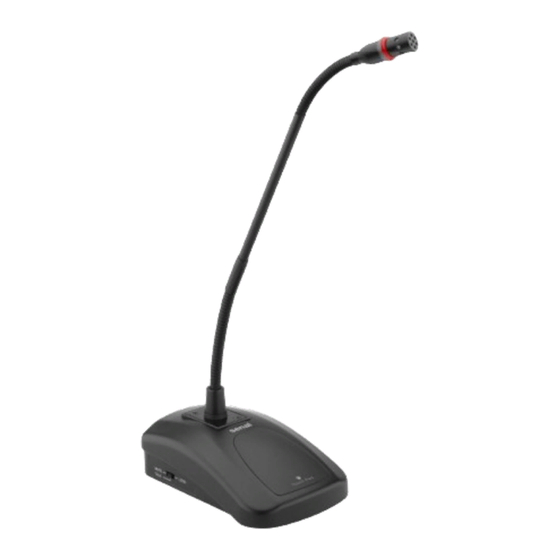
Thank you for choosing Senal. Senal’s.MXGN-series.Professional.Gooseneck.Microphones.are.sleek.microphones.that.are. designed.with.optimized.frequency.response.and.sensitivity.ideal.for.capturing.voices.. The.included.cardioid.microphone.capsule.is.perfect.for.video.conferences,.lectures,. and.meetings..To.adapt.your.microphone.for.other.conference,.speaking,.or.desktop. applications,.the.MXGN-series.is.designed.for.interchangeable.omnidirectional.and. supercardioid.capsules.(available.separately)... The.MXGN-series.microphones.integrate.into.most.AV.conferencing.systems.or.sound. systems..For.quiet.and.professional.audio,.balanced.output.rejects.unwanted.RF.and. EM.interference.and.noise,.even.over.long.cable.runs,.and.a.low-cut.filter.minimizes. room.noise.and.low-end.rumble..A.programmable.touch.pad.mutes.or.activates.the. microphone.with.a.gentle.finger.tap,.and.an.LED.ring.light.located.on.the.gooseneck.is. a.visual.indicator.of.the.mic’s.status..For.public.speaking.applications,.the.microphones’. stylish.and.slim.appearance.won’t.obscure.or.distract.attention.away.from.the.person. behind.the.microphone.. Introduction ▪ ▪ ▪ ▪ ▪ ▪ ▪ ▪ ▪ ▪ ▪ ▪ ▪ ▪ ▪ ▪ ▪ ▪ ▪ ▪... -
Page 3: Precautions
Precautions •. Please.read.and.follow.these.instructions,.and.keep.this.manual.in.a.safe.place. •. Keep.this.product.away.from.water.and.any.flammable.gases.or.liquids. •. Do.not.attempt.to.disassemble.or.repair.this.product. •. Handle.this.product.with.care. •. Use.only.parts.provided.by.the.manufacturer. •. Clean.this.product.with.only.a.soft,.dry.cloth. •. Make.sure.that.this.product.is.intact.and.that.there.are.no.missing.parts. •. All.images.are.for.illustrative.purposes.only. Precautions ▪ ▪ ▪ ▪ ▪ ▪ ▪ ▪ ▪ ▪ ▪ ▪ ▪ ▪ ▪ ▪ ▪ ▪ ▪ ▪ ▪ ▪ ▪... -
Page 4: Overview
LED ring Overview light Gooseneck Removable Windscreen microphone capsule Touch pad Microphone base MUTE LOCK LOW CUT FLAT TALK Low-cut filter Talk/Mute selector Overview ▪ ▪ ▪ ▪ ▪ ▪ ▪ ▪ ▪ ▪ ▪ ▪ ▪ ▪ ▪ ▪ ▪... -
Page 5: Instructions
Setting Up the MXGN Gooseneck Microphone Each.application.of.the.MXGN.Microphone.will.be.slightly.different.. The.following.scenarios.cover.frequently.used.setups. Live Lecture/Sound Reinforcement Mixing console This.is.ideal.in.an.auditorium.or. Power amplifier house.of.worship.where.a.voice. needs.to.be.amplified.for.an. audience. MUTE LOCK TALK Note:.MXGN.microphones.need. Phantom power supply Power amplifier phantom.power.in.order.. to.operate. MUTE LOCK TALK Video and Audio Conferencing MXGN.microphones.are. Remote video compatible.with.most.audio.and. - Page 6 Powering the MXGN Microphone The.MXGN.microphones.operate.on.phantom.power..Once.connected.to.the.power. source,.the.MXGN.mic.is.ready.to.work. Important!.When.integrating.the.MXGN.microphone.into.a.video.or.audio.conferencing. system,.or.using.it.with.a.mixing.board,.make.sure.that.phantom.power.is.enabled. Optional Mic Capsules The.MXGN-12.and.MXGN-18.include.a.cardioid.mic.capsule..Omnidirectional.(MXGN-ICO). and.supercardioid.(MXGN-ICS).capsules.are.available.separately. To.exchange.capsules,.unscrew.the.capsule.that’s.attached.to.the.gooseneck,.and.screw. on.the.replacement.capsule..Be.sure.not.to.overtighten.the.capsule.when.installing.it. Cardioid Polar Pattern The.cardioid.capsule.lessens.off-axis.noise..Use.it.in.rooms.with.inadequate.acoustic. treatment.or.in.spaces.where.background.noise.is.problematic..The.MXGN.will.capture. the.voice.of.the.person.sitting.directly.in.front.it.while.it.minimizes.room.noise.and. reverberation. Omnidirectional Polar Pattern The.omnidirectional.capsule.picks.up.sound.in.a.360-degree.pattern..Use.it.in.quiet. rooms.with.adequate.acoustic.treatment..The.microphone.will.pick.up.all.participants. seated.on.the.same.side.of.a.table...Alternatively,.it.can.be.used.to.capture.several. people.seated.around.the.microphone. Instructions ▪ ▪ ▪ ▪ ▪ ▪ ▪ ▪ ▪ ▪ ▪...
- Page 7 Supercardioid Polar Pattern The.supercardioid.capsule.has.a.slightly.narrower.pickup.field.and.rejects.more.off-. axis.noise.than.the.cardioid.capsule..This.capsule.is.an.excellent.choice.for.a.stationary. lecturer.at.a.podium.or.for.speaking.in.high-noise.environments..It.can.be.used.in.a.multi- microphone.setup,.providing.that.it’s.pointed.directly.at.the.person.using.it. Using the MXGN Gooseneck Microphone Using the Windscreen The.MXGN.microphone.should.always.be.used.with.the.included.foam.windscreen..It. prevents.the.vocal.pops.that.occur.with.the.letters.P.and.B,.and.it.protects.the.mic. capsule.from.corrosive.moisture. To.install.the.windscreen,.slip.it.over.the.microphone.capsule. Microphone Placement The.optimum.placement.for.the.microphone.is.6.to.12.inches.from.the.source. Ideally,.the.microphone.should.be.pointed.directly.toward.the.source.for.capturing.the. best.sound. Always.point.the.microphones.away.from.speakers.and.other.sources.of.unwanted.noise. Instructions ▪ ▪ ▪ ▪ ▪ ▪ ▪ ▪ ▪ ▪ ▪ ▪ ▪ ▪ ▪...
- Page 8 Powering the MXGN Microphone The.MXGN.microphones.operate.on.phantom.power..Once.connected.to.the.power. source,.the.MXGN.mic.is.ready.to.work. Important!.When.integrating.the.MXGN.microphone.into.a.video.or.audio.conferencing. system,.or.using.it.with.a.mixing.board,.make.sure.that.phantom.power.is.enabled. Low-Cut Filter Activate.the.low-cut.filter.when.using.the.microphone.in.rooms.with.inadequate.acoustic. treatment.or.constant.noise.from.air.conditioning,.fans,.or.lights. To.filter.out.low.frequencies,.move.the.selector.switch.to.the.Low.Cut.position..Moving. the.selector.to.the.Flat.position.turns.off.the.low-cut.filter. Talk/Mute Move.the.switch.to.select.the.talk/mute.function.of.the.touch.pad. When.the.LED.ring.light.is.on,.the.microphone.is.on... When.is.the.LED.ring.light.is.off,.the.microphone.is.muted. The.touch.pad.on.the.microphone’s.base.controls.the.programmable.mute.function.. There.are.three.programming.options. Instructions ▪ ▪ ▪ ▪ ▪ ▪ ▪ ▪ ▪ ▪ ▪ ▪ ▪ ▪ ▪ ▪ ▪ ▪ ▪ ▪...
-
Page 9: Instructions
Mute In.Mute.mode,.the.microphone.is.always.active..Touch.and.hold.the.sensor.pad.to.mute. the.microphone,.and.release.to.activate.the.microphone.again.. This.function.is.useful.for.momentarily.muting.the.microphone.if.you.need.to.cough,.or. to.say.something.that.isn’t.heard.by.other.participants. Talk In.Talk.mode,.the.microphone.is.always.muted..Touch.and.hold.the.sensor.pad.to.activate. the.microphone,.and.release.to.mute.the.microphone.again.. This.function.is.useful.for.a.participant.that.needs.to.speak.only.occasionally..Keeping.the. microphone.defaulted.to.mute.prevents.too.many.open.microphones.at.one.time,.and. minimizes.the.chance.of.feedback,.excessive.noise,.or.interference. Lock Tap.the.sensor.pad.to.change.the.microphone’s.status..The.microphone.will.stay.on.or. muted.until.you.touch.the.sensor.pad.again.. Selecting.Lock.is.ideal.for.meetings.where.conversation.between.participants.is. expected..Alternatively,.each.participant.can.activate.the.microphone.to.speak. individually,.and.then.mute.the.microphone.to.listen.to.the.other.remarks. Instructions ▪ ▪ ▪ ▪ ▪ ▪ ▪ ▪ ▪ ▪ ▪ ▪ ▪ ▪ ▪ ▪ ▪ ▪ ▪ ▪ ▪ ▪ ▪... -
Page 10: Specifications
Specifications Transducer Back.electret.condenser Polar Pattern Cardioid Frequency Response 50.Hz.to.18.kHz Maximum Input Level 120.dB.(@1.kHz,.THD.<1%) Sensitivity -38.dB.±3.dB.(0.dB.=.1.V./.Pa.@1.kHz) Low-Cut Filter -20.dB.@.100.Hz Output Impedance 100.Ω Power Requirements Phantom.power.DC.12.to.48.V Output Connector XLR.3-pin.male Mute Switch Programmable.touch.pad Housing Material Metal Dimensions (H × W × D) Base:.1.6. × .3.6. × .5.6.in..(4.1. × .9.1. × .14.2.cm) Gooseneck Length MXGN-12C:.12.in..(30.5.cm) MXGN-18C:.18.in..(45.7.cm) -
Page 11: Troubleshooting
0° 30° 330° 60° 300° 90° 270° 120° 240° 210° 150° 180° Frequency in Hertz Troubleshooting Problem Solution The.microphone. •. Make.sure.both.XLR.connectors.on.the.cable.are.fully.inserted.into.the. is.connected,.but. plugs.on.the.microphone.and.input.device.(conferencing.system.or.mixing. there’s.no.sound. board). •. Make.sure.your.microphone.is.connected.to.an.XLR.port.with.phantom. power,.and.that.the.phantom.power.is.turned.on. •. If.the.LED.indicator.is.off,.touch.the.sensor.pad.to.unmute.the.microphone.. See.Talk/Mute.above.about.programming.the.touch.pad. •. Refer.to.your.AV.conferencing.system’s.user.manual.to.ensure.the.input. settings.are.correct. Troubleshooting ▪ ▪ ▪ ▪ ▪ ▪... -
Page 12: Warranty
Two-Year Limited Warranty This.Senal.product.is.warranted.to.the.original.purchaser.to.be.free.from.defects.in.materials.and.workmanship. under.normal.consumer.use.for.a.period.of.two.(2).years.from.the.original.purchase.date.or.thirty.(30).days. after.replacement,.whichever.occurs.later..The.warranty.provider’s.responsibility.with.respect.to.this.limited. warranty.shall.be.limited.solely.to.repair.or.replacement,.at.the.provider’s.discretion,.of.any.product.that.fails. during.normal.use.of.this.product.in.its.intended.manner.and.in.its.intended.environment..Inoperability.of.the. product.or.part(s).shall.be.determined.by.the.warranty.provider..If.the.product.has.been.discontinued,.the. warranty.provider.reserves.the.right.to.replace.it.with.a.model.of.equivalent.quality.and.function. This. warranty. does. not. cover. damage. or. defect. caused. by. misuse,. neglect,. accident,. alteration,. abuse,. improper.installation.or.maintenance..EXCEPT.AS.PROVIDED.HEREIN,.THE.WARRANTY.PROVIDER.MAKES. NEITHER.ANY.EXPRESS.WARRANTIES.NOR.ANY.IMPLIED.WARRANTIES,.INCLUDING.BUT.NOT.LIMITED. TO. ANY. IMPLIED. WARRANTY. OF. MERCHANTABILITY. OR. FITNESS. FOR. A. PARTICULAR. PURPOSE.. This.
Need help?
Do you have a question about the MXGN Series and is the answer not in the manual?
Questions and answers