Advertisement
Available languages
Available languages
Quick Links
Advertisement

Related Manuals for Philips sonicare


Summary of Contents for Philips sonicare
- Page 1 For Kids Design a Pet Edition /...
- Page 4 empty page before TOC...
- Page 5 English 6 简体中文 21 繁體中文 39...
-
Page 6: Important Safety Information
Introduction This toothbrush enables you to obtain superior plaque removal, whiter teeth and healthier gums. Using Sonicare’s combination of gentle sonic technology and clinically developed and proven features, you can be confident that you’re getting the very best clean, every time. - Page 7 Misuse can lead to hazards or serious injuries. Accessories supplied may vary for different products. Only use original Philips accessories and consumables. Only use detachable supply unit HX6110 Keep product and batteries away from fire and do not expose them to direct sunlight or high temperatures.
-
Page 8: Intended Use
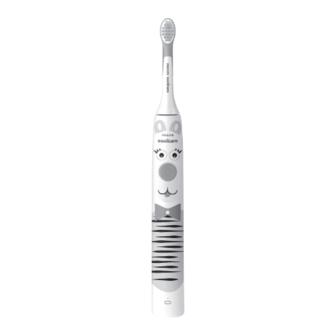
Sonicare for Kids - Design a Pet Edition power toothbrushes are intended to remove adherent plaque and food debris from the teeth to reduce tooth decay and improve and maintain oral health. Sonicare for Kids - Design a Pet Edition power toothbrushes are intended... -
Page 9: Getting Started
Android smart devices. Note: If your device is not Bluetooth capable you can still use the Sonicare for Kids app on iOS and Android (TM) smart devices to enhance your brushing experience. Getting started Applying your favorite sticker The Sonicare for Kids - Design a Pet Edition comes with several stickers to choose from. - Page 10 Note: It is normal to see a slight gap between the brush head and the handle. Using your Philips Sonicare toothbrush If you are using your Sonicare toothbrush for the first time, it is normal to feel more vibration than when using a non-electric toothbrush. It is common for first-time users to apply too much pressure.
- Page 11 Note: Keep the center of the brush in contact with the teeth at all times. 3 Press the power on/off button to switch on the Philips Sonicare. 4 Gently keep the bristles placed on the teeth and in the gumline.
- Page 12 Recommended brush Sonicare for Kids Sonicare for Kids heads Compact or Standard Compact or Standard brush head brush head Total brushing time 2 minutes...
-
Page 13: Activating Or Deactivating Features
After a pause of 30 seconds, the SmarTimer resets. EasyStart This Philips Sonicare model comes with the EasyStart feature activated. The EasyStart feature gently increases the power over the first 14 brushings to help you get used to brushing with the Philips Sonicare. - Page 14 Sonicare's effectiveness in removing plaque. Charging and battery status This Philips Sonicare toothbrush is designed to provide at least 28 brushing sessions, each session lasting 2 minutes (14 days if used twice per day) on a fully charged battery.
- Page 15 English Charging USB charging Note: Accessories included may vary based on the model purchased. 1 Plug the USB cord of the charging stand into a wall adapter that is connected to a electrical outlet. 2 Place the handle on the charger. The battery indicator lights up and the handle beeps twice.
- Page 16 English Note: To save energy, the battery indicator will switch off when not in use. Note: When the battery is completely empty, the toothbrush switches off. Place the toothbrush on the charger to charge it. Note: To keep the battery fully charged at all times, you may keep your toothbrush on the charger when not in use.
- Page 17 Replacement Replace Philips Sonicare brush heads every 3 months to achieve optimal results. Only use Sonicare for Kids Compact or Standard replacement brush heads.
-
Page 18: Warranty And Support
English Locating the model number Look on the bottom of the Philips Sonicare toothbrush handle for the model number (HX360XX). Warranty and support If you need information or support, please visit www.philips.com/support or read the international warranty leaflet. Warranty exclusions... - Page 19 English protect your eyes, hands, fingers, and the surface on which you work. When you handle batteries, make sure that your hands, the product and the batteries are dry. To avoid accidental short-circuiting of batteries after removal, do not let battery terminals come into contact with metal objects (e.g.
- Page 20 English 4 Remove the end cap from the toothbrush handle. If the end cap does not release easily from the housing, repeat step 3 until the end cap is released. 5 Holding the handle upside down, press the shaft down on a hard surface. If the internal components do not easily release from the housing, repeat step 3 until the internal components are released.
- Page 21 简体中文 说明 本款牙刷出色地清除牙菌斑,让牙齿更洁 白,牙龈更健康。 Sonicare 声波震动牙 刷融合了轻柔声波技术与临床开发和验证 功能,确保您每次使用均可获得极佳的清 洁效果。 有关更多支持和产品注册信息,请访问以 下网站: www.philips.com/support 欢迎使用 Philips Sonicare 声波震动牙刷 系列产品! 重要安全信息 仅可将本产品用于预期用途。 使用本产品 及其电池和附件之前,请仔细阅读本重要 信息,并妥善保管以供日后参考。 误用可 能会导致危害或严重伤害。 警告 请把充电器远离水源。 清洁之后,请确保充电器完全干燥, 然后再连接充电器。 本产品适合儿童和肢体不健全、感觉 或精神上有障碍或缺乏相关经验和知 识的人士使用,但前提是有人对他们 使用本产品进行监督或指导,以确保 他们安全使用,并且让他们明白相关 的危害。 儿童在无人监督的情况下, 不允许对本产品进行清洁和保养。 切勿让儿童玩弄本产品。 简体中文...
- Page 22 简体中文 请仅使用飞利浦原装附件或消耗品。 请仅使用本产品随附的充电器。 如有 提供,请仅使用原装 USB 线缆和 USB 电源部件。 请勿在室外或发热表面附近使用充电 器。 请勿将本产品的任何部件放入洗碗机 中清洗。 本产品设计仅用于清洁牙齿、牙龈和 舌头。 请停止使用变形或刷毛弯曲的牙刷 头。 请每 3 个月更换一次牙刷头,如 果出现磨损迹象,应提前更换。 避免直接接触含有精油或椰子油的产 品。 否则可能导致刷毛脱落。 如果使用本产品后大量出血,并在使 用 1 周后仍然持续出血、感觉不适或 疼痛,请停止使用本产品并咨询您的 牙医/医生。 如果您在前 2 个月中曾做过口腔或牙 龈手术,请在使用本产品前先咨询您 的牙医。 如果您体内有心脏起搏器或其他植入 设备,请在使用之前咨询医生或相关 植入装置的制造商。 如果您有医学问题,请在使用本产品 前咨询您的医生。 本产品为私人用品,不可供牙医诊所...
- Page 23 简体中文 电池安全说明 本产品包含电池,只能由技术人员拆 卸。 仅可将本产品用于预期用途。 使用本 产品及其电池和附件之前,请仔细阅 读本信息,并妥善保管以供日后参 考。 误用可能会导致危害或严重伤 害。 随附的附件可能因产品而异。 请仅使用 Philips 原装附件和消耗品。 请仅使用可拆卸电源部件 HX6110 请将产品和电池远离火源,切勿将其 暴露于阳光直射处或高温下。 如果产品异常发热或发出异味、变色 或充电时间比平时长,请停止使用并 停止为其充电,并与Philips联系。 切勿将产品及其电池放置在微波炉中 或电磁炉上。 为防止电池发热或释放有毒有害物 质,切勿打开、改装、刺穿、损坏或 拆卸产品或电池。 切勿使电池短路、 过度充电或反向充电。 本产品包含的电池不可更换。 弃置电 池时,请参阅回收章节采取正确的方 式处理本产品。 为避免电池拆卸后发生意外短路,切 勿让电池端子接触金属物体(例如硬 币、发夹、戒指)。...
- Page 24 存放和运输条件 温度:-10 °C 至 60 °C。 产品上可能出现以下符号: 阅读操作手册。 可拆卸电源部件: “xxxxxx”表示要使用的 获得认可的充电器型号。 预期用途和适用范围 Sonicare for Kids - 趣味动物版声波震动 电动牙刷的设计目的在于清除牙齿上粘附 的牙菌斑和食物残渣,以减少蛀牙,改善 和维护口腔健康。 Sonicare for Kids - 趣 味动物版声波震动电动牙刷专为个人使用 而设计。 儿童应在成人监督下使用。 Philips Sonicare(图 1) 1 手柄 2 电源开/关按钮 3 电池指示灯 附件 4 刷头保护盖...
- Page 25 8 旅行收纳盒 注意: 配件可能因购买的型号而异。 注意: 不随附插墙式适配器。 请仅使用 5V DC, 2.5 W, IPX4 adapter (USB Type A). Sonicare 应用程序 – 使用入门 下载 Sonicare for Kids 应用程序,助力 养成健康好习惯。 该应用程序与很多 iOS 和 Android (TM) 智能设备兼容。 注意: 即使您的设备不支持 Bluetooth 功能,您仍可在 iOS 和 Android (TM) 智...
- Page 26 以确保完全粘合。 注意: 儿童应当在成人的看护下使用这些 贴纸。 安装牙刷头 1 对齐牙刷头,使刷毛方向与牙刷手柄 正面的方向一致。 2 用力将刷头向下按到金属轴上,直到 按不动为止。 注意: 刷头与手柄之间会有小间隙, 这是正常的。 使用您的 Philips Sonicare 声波震动牙刷 如果您是首次使用 Sonicare 声波震动牙 刷,通常会感觉其振动幅度比非电动牙刷 更强烈。 用户首次使用时通常会用力过 度。 只需轻轻用力即可实现良好的刷牙效 果。 请按照下方的刷牙说明操作以获得最 佳体验。 为了帮助您顺利过渡,新款 Sonicare 声波震动电动牙刷出厂时已启 用 Easy-Start 刷牙动力增强程序功能。 该功能在前 14 次刷牙时会缓慢增加动 力,以帮助您适应使用 Philips Sonicare...
- Page 27 简体中文 声波震动牙刷刷牙。 刷牙说明 注意: 对于 8 岁以下儿童,建议家长或成 年看护人为其刷牙。 1 浸湿刷毛并挤上少量牙膏。 2 将牙刷刷毛以小角度(45 度)放在牙 45° 齿上。 有力地按压以使刷毛接触牙龈 线或牙龈线略下方。 注意: 始终将牙刷中间与牙齿接触。 3 按开/关按钮打开 Philips Sonicare 声 波震动牙刷。 4 将刷毛轻轻放置于牙齿和牙龈上,来 回小幅度缓慢移动,这样可以让刷毛 能够刷到牙缝。在整个刷牙周期中连 续这样移动即可。 注意: 刷毛应稍微呈喇叭形。 建议不 要像使用手动牙刷一样用力摩擦齿 面。...
- Page 28 简体中文 5 要清洁门牙内表面,请将牙刷手柄呈 半直立状倾斜,在每颗牙齿上反复垂 直震动。 6 在完成刷牙周期之后,您可以多花一 些时间刷洗牙齿的咀嚼面以及齿垢容 易出现的区域。 您还可以使用该牙刷 清洁舌头,牙刷电源打开或关闭均 可。 注意: Philips Sonicare 声波震动牙刷可 安全用于正确固定且未损坏的牙齿矫正器 (在牙齿矫正器上使用时,刷头磨损较 快)和修复牙体(补牙、齿冠、烤瓷 牙)。 KidPacer 为确保牙刷能均匀清洁整个口腔,可使用 KidPacer 功能将口腔分为 4 个区域。 KidPacer 将刷牙时间划分为 4 个相等的 时间段,并指示何时应移动到下一个部 位。 每个时间段结束时,都会有一声短音 提示。 牙刷将在刷牙阶段结束时自动停 止,同时伴有一声祝贺. 注意: 请对儿童进行指导,告知要一直刷 到祝贺音响起且牙刷关闭时才算完成。 强度...
- Page 29 在 2 秒内按第三次开关按钮可以暂停。 刷 牙 2 秒后,再次按电源开/关按钮将使牙 刷暂停工作. 极柔 温和 作用 用于训练儿童刷 该强度为全功率 牙以及让儿童熟 强度,适用于年 悉声波的低功率 龄较大/可独立刷 强度。 牙的儿童。 推荐刷头 Sonicare for Sonicare for Kids 小型刷头或 Kids 小型刷头或 标准刷头 标准刷头 总刷牙时间 2 分钟 2 分钟 如何刷牙 功能 KidPacer SmarTimer 智能计时器...
- Page 30 刷牙计时器 刷牙计时器 在刷牙周期结束时会自动关闭 牙刷,指示您的设定刷牙周期已完成。 牙科专家建议每天刷牙两次,每次不少于 2 分钟。 注意: 如果在开始刷牙周期后按下电源 开/关按钮,牙刷将暂停。 暂停30秒后, 刷牙计时器将重置。 EasyStart 刷牙动力增强程序 本型号的 Philips Sonicare 声波震动牙刷 出厂时已启用 EasyStart 刷牙动力增强程 序功能。 EasyStart 刷牙动力增强程序功 能在前 14 次刷牙时会缓慢增加动力,以 帮助您适应使用 Philips Sonicare 声波震 动牙刷刷牙。 要禁用 EasyStart 刷牙动力增强程序 (请 参见 “启用或禁用功能”)。 启用或禁用功能 您可以激活或停用...
- Page 31 听到 3 声从低到高的音调,则表明已激活该 功能 或者 如果您看到电量指示灯呈琥珀色闪烁 1 次, 并听到 3 声从高到低的音调,则表明已停用 该功能。 注意: 经过初始动力提升阶段之后,不建 议使用 Easy-Start 刷牙动力增强程序功 能,否则会降低 Sonicare 声波震动牙刷 清除牙菌斑的效果。 充电与电池状态 这款 Philips Sonicare 声波震动牙刷在电 池充满电后,可至少提供 28 个刷牙阶 段,每个阶段持续 2 分钟(如果每天刷牙 两次,可用 14 天)。 当您完成 2 分钟的 刷牙阶段、暂停牙刷或进行充电时,电池 电量指示灯会显示电池状态。...
- Page 32 简体中文 注意: 首次使用前,电池充满电需要 24 小时,但 Philips Sonicare 声波震动牙刷 在未完全充满时亦可使用。 充电 USB 充电 注意: 配件可能因购买的型号而异。 1 将充电座的 USB 充电线插头插入连接 至电源插座的插墙式适配器。 2 将牙刷手柄放在充电器上。 电池指示灯亮起,且手柄发出两声 蜂鸣音。 这表示牙刷正在充电。 电池状态 将手柄放在充电器上时,电池指示灯将显 示电池电量。 电池状态 电池指示灯 正在充电 呈绿色闪烁 已满 呈绿色持续亮起 30 秒,然 后熄灭 电池状态(手柄未置于充电器之上) 牙刷开启后,手柄底部的电池指示灯将显 示电池电量。 电池状态...
- Page 33 简体中文 已满 绿色常亮 半满 呈绿色闪烁 低 呈琥珀色闪烁 刷牙后手柄会发 出 3 声蜂鸣音 耗尽 呈琥珀色闪烁 刷牙后手柄会发 出 2 组 5 声蜂鸣 音 注意: 为了节能,在不使用时,电池指示 灯会熄灭。 注意: 电池电量完全耗尽时,牙刷会关 闭。 请将牙刷放在充电器上进行充电。 注意: 为确保电池始终电量充沛,您可在 不使用时将牙刷置于充电器上。 清洁 牙刷手柄 1 卸下牙刷头并用温水冲洗金属轴。 确 保清除所有残留牙膏。 警告:请勿使用尖锐物品按压金属轴上的 橡胶密封圈,否则可能造成损坏。 2 使用湿布擦拭牙刷柄的整个表面。 注意:...
- Page 34 简体中文 刷头 1 每次刷牙后冲洗牙刷头和刷毛。 2 从牙刷柄上卸下牙刷头,每周至少用 温水冲洗一次牙刷头连接处。请根据 需要经常冲洗刷头保护盖。 充电座 1 清洁产品前,请先将充电座电源拔 掉。 2 使用湿布擦拭充电座的表面。 旅行收纳盒 用温水冲洗并用湿布清洁旅行收纳盒。 存放 如果打算较长时间不使用产品,请从电源 插座中将其拔出,进行清洁并且储藏于凉 爽、干燥且远离阳光直射的地方。 更换 每 3 个月更换一次 Philips Sonicare 刷 头,以获得最佳效果。 请仅使用 Sonicare for Kids 小型或标准替换刷头。 查找型号 查看 Philips Sonicare 声波震动牙刷手柄 的底部,即可了解具体型号 (HX360XX)。...
- Page 35 简体中文 保修和支持 如需信息或支持,请访问 www.philips.com/support 或阅读保 修卡。 保修不包括的事项 保修不包含以下内容: 口腔内附件包括刷头和喷嘴。 使用未经授权的备件或未经授权的刷 头造成的损坏。 由于误用、滥用、疏忽、改装或擅自 修理造成的损坏。 正常磨损,包括裂口、擦痕、磨损、 变色或褪色等。 回收 此符号表示电器产品和电池不能与一 般的生活垃圾一同弃置。 请遵守您所在国家/地区有关分类回收 电器产品和电池的规定。 拆下充电电池 内含可充电锂电池。 请务必妥善回收或处 置。 丢弃产品时,必须仅由有资质的专业人员 取出内置充电电池。 取出电池之前,请确 保电池电量已完全耗尽。 当您使用工具打开产品时以及弃置充电电 池时,请采取必要的安全保护措施。 务必...
- Page 36 简体中文 保护好您的眼睛、手、手指以及工作台 面。 处理电池时,请确保您的双手、产品和电 池都是干燥的。 为避免电池拆卸后发生意外短路,切勿让 电池端两端触金属物体(例如硬币、发 夹、戒指)。 切勿用铝箔包裹电池。 在 丢弃之前,请用胶带将电池两端粘住或将 电池放在塑料袋中。 要拆下充电电池,您需要一块毛巾或布、 一个锤子和一个平头(标准)螺丝刀。 按 照下面列出的步骤执行操作时,请遵循基 本的安全措施。 1 要耗尽充电电池的电量,可以从充电 器上取下手柄,打开牙刷并让其运行 直到停止。 重复这一步骤,直至牙刷 无法再打开。 2 取下并丢弃牙刷头。 用毛巾或布包住 整个牙刷手柄。 3 用一只手握住牙刷手柄顶部,敲击底 部以上 0.5 英寸处的牙刷手柄外壳。 用锤子在 4 个侧面用力敲打,使端盖 弹出。...
- Page 37 简体中文 注意: 可能要在底部敲打多次,才能 将内部的扣合式连接分开。 4 从牙刷手柄上取下端盖。 如果很难从 外壳中取出端盖,请重复步骤 3,直 至将其取出。 5 将牙刷手柄倒置,然后将轴向下按到 坚硬表面上。 如果很难从外壳中取出 内部组件,请重复步骤 3,直至将其 取出。 6 将螺丝刀楔入电池和内部组件底部的 框架之间。 然后让螺丝刀以电池为支 撑撬断框架的底部。 7 将螺丝刀插入电池底部和框之间,折 断连接电池和印刷电路板的金属卡 舌。 这可以使电池底部断开与框架的 连接。 8 拿起电池,将其从内部组件中拉出, 以使第二个金属电池卡舌断裂。 注意: 请注意电池卡舌的锋利边缘, 以免伤到手指。 9 用胶带包住电池触点,以防止电池剩 余电量导致短路。...
- Page 38 简体中文 充电电池即可回收,产品的其它部件 也要适当地弃置。 注意: 弃置产品时,请不要将其与一般生 活垃圾堆放在一起,应将其交给政府指定 的回收中心。 这样做将有利于环保。...
- Page 39 繁體中文 簡介 這款牙刷具備出色的牙斑菌清除能力,讓牙齒更加亮白、 牙齦更健康。 Sonicare 結合了溫柔的音波震動技術以及經 臨床研發並證實的功能,讓您每一次使用都能安心享有最 潔淨的效果。 進一步的支援和產品註冊請至下列網址: www.philips.com/support 歡迎加入 Philips Sonicare 的大家庭! 重要安全資訊 請依產品指定用途使用本產品。 使用本產品、其電池與配 件前,請先仔細閱讀此重要資訊,並保留說明以供日後參 考。 不當使用可能導致危險或嚴重受傷。 警示 請把充電器遠離水源。 清潔之後,請確認充電器已完全乾燥,才可進行連 接。 兒童及身體功能或心智能力退化者,或是經驗與使用 知識缺乏者,可在有人從旁監督或適當指示如何安全 使用本產品,以及瞭解潛在危險的狀況下使用本產 品。不要讓兒童在無人監督的情況下對本產品進行清 潔和保養。 請勿讓小孩把玩本產品。 僅能搭配飛利浦原裝零件或消耗零件使用。 請只使用 隨產品提供的充電器。 如有提供,請務必僅使用原廠 USB 纜線與 USB 電源供應裝置。 充電器不可在室外或高熱表面附近使用。 請勿使用洗碗機來清潔本產品的任何零件。...
- Page 40 繁體中文 若您有醫療方面的顧慮,使用本產品之前請先諮詢您 的醫生。 本產品為個人保健用品,不宜在牙醫診所或醫療機構 供多名患者使用。 電池安全說明 本產品含有電池,只能由技術人員拆卸。 請依產品指定用途使用本產品。 使用本產品、其電池 與配件前,請先仔細閱讀本資訊,並保留說明以供日 後參考。 不當使用可能導致危險或嚴重受傷。 提供 的配件可能隨產品而異。 僅能搭配 Philips 原裝零件和耗材使用。 僅能使用可 拆式電源供應裝置 HX6110 本產品和電池應放置遠離火源位置,且不要暴露在直 射陽光或高溫下。 如果產品異常發熱或散發異味、變色或充電時間比平 時長,請停止使用產品或為其充電,並與Philips聯 絡。 請勿將產品及其電池放進微波爐或放到電磁爐上。 請勿打開、改裝、刺穿、損壞或拆解本產品或電池, 以防止電池升溫或釋放有毒或有害物質。 請避免讓電 池發生短路、過度充電或反向充電。 本產品包含無法更換的電池。 當電池使用壽命將屆 時,本產品應必須採用正確方式丟棄,詳情請參閱回 收相關內容。 為避免電池在拆卸後意外發生短路,請勿讓電池端子 接觸到金屬物體 (例如硬幣、髮夾、戒指)。 電磁波 (EMF) 本Philips產品符合所有電磁場暴露的相關適用標準和法...
- Page 41 繁體中文 可拆式電源供應零件: 「xxxxxx」是指經核可使用充電器 的型號。 適合用途 Sonicare for Kids - Design a Pet Edition 電動牙刷專供 清除黏附在牙齒的牙菌斑和食物殘渣,以減少蛀牙,並改 善和維持口腔健康。 Sonicare for Kids - Design a Pet Edition 電動牙刷適合個人使用。 兒童應在成人監督下使 用。 您的 Philips Sonicare (圖 1) 握柄 電源開關按鈕 電池指示燈 配件 刷頭蓋 刷頭 USB 充電器 (不含牆上電源轉換器) 貼紙...
- Page 42 繁體中文 使用指南 貼上您最喜愛的貼紙 Sonicare for Kids - Design a Pet Edition 隨附數種貼紙 提供選用。 貼紙可貼在任何位置,展現個人創意設計。 將您最喜愛的貼紙貼在握柄上 注意: 確定握柄清潔且乾燥後,再將貼紙完全平貼到握柄 上,避免產生氣泡,以維持貼紙黏性。 注意: 孩子應由大人陪伴黏貼貼紙。 安裝刷頭 將刷頭對齊,使刷毛朝向刷柄正面。 將刷頭用力下壓插到握柄的金屬軸上,持續到底為 止。 注意: 如果刷頭和握柄之間有些微空隙,此屬正常現 象。 使用 Philips Sonicare 牙刷 如果您是第一次使用 Sonicare 牙刷,通常會覺得比使用非 電動牙刷時震動更強。 初次使用的使用者通常會過度施 力。 請輕微施加壓力,讓牙刷清潔您的牙齒。 請遵照下列 刷牙指示操作,以獲得最佳的體驗。 為協助您順利改用新...
- Page 43 繁體中文 沾濕刷毛,擠上少量牙膏。 將牙刷刷毛放置於牙齒表面,刷毛角度微微傾斜 (45 45° 度)。 用力下壓,使刷毛接觸牙齦線或牙齦線稍下 方。 注意: 隨時讓牙刷中央與牙齒保持接觸。 按下電源開關按鈕,啟動 Philips Sonicare 牙刷。 輕輕讓刷毛置於牙齒表面及牙齦上,以小幅動作在牙 齒表面來回刷動,讓刷毛能深入牙齒間細縫。刷牙週 期當中,請全程持續此動作。 注意: 刷毛應稍微展開。 我們不建議您以手動牙刷 的方式用力刷牙。 如要清潔門齒內側表面,請直握牙刷握柄,使其呈半 傾斜,在每顆牙齒上進行數次垂直重疊的刷拂。 完成刷牙週期後,可多花些時間刷洗牙齒咬合面及齒 垢堆積區域。 您可隨個人喜好,在牙刷啟動或關閉電 源時刷洗舌頭。 注意: 若您的口中有牙齒矯正器 (如果裝有矯正器,刷頭 會較快磨損) 或牙齒補綴物 (填補、牙套、牙面鑲嵌),只要 這些裝置牢固附著且未鬆脫,您就可以安全地使用 Philips Sonicare 牙刷刷牙。...
- Page 44 若要變更強度: 按一下電源開關按鈕,開啟牙刷電源 在 2 秒鐘之內按第二次即可變更強度 在 2 秒鐘之內按第三次則會暫停。 在刷牙 2 秒鐘之後,再 按一下電源開關按鈕將會暫停牙刷 超溫和 溫和 優點 訓練時使用較低的強 全強度適用於年齡較 度,讓較年幼的孩子逐 大/可自行刷牙的使用 漸熟悉電動牙刷。 者。 建議的刷頭 Sonicare for Kids 小型 Sonicare for Kids 小型 或標準刷頭 或標準刷頭 刷牙時間總計 2 分鐘 2 分鐘 如何刷牙 功能 KidPacer...
- Page 45 KidPacer 是區間計時器,會將口腔劃分為 4 個區域,協助 孩子均衡地清潔牙齒。 SmarTimer SmarTimer 能在刷牙週期結束時自動關閉牙刷的電源,指 出您的刷牙週期已經完成。 牙科專業人士建議,每日應刷牙兩次,每次 2 分鐘以上。 注意: 如果您在刷牙週期開始後按下電源開關按鈕,牙刷 便會暫停。 暫停 30 秒後,兩分鐘計時器 SmarTimer 將重 設。 EasyStart 此 Philips Sonicare 牙刷型號預設啟用 EasyStart 功能。 EasyStart 功能會在前 14 次刷牙時段緩慢增強力道,讓您 能逐漸適應使用 Philips Sonicare 牙刷刷牙。 如何停用 EasyStart (見 「啟動或關閉功能」)。...
- Page 46 如果您看到電池指示燈閃爍綠燈 2 次,並聽見由低至高的 3 聲 音效,代表功能已啟動 或者 如果您看到電池指示燈閃爍琥珀色 1 次,並聽見由高至低的 3 聲音效,代表功能已停用。 注意: 我們不建議在最初循序漸進週期以外的時間使用 EasyStart 功能,否則會降低 Sonicare 牙刷清除牙菌斑的 效果。 充電與電池狀態 本 Philips Sonicare 牙刷的電池一次充滿電可供應至少 28 次刷牙時段的電力,每階段持續 2 分鐘 (如果每天使用兩 次,則為 14 天)。 電池指示燈會在完成 2 分鐘刷牙時段、 暫停牙刷或是正在充電時顯示電池狀態。 注意: Philips Sonicare 牙刷在第一次使用前,需要長達 24 小時的時間才能充飽電,但是在充飽電之前即可使用產 品。...
- Page 47 繁體中文 充電 USB 充電 注意: 隨附的配件可能因購買型號而異。 將充電器支架的 USB 電纜線插入連接至電源插座的牆 上電源轉換器。 將握柄放到充電器上。 電池指示燈會亮起,握柄會嗶兩聲, 這表示牙 刷正在充電。 電池狀態 握柄放上充電器時,電池指示燈會顯示電池電量。 電池狀態 電池指示燈 充電 閃爍綠燈 已滿 持續亮綠燈 30 秒,然後熄滅...
- Page 48 繁體中文 電池狀態 (若握柄未放在充電器上) 若牙刷已經啟動,握柄底部的電池指示燈會顯示電池電 量。 電池狀態 電池指示燈 音效 已滿 綠燈持續亮起 部分充滿電 閃爍綠燈 低度 閃爍琥珀色 刷牙後,握柄會發出 3 次嗶聲 熄滅 閃爍琥珀色 刷牙後,握柄會發出 2 段嗶聲,每段包含 5 次 嗶聲 注意: 為了節省能源,未使用牙刷時電池指示燈會熄滅。 注意: 電池電力完全耗盡時,牙刷會關閉電源, 這時請將 牙刷放在充電器上充電。 注意: 若要讓電池隨時保持完全充電狀態,可在不用時將 牙刷置於充電器上。...
- Page 49 牙膏。 注意事項: 請勿使用尖銳物品按壓金屬軸的橡膠套,這可 能會造成牙刷毀壞。 用濕布擦拭整個刷柄的表面。 注意: 請勿在水槽輕敲刷柄,以去除多餘水分。 刷頭 每次使用完畢後,請沖洗刷頭及刷毛。 每週至少一次將刷頭從刷柄上取下,用溫水沖洗刷頭 連接部位。 視需要可經常沖洗刷頭保護蓋。 充電器 進行清潔前,請先拔下充電器電源。 用濕布擦拭整個充電器的表面。 旅行盒 用溫水沖洗旅行盒,並用濕布清潔。 收納 如果您預計較長時間不會使用本產品,請將他從電源插座 拔出並清潔乾淨,並存放在無陽光直射的乾燥陰涼區域。 更換 請至少每隔 3 個月更換一次 Philips Sonicare 刷頭,以獲 得最佳的清潔效果。 僅限使用 Sonicare for Kids 小型或 標準替換用刷頭。 尋找型號 請查看 Philips Sonicare 牙刷握柄底部的型號 (HX360XX)。...
- Page 50 繁體中文 保固與支援 如需資訊或支援,請造 訪:www.philips.com/support,或參閱全球保固說明 書。 保固排除條件 非保固範圍者: 口腔配件包括刷頭和噴嘴。 使用未經授權之更換零件或刷頭所造成的損害。 因不當使用、濫用、疏忽、改裝或未經授權的維修所 造成之損害。 一般磨損與破損,包括剝落、刮痕、磨損、變色或褪 色。 回收 此符號表示電子產品及電池,不得與一般家用廢棄物 一併丟棄。 請按照您所在國家/地區的規定,分類與回收電子產 品與電池。 取出充電式電池 包含鋰離子充電式電池。 必須回收或正確處理。 丟棄本產品時,僅能由合格的專業人員取出內建充電式電 池。 取出電池前,請確認其電力已完全耗盡。 使用工具打開裝置或棄置充電式電池時,請採取任何必 要的安全預防措施。 務必保護您的眼睛、雙手、手指 和工作區域表面。 拿取電池時,請務必讓雙手、本產品和電池都處於乾燥 狀態。 為避免電池在取出後意外發生短路,請勿讓電池端子接 觸到金屬物體 (例如硬幣、髮夾、戒指)。 請勿以鋁箔 紙包裹電池。 丟棄電池之前,請用膠帶黏住電池端 子,或將電池放進塑膠袋。...
- Page 51 繁體中文 若要取出充電式電池,必須使用毛巾或布、槌子和一字 (標 準) 螺絲起子。 進行下列程序時,請遵守基本安全注意事 項。 若要將充電電池的電力完全耗盡,請將握柄從充電器 取下,開啟牙刷電源,讓它運轉至停為止。 重複此步 驟,直到無法再開啟牙刷的電源。 取下並棄置刷頭。 以毛巾或布覆蓋整個握柄。 以單手握住握柄頂部,敲擊底端上方 0.5 英吋處的握 柄外殼位置。 用槌子用力敲擊全部 4 側以取下尾端蓋 。 注意: 您可能必須在尾端多敲幾下,才能敲斷內部的 卡榫。 取下牙刷握柄的尾端蓋。 如果無法輕易從外殼拔下尾 端蓋,請重複步驟 3 直到尾端蓋完全鬆脫為止。 將握柄上下顛倒,在堅硬的表面上將軸向下壓。 如果 內部組件無法輕易從外殼鬆脫,請重複步驟 3 直到內 部組件鬆脫為止。...
- Page 52 繁體中文 將螺絲起子卡進電池和內部元件底部的框格之間, 然 後用螺絲起子撬起電池,使其與框格底部分離。 將螺絲起子伸進電池底部和邊框之間,拉斷連接電池 和印刷電路板的金屬突片。 可以讓電池從框裡面鬆 脫。 抓住電池,將它拉出內部零件,這樣會拉斷第二個金 屬電池突片。 注意: 電池突片的邊緣很銳利,請小心不要弄傷手 指。 用膠帶貼住電池接點,以免殘留的電力造成任何電氣 短路。 現在可以回收充電式電池,並妥善丟棄產品的其他部 分。 注意: 本產品使用壽命結束時請勿與一般家庭廢棄物一併 丟棄。請將該產品放置於政府指定的回收站。 此舉能為環 保盡一份心力。...
- Page 55 Empty page before back cover...
- Page 56 ©2023 Koninklijke Philips N.V. (KPNV). All rights reserved. Philips and the Philips shield are trademarks of KPNV. Sonicare and the Sonicare logo are trademarks of Philips Oral Healthcare, LLC and/or KPNV. 300012762261 (08/12/2023)
Need help?
Do you have a question about the sonicare and is the answer not in the manual?
Questions and answers