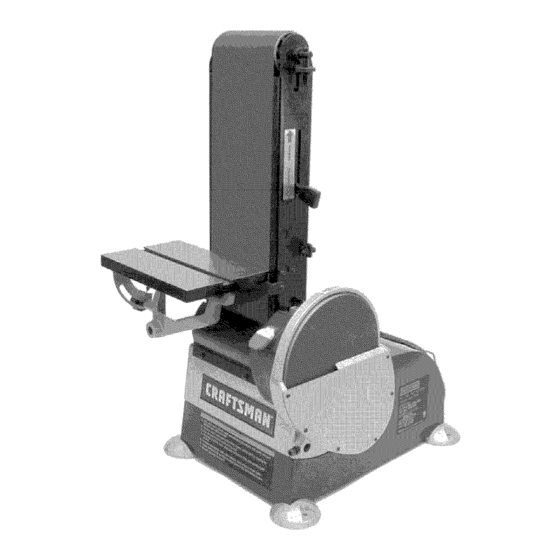
Craftsman 351.225930 Operator's Manual

Craftsman 351.225930 Operator's Manual

6 x 48" belt, 9" disc sander with dust collection
Hide thumbs Also See for 351.225930:
Available languages

Available languages

Operator's Manual
6 x 48" Belt, 9" Disc
SANDER WITH DUST COLLECTION
Model Nos.
351.225930
CAUTION:
Read and follow
all Safety Rules and Operating
Instructions
before First Use
of this Product. Keep this
manual with tool.
Sears, Roebuck and Co., Hoffman Estates, IL 60179 U.S.A.
www.sears.com/craftsman
23634.02 Draft (07/14/05)
Table of Contents
loading

Frequently Asked Questions (11)

  • How do I use the Craftsman 351.225930 belt sander?

    To use the belt sander:

    • For finishing flat surfaces, hold the workpiece firmly with both hands, keeping fingers away from the abrasive belt. Use the table to position and secure the work, keeping the end butted against the table and moving the work evenly across the abrasive belt.
    • For finishing long pieces, use the belt in a horizontal position with the work stop. Apply only enough pressure to allow the abrasive belt to remove material. Keep the end butted against the work stop and move the work evenly across the abrasive belt.
    • For finishing curved edges, finish outside curves on the flat portion of the abrasive belt and inside curves on the idler drum portion.
    • For finishing end grain, it is more convenient to finish ends of long workpieces with the abrasive belt in a vertical position. Position the table on the belt side of the sander and move the work evenly across the abrasive belt. For accuracy, use a miter gauge. The table may be tilted for beveled work.
    Was this helpful?
  • How do I replace the sanding belt on the Craftsman 351.225930 sander?

    To replace the sanding belt:

    1. Remove the table assembly and support rod or work stop.
    2. Remove the deflector, cover and chute.
    3. Release belt tension by pushing the tension lever toward the idler drum. Slide the old belt off the drive and idler drums.
    4. Slide the new belt over the drive and idler drums, centering the belt on the drums. Ensure the arrow on the inside of the belt points in the direction of belt travel.
    5. Push the tension lever towards the drive drum to tension the belt.
    6. Check the tracking of the belt.
    Was this helpful?
  • What type of sanding belts are compatible with the Craftsman 351.225930 sander?
  • How do I turn on the Craftsman 351.225930 sander?

    The ON/OFF switch is located on the upper front right of the cabinet. To turn the sander ON, pull the switch to the up position. To turn the sander OFF, push the switch to the down position. The sander can be locked from unauthorized use by locking the switch:

    1. Turn the switch to the OFF position and disconnect the sander from the power source.
    2. Pull the key out. The switch cannot be turned on with the key removed. To replace the key, slide it into the slot on the switch until it snaps.

    For more information, see page 6 of the manual.
    Was this helpful?
  • How do I troubleshoot common operational issues with the Craftsman 351.225930 belt sander?

    Common operational issues and their corrective actions are:

    • Motor will not start:
      • If due to low voltage, check the power line for proper voltage.
      • If due to an open circuit in motor or loose connections, inspect all lead connections on the motor for loose or open connection.
      • If due to a defective switch, replace the switch.
      • If due to a defective capacitor, replace the capacitor.
    • Motor will not start; fuses blown or circuit breakers are tripped:
      • If due to a short circuit in the line cord or plug, inspect the line cord or plug for damaged insulation and shorted wires.
      • If due to a short circuit in motor or loose connections, inspect all lead connections on the motor for loose or shorted terminals or worn insulation on wires.
      • If due to incorrect fuses or circuit breakers, install correct fuses or circuit breakers.
    • Motor fails to develop full power:
      • If due to an overloaded power line, reduce the load on the power line.
      • If due to undersized or too long wires/circuits, increase wire sizes or reduce the length of wiring.
      • If due to general overloading of power company's facilities, request a voltage check from the power company.
    • Motor overheats: If due to an overloaded motor, reduce the load on the motor.
    • Motor stalls:
      • If due to short circuit in motor or loose connections, inspect motor connections for loose or shorted terminals or worn insulation on lead wires.
      • If due to low voltage, correct the low line voltage conditions.
      • If due to incorrect fuses or circuit breakers, install correct fuses or circuit breakers.
      • If due to an overloaded motor, reduce the load on the motor.
    • Machine slows down while operating: If due to applying too much pressure to the workpiece, ease up on pressure.
    • Abrasive belt runs off top wheel: If due to not tracking properly, see the operation section "Adjusting Belt Tracking".
    • Dust collection not working:
      • If the dust collection bag is full, empty it.
      • If the belt is loose or broken, replace the belt.
      • If the impeller is loose or broken, replace the impeller.

    For more information, see page 10 of the manual.
    Was this helpful?
  • Can I connect a vacuum system to the Craftsman 351.225930 belt sander?

    Yes, the sander has a built-in dust collection system that collects dust from the belt and disc and exhausts it into an included 30-micron collection bag. To attach the dust collection bag, place the clamp over the bag sleeve, slide the sleeve with the clamp over the dust port, and secure it by tightening the clamp handle.


    For more information, see pages 4 and 5 of the manual.
    Was this helpful?
  • How do I clean and maintain the Craftsman 351.225930 belt sander?

    For cleaning and maintenance:

    • Cleaning:
      • Keep the machine and workshop clean. Do not allow sawdust to accumulate on the tool.
      • Keep the drums clean to prevent poor tracking and belt slippage.
      • Periodically empty the dust collection bag.
      • Ensure the motor is kept clean and frequently vacuumed free of dust.
      • Use soap and water to clean painted parts, rubber parts, and plastic guards.
    • Lubrication:
      • The shielded ball bearings are permanently lubricated and require no further lubrication.
      • If operation seems stiff, apply a light coat of paste wax to the belt table and disc table to make it easier to feed work. Do not apply wax to the belt platen, as it could cause the belt to slip.
    • Keep Tool in Repair:
      • If the power cord is worn, cut, or damaged, have it replaced immediately.
      • Replace worn abrasives when needed.
      • Replace any damaged or missing parts using the parts list.

    For more information, see page 9 of the manual.
    Was this helpful?
  • What materials can I sand with the Craftsman 351.225930 belt sander?

    The Craftsman Belt and Disc Sanders are used to sand, deburr, bevel, and grind large workpieces of wood and plastic.

    Was this helpful?
  • What are the main components of the Craftsman 351.225930 belt sander?

    The Craftsman Belt and Disc Sanders are constructed of rugged die cast aluminum and cast iron. Key components include a belt housing that can be pivoted from vertical to horizontal, an idler drum for sanding contoured shapes, a disc for sanding and beveling surfaces, and a built-in dust collection system that exhausts dust into an included 30-micron collection bag. It also features an adjustable miter gauge and a work stop.

    Was this helpful?
  • How do I adjust the belt tracking on the Craftsman 351.225930 sander?

    To adjust the belt tracking:

    1. Quickly turn the switch ON and OFF to check the tracking. The belt should ride centered on the idler and drive drums.
    2. Adjust the tracking nut as needed to center the belt on the drums.
    3. If the belt moves to the left, turn the tracking nut to the right.
    4. If the belt moves to the right, turn the tracking nut to the left.
    5. Quickly turn the switch ON and OFF again. If the belt moves to one side, continue adjusting the tracking nut until it is centered on the drums.

    For more information, see page 6 of the manual.
    Was this helpful?
  • What is the power rating of the Craftsman 351.225930 sander?

    The power rating for Model 225930 is:

    • Horsepower (Maximum Developed): 1.2
    • Voltage: 120
    • Amp: 10.0
    • Hertz: 60
    • Phase: Single
    • RPM: 3450

    For more information, see page 5 of the manual.
    Was this helpful?
Need help?

Need help?

Do you have a question about the 351.225930 and is the answer not in the manual?

Summary of Contents for Craftsman 351.225930

  • Page 1 SANDER WITH DUST COLLECTION Model Nos. 351.225930 CAUTION: Read and follow all Safety Rules and Operating Instructions before First Use of this Product. Keep this manual with tool. Sears, Roebuck and Co., Hoffman Estates, IL 60179 U.S.A. www.sears.com/craftsman 23634.02 Draft (07/14/05)
  • Page 2 ONE-YEAR FULL WARRANTY CRAFTSMAN TOOL • Keep all parts in working order. Check to determine that the If this Craftsman tool fails due to a defect in material guard or other parts will operate properly and perform their intended function.
  • Page 3 ° Sander can be installed on a workbench or a tool stand (see Recommended Accessories, page 15) using bolts, lock washers and hex nuts (not supplied). Refer to Figure ° Figure 2 shows the base dimensions, mounting holes and Check for shipping damage.
  • Page 4 Tousethetable withthebelt: • Remove work stop from belt a ssembly. • Loosen b oltinpivot b racket. Move belt a ssembly tothe vertical position, and secure i nposition b ytightening bolt. • Insert t able support rodintothebelt a ssembly bracket. Secure u sing bolt ( A), m aking s ure bolt t ightens ontothe flatsurface o ftherod.
  • Page 5 DESCRIPTION not properly grounded. To ensure proper ground, grounding The Craftsman Belt and Disc Sanders are constructed means must be tested by a qualified electrician. rugged die cast aluminum and cast iron providing...
  • Page 6 SPECIFICATIONS Some examples of these chemicals are: • Lead from lead-based paints. MODEL 225930 • Crystalline silica from bricks and cement and other Belt size ........6 x 48" masonry products. Belt platen area ......7 x 17" • Arsenic and chromium from chemically-treated lumber.
  • Page 7 ADJUSTING TABLE ANGLE Refer to Figure * To adjust table angle, loosen knob, tilt table to desired position, then secure by tightening knob. ,, Reposition table on support rod to ensure that gap between table and belt (disc) is _/_6"or less. To reposition table, loosen bolt, move table on rod and secure...
  • Page 8 • Finishing long pieces: Usebelt i nhorizontal position with • If table needs adjustment, loosen the three bolts beneath work stop. Apply o nly enough pressure to allow abrasive table, move table and secure in position. belt to remove material. Use work stop to position and secure work...
  • Page 9 * Slide new belt over the drive and idler drums; center belt on drums. * Additional abrasive belts are available (See Recommended WARNING: Make certain that the unit is disconnected from Accessories, page 15). power source before attempting to service or remove * Push tension lever towards...
  • Page 10 SYMPTOM CORRECTIVE ACTION POSSIBLE CAUSE(S) Motor will not start 1. Low voltage 1. Check power line for proper voltage 2. Open circuit in motor or loose 2. inspect all lead connections on motor for loose or connections open connection 3. Defective switch 3.
  • Page 11 Service Record Craftsman Sander with Dust Collection DATE MAINTENANCE PERFORMED REPLACEMENT PARTS REQUIRED...
  • Page 12 Model351.225930 Figure 19 - Replacement Parts Illustration for Belt and Disc 19 20 10 15...
  • Page 13 PART NO, DESCRIPTION QTY. PART NO. DESCRIPTION QTY, 21425.00 21443.00 Switch Box Idler A ssembly 23902,00 Dust C over STD833020 6-1,0 x20mm HexHead Bolt* 21428,00 Tension Lever STD863610 6-1.0 x 10mm PanHead Screw'* 21441.00 20768.00 Abrasive Belt Upper Cover STD315545 21426,00 Spring 6004ZZ B all B earing*...
  • Page 14 Models 351.225930 Figure 20 - Replacement Parts Illustration for Motor and Dust Collection "" ../ 20 [ 29...
  • Page 15 PART NO. QTY. DESCRIPTION Upper Body 21464.00 Bottom Plate 21455.00 Hose 01043.00 6-1.0 x 8ram Set Screw 21452.00 Motor 21453.00 Motor Assembly (Includes Key Nos. 4, 5, 7, 8 and 9) 21472.00 Centrifugal Switch 21471.00 Stationary Switch 21470.00 Capacitor 300MFD, 125VAC 22121.00 Bag Clamp...
  • Page 16 Ilaves del arrancador para impedir GARANTIA COMPLETA DE UN AgO PARA HERRAMIENTA cualquier uso involuntario de las herramientas mecanicas. CRAFTSMAN SE DEBE DAR MANTENIMIENTO A LA HERRAMIENTA Siesta herramienta Craftsman fallara por causa de defectos en el material o en la mano de obra en un lapso de un argo a partir de •...
  • Page 17 ,, Evite que la herramienta se encienda accidentalmente. AsegQrese que el interruptor de la herramienta esta en la posici6n OFF (apagado) antes de enchufarla. ,, No fuerce la herramienta. Funcionara en la forma mas eft- Consulte las Figuras 2-5. ciente a la velocidad para la cual se dise56.
  • Page 18 INSTALAClON CON JUNTO DE LA MESA Consulte las Figuras 3 y 4. El conjunto de mesa incluido se utiliza con ambos, el disco y la correa. Para utilizar la mesa con el disco: ,, Inserte la varilla de soporte de la mesa en la base de la lijadora.
  • Page 19 las Normas para Instalaciones Electricas (National Electric Code) y los c6digos y regulaciones locales. ADVERTENClA: Esta tarea debera ser realizada por un Consulte las Figuras 6, 7 y 8 en las paginas 19 y 20. electricista calificado. Se puede usar temporalmente un adaptador de 3 puntas a 2 FUENTE...
  • Page 20 DESCRIPClON miento antes de comenzar a lijar o esmerilar. La Lijadora de correa y disco de Craftsman est& construida ,, AsegOrese que el disco gire en el sentido de las manillas aluminio fundido...
  • Page 21 una mascara para la cara o respirador adecuadamente ajusta- dos, aprobados por MSHA/NIOSH INTERRUPTOR DE ON/OFF (ENCENDIDO/APAGADO) Consulte la Figura 9. El interruptor de encendido y apagado se encuentra en la parte delantera superior derecha del gabinete. Para encender la Iijado- ra, cambie la posici6n del interruptor a la posici6n...
  • Page 22 AJUSTE ANGULO DE LA MESA USO DE LA CORREA ABRASlVA PARA TRABAJOS DE ACABADO Consulte la Figura 12. • Acabado de las superficies planas: Sujete firmemente la pieza • Para ajustar el angulo de la mesa, afloje la manilla, incline de trabajo con las dos manos;...
  • Page 23 ,, Despues de cuadrar la mesa y la guia de ingletes con la correa (o el disco), cambie la posici6n del indicador de angulo en la escala de la guia de ingletes para ajustar la guia al angulo deseado y fijela en esa posicion con la manilla.
  • Page 24 CAMBIO DEL DISCO ABRASlVO Consulte la Figura 18. Desmonte el conjunto de la mesa. ADVERTENCIA: Asegt_rese de que la unidad este desconecta- ,, Retire la cubierta del disco. Para esto, afloje y extraiga seis da de la fuente de alimentaci6n electrica antes de tratar de dar tornillos.
  • Page 25 MEDIDA CORRECTIVA SINTOMA CAUSA(S) POSIBLE(S) El motor no arranca 1. Voltaje bajo 1. Verifique el voltaje correcto de la linea de alimentaci6n 2. Circuito abierto en el motor o 2. Inspeccione todas las conexiones de conductores conexiones sueltas en el motor para ver que no haya conexiones sueltas o abiertas...
  • Page 26 NOTAS...
  • Page 27 NOTAS...
  • Page 28 ® Registered Trademark Trademark Service Mark of Sears, Roebuck and Co. ® Marca Registrada / TM Marca de F_brica / s_ Marea de Servicio de Sears, Roebuck and Co. MC Marque de commerce Marque d_pos_e de Sears, Roebuck and Co. ©...

Table of Contents