Advertisement
Quick Links
Instruction Manual
HDMI®/VGA/mDP/Composite Table Surface Access Switch
BOX4HDECP
DE: Bedienungsanleitung - de.startech.com
FR: Guide de l'utilisateur - fr.startech.com
ES: Guía del usuario - es.startech.com
IT: Guida per l'uso - it.startech.com
NL: Gebruiksaanwijzing - nl.startech.com
PT: Guia do usuário - pt.startech.com
For full operating instructions and specifications, please visit:
www.StarTech.com/BOX4HDECP
Packaging Contents
• 1x HDMI/VGA/mDP/Composite Table Surface Access Switch
• 1x Universal Power Adapter (NA/EU/UK/AU)
• 1x DieCut Outline
• 1x Instruction Manual
System Requirements
For Installation
• Table Surface for installation
• HDMI-enabled Display Device w/ HDMI Cable (i.e. television, projector)
• Network Host Device w/ Ethernet Cable (Router/Switch)
For Operation
• Video Input Device (HDMI/VGA/Composite/mDP) and/or Network
Interface Device
• (Optional) 1x Battery Powered Mobile Device (for Charge Port)
For the most up-to-date information, please visit: www.startech.com
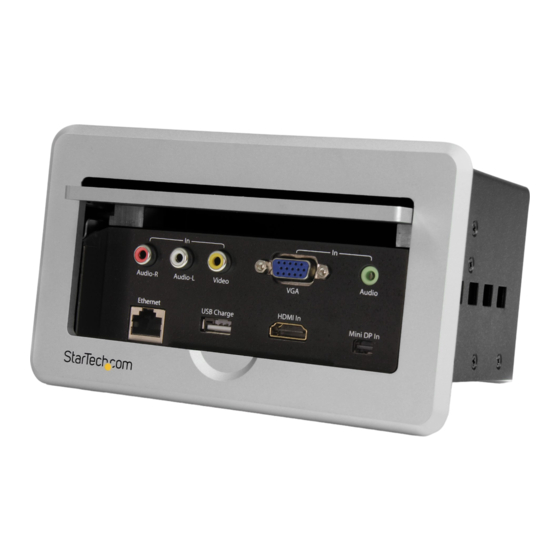
Front View
1. Composite Input Port
2. VGA Video Input Port +3.5mm Audio Input Port
3. Ethernet Input Port
4. USB Charge Port
5. HDMI Audio/Video Input
6. Mini DisplayPort Audio/Video Input Port
7. Mounting Bracket Support
Side View
1. Ethernet Output Port
2. HDMI Output Port
3. Power Adapter Port
Hardware Installation
1. Using the included die cut outline, trace the inner rectangle on
the table surface in your desired location.
*actual product may vary from photos
Manual Revision: 10/28/2015
Advertisement

Related Manuals for StarTech.com BOX4HDECP


Summary of Contents for StarTech.com BOX4HDECP
- Page 1 • (Optional) 1x Battery Powered Mobile Device (for Charge Port) *actual product may vary from photos Hardware Installation 1. Using the included die cut outline, trace the inner rectangle on the table surface in your desired location. For the most up-to-date information, please visit: www.startech.com Manual Revision: 10/28/2015...
- Page 2 This manual may make reference to trademarks, registered trademarks, and other protected names and/or symbols of third-party companies not related in any way to StarTech.com. Where they occur these references are for illustrative purposes only and do not represent an endorsement of a product or service by StarTech.com, or an endorsement of the product(s) to which this manual applies by the third-party company in question.
Need help?
Do you have a question about the BOX4HDECP and is the answer not in the manual?
Questions and answers