Table of Contents
Advertisement
Advertisement
Table of Contents

Related Manuals for Midland MICRO MOBILE MXT500


Summary of Contents for Midland MICRO MOBILE MXT500
-
Page 2: Table Of Contents
Model MXT500 TABLE OF CONTENTS WELCOME TO THE WORLD OF MIDLAND......…………………………………..…….3 FEATURES....………………………………………………………………………………………..3 FCC NOTICE....……………………..…………….……………………………………………..…..4 Exposure to Radio Frequency Energy....………..……………………………………………..4 INSTALLING YOUR RADIO....………………………………………………………………….…...5 Preparation for Installation.....…..…………………………………………..5 Installing the Mounting Bracket.....…...…………………………………………..6 Installing the Antenna.....……………….………………………………………….7 Connecting the Radio to a Power source....…………………………………..8 Connecting the Microphone.....…………….……………………………………..8 Using an External Speaker....……………….…………………………………...8... -
Page 3: Welcome To The World Of Midland
Model MXT500 WELCOME TO THE WORLD OF MIDLAND RADIO Congratulations on your purchase of a high-quality Midland product. Your MXT500 2-way radio represents state-of-the-art high-tech engineering. Designed for General Mobile Radio Service (GMRS) operation, this compact package is big on performance. It is a quality piece of electronic is all solid-state and mounted on a rugged printed circuit board. -
Page 4: Fcc Notice
Exposure To Radio Frequency Energy • Your Midland radio is designed to comply with the following national and international standards and guidelines regarding exposure of human beings to radio frequency electromagnetic energy: •... -
Page 5: Installing Your Radio
Model MXT500 INSTALLING YOUR RADIO Preparation for Installation This radio may be installed in any 12-volt negative ground system vehicle. Most current U.S. and foreign vehicles use a negative ground system, but some older models and some newer large trucks may have a positive lation. -
Page 6: Installing The Mounting Bracket
Model MXT500 INSTALLING THE MOUNTING BRACKET 1. Using the mounting bracket as a template, mark the location of each screw hole under the dash. Use a nail or other sharp pointed object to mark the hole locations. 2. Attach the bracket to the dash with the Phillips head sheet metal screws provided. -
Page 7: Installing The Antenna
Model MXT500 INSTALLING THE ANTENNA intended to be attached to the vehicle’s roof, trunk or similar location. guidelines to install the antenna: *Where you locate your antenna affects performance.* Avoid these locations. 2. Mount the antenna as high on the vehicle as possible. The higher the better. -
Page 8: Connecting The Radio To A Power Source
The MXT500 provides rear-panel jack for connection to an intercom or headsets with a TA5 mini XLR connector. When an intercom is connected, unplug the speaker mic from the radio so there is no echo. Midland recommends covering the speaker mic jack with the rubber accessory Page 8 midlandusa.com... -
Page 9: Controls And Indicators
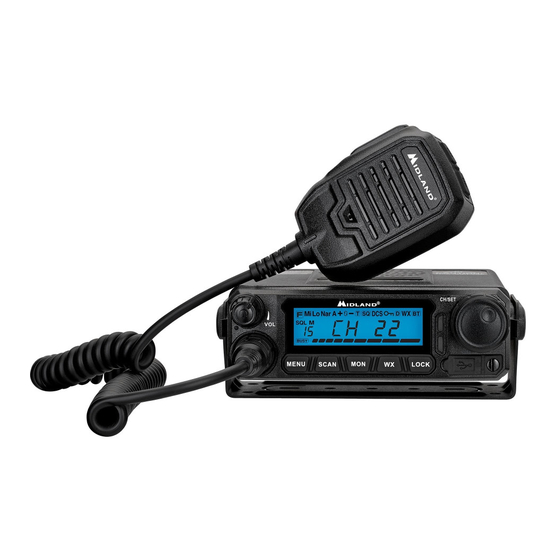
Model MXT500 CONTROLS AND INDICATORS RADIO OPERATING CONTROLS 1. Power and Volume Knob 2. Speaker Mic Jack 3. Menu Button 4. Scan/Scan Skip Button 5. Monitor Button 6. WX Button 7. Lock Button 8. Power Indicator 9. TX/RX Indicator 10. Channel/Menu Selection Knob 11. -
Page 10: Microphone Operating Controls
Model MXT500 MICROPHONE OPERATING CONTROLS 1. Channel Down 2. Channel Up 3. PTT 4. Microphone Page 10 midlandusa.com... -
Page 11: Rear Panel Connections
Model MXT500 REAR PANEL CONNECTIONS 1. Antenna Jack 2. Intecom jack 3. External Speaker jack Page 11 midlandusa.com... -
Page 12: Lcd Display
Model MXT500 LCD DISPLAY 2. Medium Power 3. Low Power 4. Narrow Band Channel 5. Auto power off 6. Repeater offset direction 7. Scan Indicator 8. CTCSS Privacy Tone 9. DCS Privacy Tone 10. Key Lock 11. Weather band 12. Channel Icon 13. -
Page 13: Operating Your Radio
Model MXT500 OPERATING YOUR RADIO About Range Your MXT500 is designed to give you maximum operating range under optimal conditions. Maximum Range / No Sight Obstruction Medium Range / Partial Obstruction to Line of Sight Short Range / Major Obstruction to Line of Sight Optimal conditions for maximum operating range are: •... -
Page 14: Power On/Off
Model MXT500 POWER ON/OFF 1.To power on, press the POWER/VOLUME knob. • The LCD will display the welcome screen and then display the factory channel. 2. To power off, press and hold the POWER/VOLUME knob. The LCD will go blank when the radio turns off. 3. -
Page 15: Transmit And Receiving A Call
Model MXT500 TRANSMITTING AND RECEIVING A CALL IMPORTANT! To communicate between two MXT500 radios or any GMRS radio, both radios must be set to the same channel and privacy code (see Selecting a Privacy Code) selections.. 1. To transmit a call, press and hold the PTT button on the microphone, and speak into the microphone in a normal voice. -
Page 16: Locking The Keypad
Model MXT500 LOCKING THE KEYPAD You can use the keypad “lock” function to prevent accidentally changing your radio’s settings. When the function is enabled, the current radio settings are “locked” in place. NOTE: When the “lock” function is enabled, the PTT button on the microphone and the POWER AND VOLUME KNOB on the radio remain active. -
Page 17: Scanning For Active Channels
Model MXT500 SCANNING FOR ACTIVE CHANNELS Your MXT500 includes an “auto-scan” mode that continuously scans all 15 GMRS channels for activity. 1.Press the SCAN button to enter “auto-scan” mode. • Your radio will rapidly scan through the 15 GMRS channels and will pause on any active channel. -
Page 18: Call Alert
Model MXT500 • A period will appear after the CH icon on the LCD noting that the channel is active in the “auto-scan” list. NOTE: The radio comes standard with all channels enabled for “auto-scan”. CALL ALERT IMPORTANT! To communicate between two MXT500 radios or any GMRS radio, both radios must be set to the same channel and Privacy Code (see selecting a privacy code) selections. -
Page 19: Menu Mode Functions
Model MXT500 SELECTING A PRIVACY CODE Continuous Tone Coded Squelch System (CTCSS) and Digitally Coded Squelch (DCS) are systems that allow several users to share the same channel without disturbing each other. When CTCSS or DCS are enabled for a selected channel, the channel is muted to all incoming signals unless they carry the correct CTCSS or DCS tone. - Page 20 Model MXT500 To Select a CTCSS Privacy Code: The MXT500 has 38 CTCSS privacy codes. 1.Follow steps 1 -3 under SELECTING A PRIVACY CODE. 2. For receive privacy code (RCP), select TSQ in the privacy menu by pressing the CHANNEL/MENU SELECTION knob. 3.
-
Page 21: Selecting The Transmit (Tx) Power Level
Model MXT500 To Disable Privacy codes: 1. Follow steps 1 & 2 under SELECTING A PRIVACY CODE. 2. Select OFF in the privacy menu by pressing the CHANNEL/MENU SELECTION knob. 3. Press the menu button to exit the privacy code settings. NOTE: If you select a CTCSS Privacy Code, any pre-selected DCS Privacy Code will be cancelled, and vice-versa. -
Page 22: Selecting A Channels Bandwidth
FRS radios are limited to narrow band mode, maximum 12.5 kHz occupied bandwidth, by FCC regulations. For best clarity, all radios communicating together should use the same bandwidth. Midland GMRS radios use narrow band mode to provide optimum communication and kHz spaced FRS/GMRS channel frequencies. - Page 23 Model MXT500 1. Press the MENU button to enter the menu. Use the CHANNEL/MENU SELECTION knob to navigate to menu setting #04 – TALK. 2. To enable or disable the talk around function, press the CHANNEL/ MENU SELECTION knob. Use the CHANNEL/MENU SELECTION knob to choose between ON or OF.
-
Page 24: Automatic Power Off Function
Model MXT500 Time Out Timer (TOT) Function The Time Out Timer limits the amount of transmitting time the radio has per PTT activation. 1. Press the MENU button to enter the menu. Use the CHANNEL/MENU SELECTION knob to navigate to menu setting #07 – TOT. 2. -
Page 25: Display Color
Model MXT500 2. To set the squelch sensitivity, press the CHANNEL/MENU SELECTION knob. Use the CHANNEL/MENU SELECTION knob to choose between 01, 02, 03, 04, 05, 06, 06, 08 and 09. Press the CHANNEL/MENU • If the squelch sensitivity is set to off, the BUSY icon will appear on the LCD. -
Page 26: Repeater Channels
Model MXT500 brightness chosen. 3. Press the menu button to exit the display brightness settings. Repeater Channels The MXT500 can talk to GMRS repeaters, which can greatly increase radio range. You can enable and disable the repeater channels on the MXT500. -
Page 27: Restoring The Default Settings
Model MXT500 1. Press the MENU button to enter the menu. Use the CHANNEL/MENU SELECTION knob to navigate to menu setting #13 - USB. 2. To enable or disable USB-C programming, press the CHANNEL/MENU SELECTION knob. Use the CHANNEL/MENU SELECTION knob to choose between ON or OFF. -
Page 28: Troubleshooting Guide
TROUBLESHOOTING GUIDE chart to correct common operation problems. If you have a problem which you believe requires service, please call our Midland customer service representatives at 816-241-8500 on Monday – Friday between 8 AM to 4:30 PM CST. Many problems can be remedied over the phone without returning the unit for service. -
Page 29: Menu Quick Reference Chart
Model MXT500 SPECIFICATIONS Channels: 15 GMRS Channels and 8 Repeater Channels Privacy Codes: 38 CTCSS; 104 DCS Operating Frequency: UHF; 462.5500 ~ 462.725 MHz Repeater Frequency: UHF; 462.5625 ~ 467.725 MHz Power Source: 13.8 VDC Nominal MENU QUICK REFERENCE CHART privacy talk comp... -
Page 30: Gmrs Frequency Chart
Model MXT500 GMRS FREQUENCY CHART (MHz) Ch. No. Ch. Freq. (MHz) Ch. No. Ch. Freq. (MHz) 462.5625 462.550 462.5875 462.575 462.6125 62.600 462.6375 462 .625 462.6625 462.650 462.6875 462.675 462.7125 462.700 CH 8-14 Restricted to Portable Use Only 462.725 GMRS REPEATER FREQUENCY CHART (MHz) Ch. -
Page 31: Ctcss Privacy Codes Frequency Chart
Model MXT500 CTCSS PRIVACY CODE CHART Code Freq. Code Freq. Code Freq. Code Freq. Code Freq. 67.0 9 118.8 156.7 210.7 71.9 123.0 162.2 218.1 74.4 97.4 127.3 167.9 225.7 77.0 100.0 131.8 173.8 233.6 79.7 103.5 136.5 179.9 241.8 82.5 107.2 141.3... -
Page 32: Fcc Warning And Statements
Model MXT500 FCC WARNINGS AND STATEMENTS by Midland Radio Corporation could void your right to operate this unit. Your radio is set up to transmit a regulated signal on an assigned frequency. It is against the law to alter or adjust the settings inside the communicator to exceed those limitations. -
Page 33: Limited Warranty
Model MXT500 LIMITED WARRANTY (United States) Subject to the exclusions set forth below, Midland Radio Corporation will repair or replace, at its option without charge, any MXT275 which fails due to a defect in material or workmanship within One Year following the initial consumer purchase. - Page 34 Model MXT500 Licensing Information Use our radio in USA is subject to the rules & regulations of FCC. Changes or modifications not expressly approved by our may void the user authority granted by the FCC to operate this radio and should not be made. To comply with FCC requirements, transmitter adjustments should be made only by or under the supervision of a person certified as technically qualified to perform transmitter maintenance and repairs in the private land mobile and fixed services as certified by...
- Page 35 5900 Parretta Drive Kansas City, MO 64120 Call 816.241.8500 We’d love to hear from you! Let us know what you think of your new Midland product at: or by visiting us at: midlandusa.com notice. MIDLAND RADIO CORPORATION is not responsible for...
Need help?
Do you have a question about the MICRO MOBILE MXT500 and is the answer not in the manual?
Questions and answers