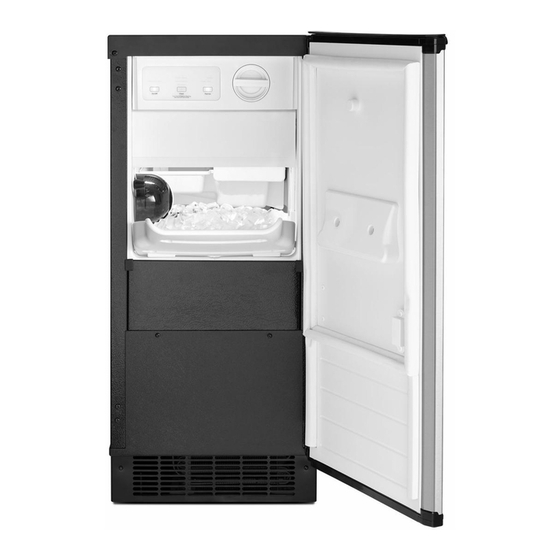
Table of Contents
Advertisement
Available languages
Available languages
LEARN MORE
In an effort to conserve natural resources, this ice maker includes a condensed User Guide. A complete User Guide can
be downloaded at www.whirlpool.com/manuals. The model number is located on the inside of the ice maker.
In the U.S.A., register your ice maker at www.whirlpool.com.
In Canada, register your ice maker at www.whirlpool.ca.
Para una version de estas instrucciones en español, visite www.whirlpool.com.
We have provided many important safety messages in this manual and on your appliance. Always read and obey all safety messages.
This is the safety alert symbol.
This symbol alerts you to potential hazards that can kill or hurt you and others.
All safety messages will follow the safety alert symbol and either the word "DANGER" or "WARNING."
These words mean:
DANGER
WARNING
All safety messages will tell you what the potential hazard is, tell you how to reduce the chance of injury, and tell you what can happen if the
instructions are not followed.
WARNING
: To reduce the risk of fire, electric shock, or injury when using your ice maker, follow these basic
precautions :
Plug into a grounded 3 prong outlet.
Do not remove ground prong.
Do not use an adapter.
Do not use an extension cord.
State of California Proposition 65 Warnings:
WARNING: This product contains one or more chemicals known to the State of California to cause cancer.
WARNING: This product contains one or more chemicals known to the State of California to cause birth defects or other reproductive harm.
How Your Ice Maker Works
When you first start your ice maker, the water pan will fill and the
system will rinse itself before starting to make ice. The rinsing process
takes about 5 minutes.
Under normal operating conditions, the ice maker will cycle at preset
temperatures. The ice level sensor located in the ice storage bin will
monitor the ice levels.
IMPORTANT: If the water supply to the ice maker is turned off, be sure
to set the ice maker control to OFF.
Your safety and the safety of others are very important.
You can be killed or seriously injured if you don't immediately follow instructions.
You can be killed or seriously injured if you don't follow instructions.
IMPORTANT SAFETY INSTRUCTIONS
SAVE THESE INSTRUCTIONS
OPERATING YOUR ICE MAKER
User Guide
Ice Maker
Disconnect power before cleaning.
Disconnect power before servicing.
Replace all parts and panels before operating.
Use two or more people to move and install ice maker.
The Ice Making Process
1. Water is constantly circulated over a
freezing plate. As the water freezes into
ice, the minerals in the water are
rejected. This produces a sheet of ice
with a low mineral content.
1
W10541618A
Advertisement
Table of Contents

Related Manuals for Whirlpool ICE MAKER


Summary of Contents for Whirlpool ICE MAKER
-
Page 1: Ice Maker
Ice Maker LEARN MORE In an effort to conserve natural resources, this ice maker includes a condensed User Guide. A complete User Guide can be downloaded at www.whirlpool.com/manuals. The model number is located on the inside of the ice maker. -
Page 2: Water Filtration System
B. O-rings D. Alignment arrow 3. The water filter compartment is located in the right-hand side of the ice maker controls. Push in on the door to release the latch, and then lower the door. NOTES: Pressing the On/Off button does not shut off power to the ice maker. -
Page 3: Normal Sounds
“Install the Water Filter” section. Normal Sounds Your new ice maker may make sounds that are not familiar to you. Because the sounds are new to you, you might be concerned about them. Most of the new sounds are normal. Hard surfaces such as A. - Page 4 5. Replace the lower access panel using the 4 screws. 6. Plug in ice maker or reconnect power. ACCESSORIES To order accessories, in the U.S.A., visit our web site www.whirlpool.com/accessories or call 1-800-901-2042. In Canada, visit our web site www.whirlpoolparts.ca or call 1-800-807-6777. Water Filter affresh ®...
-
Page 5: Problem Solver
The ice maker may not restart once it does shut off. If there was a large amount of water added to the ice maker, wait a few minutes for the drain pump to clear. If there is still water in the bin, check to see whether the drain hose is kinked. -
Page 6: Ice Production
Dirt or lint may be blocking the airflow through the condenser. If there is white scale buildup in the ice maker’s water or freezing system, you should clean the ice maker. If the drain cap is loose, water will empty from the water pan, and you will have either thin ice or no ice. Tighten the drain cap. -
Page 7: Plumbing Problems
RECOMMENDED SOLUTIONS Water Not Entering Drain If the drain hose is not aligned over the drain, move the ice maker to align the drain. Properly NOTE: Service technicians cannot repair plumbing problems outside of the ice maker. Call a licensed, qualified plumber. -
Page 8: Warranty
Whirlpool Corporation or Whirlpool Canada LP (hereafter “Whirlpool”) will pay for Factory Specified Parts and repair labor to correct defects in materials or workmanship. Service must be provided by a Whirlpool designated service company. This limited warranty is valid only in the United States or Canada and applies only when the major appliance is used in the country in which it was purchased. -
Page 9: Utilisation De La Machine À Glaçons
POUR EN SAVOIR PLUS Afin de conserver les ressources naturelles, cette la machine à glaçons comprend un guide d’utilisation rapide. L'utilisateur peut télécharger un guide complet sur www.whirlpool.com/manuals. Le numéro de modèle se trouve sur la paroi interne de la machine du glaçons. -
Page 10: Système De Filtration D'eau
2. Une fois qu’elle a atteint l’épaisseur Système de filtration d’eau désirée, la plaque de glace se dégage et glisse dans une grille de coupe, où elle est taillée en glaçons. Ne pas utiliser pour le filtrage d'une eau 3. L’eau contenant les déchets minéraux est microbiologiquement polluée ou de qualité... -
Page 11: Bruits Normaux
6. Tourner le filtre dans le sens horaire jusqu’à ce qu’il s’emboîte dans le 2. Tourner le filtre à eau dans le sens antihoraire (vers la gauche) et le logement. S’assurer que la flèche d’alignement de la tête du filtre soit retirer tout droit hors du compartiment. - Page 12 6. Brancher la machine à glaçons ou reconnecter la source de courant électrique. ACCESSOIRES Pour commander les accessoires, aux É.-U., consulter notre page Web www.whirlpool.com/accessories ou composer le 1-800-901-2042. Au Canada, consulter notre page Web www.whirlpoolparts.ca ou composer le 1-800-807-6777. Filtre à eau Lingettes pour acier inoxydable affresh ®...
-
Page 13: Résolution De Problèmes
RÉSOLUTION DE PROBLÈMES Scannez le code à gauche avec votre téléphone portable ou consultez www.whirlpool.com/product_help pour des conseils qui vous permettront peut-être d'éviter une intervention de dépannage. Fonctionnement de la machine à glaçons AVERTISSEMENT Risque de choc électrique Brancher sur une prise à 3 alvéoles reliée à la terre. -
Page 14: Production De Glaçons
Production de glaçons AVERTISSEMENT Risque de choc électrique Déconnecter la source de courant électrique avant l'entretien. Replacer pièces et panneaux avant de faire la remise en marche. Le non-respect de ces instructions peut causer un décès ou un choc électrique. PROBLÈME SOLUTIONS RECOMMANDÉES La machine à... -
Page 15: Problèmes De Plomberie
Problèmes de plomberie AVERTISSEMENT Risque du poids excessif Utiliser deux ou plus de personnes pour déplacer et installer la machine à glaçons. Le non-respect de cette instruction peut causer une blessure au dos ou d'autre blessure. PROBLÈME SOLUTIONS RECOMMANDÉES L’eau ne pénètre pas Si le tuyau de vidange n’est pas aligné... -
Page 16: Garantie
5. Les défauts apparents, notamment les éraflures, les bosses, fissures ou tout autre dommage au fini du gros appareil ménager, à moins que ces dommages soient dus à des vices de matériaux ou de fabrication et soient signalés à Whirlpool dans les 30 jours suivant la date d’achat.
Need help?
Do you have a question about the ICE MAKER and is the answer not in the manual?
Questions and answers
How do I perform the check system on my Kitchen Aid under-the-counter ice maker
To perform the check system (diagnostics) on your Whirlpool under-the-counter ice maker:
1. Enter Diagnostics Mode:
- Press and hold the leftmost (On) and rightmost (Clean) buttons together.
- Wait for the lights to flash.
- Press the Service button to enter manual test mode.
2. Run Component Tests:
- Bin Thermostat: If light blinks, it's bad; if solid, it's good.
- Evaporator Thermostat: Blinking means bad; solid means good.
- Fill Valve: Observe if water is filling; if yes, it's working.
3. Voltage Checks (advanced):
- Condenser Fan and Board: Check P92 and P93 for 12.7 DC volts.
- Ice Maker Sensor (M): At J101–J102, voltage should be 0–3.3 DC volts.
- Ice Door Sensor: At J103–J104, voltage should also be 0–3.3 DC volts.
4. Cleaning Cycle (optional):
- Press the Clean button. It will blink during cleaning (approx. 70 minutes).
- After cleaning, remove the drain cap and check for leftover cleaning solution.
These steps help identify faulty components in the system.
This answer is automatically generated
can you adjust size of ice cubes to make larger?
Unit is making ice but not dispensing cold water.
unit is making ice but isn't dispensing cold water