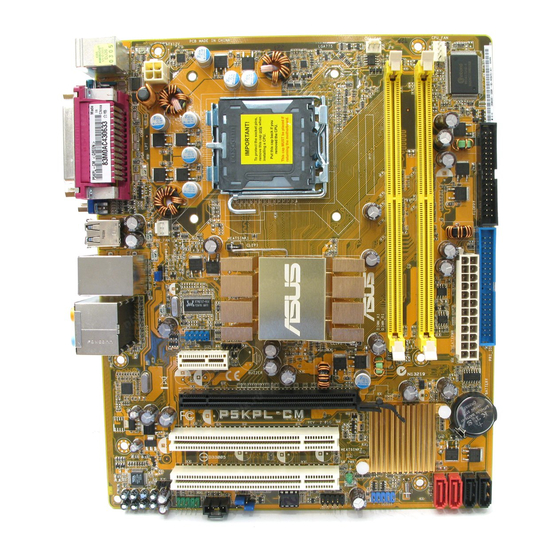
Table of Contents
Advertisement
Advertisement
Table of Contents

Related Manuals for Asus P5KPL CM - Motherboard - Micro ATX


Summary of Contents for Asus P5KPL CM - Motherboard - Micro ATX
- Page 1 P5KPL-CM...
- Page 2 Product warranty or service will not be extended if: (1) the product is repaired, modified or altered, unless such repair, modification of alteration is authorized in writing by ASUS; or (2) the serial number of the product is defaced or missing.
-
Page 3: Table Of Contents
Welcome! ..................1-2 Package contents ................. 1-2 Special features ................1-2 1.3.1 Product highlights ............1-2 1.3.2 ASUS Special features ........... 1-4 Before you proceed ..............1-5 Motherboard overview ..............1-6 1.5.1 Placement direction ............1-6 1.5.2 Screw holes ..............1-6 1.5.3... - Page 4 Chapter 2: BIOS setup Managing and updating your BIOS ..........2-2 2.1.1 Creating a bootable floppy disk ........2-2 2.1.2 ASUS EZ Flash 2 utility ........... 2-3 2.1.3 AFUDOS utility ..............2-4 2.1.4 ASUS CrashFree BIOS 3 utility ........2-6 2.1.5 ASUS Update utility ............
- Page 5 Boot Device Priority ............2-31 2.6.2 Boot Settings Configuration .......... 2-32 2.6.3 Security ................. 2-33 Tools menu ................. 2-35 ASUS EZ Flash 2 ................. 2-35 Exit menu ..................2-36 Chapter 3: Software support Installing an operating system ........... 3-2 Support DVD information ............3-2 3.2.1...
-
Page 6: Notices
Notices Federal Communications Commission Statement This device complies with Part 15 of the FCC Rules. Operation is subject to the following two conditions: • This device may not cause harmful interference, and • This device must accept any interference received including interference that may cause undesired operation. -
Page 7: Safety Information
Safety information Electrical safety • To prevent electrical shock hazard, disconnect the power cable from the electrical outlet before relocating the system. • When adding or removing devices to or from the system, ensure that the power cables for the devices are unplugged before the signal cables are connected. -
Page 8: About This Guide
Refer to the following sources for additional information and for product and software updates. ASUS websites The ASUS website provides updated information on ASUS hardware and software products. Refer to the ASUS contact information. Optional documentation Your product package may include optional documentation, such as warranty flyers, that may have been added by your dealer. -
Page 9: Conventions Used In This Guide
Conventions used in this guide To make sure that you perform certain tasks properly, take note of the following symbols used throughout this manual. DANGER/WARNING: Information to prevent injury to yourself when trying to complete a task. CAUTION: Information to prevent damage to the components when trying to complete a task. -
Page 10: P5Kpl-Cm Specifications Summary
Memory 2 x DIMM, max. 4GB, DDR2 1066 (O.C.) / 800 / 667 MHz, non-ECC, un-buffered memory Dual channel memory architecture Refer to www.asus.com or user manual for Memory Quality Vendor List Expansion Slots 1 x PCI Express x16 slot... - Page 11 8Mb Flash ROM, AMI BIOS, PnP, DMI2.0, WfM2.0, SM BIOS 2.4 Manageability WOL, PXE, RPL, WOR, PME Wake Up Support DVD contents Drivers ASUS PC Probe II ASUS Update utility Accessories 1 x Serial ATA cable 1 x Serial ATA power cable 1 x UltraDMA 100/66/33 cable...
-
Page 13: Chapter 1: Product Introduction
This chapter describes the motherboard features and the new technologies it supports. Product introduction... -
Page 14: Welcome
Green ASUS This motherboard and its packaging comply with the European Union’s Restriction on the use of Hazardous Substances (RoHS). This is in line with the ASUS vision of creating environment-friendly and recyclable products/packaging to safeguard consumers’ health while minimizing the impact on the environment. - Page 15 This motherboard supports the next-generation hard drives based on the Serial ATA (SATA) 3Gb/s storage specification, delivering enhanced scalability and doubling the bus bandwidth for high-speed data retrieval and saves. Easily backup photos, videos and other entertainment contents to external devices. See page 1-31 for details. ASUS P5KPL-CM...
-
Page 16: Asus Special Features
BIOS easily without preparing a bootable diskette or using an OS-based flash utility. ASUS CrashFree BIOS 3 The ASUS CrashFree BIOS 3 allows users to restore corrupted BIOS data from a USB flash disk containing the BIOS file. Chapter 1: Product introduction... -
Page 17: Before You Proceed
The illustration below shows the location of the onboard LED. SB_PWR P5KPL-CM Standby Powered Power P5KPL-CM Onboard LED ASUS P5KPL-CM... -
Page 18: Motherboard Overview
Motherboard overview Before you install the motherboard, study the configuration of your chassis to ensure that the motherboard fits into it. Make sure to unplug the power cord before installing or removing the motherboard. Failure to do so can cause you physical injury and damage motherboard components. -
Page 19: Motherboard Layout
ICS 9L PRS552 AR8121 PCIEX16 CR2032 3V P5KPL-CM Lithium Cell CMOS Power PCI1 Intel ICH7 PCI2 SB_PWR VT1708B SPDIF_OUT CLRTC AAFP BIOS USB56 CHASSIS F_PANEL Refer to section 1.10 Connectors for more information about rear panel connectors and internal connectors. ASUS P5KPL-CM... -
Page 20: Central Processing Unit (Cpu)
ASUS will shoulder the cost of repair only if the damage is shipment/transit-related. • Keep the cap after installing the motherboard. ASUS will process Return Merchandise Authorization (RMA) requests only if the motherboard comes with the cap on the LGA775 socket. - Page 21 CPU notch. The CPU fits in only one correct Gold orientation. DO NOT force the triangle CPU into the socket to prevent mark bending the connectors on the socket and damaging the CPU! Alignment key ASUS P5KPL-CM...
- Page 22 Apply several drops of thermal paste to the exposed area of the CPU that the heatsink will be in contact with, ensuring that it is spread in an even thin layer. Some heatsinks come with pre- applied thermal paste. If so, skip this step.
-
Page 23: Installing The Cpu Heatsink And Fan
Push down two fasteners at a time in a diagonal sequence to secure the heatsink and fan assembly in place. Orient the heatsink and fan assembly such that the CPU fan cable is closest to the CPU fan connector. ASUS P5KPL-CM 1-11... - Page 24 Connect the CPU fan cable to the connector on the motherboard labeled CPU_FAN. CPU_FAN CPU FAN PWM CPU FAN IN CPU FAN PWR P5KPL-CM P5KPL-CM CPU Fan Connector Do not forget to connect the CPU fan connector! Hardware monitoring errors can occur if you fail to plug this connector.
-
Page 25: Uninstalling The Cpu Heatsink And Fan
Rotate each fastener counterclockwise. Pull up two fasteners at a time in a diagonal sequence to disengage the heatsink and fan assembly from the motherboard. Carefully remove the heatsink and fan assembly from the motherboard. ASUS P5KPL-CM 1-13... -
Page 26: System Memory
System memory 1.7.1 Overview The motherboard comes with two Double Data Rate 2 (DDR2) Dual Inline Memory Modules (DIMM) sockets. A DDR2 module has the same physical dimensions as a DDR DIMM but has a 240-pin footprint compared to the 184-pin DDR DIMM. DDR2 DIMMs are notched differently to prevent installation on a DDR DIMM socket. -
Page 27: Memory Configurations
Vista x 64 Edition • Some old-version DDR2-800 DIMMs may not match Intel ® On-Die-Termination (ODT) requirement and will automatically downgrade to run at DDR-667. If this heppens, contact your memory vendor to check to ODT value. ASUS P5KPL-CM 1-15... - Page 28 Qualified Vendors Lists (QVL) DDR2 667 DIMM support Size Vender Model Brand Side(s) Part No. 256MB Kingston KVR667D2N5/256 Elpida E2508AB-6E-E • • 256MB Kingston KVR667D2N5/256 Kingston D3216TLSAKL3U • • 256MB Kingston KVR667D2N5/256 Infineon HYB18T256800AF3SW65 33154 • • 512MB Kingston KVR667D2N5/512 Kingston D6408TE8WL-27 •...
- Page 29 Qimonda HYB18T256800AF25SSS49313 • • 512MB Qimonda HYS64T64020HU-2.5-A Qimonda HYB18T256800AF25SSS25063 • • Corsair CM2X1024-6400 Corsair Heat-Sink Package • • Corsair XMS2-6400 Corsair Heat-Sink Package • • Corsair XMS2-6400 Corsair Heat-Sink Package • • (continued on the next page) ASUS P5KPL-CM 1-17...
- Page 30 UMAX 1GB,DDR2,PC6400 UMAX U2S12D30TP-8E • • Visit the ASUS website (www.asus.com) for the latest QVL. SS - Single-sided / DS - Double - sided DIMM support: • A*: Supports one module inserted into any slot as Single-channel memory configuration. •...
-
Page 31: Installing A Dimm
DIMM. DDR2 DIMM notch Support the DIMM lightly with your fingers when pressing the retaining clips. The DIMM might get damaged when it flips out with extra force. Remove the DIMM from the socket. ASUS P5KPL-CM 1-19... -
Page 32: Expansion Slots
Expansion slots In the future, you may need to install expansion cards. The following sub-sections describe the slots and the expansion cards that they support. Make sure to unplug the power cord before adding or removing expansion cards. Failure to do so may cause you physical injury and damage motherboard components. -
Page 33: Interrupt Assignments
— — — — Onboard USB 2.0 controller — — — — — — — shared Onboard HD audio shared — — — — — — — Onboard LAN — Used — — — — — — ASUS P5KPL-CM 1-21... -
Page 34: Pci Slot
1.8.4 PCI slot The PCI slot supports cards such as a LAN card, SCSI card, USB card, and other cards that comply with PCI specifications. The figure shows a LAN card installed on a PCI slot. If you install a PCI graphics card, we recommend that you remove the onboard graphics card driver. -
Page 35: Jumpers
• Due to the chipset limitation, AC power off is required prior using C.P.R. function. You must turn off and on the power supply or unplug and plug the power cord before reboot the system. ASUS P5KPL-CM 1-23... - Page 36 USB device wake-up (3-pin PS2_USBPW1-8) Set these jumpers to +5V to wake up the computer from S1 sleep mode (CPU stopped, DRAM refreshed, system running in low power mode) using the connected USB devices. Set to +5VSB to wake up from S3 and S4 sleep modes (no power to CPU, DRAM in slow refresh, power supply in reduced power mode).
-
Page 37: 1.10 Connectors
4-channel, 6-channel, and 8-channel configuration, the function of this port becomes Front Speaker Out. Microphone port (pink). This port connects a microphone. Side Speaker Out port (gray). This port connects the side speakers in an 8-channel audio configuration. ASUS P5KPL-CM 1-25... - Page 38 Refer to the audio configuration table below for the function of the audio ports in 2, 4, 6, or 8-channel configuration. Audio 2, 4, 6, or 8-channel configuration Headset Port 4-channel 6-channel 8-channel 2-channel Light Blue Line In Line In Line In Line In Lime...
-
Page 39: Internal Connectors
This connector is for the S/PDIF audio module to allow digital sound output. Connect one end of the S/PDIF audio cable to this connector and the other end to the S/PDIF module. P5KPL-CM SPDIF_OUT P5KPL-CM Digital Audio Connector The S/PDIF out module is purchased separately. ASUS P5KPL-CM 1-27... - Page 40 IDE connector (40-1 pin PRI_IDE) The onboard IDE connector is for the Ultra DMA 100/66/33 signal cable. There are three connectors on each Ultra DMA 100/66/33 signal cable: blue, black, and gray. Connect the blue connector to the motherboard’s IDE connector, then select one of the following modes to configure your device.
-
Page 41: Graphics Cards
Connect the right-angle side of SATA signal cable to SATA device. Or you may connect the right-angle side of SATA cable to the onboard SATA port to avoid mechanical conflict with huge graphics cards. ASUS P5KPL-CM 1-29... -
Page 42: Optical Drive Audio/Usb Connectors
USB connectors (10-1 pin USB56, USB78) These connectors are for USB 2.0 ports. Connect the USB module cable to any of these connectors, then install the module to a slot opening at the back of the system chassis. These USB connectors comply with USB 2.0 specification that supports up to 480 Mbps connection speed. - Page 43 Do not place jumper caps on the fan connectors! CHA_FAN CPU_FAN CPU FAN PWM CPU FAN IN CPU FAN PWR PWR_FAN Rotation +12V P5KPL-CM P5KPL-CM Fan Connectors Only the CPU-FAN connector support the ASUS Advanced Q-Fan feature. ASUS P5KPL-CM 1-31...
-
Page 44: Chassis Intrusion Connector
Chassis intrusion connector (4-1 pin CHASSIS) This connector is for a chassis-mounted intrusion detection sensor or switch. Connect one end of the chassis intrusion sensor or switch cable to this connector. The chassis intrusion sensor or switch sends a high-level signal to this connector when a chassis component is removed or replaced. - Page 45 • If you are uncertain about the minimum power supply requirement for your system, refer to the Recommended Power Supply Wattage Calculator at http://support.asus.com/PowerSupplyCalculator/PSCalculator. aspx?SLanguage=en-us for details. • The ATX 12 V Specification 2.0-compliant (400W) PSU has been tested to support the motherboard power requirements.
-
Page 46: System Panel Connector (10-1 Pin Panel)
11. System panel connector (10-1 pin F_PANEL) This connector supports several chassis-mounted functions. PLED PWRBTN F_PANEL P5KPL-CM +HD LED RESET P5KPL-CM System Panel Connector System power LED (2-pin PWRLED) • This 2-pin connector is for the system power LED. Connect the chassis power LED cable to this connector. -
Page 47: Chapter 2: Bios Setup
This chapter tells how to change the system settings through the BIOS Setup menus. Detailed descriptions of the BIOS parameters are also provided. BIOS setup ASUS P5KPL-CM... -
Page 48: Managing And Updating Your Bios
The following utilities allow you to manage and update the motherboard Basic Input/Output System (BIOS) setup. ASUS EZ Flash 2 (Updates the BIOS in DOS mode using a floppy disk or USB flash disk.) ASUS AFUDOS (Updates the BIOS in DOS mode using a bootable floppy disk.) -
Page 49: Asus Ez Flash 2 Utility
2.1.2 ASUS EZ Flash 2 utility The ASUS EZ Flash 2 feature allows you to update the BIOS without having to go through the long process of booting from a floppy disk and using a DOS-based utility. The EZ Flash 2 utility is built-in the BIOS chip so it is accessible by pressing <Alt>... -
Page 50: Afudos Utility
Extension name Press <Enter>. The utility copies the current BIOS file to the floppy disk. A:\>afudos /oOLDBIOS1.rom AMI Firmware Update Utility - Version 1.19(ASUS V2.07(03.11.24BB)) Copyright (C) 2002 American Megatrends, Inc. All rights reserved. Reading flash ..done Write to file..ok A:\>... -
Page 51: Updating The Bios File
Updating the BIOS file To update the BIOS file using the AFUDOS utility: Visit the ASUS website (www.asus.com) and download the latest BIOS file for the motherboard. Save the BIOS file to a bootable floppy disk. Write the BIOS filename on a piece of paper. You need to type the exact BIOS filename at the DOS prompt. -
Page 52: Asus Crashfree Bios 3 Utility
2.1.4 ASUS CrashFree BIOS 3 utility The ASUS CrashFree BIOS 3 is an auto recovery tool that allows you to restore the BIOS file when it fails or gets corrupted during the updating process. You can update a corrupted BIOS file using the motherboard support DVD , the floppy disk or the USB flash disk that contains the updated BIOS file. -
Page 53: Recovering The Bios From The Support Dvd
Restart the system after the utility completes the updating process. • Only the USB flash disk with FAT 32/16 format and single partition can support ASUS CrashFree BIOS 3. The device size should be smaller than 8GB. • DO NOT shut down or reset the system while updating the BIOS! Doing so... -
Page 54: Asus Update Utility
2.1.5 ASUS Update utility The ASUS Update is a utility that allows you to manage, save, and update the motherboard BIOS in Windows environment. The ASUS Update utility allows you ® • Save the current BIOS file • Download the latest BIOS file from the Internet •... - Page 55 To update the BIOS through the Internet: desktop by clicking Start Launch the ASUS Update utility from the Windows ® > Programs > ASUS > ASUSUpdate > ASUSUpdate. The ASUS Update main window appears. Select Update BIOS from Select the ASUS FTP site nearest...
- Page 56 To update the BIOS through a BIOS file: desktop by clicking Start Launch the ASUS Update utility from the Windows ® > Programs > ASUS > ASUSUpdate > ASUSUpdate. The ASUS Update main window appears. Select Update BIOS from a file option from the drop-down menu, then click Next.
-
Page 57: Bios Setup Program
The BIOS setup screens shown in this section are for reference purposes only, and may not exactly match what you see on your screen. • Visit the ASUS website (www.asus.com) to download the latest BIOS file for this motherboard. ASUS P5KPL-CM... -
Page 58: Bios Menu Screen
2.2.1 BIOS menu screen Menu items Menu bar Configuration fields General help Use [ENTER], [TAB] System Time [20:46:08] or [SHIFT-TAB] to System Date [Fri 02/08/2002] select a field. Legacy Diskette A [1.44M, 3.5 in] Use [+] or [-] to Primary IDE Master :[Not Detected] configure system time. -
Page 59: Menu Items
[Enabled] Change Option General Help screen. MPS Revision [1.4] Save and Exit Exit 2.2.9 General help Pop-up window At the top right corner of the menu screen is Scroll bar a brief description of the selected item. ASUS P5KPL-CM 2-13... -
Page 60: Main Menu
Main menu When you enter the BIOS Setup program, the Main menu screen appears, giving you an overview of the basic system information. Refer to section “2.2.1 BIOS menu screen” for information on the menu screen items and how to navigate through them. System Time [20:46:57] Use [ENTER], [TAB]... -
Page 61: Primary, Third And Fourth Ide Master/Slave
When set to [Disabled], the data transfer from and to the device occurs one sector at a time. Configuration options: [Disabled] [Auto] ASUS P5KPL-CM 2-15... -
Page 62: Ide Configuration
PIO Mode [Auto] Selects the PIO mode. Configuration options: [Auto] [0] [1] [2] [3] [4] DMA Mode [Auto] Selects the DMA mode. Configuration options: [Auto] SMART Monitoring [Auto] Sets the Smart Monitoring, Analysis, and Reporting Technology. Configuration options: [Auto] [Disabled] [Enabled] 32Bit Data Transfer [Enabled] Enables or disables 32-bit data transfer. -
Page 63: System Information
: Intel(R) Core (TM)2 CPU 6300 @ 1.86GHz Speed : 1866MHz Count System Memory Installed Size: 512MB Usable Size: 503MB AMI BIOS Displays the auto-detected BIOS information. Processor Displays the auto-detected CPU specification. System Memory Displays the auto-detected system memory. ASUS P5KPL-CM 2-17... -
Page 64: Advanced Menu
Advanced menu The Advanced menu items allow you to change the settings for the CPU and other system devices. Take caution when changing the settings of the Advanced menu items. Incorrect field values can cause the system to malfunction. JumperFree Configuration USB Configuration Adjust system frequency/voltage... - Page 65 Configuration options (for 1066MHz FSB CPU): [Auto] [667MHz] [800 MHz] [1066 MHz] Configuration options (for 800MHz FSB CPU): [Auto] [667MHz] [800 MHz] Selecting a very high DRAM frequency may cause the system to become unstable! If this happens, revert to the default setting. ASUS P5KPL-CM 2-19...
-
Page 66: Usb Configuration
1.8V Dual Over Voltage [Auto] Configuration options: [Auto] [1.80V] [2.00V] [2.25V] 1.5V Over Voltage [Auto] Configuration options: [Auto] [1.5V] [1.6V] VTT_CPU Over Voltage [Auto] Configuration options: [Auto] [1.2V] [1.3V] 1.25V Over Voltage [Auto] Configuration options: [Auto] [1.25V] [1.4V] 2.4.2 USB Configuration The items in this menu allows you to change the USB-related features. -
Page 67: Usb Mass Storage Device Configuration
Floppy and remaining as hard drive. Forced FDD option can be used to force a HDD formatted drive to boost as FDD drive to boot as FDD. Configuration options: [Auto] [Floppy] [Forced FDD] [Hard Disk] [CDROM] ASUS P5KPL-CM 2-21... -
Page 68: Cpu Configuration
2.4.3 CPU Configuration The items in this menu show the CPU-related information that the BIOS automatically detects. Configure advanced CPU settings Options Options Module Version: 3C.0E Manufacturer: Intel Auto Brand String: Intel(R)Core(TM)2 CPU 6300 @ 1.86GHz MANUAL Frequency : 1.86GHz FSB Speed : 1066MHz Cache L1... - Page 69 ® ® [Enabled], you can adjust the system power settings in the operating system to use the EIST feature. Set this item to [Disabled] if you do not want to use the EIST. Configuration options: [Enabled] [Disabled] ASUS P5KPL-CM 2-23...
-
Page 70: Chipset
2.4.4 Chipset The Chipset menu allows you to change the advanced chipset settings. Select an item then press <Enter> to display the sub-menu. Configure North Bridge Advanced Chipset Settings features. WARNING: Setting wrong values in below sections may cause system to malfunction. -
Page 71: Video Function Configuration
Allows you to set the audio controller. Configuration options: [Azalia] [All Disabled] Front Panel Support Type [HD Audio] Allows you to select the front panel support type. If High Definition Audio Front Panel used, please set HD Audio mode. Configuration options: [AC97] [HD Audio] ASUS P5KPL-CM 2-25... -
Page 72: Onboard Devices Configuration
2.4.5 Onboard Devices Configuration Configure Win627DHG-A Super IO Chipset Onboard PCIEX GBE LAN_ Enable/Disable Onboard PCIE GbE LAN [Enabled] LAN Option ROM [Disabled] Serial Port1 Address [3F8/IRQ4] Parallel Port Address [378] Parallel Port Mode [ECP] ECP Mode DMA Channel [DMA3] Parallel Port IRQ [IRQ7] Onboard PCIE GbE LAN [Enabled]... -
Page 73: Pci Pnp
Configuration options: [Yes] [No] Palette Snooping [Disabled] When set to [Enabled], the pallete snooping feature informs the PCI devices that an ISA graphics device is installed in the system so that the latter can function correctly. Configuration options: [Disabled] [Enabled] ASUS P5KPL-CM 2-27... -
Page 74: Power Menu
IRQ-xx assigned to [PCI Device] When set to [PCI Device], the specific IRQ is free for use of PCI/PnP devices. When set to [Reserved], the IRQ is reserved for legacy ISA devices. Configuration options: [PCI Device] [Reserved] Power menu The Power menu items allow you to change the settings for the Advanced Power Management (APM). -
Page 75: Apm Configuration
When set to [Enabled], this parameter allows you to turn on the system through a PCI Express card. This feature requires an ATX power supply that provides at least 1A on the +5VSB lead. Configuration options: [Disabled] [Enabled] ASUS P5KPL-CM 2-29... -
Page 76: Hardware Monitor
Power On By PS/2 Keyboard [Disabled] Allows you to use specific keys on the keyboard to turn on the system. This feature requires an ATX power supply that provides at least 1A on the +5VSB lead. Configuration options: [Disabled] [Space Bar] [Ctrl-Esc] [Power Key] Power On By PS/2 Mouse [Disabled] When set to [Enabled], this parameter allows you to use the PS/2 mouse to turn on the system. -
Page 77: Boot Menu
Select Item The number of device items that appears on the screen depends on the number of Enter Go to Sub-screen General Help devices installed in the system. Configuration options: [xxxxx Drive] [Disabled] Save and Exit Exit ASUS P5KPL-CM 2-31... -
Page 78: Boot Settings Configuration
This allows you to enable or disable the full screen logo display feature. Configuration options: [Disabled] [Enabled] Set this item to [Enabled] to use the ASUS MyLogo2™ feature. Add On ROM Display Mode [Force BIOS] Sets the display mode for option ROM. Configuration options: [Force BIOS]... -
Page 79: Security
<Enter>. The message “Password Uninstalled” appears. If you forget your BIOS password, you can clear it by erasing the CMOS Real Time Clock (RTC) RAM. See section “1.9 Jumpers” for information on how to erase the RTC RAM. ASUS P5KPL-CM 2-33... -
Page 80: Change User Password
After you have set a supervisor password, the other items appear to allow you to change other security settings. <Enter> to change Security Settings password. <Enter> again to Supervisor Password : Not Installed disabled password. User Password : Not Installed Change Supervisor Password User Access Level [Full Access]... -
Page 81: Tools Menu
(C)Copyright 1985-2007, American Megatrends, Inc. ASUS EZ Flash 2 Allows you to run ASUS EZ Flash 2. When you press <Enter>, a confirmation message appears. Use the left/right arrow key to select between [Yes] or [No], then press <Enter> to confirm your choice. See page 2-3, section 2.1.2 for details. -
Page 82: Exit Menu
Exit menu The Exit menu items allow you to load the optimal or failsafe default values for the BIOS items, and save or discard your changes to the BIOS items. Exit Options Exit system setup after saving the Exit & Save Changes changes. -
Page 83: Chapter 3: Software Support
This chapter describes the contents of the support DVD that comes with the motherboard package. Software support ASUS P5KPL-CM... -
Page 84: Installing An Operating System
The contents of the support DVD are subject to change at any time without notice. Visit the ASUS website(www.asus.com) for updates. 3.2.1 Running the support DVD Place the support DVD to the optical drive. The DVD automatically displays the Drivers menu if Autorun is enabled in your computer. -
Page 85: Drivers Menu
The drivers menu shows the available device drivers if the system detects installed devices. Install the necessary drivers to activate the devices. ASUS InstAll - Installation Wizard for Drivers Installs the ASUS InstAll-Drivers Installation Wizard. Intel Chipset Inf Update Program Installs the Intel chipset Inf update program. -
Page 86: Utilities Menu
ASUS InstAll-Installation Wizard for Utilities Installs all of the utilities through the Installation Wizard. ASUS Update The ASUS Update utility allows you to update the motherboard BIOS in a Windows environment. This utility requires an Internet connection either through ®... -
Page 87: Manual Menu
Most user manual files are in Portable Document Format (PDF). Install the Adobe Acrobat Reader from the Utilities menu before opening a user manual ® ® file. ASUS Motherboard Installation Guide Allows you to open the ASUS Motherboard Installation Guide. ASUS P5KPL-CM... -
Page 88: Asus Contact Information
3.2.5 ASUS Contact information Click the Contact tab to display the ASUS contact information. You can also find this information on the inside front cover of this user guide. Chapter 3: Software support...
Need help?
Do you have a question about the P5KPL CM - Motherboard - Micro ATX and is the answer not in the manual?
Questions and answers