Table of Contents
Advertisement
TABLE OF CONTENS
Foreword ...........................................................................................2
DISCLAIMER OF WARRANTY .......................................................... 2
Requests ............................................................................................. 2
Interference to televisions and radios ................................................. 2
For safe operation ............................................................................3
Symbols .............................................................................................. 3
Configuration and Function .............................................................9
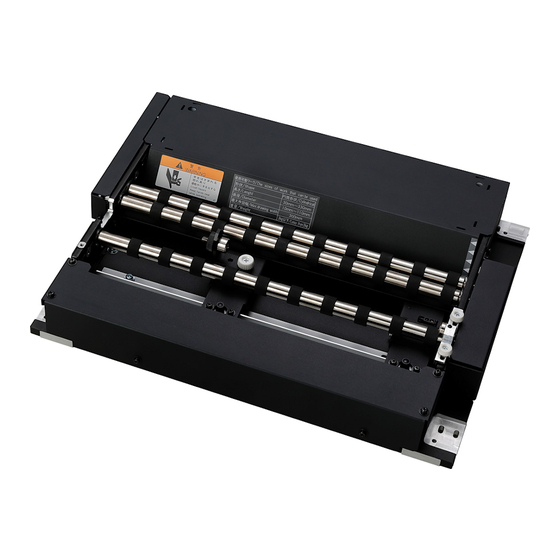
Front view of Kebab MkII system ........................................................ 9
Rear view of Kebab MkII system ........................................................ 9
Front view of Kebab MkII L system ................................................... 10
Rear view of Kebab MkII L system ................................................... 10
Usable works ...................................................................................11
Installation of Kebab MkII system .................................................12
Attach Kebab MkII/Kebab MkII L system ......................................... 12
Attach Kebab MkII system on UJF-3042MkIIseries .......................... 12
Remove the Kebab MkII system from UJF-3042MkIIseries ............. 16
Attach Kebab MkII L system on UJF-6042MkIIseries ....................... 19
Remove the Kebab MkII L system from UJF-6042MkIIseries .......... 23
Attach Kebab MkII L system on UJF-7151 plus series ..................... 26
Set a work ........................................................................................31
Set a work ......................................................................................... 31
ly used work ...................................................................................... 32
Use the work holder .......................................................................33
Remove the work holder ................................................................36
Use the origin mark detection .......................................................37
Set the origin mark detection ............................................................ 37
Use the origin mark ........................................................................... 38
When not using the Origin mark sensor ........................................... 39
Set the start position of drawing ...................................................41
Create data to be drawn .................................................................42
Measure the work size ...................................................................... 42
Test drawing ....................................................................................43
Enable Kebab printing ....................................................................44
Drawing an image from source data .............................................45
Starting the drawing operation .......................................................... 45
Interruption of drawing ...................................................................... 47
Maintenance ....................................................................................52
Cleaning the roller shafts .................................................................. 52
Cleaning the Origin mark sensor ...................................................... 53
Specifications .................................................................................54
MIMAKI ENGINEERING CO., LTD.
https://mimaki.com/
D203140-20
Advertisement
Table of Contents

Related Manuals for MIMAKI Kebab MKII


Summary of Contents for MIMAKI Kebab MKII
-
Page 1: Table Of Contents
Remove the Kebab MkII L system from UJF-6042MkIIseries ..23 Attach Kebab MkII L system on UJF-7151 plus series ..... 26 Remove the Kebab MkII L system from UJF-7151 plus series ..29 Set a work ..................31 Set a work ..................31 Attention when using a work of the different diameter from the previous- ly used work .................. -
Page 2: Foreword
Fully read this manual and make use of it in drawing to suit the customer’s needs. • Kebab MkII is an option of UJF-3042 MkIIseries and Kebab MkII L is an option of UJF-6042 MkIIseries and UJF-7151 Plus series. Fully read the instruction manual of printers together with this manual. -
Page 3: For Safe Operation
For safe operation For safe operation Symbols Symbols are used in this Operation Manual for safe operation and for prevention of damage to the machine. The indicated sign is different depending on the content of caution. Symbols and their meanings are given below. Please follow these instructions as you read this manual. Contents Failure to observe the instructions given with this symbol can result in death or serious injuries to personnel. - Page 4 For safe operation WARNING • Be sure to setup the appropriate air-moving system in case of using this machine in a closed room or a room with bad ventilation. Cautions for constructing exhaust outlet Please observe the following cautions to avoid breakdown of this machine. (1) The opening area of the exhaust outlet requires more than half of the duct entrance area.
- Page 5 For safe operation WARNING Power supply and voltage • Use this machine with indicated power specifications. Be sure to connect the power cable plug to the grounded outlet, or it may cause fire or electric shock. • Never look at the LED UV being lit with your naked eyes, or it may cause pain in your eyes or visual impairment. Be sure to wear safety glasses.
- Page 6 For safe operation Precautions for use CAUTION Protection against dust Periodic exchange parts • It is strongly recommended to use the machine in • There are some parts which must be periodically a room that is not dusty. replaced. Contract with distributors or dealers for Set the Refresh level 2 or 3 when in bad maintenance.
- Page 7 Mimaki. We would take no responsibility for any with alcohol. (Do not use alcohol for cleaning the troubles caused through the use of a UV devices exterior cover, or the paint will peel off.)
- Page 8 Position of the warning label Warning labels are adhered on Kebab MkII system/Kebab MkII L system. Be sure to fully understand the warnings given on the labels. In the case where any of the warning label has become so soiled that the warning message is illegible or has come off, purchase a new one from your local distributor or our office.
-
Page 9: Configuration And Function
Work holder Attaching hole Curbs the horizontal shifting of the work during rotation. Hole to attach Kebab MkII system into. You can use it for a work with a large diameter. It is also on the opposite side. Remove it when using a work with a small diameter. -
Page 10: Front View Of Kebab Mkii L System
Configuration and Function Front view of Kebab MkII L system Roller shaft Test drawing area Shaft to rotate the work When you install Kebab MkII L sys- putting work tem on absorbing table, you can between two on either of perform test drawing in this area. -
Page 11: Usable Works
Usable works Usable works Kebab MkII system Kebab MkII L system Shape Cylinder Maximum 300 mm 600 mm Length Minimum 30 mm 30 mm Maximum 110 mm 110 mm Diameter Minimum 10 mm 10 mm Max. printing width 300 mm 600 mm Small diameter : no more than 1.5 kg,... -
Page 12: Installation Of Kebab Mkii System
Kebab MkII L UJF-7151 plus, UJF-7151plusII Attach Kebab MkII system on UJF-3042MkIIseries Attach Kebab MkII system to UJF-3042MkIIseries matching its position with the diameter of the work drawn by the UJF-3042MkII. Turn OFF the main power of the printer main unit. - Page 13 “END [ent]” is displayed on the screen. Do not press the ENTER key until the work up to the Step 15 has been completed. If you press the ENTER ENTER key before the replacing work has been completed, printer starts Kebab MkII system automatic recognition operation.
- Page 14 (2) Attach the K positioner BKT_R in the left front corner of K positioner BKT_R the table using a provided plastic knob screw. (3) Attach the cable BKT in the back of table. Cable BKT (4) Place the Kebab MkII system on the table.
- Page 15 Direction to push to push • Check that there is no gap between Kebab MkII system and the table. • If there is gap, perform the procedures below: Lightly push Kebab MkII system into from above. Check that there is no dust etc. on the UJF-3042MkIIseries table.
-
Page 16: Remove The Kebab Mkii System From Ujf-3042Mkiiseries
When you draw the work with different diameter from the one you drew until then, it may be required to remove Kebab MkII system once and reattach it on the table depending on the diameter. When removing Kebab MkII system, follow the procedures below: Turn OFF the main power of the printer main unit. - Page 17 Installation of Kebab MkII system Remove the cable BKT. Cable BKT Remove the table by lifting up. • Lift the table vertically by holding its both edges. Depending on a purpose, use the sus- taining shaft of the number shown in the table.
- Page 18 Installation of Kebab MkII system Attach the table that was removed. Remove the K positioner BKT_R (x2) at the both front edges of table. K positioner BKT_R K positioner BKT_R Close the front cover. Turn the power of printer ON.
-
Page 19: Attach Kebab Mkii L System On Ujf-6042Mkiiseries
Installation of Kebab MkII system Attach Kebab MkII L system on UJF-6042MkIIseries Attach Kebab MkII L system to UJF-6042MkIIseries matching its position with the diameter of the work drawn by the UJF-6042MkIIseries. Turn OFF the main power of the printer main unit. - Page 20 Installation of Kebab MkII system Remove the connector panel K shown at the center of printer. Attach the table that was removed. Put the cable under the table into the printer main unit. Turn ON the main power and the power of printer.
- Page 21 Step 17 has been completed. If you press the ENTER ENTER key before the replacing work has been completed, printer starts Kebab MkII L system automatic recognition operation. Attach the Kebab MkII L system.
- Page 22 Direction to push to push • Check that there is no gap between Kebab MkII L system and the table. • If there is gap, perform the procedures below: Lightly push Kebab MkII L system into from above. Check that there is no dust etc. on the UJF-6042MkIIseries table.
-
Page 23: Remove The Kebab Mkii L System From Ujf-6042Mkiiseries
When you draw the work with different diameter from the one you drew until then, it may be required to remove Kebab MkII L system once and reattach it on the table depending on the diameter. When removing Kebab MkII L system, follow the procedures below: Turn OFF the main power of the printer main unit. - Page 24 (1) Change the work to the one of diameter more than 10 mm and less than 65 mm. 1 pc (2) Change the work to the one of diameter more than 65 mm and less than 110 mm. 0 pc (3) Remove Kebab MkII L system. 2 pc...
- Page 25 Installation of Kebab MkII system Attach the connector panel K in the cen- ter of printer. Attach the table that was removed. Put the cable under the table into the printer main unit. Remove the K positioner BKT_R (x2) at K positioner BKT_R the both front edges of table.
-
Page 26: Attach Kebab Mkii L System On Ujf-7151 Plus Series
Installation of Kebab MkII system Attach Kebab MkII L system on UJF-7151 plus series Attach Kebab MkII L system to UJF-7151 plus series matching its position with the diameter of the work drawn by the UJF-7151 plus series. Press the key in the local mode. - Page 27 Direction to push • Check that there is no gap between Kebab MkII L system and the table. • If there is gap, perform the procedures below: Lightly push Kebab MkII L system into from above. Check that there is no dust etc. on the UJF-7151 plus series table.
- Page 28 Press the key. ENTER S E T O P T I O N J I G J i g : K e b a b M k II • Printer performs Kebab MkII L system automatic recognition operation.
-
Page 29: Remove The Kebab Mkii L System From Ujf-7151 Plus Series
Step 6 has been completed. If you press the ENTER key before the replacing work has been completed, printer starts Kebab MkII L ENTER system automatic recognition operation. Remove the option relay cable from the printer main unit. - Page 30 K positioner BKT_R the right front of table. Press the key. ENTER S E T O P T I O N J I G J i g : N O N E • Printer performs Kebab MkII L system automatic recognition operation.
-
Page 31: Set A Work
Set a work Set a work Set a work Set the work on the jig. For Kebab MkII system/Kebab MkII L system, you can set several works of same diameter at the same time. Press the key in the local mode. FUNC1... -
Page 32: Attention When Using A Work Of The Different Diameter From The Previously Used Work
When using Kebab MkII system/Kebab MkII L system with UJF-3042 MkII/UJF-6042 MkII, if the using work is changed as below, it is necessary to once remove Kebab MkII system/Kebab MkII L system and attach again after adjusting the number of table sustaining shaft. -
Page 33: Use The Work Holder
Use the work holder Use the work holder The work holder can curb the horizontal shifting of the work during rotation and reduce the misalignment of drawing that happens while drawing several times. • You can use the work holder for the work with a large diameter. •... - Page 34 Use the work holder Tighten the screws (2 pieces) retaining the right work holder. Screw Put the ball part of the right work holder and the work together. Place the left work holder close to the work. • Place the work and left work holder several centimeters away from each other to adjust the left work holder later.
- Page 35 Use the work holder Tighten the screw of the left work holder. Screw...
-
Page 36: Remove The Work Holder
Remove the work holder Remove the work holder When drawing the work with a small diameter, remove the work holder to avoid it from colliding with the print head or slider. Remove the right work holder. • Loosen and remove the screws retaining the right work holder. Screw Remove the left work holder. -
Page 37: Use The Origin Mark Detection
Use the origin mark detection Use the origin mark detection When you use the origin mark detection, the origin mark attached to the work for each drawing is detected. You can reduce the misalignment of drawing in the rotation direction of the work as the starting point of drawing is aligned. To use the origin mark detection function, you need to make the setting on the printer in the following procedure. -
Page 38: Use The Origin Mark
Use the origin mark detection Use the origin mark Attach the origin mark on the work. • Use the tape with a width of 12 mm or longer and 25 mm or shorter or a length of 15 mm as the origin mark, and attach it to the work. -
Page 39: When Not Using The Origin Mark Sensor
Use the origin mark detection Align the positions of the origin mark of the work and the origin mark sensor. origin mark sensor Tighten the screws and fix the origin mark sensor. • You can check the origin mark sensor and origin point mark by making settings for the work or Kebab. -
Page 40: Responding To "Error 524 Work Orign Mark
Use the origin mark detection Responding to “ERROR 524 WORK ORIGN MARK” The “ERROR 524 WORK ORIGN MARK” occurs when the Origin mark could not be detected due to an abnormality occurring during Origin mark detection operations. Follow the procedures described in the table below to resolve the problem. If no improvement is seen after respond- ing to the problem, please contact the distributor or one of our sales offices. -
Page 41: Set The Start Position Of Drawing
> Set]. • The [Kebab Origin Set] menu is displayed only when installing the Kebab MkII (MkII L) system. • Enter the diameter of the work before selecting the menu as the table height differs depending on the diame- ter.( P.31) -
Page 42: Create Data To Be Drawn
Create data to be drawn Create data to be drawn Create data to be drawn on the work. • Create data to be drawn in the format below: PS, EPS, TIFF, JPEG, BMP and PDF1.4 • Prepare the development work data for drawing. •... -
Page 43: Test Drawing
Set the media for test drawing at Attach the media with a tape or the rear of Kebab MkII system/ something similar. Kebab MkII L system. • Attach the media with a tape or something similar. -
Page 44: Enable Kebab Printing
Enable Kebab printing Enable Kebab printing To draw using Kebab MkII/Kebab MkII L, you need to enable the Kebab printing function in RasterLink6. Select the [Enviroments] - [Printer Management...] menu. • “Printer Management” dialogue is displayed. Click Click the printer to use, and then click [Function icon]. -
Page 45: Drawing An Image From Source Data
Drawing an image from source data Drawing an image from source data • When you draw the work with a light mass or unevenness, the data may not be drawn accurately as it may slide due to the low friction of the work and rollers and so on. We recommend that you test draw with a sample work before drawing the actual work. - Page 46 Drawing an image from source data Click (Kebab Jig Print) icon. Click Check “Kebab Edit”. Check Click (Exection) icon. • The [Execution] menu is displayed. • Select [RIP and Print] or [Immediate Print], and click [Start]. Click Select Click...
-
Page 47: Interruption Of Drawing
Drawing an image from source data Transmit data to be drawn from the computer. • Drawing conditions are displayed. • As for the data transmission method, see the operation manual of the output software. [ UJF-3042MkIIseries/6042MkIIseries ] [ UJF-7151 plus series ] Resolution Resolution 6 0 0 x 6 0 0... - Page 48 Drawing an image from source data Use the job for adjusting the print size (Create Circumference measure Job), and check the actual print size. If it is difficult to know the print size with the actual print data, use the job for adjusting the print size (Create Circum- ference measure Job) instead.
- Page 49 Drawing an image from source data Set the work diameter and the width and color of the lines to print. Input the diameter of work. Input the scale length. Input the line width. (The thickness of the line is displayed in right side by inch.) Select the color and density.
- Page 50 Drawing an image from source data Check the drawing result. • When you draw Create Circumference measure Job, scales are printed for the print start position (0.0 mm) as well as the end position. • The pitch of the scales for the print end position is 1 mm. The circumference calculated based on the diameter of the work.
- Page 51 Drawing an image from source data To draw the data that perfectly fits the drawing area of the work If the drawn images are overlapped or have a gap between each other when using the sample work, try the following so that the images perfectly fit in the work size.
-
Page 52: Maintenance
• Make sure to put on goggles and gloves before cleaning. (Use the goggles and gloves that come as accessories with printer). • Make sure that the cleaning liquid does not come into contact with your skin. • Remove the Kebab MkII system from the printer body before cleaning. • Glove • Goggles •... -
Page 53: Cleaning The Origin Mark Sensor
Maintenance Press down with a paper Wipe away the cleaning liquid attached to the roller shaft with a paper towel. • Gently press a paper towel on to the roller shaft and slowly rotate the roller shaft with your fingers. •... -
Page 54: Specifications
Specifications Specifications Specifications Item Kebab MkII system Kebab MkII L system UJF-3042MkII, UJF-3042MkIIe EX, UJF-6042MkII, UJF-6042MkII e, Supported printer UJF-3042MkIIe, UJF-3042MkIIe EX UJF-7151plus, UJF-7151plusII Resolution Drawing mode Complies with the supported printers Usable inks Shape Cylindrical work Usable Length Over 30 mm, under 300 mm... - Page 55 D203140-20-15042022...
- Page 56 © 2016 MIMAKI ENGINEERING CO., LTD.
Need help?
Do you have a question about the Kebab MKII and is the answer not in the manual?
Questions and answers