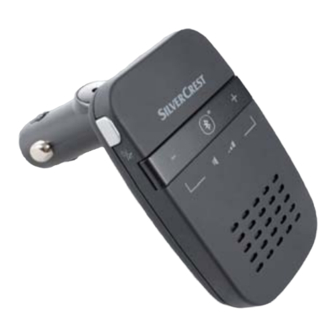
Silvercrest SBTF 10 B2 Operating Instructions Manual
Hide thumbs
Also See for SBTF 10 B2:
- Operating instructions manual (75 pages) ,
- Operating instructions manual (39 pages) ,
- Operating instructions manual (49 pages)
Table of Contents
Advertisement
Available languages
Available languages
DISPOSITIVO MANOS LIBRES BLUETOOTH
VIVAVOCE BLUETOOTH
DISPOSITIVO MANOS
LIBRES BLUETOOTH
Instrucciones de uso
SISTEMA DE MÃOS-
LIVRES BLUETOOTH
Manual de instruções
BLUETOOTH
FREISPRECH
EINRICHTUNG
Bedienungsanleitung
IAN 78534
®
®
®
-
®
SBTF 10 B2
VIVAVOCE BLUETOOTH
Istruzioni per l'uso
BLUETOOTH
HANDS-FREE KIT
Operating instructions
®
®
®
5
Advertisement
Chapters
Table of Contents

Subscribe to Our Youtube Channel
Related Manuals for Silvercrest SBTF 10 B2


Summary of Contents for Silvercrest SBTF 10 B2
- Page 1 ® DISPOSITIVO MANOS LIBRES BLUETOOTH ® VIVAVOCE BLUETOOTH SBTF 10 B2 ® DISPOSITIVO MANOS VIVAVOCE BLUETOOTH ® LIBRES BLUETOOTH Istruzioni per l’uso Instrucciones de uso ® SISTEMA DE MÃOS- BLUETOOTH ® LIVRES BLUETOOTH HANDS-FREE KIT Manual de instruções Operating instructions ®...
- Page 2 Antes de empezar a leer abra la página que contiene las imágenes y, en seguida, familiarícese con todas las funciones del dispositivo. Prima di leggere aprire la pagina con le immagini e prendere confi denza con le diverse funzioni dell’apparecchio. Antes de começar a ler abra na página com as imagens e, de seguida, familiarize-se com todas as funções do aparelho.
-
Page 4: Table Of Contents
Importador ........14 Declaración de conformidad EU ....15 SBTF 10 B2... -
Page 5: Indicaciones De Seguridad
¡Durante el manejo y la consulta del dispositivo manos libres no deje de prestar atención a la carretera! ● ¡Antes de empezar a conducir familiarícese con el funcionamiento y practique el manejo seguro del dispositivo manos libres! SBTF 10 B2... - Page 6 ABS electrónico, el regulador electrónico de velocidad y el sistema del airbag. Para recibir más información sobre su automóvil o los posibles accesorios, póngase en con- tacto con fabricante correspondiente o su representante. SBTF 10 B2...
-
Page 7: Uso Conforme A Lo Proyectado
Uso conforme a lo proyectado El dispositivo manos libres Bluetooth SBTF 10 B2 ha sido diseñado para su uso en el automóvil, con una tensión a bordo de 12-24 V. Para realizar las funciones de llamada, ® el dispositivo manos libres utiliza la radiotécnica Bluetooth y un procesador digital de señales (DSP). -
Page 8: Volumen De Suministro
/ 1 A Fusible: F2AL / 250 V Medidas (A x F x A): 15,7 x 5,3 x 2,3 cm Peso: 67 g Temperatura de servicio: +15° de hasta +40°C Humedad: 5 de hasta 75% (sin condensación) SBTF 10 B2... -
Page 9: Elementos De Mando
En automóviles en los que el mechero o bien la base de enchufe de a bordo funcione también sin necesidad de conectar el contacto: ● Utilice el dispositivo manos libres sólo con el motor en- cendido. De otro modo, a la larga podría descargarse la batería del vehículo. SBTF 10 B2... -
Page 10: Conexión Y Desconexión Del Dispositivo Manos Libres
Ajuste el teléfono móvil para que busque aparatos con ® Bluetooth . Encontrará una descripción detallada al respecto en las instrucciones de uso de su teléfono móvil. ● Asegúrese de que el dispositivo manos libres está correctamente colocado y de que está desconectado. SBTF 10 B2... - Page 11 Mientras que no se realice el LED de indicación de estado 6 parpadea cada 3 segundos dos veces. Para más información con- sulte las instrucciones de uso de su teléfono móvil. SBTF 10 B2...
-
Page 12: Emparejar El Dispositivo Manos Libres Con Varios Teléfonos
Si desea establecer la conexión del dispositivo de manos libres con el teléfono móvil utilizado como ultimo proceda como sigue: ● ® Asegúrese de que el Bluetooth está activado en el teléfono móvil y conecte el dispositivo manos libres. SBTF 10 B2... -
Page 13: Utilizar El Dispositivo Manos Libres
Si está desconectada la señal de llamada en su teléfono móvil, se emitirá de todos modos un tono de llamada a través del dispositivo de manos libres. SBTF 10 B2... -
Page 14: Carga De Dispositivos De 5 V
Conecte el aparato a cargar con la conexión USB 4 del dispositivo de manos libres. El dispositivo obtiene ahora la alimentación de corriente del dispositivo de manos libres. Si el dispositivo dispone de una indica- ción de control de carga, indicará que el dispositivo está cargando. SBTF 10 B2... -
Page 15: Eliminación De Fallos
No utilice productos químicos agresivos, disolventes ni productos de limpieza fuertes para limpiar el aparato. Podría dañar la superfi cie de la carcasa. ● Limpie la superfi cie de la carcasa con un trapo ligera- mente humedecido. SBTF 10 B2... -
Page 16: Evacuación
Esta garantía no reduce en forma alguna sus derechos legales. Por el mero hecho de hacer uso de la garantía no implica la prolongación del período de válidez de la garantía. Ello rige también para piezas sustituidas y reparadas. SBTF 10 B2... -
Page 17: Importador
Servicio España Tel.: 902 59 99 22 (0,08 EUR/Min. + 0,11 EUR/llamada (tarifa normal)) (0,05 EUR/Min. + 0,11 EUR/llamada (tarifa reducida)) E-Mail: kompernass@lidl.es IAN 78534 Importador KOMPERNASS GMBH BURGSTRASSE 21 44867 BOCHUM, GERMANY www.kompernass.com SBTF 10 B2... -
Page 18: Declaración De Conformidad Eu
Bochum, declaramos que el producto de dispositivo ® manos libres Bluetooth SBTF 10 B2 ha sido construido conforme a los requisitos básicos y demás normativas relevantes según la directiva de vehículos 2004/104/ EC, de la directiva R&TTE 99/5/EC, de la directiva de baja tensión 2006/95/EC y de la directiva RoHS... - Page 19 SBTF 10 B2...
- Page 20 Importatore ........30 Declaración de conformidad EU ....30 SBTF 10 B2...
-
Page 21: Avvertenze Di Sicurezza
● Installare il dispositivo vivavoce nel veicolo in modo da non compromettere la visuale e non installare l‘apparecchio in una zona di possibile impatto della cellula passeggero o nell‘area di azione dell‘airbag. SBTF 10 B2... -
Page 22: Uso Conforme
Uso conforme ® Il Vivavoce Bluetooth SBTF 10 B2 è stato previsto per l’uso in veicoli con tensione di bordo da 12-24 V. Il dispositivo ® vivavoce utilizza la tecnologia Bluetooth nonché un pro- cessore di segnali digitale (DSP), per eseguire le funzioni di chiamata. -
Page 23: Introduzione
HSP (Headset-Profi le) consente le funzioni standard come la trasmissione della voce, la ricezione e il rifi uto delle chiamate. HFP (Handsfree-Profi le) consente le funzioni vivavoce di un telefono cellulare, ad es. con l’aiuto di comandi vocali. SBTF 10 B2... -
Page 24: Volume Della Fornitura
+15° a +40°C Umidità: da 5 a 75% (nessuna condensa) Elementi di comando 1 Connettore da 12 V per auto 2 Microfono 3 +/- Tasti 4 Connessione USB 5 Altoparlante 6 Spia di stato LED 7 Tasto multifunzione SBTF 10 B2... -
Page 25: Installazione Del Dispositivo Vivavoce Nel Veicolo
In caso contrario, la batteria del veicolo si può scaricare dopo un periodo di tempo prolungato. Avvertenza: se non si utilizza il dispositivo vivavoce, rimuoverlo dalla presa dell’accendisigari del veicolo. Conservare l’appa- recchio in un luogo asciutto, esente da polvere e protetto dall’irradiazione solare diretta. SBTF 10 B2... -
Page 26: Accensione E Spegnimento Del Dispositivo Vivavoce
7 per circa 3 secondi. Si udrà un seg- nale acustico prolungato e basso, e la spia di stato LED 6 si spegnerà. ● Collocare il dispositivo vivavoce e il cellulare a distan- za non superiore a 1 metro. SBTF 10 B2... -
Page 27: Accoppiamento Del Dispositivo Vivavoce Con Vari Cellulari
Il dispositivo vivavoce può essere accoppiato con un mas- simo di otto telefoni cellulari compatibili. Esso può tuttavia collegarsi solo a un cellulare per volta. Se si accoppia un altro cellulare al dispositivo vivavoce, le informazioni di accoppiamento del cellulare accoppiato per primo verranno cancellate. SBTF 10 B2... -
Page 28: Disconnessione
Non appena si è connesso il dispositivo vivavoce con il cellulare preceden- temente accoppiato, risuonerà un breve segnale acustico acuto a conferma dell’avvenuta connessione. Per ulteriori informazioni sull’accoppiamento automatico, consultare il manuale di istruzioni del proprio cellulare. SBTF 10 B2... -
Page 29: Uso Del Dispositivo Vivavoce
● Premere una volta brevemente il tasto multifunzione 7, per accettare la chiamata. ● Premere una volta brevemente il tasto multifunzione 7, per terminare la chiamata. La chiamata può essere accettata o terminata anche tramite il cellulare. SBTF 10 B2... -
Page 30: Carica Degli Apparecchi Da 5 V
Se non si riesce a collegare il dispositivo vivavoce al cellulare compatibile, procedere come segue: ● Assicurarsi che nel telefono cellulare sia attivata la ® funzione Bluetooth ● Assicurarsi che il dispositivo vivavoce sia stato connes- so, acceso e alimentato correttamente. SBTF 10 B2... -
Page 31: Pulizia E Cura
Smaltire l’apparecchio attraverso un’azienda di smal- timento autorizzata o attraverso l’ente di smaltimento comunale. Rispettare le prescrizioni attualmente in vigore. In caso di dubbi mettersi in contatto con l’ente di smalti- mento competente. Smaltire tutti i materiali dell’imballaggio in modo ecologicamente conforme. SBTF 10 B2... -
Page 32: Garanzia & Assistenza
Le riparazioni eff ettuate dopo la scadenza del periodo di garanzia sono a pagamento. Assistenza Italia Tel.: 02 36003201 E-Mail: kompernass@lidl.it IAN 78534 Assistenza Malta Tel.: 80062230 E-Mail: kompernass@lidl.com.mt IAN 78534 SBTF 10 B2... -
Page 33: Importatore
Declaración de conformidad EU Kompernaß GmbH, Burgstraße 21, D-44867 Bochum, dichiara che il prodotto SBTF 10 B2 vivavoce Bluetooth® è conforme ai requisiti fondamentali e alle altre norme rilevanti della Direttiva 2004/104/EC, della Direttiva R&TTE 99/5/EC, della Direttiva bassa tensione 2006/95/EC e della Direttiva RoHS 2011/65/EU. - Page 34 Importador ........44 Declaração de conformidade EU ....45 SBTF 10 B2...
-
Page 35: Indicações De Segurança
● Não distraia a sua atenção no trânsito com a utiliza- ção e indicações do equipamento mãos-livres! ● Antes de iniciar uma viagem familiarize-se com as instruções e pratique a utilização segura do equipa- mento mãos-livres! SBTF 10 B2... - Page 36 ABS electróni- co, regulador de velocidade electrónico e sistemas de airbags. Para mais informações acerca do automóvel ou acessórios, entre em contacto com o respectivo fabricante ou o seu substituto. SBTF 10 B2...
-
Page 37: Utilização Correcta
Utilização correcta ® O sistema de mãos-livres Bluetooth SBTF 10 B2 está previsto para uma utilização em automóveis com uma tensão de 12-24 V. O equipamento mãos-livres utiliza téc- ® nicas via rádio Bluetooth assim como um processador de sinais digital (DSP) para executar funções de ligação. -
Page 38: Volume De Fornecimento
Ligação USB: / 1 A Fusível: F2AL / 250 V Dimensões (C x L x A): 15,7 x 5,3 x 2,3 cm Peso: 67 g Temperatura de serviço: +15° até +40°C Humidade: 5 a 75% (sem condensação) SBTF 10 B2... -
Page 39: Elementos De Comando
Em automóveis, em que o isqueiro ou a tomada de rede de bordo também funcionam com a ignição: ● Utilize o equipamento mãos-livres somente com o motor ligado. Caso contrário, a bateria do automóvel pode descarregar ao longo de um período de tempo prolongado. SBTF 10 B2... -
Page 40: Ligar E Desligar O Equipamento Mãos-Livres
Ajuste o telemóvel de forma a que este procure apare- ® lhos Bluetooth . Encontra uma descrição detalhada no manual de instruções do seu telemóvel. ● Certifi que-se de que o equipamento mãos-livres esteja correctamente colocado e desligado. SBTF 10 B2... - Page 41 Neste caso, o acoplamento tem de ser executado adicionalmente no telemóvel. Enquanto isto não for efectuado, o LED de indicação de estado pisca 6 duas vezes a cada 3 segundos. Encontra mais informações no manual de instruções do seu telemóvel. SBTF 10 B2...
-
Page 42: Com Vários Telemóveis
Restaurar a ligação Se pretender voltar a ligar o equipamento mãos-livres ao telemóvel utilizado pela última vez: ● ® Certifi que-se de que o Bluetooth está activado no telemóvel e ligue o equipamento mãos-livres. SBTF 10 B2... -
Page 43: Utilizar Equipamento Mãos-Livres
Se receber uma chamada, o LED de indicação de estado pisca 6 e ouve um sinal de chamada através do equipa- mento mãos-livres. Se o sinal de chamada do seu telemóvel estiver desligado, nesse caso, não é emitido um sinal de chamada através do equipamento mãos-livres. SBTF 10 B2... -
Page 44: Carregamento De Aparelhos De 5 V
Conecte o aparelho a carregar à ligação USB 4 do equipamento mãos-livres. O aparelho recebe agora a respectiva alimentação de tensão através do equi- pamento mãos-livres. Caso o aparelho disponha de um indicador de controlo de carga, este mostra que o aparelho está a ser carregado. SBTF 10 B2... -
Page 45: Resolução De Problemas
● Não utilize químicos agressivos, solventes de limpeza ou detergentes fortes para a limpeza do aparelho. Poderia danifi car a superfície do alojamento. ● Limpe a superfície da caixa com um pano ligeiramente humedecido. SBTF 10 B2... -
Page 46: Eliminação
ídas e reparadas. Danos ou falhas já presentes no mo- mento da compra devem ser comunicados imediatamente após a desembalagem, o mais tardar dois dias após a data de compra. As reparações realizadas após o fi nal do período de garantia comportam custos. SBTF 10 B2... -
Page 47: Importador
Assistência Portugal Tel.: 70778 0005 (0,12 EUR/Min.) E-Mail: kompernass@lidl.pt IAN 78534 Importador KOMPERNASS GMBH BURGSTRASSE 21 44867 BOCHUM, GERMANY www.kompernass.com SBTF 10 B2... -
Page 48: Declaração De Conformidade Eu
Declaração de conformidade EU Nós, Kompernaß GmbH, Burgstraße 21, D-44867 Bochum, declaramos que o produto SBTF 10 B2 Sistema de mãos-livres Bluetooth®, está de acordo com os requisitos essenciais e as outras normas relevantes da directiva de veículos a motor 2004/104/EC, com a directiva R&TTE (norma relativa aos equipamentos de rádio e equipamen-... - Page 49 SBTF 10 B2...
- Page 50 Importer ........59 Declaration of EU Conformity ....60 SBTF 10 B2...
-
Page 51: Safety Instructions
Install the hands-free appliance in the vehicle such that your view is not obstructed and that the appliance is not located in an impact zone in the passenger com- partment or in the infl ation area of airbags. SBTF 10 B2... -
Page 52: General Safety Instructions
Correct Usage ® The Bluetooth Hands-Free Kit SBTF 10 B2 is designed for use in vehicles with a voltage of 12-24 V. The hands- ® free phone system uses both Bluetooth radio technology aswell as a digital signal processor (DSP) to carry out telephone functions. -
Page 53: Introduction
The HFP (Handsfree-Profi l) makes possible the hands-free call functions of a mobile telephone, for example with the help of voice commands. SBTF 10 B2... -
Page 54: Items Supplied
Weight: 67 g Operational temperature: +15° to +40°C Humidity: 5 to 75% (no condensation) Operating Elements 1 Vehicle connector plug 2 Microphone 3 +/- Buttons 4 USB port 5 Loudspeakers 6 LED status indicator 7 Multi-function button SBTF 10 B2... -
Page 55: Installing The Hands-Free Appliance In A Vehicle
6 blinks twice every 3 seconds. Switching off : The appliance is in standby mode. ● Press and hold the multi-function button 7 for 3 seconds, until a long and deep signal tone is heard. The LED status display 6 extinguishes. SBTF 10 B2... -
Page 56: Coupling The Hands-Free Appliance With A Mobile Telephone
You will hear a long high signal tone and the LED status indicator 6 blinks every 3 seconds. ● You can now use the hands-free appliance. SBTF 10 B2... -
Page 57: Coupling The Hands-Free Appliance With Several Mobile Telephones
To use the hands-free appliance with a linked mobile phone that is not the last used mobile phone, the connection must be made via the ® Bluetooth menu of the mobile phone. SBTF 10 B2... -
Page 58: Separating The Connection
Use your mobile telephone in the usual way to make a call. ● For redialing of the last number called, shortly press the multi-function button 7 twice. ● For activation of voice dialling, shortly press the multi- function button 7 once. SBTF 10 B2... -
Page 59: Automatic Call Acceptance
+/- buttons 3. ● During a call, repeatedly press the + resp. - buttons 3 until the desired sound volume level is obtained. The attainment of the maximum sound volume level is indi- cated by a short signal tone. SBTF 10 B2... -
Page 60: Charging 5 V Devices
● NEVER submerse the appliance in water or other liquids! ● Do not permit liquids to permeate into the housing! ● Never open the housing of the appliance! There are no user-serviceable elements inside. SBTF 10 B2... -
Page 61: Disposal
The warranty is void in the case of abusive and improper handling, use of force and internal tampering not carried out by our authorized service branch. Your statutory rights are not restricted in any way by this warranty. SBTF 10 B2... -
Page 62: Importer
Repairs made after the expiration of the warranty period are subject to payment. Service Great Britain Tel.: 0871 5000 720 (£ 0.10/Min.) E-Mail: kompernass@lidl.co.uk IAN 78534 Service Malta Tel.: 80062230 E-Mail: kompernass@lidl.com.mt IAN 78534 Importer KOMPERNASS GMBH BURGSTRASSE 21 44867 BOCHUM, GERMANY www.kompernass.com SBTF 10 B2... -
Page 63: Declaration Of Eu Conformity
Declaration of EU Conformity We, Kompernaß GmbH, Burgstraße 21, D-44867 Bochum, ® hereby declare that the product SBTF 10 B2 Bluetooth hands-free Kit complies with the essential requirements and other relevant provisions of the Motor Vehicle Directive 2004/104/EC, the R&TTE Directive 99/5/EC, the Low Voltage Directive 2006/95/EC and the RoHS Directive 2011/65/EU. - Page 64 Importeur ........74 EU-Konformitätserklärung ..... . . 75 SBTF 10 B2...
-
Page 65: Sicherheitshinweise
● Lassen Sie sich durch die Bedienung und Anzeigen der Freisprecheinrichtung nicht in Ihrer Aufmerksamkeit für den Straßenverkehr ablenken! ● Machen Sie sich vor Fahrtantritt mit der Bedienung vertraut und üben Sie den sicheren Gebrauch der Freisprecheinrichtung! SBTF 10 B2... - Page 66 Systeme in Kraftfahrzeugen, z.B. elektronisches ABS, elektronischer Geschwindigkeitsregler und Airbagsysteme, beeinträchtigen. Für weitere Informa- tionen über Ihr Fahrzeug oder etwaiges Zubehör setzen Sie sich mit dem betreff enden Hersteller oder seiner Ver- tretung in Verbindung. SBTF 10 B2...
-
Page 67: Bestimmungsgemäßer Gebrauch
Bestimmungsgemäßer Gebrauch ® Die Bluetooth -Freisprecheinrichtung SBTF 10 B2 ist für die Verwendung in Fahrzeugen mit einer Bordspannung von 12-24 V vorgesehen. Die Freisprecheinrichtung verwendet ® Bluetooth Funktechnik sowie einen digitalen Signalpro- zessor (DSP), um Anruff unktionen auszuführen. Zusätzlich können über den USB-Anschluss mobile Geräte mit einer... -
Page 68: Lieferumfang
HSP und HFP Ausgangsspannung USB-Anschluss: / 1 A Sicherung: F2AL / 250 V Maße (L x B x H): 15,7 x 5,3 x 2,3 cm Gewicht: 67 g Betriebstemperatur: +15° bis +40°C Feuchtigkeit: 5 bis 75% (keine Kondensation) SBTF 10 B2... -
Page 69: Bedienelemente
Vorsicht! Bei Fahrzeugen, bei denen der Zigarettenanzünder bzw. die Bordnetz-Steckdosen auch bei ausgeschalteter Zün- dung funktionieren: ● Benutzen Sie die Freisprecheinrichtung nur bei einge- schaltetem Motor. Anderenfalls kann die Fahrzeugbat- terie über einen längeren Zeitraum entladen werden. SBTF 10 B2... -
Page 70: Ein- Und Ausschalten Der Freisprecheinrichtung
Stellen Sie das Mobiltelefon so ein, dass es nach ® Bluetooth -Geräten sucht. Eine detaillierte Beschrei- bung dazu fi nden Sie in der Bedienungsanleitung Ihres Mobiltelefons. ● Stellen Sie sicher, dass die Freisprecheinrichtung korrekt angebracht und ausgeschaltet ist. SBTF 10 B2... - Page 71 In diesem Fall muss die Kopplung zusätzlich am Mobiltelefon durchgeführt werden. Solange dies nicht erfolgt ist, blinkt die LED-Zustands- anzeige 6 alle 3 Sekunden zweimal. Weitere Informationen fi nden Sie in der Bedienungsanleitung Ihres Mobiltelefons. SBTF 10 B2...
-
Page 72: Freisprecheinrichtung Mit Mehreren Mobiltelefonen Koppeln
-Menü löschen, um die Verbindung zu trennen. Wiederherstellen der Verbindung Wenn Sie die Freisprecheinrichtung erneut mit dem zuletzt verwendeten Mobiltelefon verbinden möchten: ● ® Stellen Sie sicher, dass Bluetooth im Mobiltelefon ak- tiviert ist und schalten Sie die Freisprecheinrichtung ein. SBTF 10 B2... -
Page 73: Freisprecheinrichtung Verwenden
Annehmen und Beenden eines Anrufs Wenn Sie einen Anruf erhalten, blinkt die LED-Zustands- anzeige 6 und Sie hören über die Freisprecheinrichtung einen Rufton. Wenn das Anrufsignal in Ihrem Mobiltele- fon ausgeschaltet ist, wird dennoch der Rufton über die Freisprecheinrichtung ausgegeben. SBTF 10 B2... -
Page 74: Laden Von 5 V-Geräten
Verbinden Sie das zu ladene Gerät mit dem USB-An- schluss 4 der Freisprecheinrichtung. Das Gerät erhält seine Stromversorgung nun von der Freisprecheinrich- tung. Wenn das Gerät über eine Ladekontrollanzeige verfügt, zeigt diese an, dass das Gerät geladen wird. SBTF 10 B2... -
Page 75: Fehlerbehebung
Bedienelemente darin. ● Verwenden Sie keine scharfen Chemikalien, Reinigungs- lösungen oder starke Reinigungsmittel zur Reinigung des Gerätes. Dies könnte die Gehäuseoberfl äche beschä- digen. ● Reinigen Sie die Gehäuseoberfl äche mit einem leicht angefeuchteten Tuch. SBTF 10 B2... -
Page 76: Entsorgen
Dies gilt auch für ersetzte und reparierte Teile. Eventuell schon beim Kauf vorhandene Schäden und Mängel müssen sofort nach dem Auspacken gemeldet werden, spätestens aber zwei Tage nach Kaufdatum. Nach Ablauf der Garantiezeit anfallende Reparaturen sind kostenpfl ichtig. SBTF 10 B2... -
Page 77: Importeur
IAN 78534 Service Österreich Tel.: 0820 201 222 (0,15 EUR/Min.) E-Mail: kompernass@lidl.at IAN 78534 Service Schweiz Tel.: 0842 665566 (0,08 CHF/Min., Mobilfunk max. 0,40 CHF/Min.) E-Mail: kompernass@lidl.ch IAN 78534 Importeur KOMPERNASS GMBH BURGSTRASSE 21 D-44867 BOCHUM www.kompernass.com SBTF 10 B2... -
Page 78: Eu-Konformitätserklärung
EU-Konformitätserklärung Wir, Kompernaß GmbH, Burgstraße 21, D-44867 Bochum, ® erklären, dass das Produkt SBTF 10 B2 Bluetooth -Frei- sprecheinrichtung den grundlegenden Anforderungen und den anderen relevanten Vorschriften der Kfz-Richt- linie 2004/104/EC, der R&TTE-Richtlinie 99/5/EC, der Niederspannungsrichtlinie 2006/95/EC und der RoHS-Richtlinie 2011/65/EU entspricht. - Page 79 KOMPERNASS GMBH Burgstraße 21 D-44867 Bochum www.kompernass.com Estado de las informaciones · Versione delle informazioni · Estado das informações · Last Information Update · Stand der Informationen: 08 / 2012 · Ident.-No.: SBTF10B2072012-3 IAN 78534...
Need help?
Do you have a question about the SBTF 10 B2 and is the answer not in the manual?
Questions and answers