Sign In
Upload
Manuals
Brands
Brother Manuals
Scanner
ADS-1250W
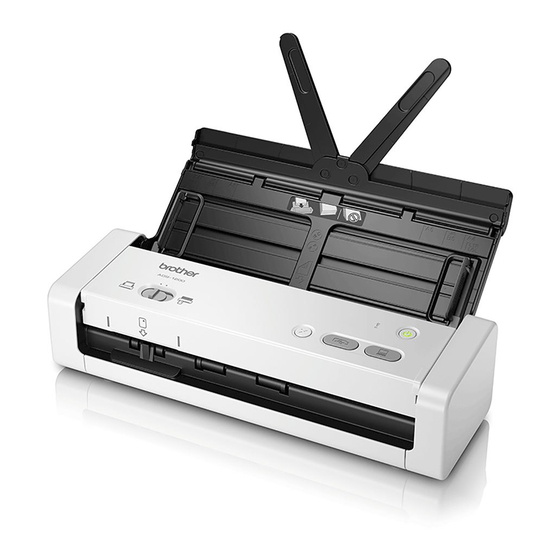
Brother ADS-1250W Manuals
Manuals and User Guides for Brother ADS-1250W. We have
4
Brother ADS-1250W manuals available for free PDF download: Online User's Manual, Quick Setup Manual
Brother ADS-1250W Online User's Manual (224 pages)
Brand:
Brother
| Category:
Scanner
| Size: 4 MB
Table of Contents
Table of Contents
2
Before You Use Your Brother Machine
5
Definitions of Notes
6
Related Information
6
Trademarks
7
Important Note
8
Introduction to Your Brother Machine
9
About this Machine
10
Set up Your Scanner
11
Control Panel Overview
12
Touchscreen LCD Overview
15
Home Screen
15
Settings Menu
17
USB Port and Cable Overview
19
Paper Handling
20
Document Specifications
21
Acceptable Documents
22
Unacceptable Documents
23
Area Not to be Perforated
24
Carrier Sheet Recommendations
25
Notes for Using Carrier Sheets
26
Load Documents
27
Load Standard Size Documents
28
Load Business Cards
30
Load a Plastic Card
31
Load Documents Longer than Standard Size
32
Load Non-Standard Size Documents
33
Load Receipts, Clippings, Photos, and Other Documents
35
Scan
37
Before Scanning
38
Scan Using Bus Power Mode
39
Scan Using the Scan Functions on Your Brother Machine
40
Save Scanned Documents on Your Computer
41
Press [Start]
41
Save Scanned Documents Using Scan to Workflow Function
42
Save Scanned Documents to a USB Flash Drive
43
Send Scanned Data to an Email Server
46
Use TX Verification Mail
47
Set up the Address Book
48
Register an Email Address Using Remote Setup
49
Register an Email Address Using Web Based Management
50
Scan to FTP
51
Scan to SFTP
55
Set up a Scan to SFTP Profile
56
Upload Scanned Data to an SFTP Server
58
Scan to Network
59
Set up a Scan to Network Profile
60
Upload Scanned Data to a Mapped Network Drive (CIFS) Server
62
Web Services for Scanning on Your Network (Windows 7, Windows 8 and Windows 10)
63
Use Web Services to Install Drivers Used for Scanning (Windows 7, Windows 8 and Windows 10)
64
Scan Using Web Services from the Brother Machine (Windows 7, Windows 8 and Windows 10)
65
Configure Scan Settings for Web Services
66
Scan Options Using the Touchscreen
67
Restrict Scan Functions from External Devices
68
Scan from Your Computer (Windows)
69
Scan Using Nuance ™ Paperport ™ 14 or Other Windows Applications
70
TWAIN Driver Settings (Windows)
72
Scan Using Windows Photo Gallery or Windows Fax and Scan
76
WIA Driver Settings (Windows)
77
Scan Using Nuance ™ Power PDF
79
Scan Using Brother Iprint&Scan (Windows)
80
Scan from Your Computer (Mac)
81
Scan Using Brother Iprint&Scan (Mac)
82
Scan Using TWAIN-Compliant Applications (Mac)
83
TWAIN Driver Settings (Mac)
84
Scan Using Apple Image Capture (ICA Driver)
86
Scan Using Apple Image Capture
87
ICA Driver Settings
88
Network
90
Supported Basic Network Features
91
Network Management Software and Utilities
92
Learn about Network Management Software and Utilities
93
Additional Methods of Configuring Your Brother Machine for a Wireless Network
94
Before Configuring Your Brother Machine for a Wireless Network
95
Configure Your Machine for a Wireless Network Using the One-Push Method of Wi-Fi Protected Setup ™ (WPS)
96
Configure Your Machine for a Wireless Network Using the PIN Method of Wi-Fi Protected Setup ™ (WPS)
97
Configure Your Machine for a Wireless Network Using the Machine's Control Panel Setup Wizard
99
Use Wi-Fi Direct
101
Scan from Your Mobile Device Using Wi-Fi Direct
102
Configure Your Wi-Fi Direct Network
103
Wi-Fi Direct Network Configuration Overview
104
Configure Your Wi-Fi Direct Network Using the One-Push Method
106
Configure Your Wi-Fi Direct Network Using the One-Push Method of Wi-Fi Protected Setup ™ (WPS)
107
Configure Your Wi-Fi Direct Network Using the PIN Method
108
Configure Your Wi-Fi Direct Network Using the PIN Method of Wi-Fi Protected Setup ™ (WPS)
109
Configure Your Wi-Fi Direct Network Manually
110
Use Wireless Direct
111
Scan from Your Mobile Device Using Wireless Direct
112
Configure Your Wireless Direct Network Manually
113
Advanced Network Features
114
Synchronize Time with the SNTP Server Using Web Based Management
115
Configure Date and Time Using Web Based Management
116
Configure the SNTP Protocol Using Web Based Management
118
Technical Information for Advanced Users
120
Wireless LAN Error Codes
121
Security
122
Lock the Machine Settings
123
Setting Lock Overview
124
Set or Change the Setting Lock Password
125
Turn Setting Lock on or off
126
Network Security Features
127
Secure Function Lock 3.0
128
Configure Secure Function Lock 3.0 Using Web Based Management
130
Manage Your Network Machine Securely Using SSL/TLS
132
Certificates and Web Based Management
133
Supported Security Certificate Features
134
Import and Export a CA Certificate
135
Manage Multiple Certificates
136
Create a Self-Signed Certificate
137
Install the Self-Signed Certificate for Windows Users with Administrator Rights
138
Import and Export the Self-Signed Certificate on Your Brother Machine
140
Import the Self-Signed Certificate
141
Export the Self-Signed Certificate
142
Send an Email Securely
143
Brother Iprint&Scan for Windows and Mac
145
Brother Iprint&Scan Overview
146
Configure Scan to Workflow Settings Using Brother Iprint&Scan
147
Troubleshooting
148
Error and Maintenance Messages
149
Error and Maintenance Indications
154
Service Call Indications
157
Document Jam
158
Card Jam
160
If You Are Having Difficulty with Your Machine
161
Scanning and Other Problems
162
Other Difficulties
166
Network Problems
167
If You Cannot Complete the Wireless Network Setup Configuration
168
Your Scanner Cannot be Detected on the Network During Installation
170
Your Brother Machine Cannot Scan over the Network
171
If You Want to Check that Your Network Devices Are Working Correctly
173
Check the Serial Number
174
Reset Your Brother Machine
176
Reset the Usage Counters
177
Routine Maintenance
178
Clean Your Brother Machine
179
Clean the Outside of the Machine
180
Clean the Scanner and Rollers
181
Clean the Sensors
184
Replace Supplies
185
Supplies
186
Check Supplies Replacement Cycle
187
Replace the Pick up Roller
189
Replace the Separation Pad
191
Pack and Ship Your Brother Machine
193
Machine Settings
195
Change Machine Settings from the Control Panel
196
In the Event of Power Failure (Memory Storage)
197
Change the General Settings from the Control Panel
198
Operation
199
Save Your Favorite Settings as a Shortcut
200
Add Shortcuts
201
Change or Delete Shortcuts
202
Change Machine Settings from Your Computer
203
Change Machine Settings Using Web Based Management
204
What Is Web Based Management
205
Access Web Based Management
206
Set a Login Password for Web Based Management
207
Change the Machine Settings Using Remote Setup
208
Remote Setup (Windows)
209
Set up the Brother Machine Using Remote Setup (Windows)
210
Change the General Settings Using Remote Setup
212
Remote Setup (Mac)
213
Set up the Brother Machine Using Remote Setup (Mac)
214
Appendix
217
Specifications
218
General Specifications
218
Document Specifications
219
Scanner Specifications
220
Interface Specifications
220
Enter Text on Your Brother Machine
223
Inserting Spaces
223
Making Corrections
223
Advertisement
Brother ADS-1250W Online User's Manual (218 pages)
Brand:
Brother
| Category:
Scanner
| Size: 4 MB
Table of Contents
Table of Contents
2
Before You Use Your Brother Machine
5
Definitions of Notes
6
Trademarks
7
Important Note
8
Introduction to Your Brother Machine
9
About this Machine
10
Set up Your Scanner
11
Control Panel Overview
12
Touchscreen LCD Overview
15
USB Port and Cable Overview
18
Paper Handling
19
Document Specifications
20
Acceptable Documents
21
Unacceptable Documents
22
Load Documents
24
Load Standard Size Documents
25
Load Business Cards
27
Load a Plastic Card
28
Load Documents Longer than Standard Size
29
Scan
30
Before Scanning
31
Scan Using Bus Power Mode
32
Scan Using the Scan Functions on Your Brother Machine
33
Save Scanned Documents on Your Computer
34
Save Scanned Documents Using Scan to Workflow Function
35
Save Scanned Documents to a USB Flash Drive
36
Send Scanned Data to an Email Server
39
Set up the Address Book
41
Scan to FTP
44
Scan to SFTP
48
Scan to Network
52
Web Services for Scanning on Your Network (Windows ® 7, Windows ® 8 and Windows ® 10)
56
Scan Options Using the Touchscreen
60
Restrict Scan Functions from External Devices
61
Scan from Your Computer (Windows ® )
62
Scan Using Nuance ™ Paperport ™ 14 or Other Windows ® Applications
63
Scan Using Windows ® Photo Gallery or Windows ® Fax and Scan
69
Scan Using Nuance ™ Power PDF
73
Scan Using Brother Iprint&Scan (Windows ® )
74
Scan from Your Computer (Mac)
75
Scan Using Brother Iprint&Scan (Mac)
76
Scan Using TWAIN-Compliant Applications (Mac)
77
Scan Using Apple Image Capture (ICA Driver)
80
Network
84
Supported Basic Network Features
85
Network Management Software and Utilities
86
Learn about Network Management Software and Utilities
87
Additional Methods of Configuring Your Brother Machine for a Wireless Network
88
Before Configuring Your Brother Machine for a Wireless Network
89
Configure Your Machine for a Wireless Network Using the One-Push Method of Wi-Fi Protected Setup ™ (WPS)
90
Configure Your Machine for a Wireless Network Using the PIN Method of Wi-Fi Protected Setup ™ (WPS)
91
Configure Your Machine for a Wireless Network Using the Machine's Control Panel Setup Wizard
93
Use Wi-Fi Direct
95
Use Wireless Direct
105
Advanced Network Features
108
Synchronize Time with the SNTP Server Using Web Based Management
109
Technical Information for Advanced Users
114
Wireless LAN Error Codes
115
Security
116
Lock the Machine Settings
117
Setting Lock Overview
118
Network Security Features
121
Secure Function Lock 3.0
122
Manage Your Network Machine Securely Using SSL/TLS
126
Send an Email Securely
137
Brother Iprint&Scan for Windows ® and Mac
139
Brother Iprint&Scan Overview
140
Configure Scan to Workflow Settings Using Brother Iprint&Scan
141
Troubleshooting
142
Error and Maintenance Messages
143
Error and Maintenance Indications
148
Service Call Indications
151
Document Jam
152
Card Jam
154
If You Are Having Difficulty with Your Machine
155
Scanning and Other Problems
156
Network Problems
161
Check the Serial Number
168
Reset Your Brother Machine
170
Reset the Usage Counters
171
Routine Maintenance
172
Clean Your Brother Machine
173
Clean the Outside of the Machine
174
Clean the Scanner and Rollers
175
Clean the Sensors
178
Replace Supplies
179
Supplies
180
Check Supplies Replacement Cycle
181
Replace the Pick up Roller
183
Replace the Separation Pad
185
Pack and Ship Your Brother Machine
187
Machine Settings
189
Change Machine Settings from the Control Panel
190
In the Event of Power Failure (Memory Storage)
191
Change the General Settings from the Control Panel
192
Save Your Favorite Settings as a Shortcut
194
Change Machine Settings from Your Computer
197
Change Machine Settings Using Web Based Management
198
Change the Machine Settings Using Remote Setup
202
Appendix
211
Specifications
212
Enter Text on Your Brother Machine
217
Brother ADS-1250W Online User's Manual (225 pages)
Brand:
Brother
| Category:
Scanner
| Size: 4 MB
Advertisement
Brother ADS-1250W Quick Setup Manual (10 pages)
Brand:
Brother
| Category:
Scanner
| Size: 2 MB
Table of Contents
Connect the Power Cord
1
Product Safety Guide
3
Symbols and Conventions Used in the Documentation
3
Compilation and Publication
3
Choosing a Location
3
Important Safety Instructions
7
Federal Communications Commission (FCC) Declaration of Conformity (USA Only)
8
LAN Connection (ADS-2700W Only)
8
Open Source Licensing Remarks
9
Advertisement
Related Products
Brother ADS-1200
Brother ADS-1600W
Brother ADS-1100W
Brother ADS-1500W
Brother ImageCenter ADS-1000w
Brother ADS-1700W
Brother ADS-1300
Brother ADS-1350W
Brother ADS-1190
Brother ADS-1700WUN1
Brother Categories
Sewing Machine
All in One Printer
Printer
Label Maker
Fax Machine
More Brother Manuals
Login
Sign In
OR
Sign in with Facebook
Sign in with Google
Upload manual
Upload from disk
Upload from URL