Sign In
Upload
Manuals
Brands
Brother Manuals
Cutter
891-Z05
Brother 891-Z05 Manuals
Manuals and User Guides for Brother 891-Z05. We have
3
Brother 891-Z05 manuals available for free PDF download: Operation Manual, Wireless Network Setup Manual
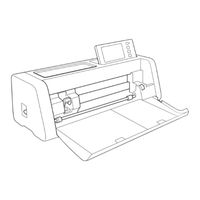
Brother 891-Z05 Operation Manual (111 pages)
Cutting Machine
Brand:
Brother
| Category:
Cutter
| Size: 7 MB
Table of Contents
Terms and Conditions
3
Terms of Use
3
Introduction
5
Important Notice
5
Important Safety Instructions
5
Symbols Used in this Document
5
Table of Contents
6
Features
8
Patterns ("Pattern" Mode)
8
Scanning ("Scan" Mode)
8
Transferring Data Using the Wireless Network Connection Function
9
Getting Started
10
Parts and Functions
10
Unit Descriptions - Front
10
Unit Descriptions - Rear
11
Unit Descriptions - Operation Panel
11
Included Accessories
11
Before Use
12
Removing the Packing Materials
12
Turning On/Off the Machine
12
Preparing for Feeding the Mat
13
Operation of LCD Panel
13
Machine Settings
14
Settings Screen
14
Auto Shutdown
16
Basic Operations
17
First Steps
17
Selecting the Mat Appropriate for the Material
17
Reference Table of Mat and Material Combinations
18
Attaching the Material to the Mat
20
Blade and Material Combination
27
Installing and Uninstalling the Holder
28
Test Cut (Trial Cut)
29
Pattern Cutting
33
Tutorial 1 - Cutting Patterns
33
Tutorial 2 - Cutting Advanced Patterns
36
Pattern Selection
42
Selecting a Single Pattern
42
Selecting Multiple Patterns
42
Advanced Operations
44
Cutting and Editing Functions
44
Pattern Editing Functions
44
Pattern Editing Functions - Multiple Patterns
45
Mat Layout Screen
45
Layout Editing Functions
46
Object Editing Screen
47
Undoing an Operation
48
Grouping/Ungrouping Patterns
48
Welding (Merging the Outlines of Multiple Patterns)
50
Aligning Patterns
51
Auto Layout Functions
53
Scanning a Background Image
54
Character Input Functions
55
Memory Functions
57
Saving
57
Retrieve Data
58
Retrieve from Canvasworkspace (Via a Wireless Network Connection)
59
Retrieve from Canvasworkspace (Using a USB Cable) (Compatible Only with Windows)
60
Importing Designs
61
Retrieving Embroidery Data for Cutting (Compatible Models Only)
62
Preparing .Phc or .Pes Files
62
Retrieving the Pattern to the Cutting Machine
62
Creating Appliqué Data
63
Creating Embroidering Line Data
63
Drawing Functions
66
Drawing
66
Cutting Around Drawings
67
Using Drawing Functions to Fill Patterns/Make Outlines Thicker
71
Scanning Functions
73
SCANNING for CUTTING (Direct Cut)
73
Tutorial 3 - Scanning and Cutting
73
Advanced Cutting Functions for "Direct Cut
77
CREATING CUTTING DATA (Scan to Cut Data)
79
Tutorial 4 - Creating Cutting Data
79
Adjusting Image Detection Levels
85
SCANNING IMAGES (Scan to USB)
87
Notes on Scanning
87
Tutorial 5 - Scanning to USB
87
Selecting the Area to be Saved
89
Transferring an Image to Canvasworkspace
89
Appendix
91
Consumables
91
Replacement Criteria
91
Replacing the Blade
91
Care and Maintenance
93
Cleaning
93
Cleaning the Scanner Glass
95
Adjusting the Screen
96
Adjusting the Scanning/Cutting Position
96
Adjusting the Position of the Feed Roller
98
Troubleshooting
99
Error Messages
103
Updating the Software
106
Automatic Update Function
106
Update Procedure Using USB Flash Drive
107
Update Procedure Using the Application (Canvasworkspace)
107
Optional Accessories
109
Product Specifications
109
Advertisement
Brother 891-Z05 Operation Manual (110 pages)
Brand:
Brother
| Category:
Cutter
| Size: 15 MB
Table of Contents
Terms of Use
2
Introduction
4
Important Notice
4
Important Safety Instructions
4
Symbols Used in this Document
4
Table of Contents
5
Features
7
Patterns ("Pattern" Mode)
7
Scanning ("Scan" Mode)
7
Transferring Data Using the Wireless Network Connection Function
8
1 Getting Started
9
Parts and Functions
9
Unit Descriptions - Front
9
Unit Descriptions - Rear
10
Unit Descriptions - Operation Panel
10
Included Accessories
10
Before Use
11
Removing the Packing Materials
11
Turning On/Off the Machine
11
Preparing for Feeding the Mat
12
Operation of LCD Panel
12
Machine Settings
13
Settings Screen
13
Auto Shutdown
15
2 Basic Operations
16
First Steps
16
Selecting the Mat Appropriate for the Material
16
Reference Table of Mat and Material Combinations
17
Attaching the Material to the Mat
19
Blade and Material Combination
26
Installing and Uninstalling the Holder
27
Test Cut (Trial Cut)
28
Pattern Cutting
32
Tutorial 1 - Cutting Patterns
32
Tutorial 2 - Cutting Advanced Patterns
35
Pattern Selection
41
Selecting a Single Pattern
41
Selecting Multiple Patterns
41
3 Advanced Operations
43
Cutting and Editing Functions
43
Pattern Editing Functions
43
Pattern Editing Functions - Multiple Patterns
44
Mat Layout Screen
44
Layout Editing Functions
45
Object Editing Screen
46
Undoing an Operation
47
Grouping/Ungrouping Patterns
47
Welding (Merging the Outlines of Multiple Patterns)
49
Aligning Patterns
50
Auto Layout Functions
52
Scanning a Background Image
53
Character Input Functions
54
Memory Functions
56
Saving
56
Retrieve Data
57
Retrieve from Canvasworkspace (Via a Wireless Network Connection)
58
Retrieve from Canvasworkspace (Using a USB Cable) (Compatible Only with Windows)
59
Importing Designs
60
Retrieving Embroidery Data for Cutting (Compatible Models Only)
61
Preparing .Phc or .Pes Files
61
Retrieving the Pattern to the Cutting Machine
61
Creating Appliqué Data
62
Creating Embroidering Line Data
62
Drawing Functions
65
Drawing
65
Cutting Around Drawings
66
Using Drawing Functions to Fill Patterns/Make Outlines Thicker
70
4 Scanning Functions
72
SCANNING for CUTTING (Direct Cut)
72
Tutorial 3 - Scanning and Cutting
72
Advanced Cutting Functions for "Direct Cut
76
CREATING CUTTING DATA (Scan to Cut Data)
78
Tutorial 4 - Creating Cutting Data
78
Adjusting Image Detection Levels
84
SCANNING IMAGES (Scan to USB)
86
Notes on Scanning
86
Tutorial 5 - Scanning to USB
86
Selecting the Area to be Saved
88
Transferring an Image to Canvasworkspace
88
5 Appendix
90
Consumables
90
Replacement Criteria
90
Replacing the Blade
90
Care and Maintenance
92
Cleaning
92
Cleaning the Scanner Glass
94
Adjusting the Screen
95
Adjusting the Scanning/Cutting Position
95
Adjusting the Position of the Feed Roller
97
Troubleshooting
98
Error Messages
102
Updating the Software
105
Automatic Update Function
105
Update Procedure Using USB Flash Drive
106
Update Procedure Using the Application (Canvasworkspace)
106
Optional Accessories
108
Brother 891-Z05 Wireless Network Setup Manual (17 pages)
Brand:
Brother
| Category:
Cutter
| Size: 1 MB
Table of Contents
Introduction
3
Transfer Data Using Wireless LAN
3
Table of Contents
4
Quick Wireless Network Setup Instructions
5
Connect Machine to a Wireless Network
8
Activate the Wireless Network
8
Set up the Wireless Network
8
Check the Wireless Network Setup/Status
11
Using the "Others" Menu
11
Register Machine under Canvasworkspace
12
Troubleshooting
15
How Can I Find the Wireless Security Information (Network Name (SSID) and Network Password)
15
Error Codes/Error Messages
15
Advertisement
Advertisement
Related Products
Brother 891-Z01
Brother 891-Z03
Brother 891-Z04
Brother 891-Z02
Brother 891-Z08
Brother 893-Z05
Brother 893-Z09
Brother 893-Z11
Brother 8910DW
Brother 8950DWT
Brother Categories
Sewing Machine
All in One Printer
Printer
Label Maker
Fax Machine
More Brother Manuals
Login
Sign In
OR
Sign in with Facebook
Sign in with Google
Upload manual
Upload from disk
Upload from URL