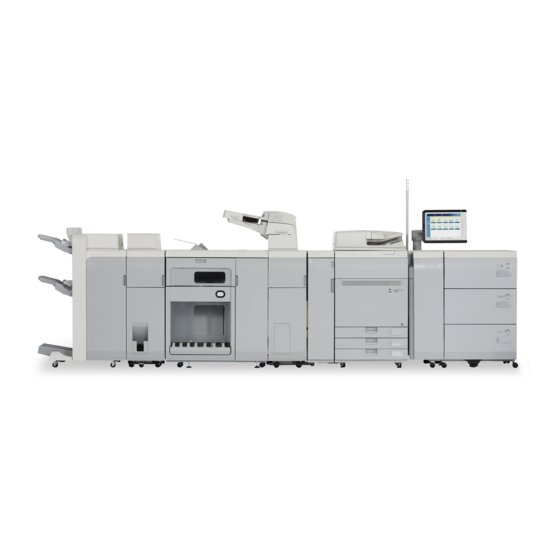
Canon ImagePress C800 Quick Start Manual
Hide thumbs
Also See for ImagePress C800:
- Operation manual (315 pages) ,
- Quick manual (312 pages) ,
- Troubleshooting manual (256 pages)

Related Manuals for Canon ImagePress C800


Summary of Contents for Canon ImagePress C800
- Page 1 Quick Guide Read this guide first. Please read this guide before operating this product. After you finish reading the guide, store it in a safe place for future reference.
-
Page 2: Paper Types
C800/C700/C60 Practical Features Auto Gradation Adjustment for Various Paper Types The Auto Adjust Gradation function adjusts the gradation, density, and color tone of images, and only requires you to scan the test page. This function can be used for various weights of paper so that a high quality print result can be obtained in different paper types. - Page 3 Easy Operation for Adjusting Image Position You can adjust the image positions easily with this machine. All you need is measuring marks on the test page and then entering the measured values on the touch panel display. After that, the machine will automatically adjust the image positions.
-
Page 4: Table Of Contents
Turning ON the Main Power ....... .19 Contacting Your Local Authorized Canon Dealer ... .34 Shutting Down the Machine . -
Page 5: Keys And Buttons Used In This Manual
[OK], [Add], [Cancel] Illustrations Used in This Manual Illustrations used in this manual are those displayed when the imagePRESS C800 has the following optional equipment attached to it: the Duplex Color Image Reader Unit-H1, Upright Control Panel-D1, and Output Tray-A1. -
Page 6: Important Safety Instructions
OFF the main power switch, and disconnect the power cord from the power outlet. Then, contact your local authorized Canon dealer. CAUTION Do not install the machine in unstable locations Avoid installing the machine at high altitudes of about 3,000 meters above sea level, or higher. -
Page 7: Provide Adequate Installation Space
Important Safety Instructions IMPORTANT Do not install the machine in the following locations It is recommended that the room be appropriately ventilated, sufficient to maintain a comfortable • A location subject to rapid changes in temperature working environment, in areas of machine operation. and humidity In addition, do not install this machine where it •... -
Page 8: Power Supply
▀ Power Supply Plug the machine into an outlet that is 208 V AC 20 A or greater. WARNING • Do not use power supplies with voltages other than • Do not connect or disconnect the power plug with those specified herein, as this may result in a fire or wet hands, as this may result in electrical shock. -
Page 9: Handling
Then, contact it may result in a fire or electrical shock. your local authorized Canon dealer. Continued use of • When moving the machine, always turn OFF the the machine in this condition may result in a fire or main power switch, disconnect the power plug from electrical shock. - Page 10 If you intend to move the machine over a long distance, contact your local authorized Canon dealer • Do not shake the machine or do not apply shock to beforehand. Do not attempt to move the machine the machine.
-
Page 11: Maintenance And Inspections
Important Safety Instructions ▀ Maintenance and Inspections Clean this machine regularly. The machine may not operate properly if dust accumulates. Make sure to read the followings when cleaning the machine. WARNING • When cleaning the machine, first turn OFF the main removed. -
Page 12: Consumables
▀ Consumables WARNING • If you accidentally spill or scatter toner, carefully • Do not burn or throw toner cartridges in open wipe up the loose toner with a damp, soft cloth and flames. Do not store toner cartridges in places avoid inhaling any toner dust. -
Page 13: Parts And Their Functions
Parts and Their Functions This section provides you with the names and functions of all the parts of the machine. The keys and display on the control panel are also described. Read this section to use the machine’s various functions smoothly. "Optional Products"... -
Page 14: Back View
▀ Back View LAN Port Breaker Use a LAN cable to connect the machine to a Detects excess current or leakage current. network. Test Button USB Port (2) Press this button to test the circuit breaker. Use the USB port to connect external hard disks and other devices to the machine. -
Page 15: Internal View
Parts and Their Functions ▀ Internal View Toner Cartridge Waste Toner Container This cartridge contains toner. Pull out this cartridge Waste toner accumulates in this container. Pull out when replacing it with a new one. this container when replacing it with a new one. Front Cover Left Cover on the Front Side Open this cover to clear a paper jam in the... -
Page 16: Control Panel (Upright Control Panel-D1)
Main Power Indicator When the Error indicator maintains a steady red Lights when the main power is turned ON. light, contact your local authorized Canon dealer. Edit Pen Settings/Registration key Use when operating the touch panel display, such Press to register and specify settings. - Page 17 Parts and Their Functions Reset key Status Monitor/Cancel key Press to restore the standard settings of the Press to check the status of jobs or to cancel print machine. jobs. Also, press to check status of the machine, such as checking the amount of paper remaining. ID (Log In/Out) key Quick Menu key Press to log in/out when a login service such as...
-
Page 18: Status Monitor/Cancel Screen
Status Monitor/Cancel Screen If you press , the Status Monitor/Cancel screen appears, and you can confirm the status of jobs and consumables on this screen. By obtaining information, such as the completion time of the current job or the amount of paper remaining, you can perform smooth printing operation without interruption. -
Page 19: How To Turn On The Main Power
How to Turn ON the Main Power This section explains how to turn ON the main power. ▀ Turning ON the Main Power Make sure that the power plug is firmly inserted into the power outlet, and the breaker is turned ON. Open the main power switch cover. -
Page 20: Loading Paper
Loading Paper Load paper by following the procedure below. In this section, A4 custom size paper is used as an example. Confirm the paper types that can be loaded. Confirmation "Available Paper," on p. 20 Register all paper types you are going to use. Preparation "Registering Paper Types in the Paper Database,"... -
Page 21: Paper Drawer
Loading Paper Paper Drawer Paper Capacity Upper, middle, and lower decks: 550 sheets (20 lb bond (80 g/m )) each Paper Type Thin 1 to 2, Plain 1 to 2, Heavy 1 to 4, Color, Recycled, Pre-Punched, Transparency, Clear Film, Tab, Bond, Letterhead, Textured, Vellum, and Envelopes Paper Size 13"... -
Page 22: Registering Paper Types In The Paper Database
▀ Registering Paper Types in the Paper Database Register all paper types you are going to use with this machine. You can register paper types by selecting paper types from the Paper Database. NOTE If you load paper which is already registered in the machine, such as plain or recycled paper, this step is not necessary. Proceed to the next step "Loading Paper into the Paper Drawer". -
Page 23: Loading Paper Into The Paper Drawer
Loading Paper ▀ Loading Paper into the Paper Drawer Open the paper drawer. • Gently pull out the paper drawer until it stops. Adjust the position of the paper drawer guides. • Slide each guide while squeezing it on the top to align for the desired paper size. -
Page 24: Selecting Paper Types From The Paper Database
▀ Selecting Paper Types from the Paper Database Select the loaded paper type from the Paper Database. Press (Settings/Registration). Press [Preferences] [Paper Settings] [Paper Settings]. Select the paper source in which you loaded paper press [Set]. • If you load paper other than standard paper, select [Custom Size] or [Envelope]. -
Page 25: Cleaning And Maintenance
Cleaning and Maintenance For optimum operation of the machine, we recommend to clean and check the machine regularly. ▀ Cleaning the Platen Glass If originals cannot be scanned properly, follow the cleaning procedure below. Clean with a cloth which is wrung after being dampened in water, and then clean with a soft and dry cloth. -
Page 26: Cleaning The Feeder
▀ Cleaning the Feeder If originals which are fed from the feeder become dirty, follow the cleaning procedure below. Clean with a cloth which is wrung after being dampened in water, and then clean with a soft and dry cloth. Use the provided glass cleaning cloth for simple cleaning. -
Page 27: Automatic Feeder Cleaning
Cleaning and Maintenance ▀ Automatic Feeder Cleaning If originals which are fed from the feeder become dirty, follow the procedure below. Place 10 sheets of blank paper into the feeder. • Use LTR plain paper. Press (Settings/Registration). Press [Adjustment/Maintenance] [Maintenance] [Clean Feeder]. Press [Start]. -
Page 28: Refreshing The Fixing Belt
▀ Refreshing the Fixing Belt If streaks appear on the output paper, or gloss unevenness occurs in the high density area of the printed heavy paper, follow the procedure below. Press (Settings/Registration). Press [Adjustment/Maintenance] [Maintenance] [Refresh Fixing Belt]. Press [Start]. -
Page 29: Inspection Of The Breaker
2. If the breaker lever is not switched to the OFF position, despite carrying out the above procedure two or three times, contact your local authorized Canon dealer. Switch the breaker lever to ON. Turn ON the main power. -
Page 30: Consumables
The waste toner is accumulated in the waste toner container, and when the container is nearly full, a message prompting you to replace the container appears on the touch panel display. For information on how to replace the waste toner container, see the e-Manual. Your local authorized Canon dealer will dispose of the used waste toner container. - Page 31 Staple Cartridge-D3 Genuine Supplies Canon has developed and manufactured Toner, Parts, and Supplies specifically for use in this machine. For optimal print quality and for optimal machine performance and productivity, we recommend that you use Genuine Canon Toner, Parts, and Supplies.
-
Page 32: Troubleshooting
Troubleshooting This section explains how to solve problems when paper jam occurs frequently or error messages are displayed. For information on the detailed procedures and precautions, see the e-Manual. "Problem Solving" in the e-Manual ▀ Clearing Paper Jams and Staple Jams If a paper jam or staple jam occurs, follow the instructions displayed on the touch panel display to clear the jam. -
Page 33: When An Error Message Is Displayed
If the machine cannot operate normally after turning the main power OFF and then ON, contact your local authorized Canon dealer. "Contacting Your Local Authorized Canon Dealer, " on p. 34 If a key for the Limited Functions mode is displayed:... -
Page 34: Contacting Your Local Authorized Canon Dealer
• Write down the error code "EXXXXX-XXXX". Turn OFF the main power. • Press the main power switch to the " " side. Remove the power plug from the power outlet. Confirm the product name, and contact your local authorized Canon dealer. -
Page 35: If Memory Becomes Full
If the machine cannot operate when the main power is turned ON, check the breaker. If the breaker is switched to the OFF position, do not attempt to turn ON the breaker yourself, and be sure to contact your local authorized Canon dealer. -
Page 36: Specifications
• Perfect Binder-D1 • Professional Puncher-B1 ▀ Main Unit Item Specifications Name Canon imagePRESS C800/C700/C60 Type Reader-Printer Separated, Console type Color Supported Full Color Resolution for Writing 2,400 dpi x 2,400 dpi Paper Weight/Type Paper Drawer 1, 2, 3: Weight:... - Page 37 Specifications Item Specifications First Copy Time Full color imagePRESS C800/C700/C60: 7.7 seconds* Black-and-White: imagePRESS C800/C700/C60: 6.9 seconds* When "Color Priority" is selected. When "Black & White Priority" is selected. Copy Speed* Direct (sheets/minute) imagePRESS C800 imagePRESS C700 imagePRESS C60 <Full Color>...
- Page 38 Item Specifications Paper Feeding System/Capacity Paper Drawer 1, 2, 3: 550 sheets x 3 cassettes (20 lb bond (80 g/m Multiple Copies 1 to 9,999 sheets Power Source 208 V AC, 60 Hz, 20 A Power Consumption Maximum Power Consumption: 3,520 W or less Power Consumption: When in the Sleep mode:...
- Page 39 Specifications Item Specifications Magnification Regular paper size: Same Ratio: Direct Reduction: 1 : 0.78 (LGL LTR) 1 : 0.73 (11" x 17" LGL, 11" x 15" LTR) 1 : 0.64 (11" x 17" LTR) 1 : 0.50 (11" x 17"STMT) 1 : 0.25 Enlargement: 1 : 1.21 (LGL ...
- Page 40 ▀ POD Deck Lite-B1 Item Specifications Paper Size / Weight / Type Size: 13" x 19", 12 5/8" x 17 11/16", 12" x 18", 11" x 17", LGL, LTR, LTRR, EXEC, STMTR, Custom Size (5 1/2" x 5 7/8" to 13" x 19 1/4" (139.7 mm x 148 mm to 330.2 mm x 487.7 mm))* , and Envelopes* Custom paper sizes which are smaller than 5 1/2"...
- Page 41 Specifications Item Specifications Paper Size / Weight / Type Type: Thin 2 (14 lb bond to 16 lb bond (52 g/m to 63 g/m )), Thin 1 (17 lb bond to 20 lb bond (64 g/m to 79 g/m )), Plain 1 (20 lb bond to 24 lb bond (80 g/m to 90 g/m )), Plain 2 (25 lb bond to 28 lb bond (91 g/m...
- Page 42 ▀ Stack Bypass Alignment Tray-C1 Item Specifications Paper Size / Weight / Type See "Specifications" of the "Stack Bypass-B1, " on p. 41. Paper Capacity See "Specifications" of the "Stack Bypass-B1, " on p. 41. Weight 2.4 lb (1.1 kg) If the basis weight of the paper is below 156 g/m (42 lb bond), or the side of the paper parallel to the feeding direction is shorter than A4R or LTRR, the amount of skew correction...
- Page 43 Specifications ▀ Document Insertion Unit-M1 Item Specifications Paper Size/Weight/Type Size: 13" x 19", 12 5/8" x 17 11/16", 12" x 18", 11" x 17", LGL, LTR, LTRR, EXEC, and Custom Size (7 1/8" x 7 1/8" to 13" x 19 1/4" (182 mm x 182 mm to 330.2 mm x 487.7 mm)) Weight: 14 lb bond to 110 lb cover (52 g/m to 300 g/m...
- Page 44 Item Specifications Paper Size / Weight / Type Weight: Z-Fold: 14 lb bond to 28 lb bond (52 g/m to 105 g/m C-Fold: 14 lb bond to 28 lb bond (52 g/m to 105 g/m Accordion Z-Fold: 14 lb bond to 28 lb bond (52 g/m to 105 g/m Double Parallel Fold: 14 lb bond to 24 lb bond (52 g/m...
- Page 45 Specifications Item Specifications Weight Approximately 2.6 lb (1.2 kg) Installation Space Including the 76 7/8" x 36 3/4" (1,952 mm x 934 mm) (when the Duplex Color Image Reader Unit-H1 and the Upright Control Panel-D1 are attached) Main Unit (W x D) ▀...
- Page 46 Item Specifications Capacity Per Tray* Staple mode Tray B: LTR, and EXEC: 3,000 sheets/200 sets (or 16 5/8" (423 mm) in height) LTRR: 2,000 sheets/200 sets (or 11 1/4" (285 mm) in height) 11" x 17" and LGL: 1,500 sheets/200 sets (or 8 1/2" (216 mm) in height) No Collating/Collate/Group mode with different paper sizes Tray A: 1,000 sheets (or 5 3/4"...
- Page 47 Specifications Item Specifications Power Source/Maximum Power 120-240 V AC, 50/60 Hz, 8 A/500 W or less Consumption Dimensions (H x W x D) 48 3/4" x 31 1/2" x 31 1/4" (1,239 mm x 800 mm x 792 mm) Weight Approximately 287 lb (130 kg) Installation Space Including the Main Unit 92"...
- Page 48 Item Specifications Capacity Per Tray Collate, Group mode Tray B: LTR and EXEC: 1,300 sheets (or 7 3/8" (188 mm) in height) * 11" x 17", LGL, and LTRR: 650 sheets (or 3 3/4" (96 mm) in height) Tray C: LTR and EXEC: 1,700 sheets (or 9 5/8"...
- Page 49 Specifications ▀ Saddle Finisher-AM2 Item Specifications Paper Size/Weight/Type Size: 13" x 19", 12 5/8" x 17 11/16", 12" x 18", 11" x 17", LGL, LTR, LTRR, EXEC, STMTR, Custom Size (4" x 5 7/8" to 13" x 19 1/4" (100 mm x 148 mm to 330.2 mm x 487.7 mm)), and Envelopes Weight: 14 lb bond to 110 lb cover (52 g/m to 300 g/m...
- Page 50 Item Specifications Capacity Per Tray* No Collating/Collate/Group mode with different paper sizes Tray A: 1,000 sheets (or 5 3/4" (147 mm) in height) Tray B* If the High Volume Stack Mode is set to 'Off': LTR and EXEC: 2,000 sheets (or 11 1/4" (285 mm) in height) 13"...
- Page 51 Specifications Item Specifications Available Saddle Stitch Capacity/Size Saddle Stitch: 25 sheets (20 lb bond (80 g/m )) (including 1 cover sheet) Saddle Folding: 5 sheets (20 lb bond (80 g/m Size: 13" x 19", 12 5/8" x 17 11/16", 12" x 18", 11" x 17", LGL, LTRR, and Custom Size (8 1/4" x 11" to 13"...
- Page 52 Item Specifications Capacity Per Tray No Collating mode Tray A: LTR, STMTR, and EXEC: 250 sheets (or 1 3/4" (43 mm) in height) 13" x 19", 12 5/8" x 17 3/4", 12" x 18", 11" x 17", LGL, and LTRR: 125 sheets (or 7/8"...
- Page 53 Specifications Item Specifications Max. Stapling Capacity/Available Staple Size When the standard staple cartridge is attached: (The maximum stapling capacity may vary, depending on the paper type and weight.) LTR and EXEC: 50 sheets (20 lb bond (80 g/m 11" x 17", LGL, and LTRR: 30 sheets (20 lb bond (80 g/m Corner Staple mode/Double Staple mode: 11"...
- Page 54 ▀ Puncher Unit-BS1 / Puncher Unit-BT1 Item Specifications Paper Size/Weight/Type Size: Puncher Unit-BS1: Two Holes: LGL, LTRR, and Custom Size (7 1/8" x 7 1/8" to 11 3/4" x 17" (182 mm x 182 mm to 297 mm x 432 mm)) Three Holes: 11"...
- Page 55 Specifications ▀ External 2/3 Hole Puncher-C1 Item Specifications Paper Size/Weight/Type Size: 2 Holes: LGL and LTRR 3 Holes: 11” x 17” and LTR Weight: 14 lb bond to 140 lb index (52 g/m to 256 g/m Type: Thin 2 (14 lb bond to 16 lb bond (52 g/m to 63 g/m )), Thin 1 (17 lb bond to 20 lb bond (64 g/m...
-
Page 56: Send Function
▀ Professional Puncher Integration Unit-C1 Item Specifications Paper Size/Weight/Type Size: Weight: Plain: 20 lb bond to 80 lb cover (75 g/m to 216 g/m Coated: 44.4 lb cover to 80 lb cover (120 g/m to 216 g/m Type: Thin 1 (17 lb bond to 20 lb bond (64 g/m to 79 g/m )), Plain 1 (20 lb bond to 24 lb bond (80 g/m... - Page 57 Specifications Item Specifications Interface 1000BASE-T, 100BASE-TX, 10BASE-T Color Mode Automatic-Color Select (Full Color/Grayscale), Automatic-Color Select (Full Color/Black-and- White), Full Color, Grayscale, Black-and-White Original Type Text, Text/Photo, Photo Other Preview, Browse Windows (SMB) File Server Optional PDF / XPS / OOXML Functions Compact, Trace and Smooth, Limited Color, Encryption, OCR, Device Signature, User Signature, Optimization for Web* , PDF/A-1b, Policy Applied...
-
Page 58: Network Environment
Item Specifications Optional PDF / XPS / OOXML Functions (E-mail only) Compact, Trace and Smooth, Limited Color, Encryption, OCR, Device Signature, User Signature, Optimization for Web* , PDF/A-1b, Policy Applied Compact, OCR, Device Signature, User Signature OOXML PowerPoint, Word, OCR Available after setting RX conditions of the destination. - Page 59 If you are not sure who to contact, and have both purchased and are using the equipment in the U.S.A., please refer to the “SUPPORT” page on Canon U.S.A. ’ s Web site (http://www.usa.canon.com).
- Page 60 Canon Inc. This product includes software and/or software modules that are licensed by Canon Inc. or its licensors from third parties. Use and distribution of this software and/or software modules are subject to conditions (a) through (d) below.
- Page 61 The information in this document is subject to change without notice. CANON INC. MAKES NO WARRANTY OF ANY KIND WITH REGARD TO THIS MATERIAL, EITHER EXPRESS OR IMPLIED, EXCEPT AS PROVIDED HEREIN, INCLUDING WITHOUT LIMITATION, THEREOF, WARRANTIES AS TO MARKETABILITY, MERCHANTABILITY, FITNESS FOR A PARTICULAR PURPOSE OR USE, OR NON-INFRINGEMENT.
- Page 62 Trademarks "MEAP" is a trademark of CANON Inc., referring to an "application platform" for Canon multifunction and single function printers. This product contains the Universal Font Scaling Technology or UFST® under license from Monotype Imaging, Inc. UFST® is a trademark of Monotype Imaging, Inc. registered in the United States Patent and Trademark Office and may be registered in certain jurisdictions.
- Page 63 The PDF logo is a trademark or registered trademark of Adobe Systems Incorporated in the United States and other countries. Copyright © 2008 Adobe Systems Incorporated. All rights reserved. Protected by U.S. Patents 6,185,684; 6,205,549; 7,213,269; 7,272,628; 7,278,168; Patents pending in the U.S. and other countries. All instances of the name PostScript in the text are references to the PostScript language as defined by Adobe Systems Incorporated unless otherwise stated.
- Page 64 ("Separate Warranty"). Repairs of such Canon brand peripheral equipment shall be governed by the terms of the Separate Warranty. Non-Canon brand equipment that may be distributed with the Product is sold "AS IS" and without warranty of any kind by Canon, including any implied warranty regarding merchantability or fitness for a particular purpose, and all such warranties are disclaimed.
- Page 65 ("Separate Warranty"). Repairs of such Canon brand peripheral equipment shall be governed by the terms of the Separate Warranty. Non-Canon brand equipment that may be distributed with the Product is sold "AS IS" and without warranty of any kind by Canon, including any implied warranty regarding merchantability or fitness for a particular purpose, and all such warranties are disclaimed.
- Page 68 6390 Dixie Road Mississauga, Ontario L5T 1P7, Canada CANON EUROPA N.V. Bovenkerkerweg 59, 1185 XB Amstelveen, The Netherlands (See http://www.canon-europe.com/ for details on your regional dealer) CANON LATIN AMERICA, INC. One Canon Park, Melville, NY 11747, U.S.A. CANON AUSTRALIA PTY. LTD Building A, The Park Estate, 5 Talavera Road, Macquarie Park, NSW 2113, Australia CANON CHINA CO., LTD...
Need help?
Do you have a question about the ImagePress C800 and is the answer not in the manual?
Questions and answers