Table of Contents
Advertisement
Quick Links
Advertisement
Table of Contents

Related Manuals for InoTec CPS 220/20


Summary of Contents for InoTec CPS 220/20
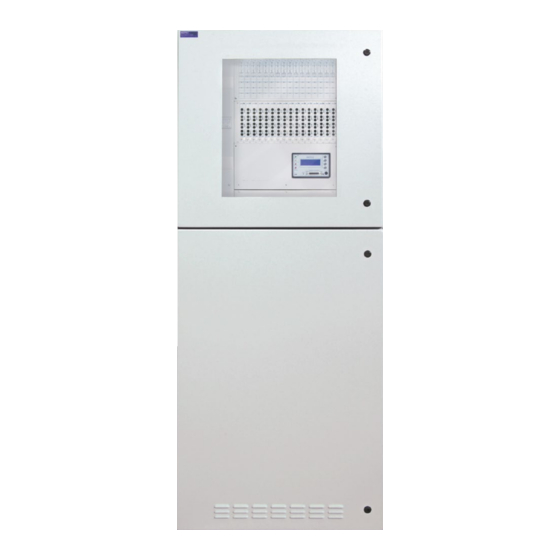
- Page 1 Mounting- and Operating Instructions Montage- und Betriebsanleitung Central Battery System Zentralbatteriesystem CPS 220 / 20 / J-SV / J-SKÜ CPS 220 / 20 / J-SV / J-SKÜ CPS 220 / 64 / J-SV / J-SKÜ CPS 220 / 64 / J-SV / J-SKÜ 4-line controller 4-zeiliges Steuerteil Sicherheitstechnik GmbH...
-
Page 3: Table Of Contents
CPS 220 / 20 …, CPS 220 / 64 …, CPUS 220 / 64 …, 6.1.1. CPS 220/20 …, CPS 220/64 …, CPUS 220/64 …, CPUSB 220 / 64 / 16, CPUSB 220 / 64 / 8 … CPUSB 220/64/16, CPUSB 220/64/8 …... - Page 4 CPS 220/64/SV Mounting and Operating Instructions CPS 220/64/SV Montage- und Betriebsanleitung 6.3.2.3. Externer Datenbus RTG - X2 6.3.2.3. External databus RTG — X2 6.3.2.4. Weitere Baugruppen - X2 6.3.2.4. Additional devices — X2 6.3.2.5. Endstromkreise - X3 6.3.2.5. Final circuits — X3 6.3.2.6.
-
Page 5: Rif
CPS 220/64/SV Mounting and Operating Instructions CPS 220/64/SV Montage- und Betriebsanleitung 4-zeiliges Steuerteil 8. 4-line controller 8.1. Allgemeines 8.1. General 8.2. Testmenü 8.2. Test menu 8.2.1. Funktionstest starten 8.2.1. Running a function test 8.2.2. Starting battery duration test 8.2.2. Betriebsdauertest starten 8.2.3. - Page 6 CPS 220/64/SV Mounting and Operating Instructions CPS 220/64/SV Montage- und Betriebsanleitung 10.3. „Programmierung“ 10.3. „Programming“ 10.3.1. Geräteeinstellungen 10.3.1. Program device 10.3.1.1. Unterstation 10.3.1.1. Sub station 10.3.1.2. Relais Programmierung 10.3.1.2. Relay programming 10.3.1.3. SL with SLÜ 10.3.1.3. SL mit SLÜ 10.3.1.4.
-
Page 7: Allgemeine Hinweise
1.4. Disposal Batteries and electronic components supplied by 1.4. Entsorgung INOTEC can be returned to INOTEC or should be disposed of in accordance with the national gui- Von INOTEC gelieferte Batterien und Elektronikbau- delines and regulations governing the disposal of teile können an INOTEC zurückgegeben werden... -
Page 8: Sicherheitshinweise
INOTEC autorisierte Personen involve opening the device must ONLY be carried out by vorgenommen werden. Eingriffe durch andere Personen personnel authorised to do so by INOTEC. The guarantee führen zum Verlust der Gewährleistung. becomes invalid if unauthorised personnel work on the system. -
Page 9: Produktbeschreibung
4. Produktbeschreibung 4. Product description Die Zentralbatteriesysteme CPS 220 / 20 und CPS 220 / 64 The central battery systems CPS 220/20 and CPS 220/64 sind ein batteriegestütztes Überwachungs- und Versor- are battery-supported monitoring and supply devices for gungsgerät für den Notlichtbetrieb von Sicherheits- und the emergency lighting operation of safety and emergen- Rettungszeichenleuchten. - Page 10 Optional modules can be used to enhance the central Die Zentralbatteriesysteme CPS 220 / 64 und CPS220 / battery systems CPS 220/64 and CPS 220/20, as well 20, sowie die Unterstation CPUS 220 / 64 können mit as the sub station CPUS 220/64, with the following...
-
Page 11: Aufbau Der Cps 220/20 Und Cps
3-phasig mit ein oder zwei Ladeteilen mit 3A bzw. 7,5A. 3 A or 7.5 A chargers. • CPS 220 / 64 / 11kW 3-phasig, CPS 220 / 64 / 22kW • CPS 220/64/11 kW 3-phase, CPS 220/64/22 kW 3-phasig 3-phase 3-phasige Ausführungen im 2m-Schrank mit 11kW... - Page 12 CPS 220/64/SV Mounting and Operating Instructions CPS 220/64/SV Montage- und Betriebsanleitung CPS 220 / 64 / 11kW CPS 220 / 64 / 11kW-2 Netzanschluß Mains Klemmen /Anschlußraum Terminals Sicherungsabgänge US Netz/ Batt Substation output CP 4x2A CP 4x2A CP 4x2A...
- Page 13 CPS 220/64/SV Mounting and Operating Instructions CPS 220/64/SV Montage- und Betriebsanleitung CPS 220 / 64 / 22kW- 3 phase Batteriesicherungen Battery fuses 850 008 850 009 Netzanschluß Mains CPS 220 / 64 / 11kW - 3 phase Anschlußklemmen Terminals CP 4x2A...
-
Page 14: Cpusb 220 / 64 / 16, Cpusb 220 / 64
Stromkreise an die Zentralbatteriesysteme CPS CPS 220/64, CPS 220/20 and to the sub station CPUS 220 / 64, CPS 220 / 20 und die Unterstation CPUS 220 / 220/64. The BUS sub stations are supplied with power via 64 anzuschließen. -
Page 15: Aufbau Der Cpusb - Systeme
CPS 220/64/SV Mounting and Operating Instructions CPS 220/64/SV Montage- und Betriebsanleitung 4.2.1. Aufbau der CPUSB - Systeme 4.2.1. Layout CPUSB CPUSB 220 / 64 / 16 Klemmen Anschlußraum Terminals CP 4x2A CP 4x2A CP 4x2A CP 4x2A CP 4x2A CP 4x2A... -
Page 16: Cpusb 220 / 64 / 1-2X2,5A/24V
TFT-Steuerteil nutzbar. can only be used with a TFT controller. Rettungs- und Sicherheitsleuchten mit INOTEC 24V- Emergency exit and safety luminaires with INOTEC 24V Technik und INOTEC 24V-D.E.R.-Leuchten für dynamische technology and INOTEC 24V-D.E.R. luminaires for dynamic Fluchtwegkennzeichnung können an die externe BUS-... -
Page 17: Cpusb 220 / 64 / 24V
Betrieb und die Überwachung von 24V-Sicherheits- operation and monitoring of 24 V safety and emergency und Rettungszeichenleuchten an dem Zentralbatteriesys- exit luminaires on the central battery systems CPS 220/64 tem CPS 220 / 64 bzw. CPS 220 / 20. and CPS 220/20. -
Page 18: Technische Daten
CPS 220/64/SV Mounting and Operating Instructions CPS 220/64/SV Montage- und Betriebsanleitung 5. Technische Daten 5. Technical data 5.1. CPS 220/64, CPS 220/20, CPUS 220/64 5.1. CPS 220 / 64, CPS 220 / 20, CPUS 220 / 64 Schutzklasse: Protection class:... - Page 19 CPS 220/64/SV Mounting and Operating Instructions CPS 220/64/SV Montage- und Betriebsanleitung CPS 220 / 64 / 11kW CPS 220 / 64 / 22kW CPS 220 / 20 / 1,2A 3-phasig 3-phasig CPS 220 / 64 / 11kW 3phasig CPS 220 / 64 / 22kW 3phasig...
- Page 20 CPS 220/64/SV Mounting and Operating Instructions CPS 220/64/SV Montage- und Betriebsanleitung CPS 220 / 20 / 5,5kW / 7,5A CPS 220 / 20 / 3A CPS 220 / 20 / 5,5kW / 3A CPS 220 / 20 / 3A CPS 220 / 20 / 3A...
- Page 21 CPS 220/64/SV Mounting and Operating Instructions CPS 220/64/SV Montage- und Betriebsanleitung CPUS 220 / 64 / 11kW CPUS 220 / 64 / 11kW CP 4x2A CP 4x2A CP 4x2A CP 4x2A CP 4x2A CP 4x2A CP 4x2A CP 4x2A 3,15 A...
-
Page 22: Cpusb 220/64/1-4 A
CPS 220/64/SV Mounting and Operating Instructions CPS 220/64/SV Montage- und Betriebsanleitung 5.2. CPUSB 220 / 64 / 16, 5.2. CPUSB 220/64/16, CPUSB 220 / 64 / 8 – 1, CPUSB 220/64/8–1, CPUSB 220 / 64 / 8 – 9, CPUSB 220/64/8–9 CPUSB 220 / 64 / 1 - 2A, CPUSB 220/64/1–2A,... -
Page 23: Cpusb 220 / 64 / 24V
CPS 220/64/SV Mounting and Operating Instructions CPS 220/64/SV Montage- und Betriebsanleitung 5.3. CPUSB 220 / 64 / 24V 5.3. CPUSB 220/64/24 V Schutzklasse: Protection class: Schutzart: IP 20 Protection category: IP 20 Zulässige Umgebungstemperatur: Permissible ambient temperature: für das Gerät: -5°C bis +35°C... -
Page 24: Aufstellung, Anschluss
Systems zu entfernen. 6.1.1. CPS 220 / 20 …, CPS 220 / 64 …, 6.1.1. CPS 220/20 …, CPS 220/64 …, CPUS 220 / 64 …, CPUSB 220 / 64 / 16, CPUS 220/64 …, CPUSB 220/64/16, CPUSB 220 / 64 / 8 …... -
Page 25: Cpusb 220 / 64 / 24V
CPS 220/64/SV Mounting and Operating Instructions CPS 220/64/SV Montage- und Betriebsanleitung Jetzt kann die Haube des Gehäuses abgenommen wer- The cover can now be removed. The six screws and the den. Anschließend müssen die sechs Schrauben und die front cover now have to be removed so that the housing Frontabdeckung entfernt werden, um das Gehäuse an der... -
Page 26: Batterieschrank Mit 1 Strang Á 18 Blöcke
CPS 220/64/SV Mounting and Operating Instructions CPS 220/64/SV Montage- und Betriebsanleitung Es dürfen nur Batterien verwendet werden, die Only batteries may be used, which have a specified eine angegebene Lebensdauererwartung von life time of at least 10 years at 20°C ambient mindestens 10 Jahren bei 20°C Umgebungstempe-... -
Page 27: Batterieschränke Mit 1 Strang Á 18 Blöcke
CPS 220/64/SV Mounting and Operating Instructions CPS 220/64/SV Montage- und Betriebsanleitung 6.2.2. 2 Batterieschränke mit 1 Strang 6.2.2. 2 battery cabinets with 1 battery set, á 18 Blöcke 18 blocks each F1 F2 6.2.3. 2 battery cabinets with 2 battery sets, 6.2.3. -
Page 28: Batteriemontage Auf Batteriegestell
6.3.1. System structure Das CPS 220 / 64 – System kann durch den Einsatz von Additional final circuits can be added to the CPS 220/64 Unterstationen (CPUS 220 / 64 …) und BUS-Unterstatio- system using sub stations (CPUS 220/64 …) and BUS sub nen (CPUSB 220 / 64 …) um zusätzliche Endstromkreise... -
Page 29: Cps 220 / 20
Betrieb. 6.3.2. CPS 220 / 20 …, CPS 220 / 64 …, CPUS 220 / 64 6.3.2. CPS 220/20 …, CPS 220/64 …, CPUS 220/64 …, CPUSB 220 / 64 / 16, CPUSB 220 / 64 / 8 … …, CPUSB 220/64/16, CPUSB 220/64/8 …... -
Page 30: Weitere Baugruppen - X2
6.3.2.6. Endstromkreise CP 24V 2x2,5A - X7 6.3.2.6. Final circuits CP24V 2x2,5A - X7 INOTEC 24V-LED-Leuchten werden an die Klemmen der Connect INOTEC 24V-LEDs to the terminals on terminal Klemmleiste X7 des jeweiligen Endstromkreises ange- rail X7 of the respective final circuit. -
Page 31: Endstromkreise Cp D.e.r. - X14
CP 1x6A in Jokertechnik CP 1x6A in Joker technology In den Anlagen CPS 220 / 20 und CPS 220 / 64 können The CPS 220/20 and CPS 220/64 systems are able to ac- verschiedene Typen von Stromkreisumschaltungen ein- commodate various types of change-over device: gesetzt werden: •... -
Page 32: Stromkreisumschaltungen Cp 2X2,5A / 24V
This type of change-over device can be used in systems Dieser Typ Stromkreisumschaltung kann in den Anlagen CPS 220 / 20 and CPS 220 / 64 for INOTEC-emergency CPS 220 / 20 und CPS 220 / 64 für INOTEC-Notleuchten lights in the 24V or 24V D.E.R. versions. The circuit rack- mit 24V-Technik bzw. -
Page 33: Stromkreisumschaltung Cp D.e.r. 2X2,5A
Die Stromkreisumschaltung CP D.E.R. 2x2,5A kann in den The change-over device CP D.E.R. 2x2,5A can be used Anlagen CPS 220/20 und CPS220/64 für INOTEC 220V in systems CPS 220/20 and CPS220/64 for INOTEC 220V D.E.R. Leuchten eingesetzt werden. D.E.R. luminaries. -
Page 34: Cpusb 220 / 64 / 1
CPS 220/64/SV Mounting and Operating Instructions CPS 220/64/SV Montage- und Betriebsanleitung Die LEDs auf den Umschaltungeen geben folgende Infor- The LEDs on the change-over units provide the following mationen: information: LEDs Meldung LEDs Message Leuchtenstörung Light fault rot (Dauerleuchten) red (steady) rot (3 Sek. -
Page 35: Versorgungsspannung
CPS 220/64/SV Mounting and Operating Instructions CPS 220/64/SV Montage- und Betriebsanleitung Der maximale Einschaltstrom pro Stromkreis darf The maximum inrush current per circuit must not nicht mehr als 250A für 500µs betragen! exceed 250A for 500 µs! Für die Stromkreisumschaltungen nur Orginalsi- Use only original fuses with extinguishing agents cherungen mit Löschmitteln verwenden. -
Page 36: Stromkreisweiche (Skw)
CPS 220/64/SV Mounting and Operating Instructions CPS 220/64/SV Montage- und Betriebsanleitung 6.3.3.5. Stromkreisweiche (SKW) 6.3.3.5. Circuit separating module (SKW) L+ N- Lichtschalter Light switch Notleuchte Emergency lighting Allgemein- beleuchtung General lighting Wechsler change-over contact pot.frei SK2 SK3 SK4 Kontakte SL-SL+ Für den Einsatz in Mieterbereichen kann zur selektiven... -
Page 37: Cpusb 220 / 64 / 24V
Connection of the supply voltage from the main device, L1 N PE Netzeinspeisung rät des Typs CPS 220 / 64 / … oder CPUS 220 / 64 / … an type CPS 220/64/… or CPUS 220/64/… to terminals L+, Netz Batterie INOTEC... -
Page 38: Gerätebus Ib2
CPS 220/64/SV Mounting and Operating Instructions CPS 220/64/SV Montage- und Betriebsanleitung 6.3.4.2. Gerätebus IB2 6.3.4.2. Device bus IB2 Eine Kommunikation mit dem Steuerteil im Hauptgerät Communication with the controller in the main device erfolgt über den Gerätebus (IB2), welcher an die Klemmen is via the device bus (IB2), which is connected to terminals... -
Page 39: Lichtschalterabfrage
CPS 220/64/SV Mounting and Operating Instructions CPS 220/64/SV Montage- und Betriebsanleitung 6.3.4.4. Lichtschalterabfrage 6.3.4.4. Light sequence switching Sollen Leuchten der If general lighting and Allgemeinbeleuch- safety lighting lumi- tung und Sicherheits- naires are to be con- leuchten gemeinsam nected, the following geschaltet werden, so circuit can be applied. -
Page 40: Zentrales Dimmen
CPS 220 / 64 – Systems. 6.3.5.1. RIF 5 6.3.5.1. RIF 5 The RIF 5 is fitted into devices CPS 220/64 and CPUS Das RIF 5 ist werksseitig in die Geräte CPS 220/64 und 220/20 at delivery. The module provides volt-free signal- CPUS 220/20 eingebaut. - Page 41 For temperature controlled charging, a sensor (type KTY Für eine temperaturgeführte Ladung ist ein Tempera- or INOTEC sensor) must be connected inside the battery turfühler (Typ KTY oder INOTEC Sensor) innerhalb des compartment to terminals T+/T- of the RIF 5 module. This...
-
Page 42: Siehe 8.4. Programmierung
CPS 220/64/SV Mounting and Operating Instructions CPS 220/64/SV Montage- und Betriebsanleitung Die verschiedenen Zustände der RIF 5-Meldekontakte The various statuses of the RIF 5 signalling contacts are sind der folgenden Tabelle zu entnehmen: shown in the table below: Gerätezustand Device status... -
Page 43: Siehe 8.4. Programmierung
CPS 220/64/SV Mounting and Operating Instructions CPS 220/64/SV Montage- und Betriebsanleitung UV 2 UV ... UV 1 SUB DB 2 SUB DB ... SUB DB 1 Adresse Adresse Adresse 1 bis 31 1 bis 31 1 bis 31 DPÜ / B.1 DPÜ... -
Page 44: Batteriemanagementsystem Bcs
CPS 220/64/SV Mounting and Operating Instructions CPS 220/64/SV Montage- und Betriebsanleitung 6.3.5.2. Batteriemanagementsystem BCS 6.3.5.2. Battery management system BCS Das Batteriemanagementsystem BCS ist nur mit The battery management system BCS can only be TFT-Steuerteil nutzbar. used with a TFT controller. -
Page 45: Bcs Sensor
CPS 220/64/SV Mounting and Operating Instructions CPS 220/64/SV Montage- und Betriebsanleitung Zustand Not- Zustand BCS- Reaktion Emerg. light device BCS sensor Reaction lichtgerät Sensor state state AC-Betrieb und Unterspannung Ladung wird aus- AC operation and Undervoltage Charging is swit- Ladung einge-... -
Page 46: Adresse
CPS 220/64/SV Mounting and Operating Instructions CPS 220/64/SV Montage- und Betriebsanleitung Durch drücken der unteren Taste (Enter-Taste ) erscheint Pressing the lower button (Enter button) calls up the das Menü des BCS-Moduls. Mittels der Pfeiltasten kann menu of the BCS module. The arrow buttons can be used durch das Menü... - Page 47 CPS 220/64/SV Mounting and Operating Instructions CPS 220/64/SV Montage- und Betriebsanleitung...
-
Page 48: Lsa 3 / Lsa
CPS 220/64/SV Mounting and Operating Instructions CPS 220/64/SV Montage- und Betriebsanleitung 6.3.5.3. LSA 3 / LSA 8.1 6.3.5.3. LSA 3 / LSA 8.1 Mit den LSA 3- und LSA 8.1-Modulen ist ein gemeinsames With the LSA 3 and LSA 8.1 modules, the main and safety Ein- und Ausschalten von Netz- und Sicherheitsleuchten luminaires can be switched on and off together. - Page 49 CPS 220/64/SV Mounting and Operating Instructions CPS 220/64/SV Montage- und Betriebsanleitung 6.3.5.3.2. LSA 8.1 6.3.5.3.2. LSA 8.1 Pro Steuerteil sind bis zu 3 LSA 8.1-Module an den Up to 3 LSA 8.1 modules can be connected to the device Gerätebus anschließbar. Die LSA 8.1 besitzt 8 galvanisch bus for each controller.
- Page 50 CPS 220/64/SV Mounting and Operating Instructions CPS 220/64/SV Montage- und Betriebsanleitung Zur Nutzung der integrierten DPÜ/B muss diese per Mi- To use the integrated DPÜ/B, this must be activated by croschalter am LSA 8.1-Modul aktiviert werden. microswitch on the LSA 8.1 module.
-
Page 51: Lsa
CPS 220/64/SV Mounting and Operating Instructions CPS 220/64/SV Montage- und Betriebsanleitung UV 1 UV 2 DPÜ DPÜ gem. gem. 0108 0108 INOTEC INOTEC 24V– 24V– 24V– 24V– 24V– 24V– 24V– 24V– 850 007 LSA 8.1 230 V LSA 8.1 230V... -
Page 52: Dreiphasenüberwachungen
CPS 220/64/SV Mounting and Operating Instructions CPS 220/64/SV Montage- und Betriebsanleitung 6.3.5.4. Dreiphasenüberwachungen 6.3.5.4. Three-phase monitors (DPÜs) 6.3.5.4.1. DPÜ 6.3.5.4.1. DPÜs Zur Überwachung der Netzspannung an den Unter- To monitor the mains voltage at the general lighting sub- verteilern der Allgemeinbeleuchtung können die DPÜ- distribution boards, the DPÜ... - Page 53 CPS 220/64/SV Mounting and Operating Instructions CPS 220/64/SV Montage- und Betriebsanleitung 6.3.5.4.2. DPÜ/B.2 6.3.5.4.2. DPÜ/B.2 Zur Überwachung der Netzspannung an den Untervertei- To monitor the mains voltage at the general lighting sub- lern der Allgemeinbeleuchtung werden die DPÜ/B.2- Mo- distribution boards, the DPÜ/B.2 modules are integrated dule direkt in den Unterverteiler eingebaut.
- Page 54 CPS 220/64/SV Mounting and Operating Instructions CPS 220/64/SV Montage- und Betriebsanleitung F1 F2 FI 0,03A Schalter Schalter Schalter Schütz Allgemein- beleuchtung DPÜ / B.2 Allgemein- 890 417 beleuchtung INOTEC Allgemein- 0 Min 5 Min Made in x10 (T) beleuchtung Germany...
- Page 55 CPS 220/64/SV Mounting and Operating Instructions CPS 220/64/SV Montage- und Betriebsanleitung 6.3.5.4.3. DPÜ/B.1 6.3.5.4.3. DPÜ/B.1 Zur Überwachung der Netzspannung an den Untervertei- To monitor the mains voltage at the general lighting sub- lern der Allgemeinbeleuchtung werden die DPÜ/B.1- Mo- distribution boards, the DPÜ/B.1 modules are integrated dule direkt in den Unterverteiler eingebaut.
- Page 56 CPS 220/64/SV Mounting and Operating Instructions CPS 220/64/SV Montage- und Betriebsanleitung UV 2 UV ... UV 1 SUB DB 2 SUB DB ... SUB DB 1 Adresse Adresse Adresse 1 bis 31 1 bis 31 1 bis 31 DPÜ / B.1 DPÜ...
-
Page 57: Dpü Dpü
Dreiphasenüberwachungen an mehrere Sicherheitslicht- (CPS 220/64, CPS 220/20) so that, should the power to geräte (CPS 220/64, CPS 220/20) anzuschließen, um bei a sub-distribution board fail, the connected safety ligh- Netzausfall in einer Unterverteilung die angeschlossenen ting devices will also be switched on. -
Page 58: Fernmeldetableau - Mtb
CPS 220/64/SV Mounting and Operating Instructions CPS 220/64/SV Montage- und Betriebsanleitung 6.3.5.6. Fernmeldetableau – MTB 6.3.5.6. Remote mimic panel — MTB Das Fernmeldetableau wird an das RIF5-Modul gem. The remote mimic panel is connected to the RIF5 module nachfolgendem Schaltbild angeschlossen. Die Leitungs- in accordance with the circuit diagram below. -
Page 59: Cps-Mtb
6.3.5.7. CPS-MTB 6.3.5.7. CPS-MTB Mehrere CPS 220 / 64 -Geräte können über den 3-adrigen Several CPS 220/64 devices can be connected to one cen- RTG-BUS auf ein zentrales Meldetableau aufgeschaltet tral mimic panel via the 3-wire RTG BUS. This supports two werden. -
Page 60: Inoweb
CPS 220/64/SV Mounting and Operating Instructions CPS 220/64/SV Montage- und Betriebsanleitung 6.3.5.8. INOWEB 6.3.5.8. INOWEB Über das im TFT Steuerteil integriert INOWEB-Modul The INOWEB (integrated in TFT controller unit) module kann der Zustand des CPS-Gerätes mittels Netzwerkver- enables the status of the CPS device to be polled via the bindung abgefragt werden. -
Page 61: Überprüfung Der Verbindungen
System wieder eingeschaltet werden. the insulation measuring is complete. Die Isolationsmessung nicht an Stromkreisen mit Do not perform the insulation measurement on INOTEC 24V-Leuchten durchführen. Die Leuchten the circuits with INOTEC 24V luminaires. This would werden zerstört. destroy the luminaires. -
Page 62: Einschalten Des Zentralbatteriesystems
CPS 220/64/SV Mounting and Operating Instructions CPS 220/64/SV Montage- und Betriebsanleitung Die Isolationsmessung ist mit einer max. Messspannung The insulation must be measured with a max. measure- von 500V DC und einem Messstrom von 1mA durchzufüh- ment voltage of 500 V DC and a measurement current ren! Es dürfen nur Messgeräte verwendet werden, die den... -
Page 63: Zeiliges Steuerteil
CPS 220/64/SV Mounting and Operating Instructions CPS 220/64/SV Montage- und Betriebsanleitung 8. 4-zeiliges Steuerteil 8. 4-line controller 8.1. Allgemeines 8.1. General Das Steuerteil der CPS 220 besteht aus einem 4-zeiligen The CPS 220 controller comprises a 4-line display and Display mit je 20 Zeichen. -
Page 64: Testmenü
CPS 220/64/SV Mounting and Operating Instructions CPS 220/64/SV Montage- und Betriebsanleitung 8.2. Testmenü 8.2. Test menu 8.2.1. Funktionstest starten 8.2.1. Running a function test Menü Testauslösung FT/BT/Learn Menu Test menu FT/DT/Learn Start FT FT auslösen... -
Page 65: Tiefentladeschutz Prüfen
CPS 220/64/SV Mounting and Operating Instructions CPS 220/64/SV Montage- und Betriebsanleitung überwachung muss ein Learnmode ausgeführt werden, consumption of the connected consumers. This function um die Stromaufnahme der angeschlossenen Verbrau- can also be activated for the entire central battery device cher zu ermitteln. -
Page 66: Betriebsdauertest Abbrechen
CPS 220/64/SV Mounting and Operating Instructions CPS 220/64/SV Montage- und Betriebsanleitung 8.2.7. Betriebsdauertest abbrechen 8.2.7. Cancelling battery duration test BT-Abbruch Cancel DT Ein versehentlich gestarteter Betriebsdauertest kann im A battery duration test that has been started accidentally Hauptmenü über den Befehl „BT-Abbruch“ nach ca. 5 can be stopped manually in the main menu using the Sekunden manuell beendet werden. -
Page 67: Ladekreis Info
CPS 220/64/SV Mounting and Operating Instructions CPS 220/64/SV Montage- und Betriebsanleitung weiter zum Durchblättern der Informationen des Next to scroll through the information on the selec- ted slot gewählten Platzes Unter anderem sind folgende Informationen abrufbar: The retrievable information includes: •... -
Page 68: Ausdruck Anlagenkonfiguration
CPS 220/64/SV Mounting and Operating Instructions CPS 220/64/SV Montage- und Betriebsanleitung • SLÜ mit / ohne SL- Schleifenüberwachung • SLÜ with/without SL monitoring loop function (module) • SLÜ mit / ohne FS- Schleifenüberwachung • SLÜ with/without RS monitoring loop function (module) •... -
Page 69: Prüfbuch
CPS 220/64/SV Mounting and Operating Instructions CPS 220/64/SV Montage- und Betriebsanleitung 8.3.3. Prüfbuch 8.3.3. Logbook Menü Info Prüfbuch Menu Info Logbook Im Prüfbuch werden Statusänderungen des Zentral- Status changes of the central battery device and the batteriegerätes und die Ergebnisse von Funktions- und... -
Page 70: Netzausfall Uv Info
CPS 220/64/SV Mounting and Operating Instructions CPS 220/64/SV Montage- und Betriebsanleitung Es können alle Einträge ausgedruckt werden oder die All entries or the most recent entries can be printed aktuellsten Einträge (max. die 255 neusten Einträge). Der (max. 255 most recent entries). Printing is cancelled Ausdruck wird mit „Drucken abbrechen „... -
Page 71: Programmierung
CPS 220/64/SV Mounting and Operating Instructions CPS 220/64/SV Montage- und Betriebsanleitung 8.4.2. Programmierung 8.4.2. Programming Um die Einstellungen vor unbefugtem Zugriff zu schüt- To protect the settings from unauthorised access, a pass- zen, ist eine Passwortabfrage eingebaut. Das Passwort word prompt is integrated. The password can be indivi- kann in den Geräteeinstellungen individuell gewählt... -
Page 72: Inostick
CPS 220/64/SV Mounting and Operating Instructions CPS 220/64/SV Montage- und Betriebsanleitung 8.4.2.2. INOSTICK 8.4.2.2. INOSTICK Menü Programmierung Programmierung Menu Programming Programming INOSTICK INOSTICK K o n f i g... -
Page 73: Programmierung
CPS 220/64/SV Mounting and Operating Instructions CPS 220/64/SV Montage- und Betriebsanleitung 8.4.2.3. Programmierung 8.4.2.3. Programming Menü Programmierung Programmierung Menu Programming Programming Programmierung Programming Die Programmierung im Steuerteil kann vor unbefugtem The programming in the controller can be protected Zugriff mit einem 4-stelligem Passwort geschützt werden. - Page 74 CPS 220/64/SV Mounting and Operating Instructions CPS 220/64/SV Montage- und Betriebsanleitung Es können bis zu drei LSA 8-Module am Gerät Up to three LSA 8 modules can be registered on the de- angemeldet werden, welche entweder am BUS IB 1 vice. These are connected either to BUS IB1 (internal (interne Gerätekomponenten) oder BUS IB2 (externe...
- Page 75 CPS 220/64/SV Mounting and Operating Instructions CPS 220/64/SV Montage- und Betriebsanleitung Folgende Meldungen stehen zur Auswahl: The following messages are available: • Ladestörung ja/nein • Charging failure Yes/no • Stromkreisstörung ja/nein • Circuit failure Yes/no • Netzausfall HV ja/nein • Main-db failure Yes/no •...
- Page 76 CPS 220/64/SV Mounting and Operating Instructions CPS 220/64/SV Montage- und Betriebsanleitung PC-Tastatur mit PS/2-Anschluss benötigt. tions. F 4 < > F 5 D P Ü / B : F 4 < > F 5 D P Ü / B : U n t e r v e r t e i l .
- Page 77 CPS 220/64/SV Mounting and Operating Instructions CPS 220/64/SV Montage- und Betriebsanleitung Die Festlegung welche Betriebsarten blockiert wurden, The modes that have been blocked are specified in the geschieht im Menü „Funktion Fernschalter blockiert“: menu “Remote switch function blocked” menu: • Dauerlicht (DL) •...
-
Page 78: Stromkreisprogrammierung
CPS 220/64/SV Mounting and Operating Instructions CPS 220/64/SV Montage- und Betriebsanleitung Ausdruck der Anlagenkonfiguration Configuration printout Die Konfiguration des Gerätes kann über einen The device configuration can be printed out via a connected printer or using INOPRINT. angeschlossenen Drucker oder mittels INOPRINT ausgedruckt werden. - Page 79 CPS 220/64/SV Mounting and Operating Instructions CPS 220/64/SV Montage- und Betriebsanleitung Zuordnung von Schalteingängen Assignment of input switches In den Schaltungsarten „Dauerlichtstromkreis geschaltet“ In operation modes “Maintained lighting circuit connec- ted” and “Joker circuit connected”, up to three input swit- und „Joker Stromkreis geschaltet“...
- Page 80 CPS 220/64/SV Mounting and Operating Instructions CPS 220/64/SV Montage- und Betriebsanleitung Einzelleuchtenüberwachung Individual luminaire monitoring Ist die Überwachungsart „Einzelleuchtenüberwachung“ If “Individual luminaire monitoring” is selected, up to 20 ausgewählt, so können bis zu 20 Leuchten angemeldet luminaires can be registered. You must state whether or werden.
-
Page 81: Inoweb
Leuchte mittels eines Webbrowser dargestellt via the INOWEB interface using a web browser. To that werden. Dazu wird die CPS 220 / 64 in ein lokales Netz- end, the CPS 220/64 is integrated into a local network. werk eingebunden. 9.1. Bedienung 9.1. -
Page 82: Störungsausdruck
CPS 220/64/SV Mounting and Operating Instructions CPS 220/64/SV Montage- und Betriebsanleitung The destinations are shown in the current display, which Die Zielorte werden in der Stromkreisdarstellung ange- can be shown by clicking the luminaires. zeigt, die mit einem Mausklick auf die Leuchten aufgeru- fen wird. -
Page 83: Externe Verknüpfungen
CPS 220/64/SV Mounting and Operating Instructions CPS 220/64/SV Montage- und Betriebsanleitung 9.3. Externe Verknüpfungen 9.3. External links Der Menüpunkt „ext. Verknüpfung“ bietet die Möglichkeit, The menu option “Ext. link” allows access to files on auf Dateien im Netzwerk zuzugreifen. Je nach gewählter the network. - Page 84 CPS 220/64/SV Mounting and Operating Instructions CPS 220/64/SV Montage- und Betriebsanleitung A green check mark next to the Apache indicates that the Ein grüner Haken neben dem Feld Apache deutet an, dass server was started. der Webserver gestartet wurde. Starting behaviour and the TCP-port can be configured Unter „Settings“...
-
Page 85: Inoweb E-Mail Setup
CPS 220/64/SV Mounting and Operating Instructions CPS 220/64/SV Montage- und Betriebsanleitung 9.3.2. INOWeb E-Mail Setup 9.3.2. INOWeb E-Mail Setup Mittels INOWeb E-Mail Client hat der Anwender die Mög- The INOWeb E-Mail Client enables the possibility to lichkeit über geschehene Ereignisse der Anlage per E-Mail inform the user about all events, which happened to the informiert zu werden. - Page 86 CPS 220/64/SV Mounting and Operating Instructions CPS 220/64/SV Montage- und Betriebsanleitung Projekt: Hier ist die Vergabe der Projekt- Project: Hier ist die Vergabe der Projektebe- bezeichnung möglich. Dazu stehen Ih- zeichnung möglich. Dazu stehen Ihnen nen maximal 32 Zeichen zur Verfügung.
- Page 87 CPS 220/64/SV Mounting and Operating Instructions CPS 220/64/SV Montage- und Betriebsanleitung Aktuelle Hier ist die Senderadresse hinterlegt. E-Mail sender Enter the e-mail address of the sender Sender E-Mail adress: here. Adresse: E-Mail recipi- You can enter up to two recipients here.
-
Page 88: Programmierung Cpusb
CPS 220/64/SV Mounting and Operating Instructions CPS 220/64/SV Montage- und Betriebsanleitung 10. Programmierung CPUSB 220/64/24 10. Programming CPUSB 220/64/24 10.1. Bedienung und Menüstruktur 10.1. Operation and menu structure C P U S B 2 4 V C P U S B... -
Page 89: Testmenü
CPS 220/64/SV Mounting and Operating Instructions CPS 220/64/SV Montage- und Betriebsanleitung 10.2. „Testmenü“ 10.2. „Test menu“ 10.2.1. Funktionstest 10.2.1. Function test OK Testmenu Ok FT Start OK OK Test menu Ok FT Start OK Im Funktionstestmodus schaltet das Gerät in den Bat- In function test mode, the device switches to battery teriebetrieb und überprüft die angeschlossenen und... - Page 90 CPS 220/64/SV Mounting and Operating Instructions CPS 220/64/SV Montage- und Betriebsanleitung 10.3.1.2. Relais Programmierung 10.3.1.2. Relay programming In diesem Menü werden die Einstellungen für die Melde- The settings for the signalling contact are made in this kontakte vorgenommen. menu. Unter „Prog. Kontakte“ wird definiert, ob es sich bei die- The “Prog.
- Page 91 CPS 220/64/SV Mounting and Operating Instructions CPS 220/64/SV Montage- und Betriebsanleitung S t r o m k r e i s : C i c u i t : Z u m u n d a b m e l d e n p r e s s d r ü...
- Page 92 CPS 220/64/SV Mounting and Operating Instructions CPS 220/64/SV Montage- und Betriebsanleitung 10.3.3.1. Bereitschaftslicht (BL) 10.3.3.1. Non-maintained li ghting (NM) Im Normalbetrieb ist die Leuchte ausgeschaltet. Bei Netz- The luminaire is switched off during standard operation. ausfall UV bzw. Netzausfall HV wird die Leuchte einge- In the case of sub-db failure or main-db failure, the lumi- schaltet.
- Page 93 CPS 220/64/SV Mounting and Operating Instructions CPS 220/64/SV Montage- und Betriebsanleitung 10.3.5. Passwort ändern 10.3.5. Change password OK Programmierung OK Passwort ändern OK Programming OK Change password G e b e n S i e...
- Page 94 CPS 220/64/SV Mounting and Operating Instructions CPS 220/64/SV Montage- und Betriebsanleitung 10.5. Block. Aufheben 10.5. Device block Ein blockiertes CPUSB-Gerät wird über diesen Befehl A blocked CPUSB device is re-activated via this command wieder freigegeben, sobald ein Haken signalisiert, dass es as soon as a tick signals that the block can be cancelled.
- Page 95 CPS 220/64/SV Mounting and Operating Instructions CPS 220/64/SV Montage- und Betriebsanleitung 11.2.2. Wöchentliche Prüfung 11.2.2. Weekly test Eine wöchentliche Umschaltung auf die Stromquelle für A changeover to the power source must be carried out Sicherheitszwecke hat zu erfolgen und die Funktion der every week for safety purposes and the function of the Leuchten für die Sicherheitsbeleuchtung ist zu prüfen.
- Page 96 CPS 220/64/SV Mounting and Operating Instructions CPS 220/64/SV Montage- und Betriebsanleitung 11.3. Batterieinspektion und –überwachung 11.3. Battery inspection and monitoring. Die Batterien und Betriebsgeräte sind, gemäß EN 50272-2, The batteries and operating devices must be checked regelmäßig auf einwandfreie Funktion zu überprüfen.
- Page 97 A. Dokumentation A. Documentation Die beiliegende Dokumentations-CD enthält von den The enclosed documentation CD contains the following Standard CPS 220 / 64-Geräten folgende Informationen: information on the standard CPS 220/64 devices: • Materiallisten • Material lists • Gehäuseansichten • Housing views •...
- Page 98 CPS 220/64/SV Mounting and Operating Instructions CPS 220/64/SV Montage- und Betriebsanleitung C. Kundendienst C. Customer Service Bevor Sie den Kundendienst aufgrund einer vorliegenden Before contacting the customer service due to a failure, Störung kontaktieren, überprüfen Sie bitte Folgendes: please check the following: Prüfung auf Leuchtenfehler...
- Page 99 CPS 220/64/SV Mounting and Operating Instructions CPS 220/64/SV Montage- und Betriebsanleitung 12. Index 12. Index Anlagenkonfiguration Assembly Anlagenkonfiguration drucken 68,78 Automatic battery duration test Anschluss Anschlussklemmen 30,32 Battery 25,96 Battery cabinets 25,27 Batterie Info 67,77 Battery duration test 44,45,81,94,95 Batterieinspektion...
- Page 100 CPS 220/64/SV Mounting and Operating Instructions CPS 220/64/SV Montage- und Betriebsanleitung Inbetriebnahme 8,61 Failure 7,68,93,98 Info Failure info 68,88,93,98 Batterie 67,77 Failure printout 68,82 DPÜ/B 53,55 Function test 7,64,65,81,95,98 Geräte 66,93 Ladekreis Individual luminaire monitoring 9,32 Leuchten Info Netzausfall UV...
- Page 101 CPS 220/64/SV Mounting and Operating Instructions CPS 220/64/SV Montage- und Betriebsanleitung Passwort 71,73,77,81,89,93 Password 71,73,77,81,89,93 Phasenauswahlschaltung Phase selector switch Potentialfreie Kontakte Print 68,69,78,82 Produktbeschreibung Product description Programmierung 63,70,71,89 Programming 63,70,71,89 INOSTICK 71,72 Charger Komponenten Components DPÜ/B Circuit LSA 3 Circuits LSA 8 DPÜ/B...
- Page 102 CPS 220/64/SV Mounting and Operating Instructions CPS 220/64/SV Montage- und Betriebsanleitung Glossar Battery control system Monitoring and logging of battery block voltage(s) and -temptature(s) measured by Batteriemanagmentsystem BCS-sensor(s) Erfassung und Protokollierung der Batterie blockspannung und -temperatur Battery control system mittels BCS-Sensor.
- Page 103 CPS 220/64/SV Mounting and Operating Instructions CPS 220/64/SV Montage- und Betriebsanleitung CPUSB BUS-Unterstation ohne eigenes Steuerteil Circuit separating module (SKW) zum Betrieb am Steuerteil einer CPS Power supply for the circuit comes from oder CPUS. the local sub-distribution board during...
- Page 104 CPS 220/64/SV Mounting and Operating Instructions CPS 220/64/SV Montage- und Betriebsanleitung Interner Gerätebus zum Anschluss von Internal device bus for connecting INOTEC INOTEC Modulen (Stromkreise, LSA, modules (circuits, LSA, DPÜ/B, etc.) DPÜ/B, etc.) Individual lamp monitoring INOLAN Umsetzer von RTG auf Ethernet zur Monitors and reports status of each indi- Überwachung der Notlichtgeräte mittels...
- Page 105 CPS 220/64/SV Mounting and Operating Instructions CPS 220/64/SV Montage- und Betriebsanleitung Nennbetriebsdauer Loop monitoring Die laut den gültigen Vorschriften notwen- System for monitoring an SL+/SL- or dige Betriebsdauer des Notlichtgerätes im FS+/FS- for open circuits or short circuits Notbetrieb.
- Page 106 CPS 220/64/SV Mounting and Operating Instructions CPS 220/64/SV Montage- und Betriebsanleitung RTG-BUS BUS-System von INOTEC zur Überwa- RTG-BUS BUS system from INOTEC for monitoring the chung der Notlichtgeräte mittels weiterer emergency lighting device using other INO- INOTEC-Systeme oder Software. TEC systems or software.
- Page 108 INOTEC Sicherheitstechnik GmbH Am Buschgarten 17 59469 Ense Germany Tel +49 29 38/97 30-0 Fax +49 29 38/97 30-29 info@inotec-licht.de www.inotec-licht.de 708 206 05/2015 Sicherheitstechnik GmbH...
Need help?
Do you have a question about the CPS 220/20 and is the answer not in the manual?
Questions and answers