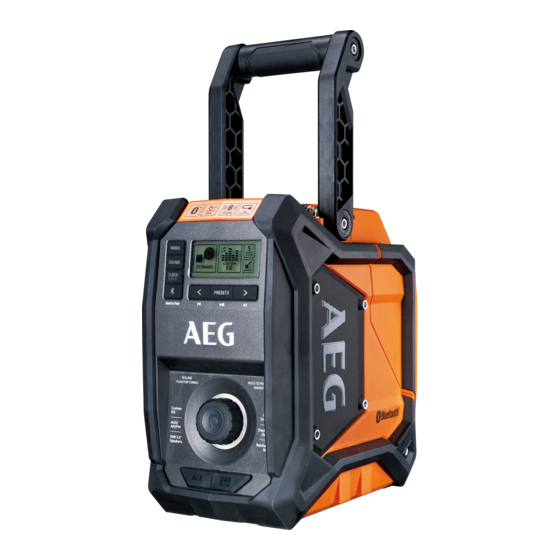
BRFM18
BRFMB18
Original instructions
Table of Contents
loading

Frequently Asked Questions (10)

  • Does the AEG BRFMB18 Radio support Bluetooth connectivity?

    Yes, the BRFMB18 model supports Bluetooth® connectivity. When the product is switched to Bluetooth® mode, it will attempt to pair to a Bluetooth® enabled device. Bluetooth® enabled devices must be within 10 m (30 ft) of the product and set to search/scan to pair.


    For more information, see pages 9 and 12 of the manual.
    Was this helpful?
  • How do I power on the AEG BRFMB18 Radio?

    To power on the radio, press the on/off button. You may need to press and hold the button for up to 3 seconds for the product to turn on.


    For more information, see page 11 of the manual.
    Was this helpful?
  • How do I adjust the volume on the AEG BRFMB18 Radio?

    When the product is switched on, it will return to the last volume setting. To increase the volume, turn the volume/tuning control clockwise. The maximum volume value is 25. To decrease the volume, turn the volume/tuning control counterclockwise. To mute the sound, press MUTE.


    For more information, see page 11 of the manual.
    Was this helpful?
  • How can I set up radio station presets on the AEG BRFMB18 Radio?

    To set up radio station presets:

    1. Tune to the desired FM or AM frequency.
    2. Press and hold PRESETS until the preset position number flashes on the screen.
    3. Press < or > to choose a preset position number. There are 5 preset positions for FM and 5 for AM; only one station can be saved in each position.
    4. Press PRESETS again to store the frequency.

    To tune to presets, press and release PRESETS to cycle through each preset position number and its associated frequency.


    For more information, see page 11 of the manual.
    Was this helpful?
  • What audio sources can the AEG BRFMB18 Radio play?

    The radio is suitable for reception of broadcasting and to playback audio sound from an externally connected CD player, MP3 player, or cassette tape deck. It can also be used as an amplifier for MP3 players, CD players, smartphones, tablets, and other music devices through its AUX 1 and AUX 2 auxiliary modes. Additionally, the BRFMB18 model supports Bluetooth® enabled devices.

    Was this helpful?
  • What types of batteries does the AEG BRFMB18 Radio use?

    The AEG BRFMB18 Radio can be operated by either an AEG 18V battery pack or an AC adapter. For clock backup, it uses AAA batteries (1.5V AAA (LR03)).

    Was this helpful?
  • Is the AEG BRFMB18 Radio waterproof or water-resistant?

    The product is not waterproof and should not be submerged in liquid. Failure to heed this warning could result in serious personal injury.

    Was this helpful?
  • Does the AEG BRFMB18 Radio have an auxiliary input for external devices?

    Yes, the product has two auxiliary modes, AUX 1 and AUX 2, for connecting external devices. The AUX jack input size is 3.5 mm.

    Was this helpful?
  • What is the range for Bluetooth connection on the AEG BRFMB18 Radio?

    The Bluetooth® range for the BRFMB18 is a maximum of 40 m. Bluetooth® enabled devices must be within 10 m (30 ft) of the product to pair.

    Was this helpful?
  • Can the AEG BRFMB18 Radio tune into traditional FM/AM radio stations?

    Yes, the radio can tune into traditional FM and AM radio stations. The tuning range for FM is 87.50-108.00 MHz, and for AM it is 522-1620 KHz.

    Was this helpful?
Need help?

Need help?

Do you have a question about the BRFMB18 and is the answer not in the manual?

Questions and answers

Summary of Contents for AEG BRFMB18

  • Page 1 BRFM18 BRFMB18 Original instructions...
  • Page 2 26. Aux 2 input jack 2. Custom equaliser 12. Connect via Bluetooth® 19. Volume/tuning control 27. Battery port 3. Clock display setting (BRFMB18 only) 20. Power on/off 28. Device storage 4. Mute sound (BRFM18 only) 13. Bluetooth® mode indicator 21. Aux 1 input jack 29.
  • Page 3 click...
  • Page 4 click...
  • Page 5 78-100 % 55-77 % 33-54 % 10-32 % <10 %...
  • Page 6 BRFM18 BRFM18 BRFMB18 AUX1 mode BRFMB18 For BRFMB18...
  • Page 7 click AUX2 mode AUX2 mode click...
  • Page 8 4. Mute sound 10. Power on/off 5. Preset selection 11. Bluetooth® indicator 6. Radio tuning or song select 12. Bluetooth® button AM mode BRFM18 BRFMB18 AUX1 mode AUX2 mode BLUETOOTH mode(for BRFMB18) When using radio, adjust the antenna for best signal reception.
  • Page 9 The device must not be exposed to splashing water, rain or humid Do not dispose of used battery packs in the household refuse or environments. by burning them. AEG Distributors offer to retrieve old batteries to Objects with liquids, e.g. vases, should not be placed on the device. protect our environment.
  • Page 10 See page 4. liquid or gas. The product can be operated by either an AEG 18V battery pack or Do not use the product at high altitude due to low air pressure. A AC adapter.
  • Page 11 Press to cycle through available modes. 1. Briefly press the on/off button to enter frequency tuning. AM There are four (BRFM18)/five (BRFMB18) modes to choose from: indicator will flash. FM mode 2. Turn the volume/frequency control knob clockwise to increase AM mode the frequency.
  • Page 12 2. Connect auxiliary cable to the device. 2. Select “AEG JOBSITE BT5 RADIO” from your device’s list of 3. Open the AUX 1 input jack cover. Connect the other end of the available Bluetooth® signals to pair the device and the product.
  • Page 13 Temperatures in excess of 50°C (122°F) reduce the performance of one of our AEG service agents (see our list of guarantee/service the battery pack. Avoid extended exposure to heat or sunshine (risk addresses).
  • Page 14 Please read the instructions carefully before starting the machine. For indoor use only. Class II equipment Do not touch the metal part of the antenna in order to avoid a drop in signal reception caused by electrostatic discharge. ® Bluetooth® Do not dispose of electric tools together with household waste material.
  • Page 15 BLUETOOTH® LICENSE STATEMENT The Bluetooth® word mark and logos are registered trademarks owned by Bluetooth SIG, Inc., and any use of such marks by Techtronic Industries Australia Pty Ltd and Techtronic Industries N.Z. Limited are under license. Other trademarks and trade names are those of their respective owners.
  • Page 16 Techtronic Industries Australia Pty Ltd 31 Gilby Road, Mount Waverley, VIC 3149 Australia Techtronic Industries N.Z. Limited 2 Landing Drive, Mangere Auckland, 2022, New Zealand AEG is a registered trademark used under license from AB Electrolux (publ). 20181116v2...

This manual is also suitable for:

Brfm18

Table of Contents