Download Print this page
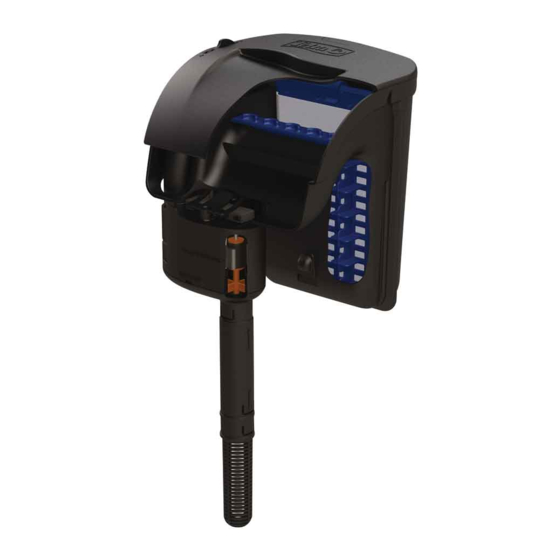
Tetra Whisper IQ10 Manual

Tetra Whisper IQ10 Manual

Power filters

Advertisement

Advertisement

loading

Frequently Asked Questions (13)

  • How often should I change the filter cartridges in the Tetra Whisper IQ10 system?
    Was this helpful?
  • How do I clean the Tetra Whisper IQ10 filter?

    To clean the Tetra Whisper IQ10 filter, you should:

    • Unplug the unit and clean the filter with a clean wet cloth. If needed, add white distilled vinegar to the cloth and rinse thoroughly.
    • If the Bio-Grid is clogged, gently wash it with room temperature water treated with AquaSafe® water conditioner to protect beneficial bacteria.
    • To clean the impeller, remove the Strainer and Extension Tube, then the Impeller Cover with a screwdriver, and pull off the rubber impeller endcap. Pull the Impeller Assembly out and away from the shaft. Examine all parts for debris, remove debris from the Strainer, Extension Tubes, and Impeller Cover by rinsing under cool water, and remove any material twisted around the Impeller Shaft with a needle or tweezers. Rinse and clean the Impeller Assembly by rinsing under cool water.
    Was this helpful?
  • What troubleshooting steps can I take if my Tetra Whisper IQ10 filter is not working?

    If your filter is not working, you can take the following troubleshooting steps:

    • Unplug the unit and clean the filter with a clean wet cloth. If needed, add white distilled vinegar to the cloth and rinse thoroughly.
    • If the Bio-Grid is clogged, gently wash it with room temperature water treated with AquaSafe® water conditioner to protect beneficial bacteria.
    • If the motor is noisy or you need to service the impeller, refer to the "Impeller Removal" guide in this manual.
    • If you notice any damage to the impeller when servicing, reference the parts list in this manual or the item number on your filter lid to order a new part.
    • If the motor housing separates from the filter body, refer to Illustration A (below) to reassemble it.
    • On startup, if you hear rattling, remove the cover and place it on the filter again. Ensure your aquarium lid or other equipment is not interfering with the filter.

    For more information, see page 1 of the manual.
    Was this helpful?
  • What are the steps to install the Tetra Whisper IQ10 filter?

    To install the Tetra Whisper IQ10 filter, follow these steps:

    1. Attach the strainer (and extension tubes, if necessary) so it is no closer than 2" to the aquarium gravel once the system is hanging on the aquarium frame.
    2. Hang the system on the aquarium frame. Ensure the aquarium water is at or above the minimum water level indicated on the system's motor assembly.
    3. Plug the filtration system into an outlet, making sure to arrange a drip loop with the power cord.
    4. The filter does not need to be primed; once plugged in, it will begin to draw water from the aquarium into the filter.

    For more information, see page 1 of the manual.
    Was this helpful?
  • How do I set up the Tetra Whisper IQ10 filter?

    To set up the Tetra Whisper IQ10 filter, follow these steps:

    1. Attach the strainer (and extension tubes, if necessary) so it is no closer than 2" to the aquarium gravel once the system is hanging on the aquarium frame.
    2. Hang the system on the aquarium frame. Ensure the aquarium water is at or above the minimum water level indicated on the system's motor assembly.
    3. Plug the filtration system into an outlet, making sure to arrange a drip loop with the power cord.
    4. The filter does not need to be primed; once plugged in, it will begin to draw water from the aquarium into the filter.

    For more information, see page 1 of the manual.
    Was this helpful?
  • What kind of filter media does the Tetra Whisper IQ10 use?

    The Tetra Whisper IQ10 uses a StayClean Cartridge and a Bio-Grid. When medicating fish, the carbon from the Bio-Bag should be removed, as carbon absorbs most medications.

    Was this helpful?
  • Why is my Tetra Whisper IQ10 filter making excessive noise?

    If the filter is making excessive noise, it could be due to a noisy motor or rattling. If the motor is noisy, you should service the impeller yearly. If you hear rattling on startup, remove the cover and place it on the filter again, ensuring your aquarium lid or other equipment is not interfering with the filter.


    For more information, see page 1 of the manual.
    Was this helpful?
  • How do I access and clean the impeller in the Tetra Whisper IQ10 filter?

    To access and clean the impeller:

    1. Unplug the filter and lift it out of the water.
    2. Remove the Strainer and Extension Tube by pulling down from the Impeller Cover.
    3. Remove the Impeller Cover with a screwdriver using the slot provided.
    4. Remove the rubber impeller endcap by pulling off the impeller shaft.
    5. Pull the Impeller Assembly out and away from the shaft (the magnet on the impeller may require some force).
    6. Examine all parts for debris that could cause blockage.
    7. Remove debris from the Strainer, Extension Tubes, and Impeller Cover by rinsing under cool water.
    8. Remove any material that may have twisted around the Impeller Shaft with a needle or tweezers.
    9. Rinse and clean the Impeller Assembly by rinsing under cool water. 1
    10. Reassemble the system and place it on the aquarium.

    For more information, see page 2 of the manual.
    Was this helpful?
  • How do I prime the Tetra Whisper IQ10 filter after cleaning or setup?

    The Tetra Whisper IQ10 filter does not need to be primed. Once plugged in, it will begin to draw water from the aquarium into the filter.

    Was this helpful?
  • What should I do if my Tetra Whisper IQ10 filter is leaking?

    If the appliance shows any sign of abnormal water leakage, immediately unplug it from the power source.

    Was this helpful?
  • What type of aquarium filter is the Tetra Whisper IQ10?

    The Tetra Whisper IQ10 is a Power Filter.

    Was this helpful?
  • What causes reduced water flow in the Tetra Whisper IQ10 filter?

    Reduced water flow can be caused by a clogged Bio-Grid. If this happens, gently wash the Bio-Grid with room temperature water treated with AquaSafe® water conditioner to protect beneficial bacteria.

    Was this helpful?
  • Does the Tetra Whisper IQ10 filter provide biological filtration?

    Yes, the Tetra Whisper IQ10 filter provides biological filtration. The Bio-Grid is a permanent part of the filtration system where beneficial bacteria grow, which turns toxins into less toxic nitrates. It is important not to dispose of the Bio-Grid unless it is damaged, and not to remove the beneficial bacteria when cleaning it.


    For more information, see page 1 of the manual.
    Was this helpful?
Need help?

Need help?

Do you have a question about the Whisper IQ10 and is the answer not in the manual?

Questions and answers

Summary of Contents for Tetra Whisper IQ10

  • Page 2 FLOW RATE To select maximum flow, pull the flow control dial toward the front of Maximum flow the filter (toward the "+" symbol). To lessen flow, push the flow control dial toward the back of the filter (toward the "-" symbol). You will know if your filter is running at a reduced flow rate because the dial will turn red.

This manual is also suitable for:

Whisper iq20Whisper iq30Whisper iq45Whisper iq60