Sign In
Upload
Manuals
Brands
Mobotix Manuals
Security Camera
S14
Mobotix S14 IP Camera Manuals
Manuals and User Guides for Mobotix S14 IP Camera. We have
1
Mobotix S14 IP Camera manual available for free PDF download: Manual
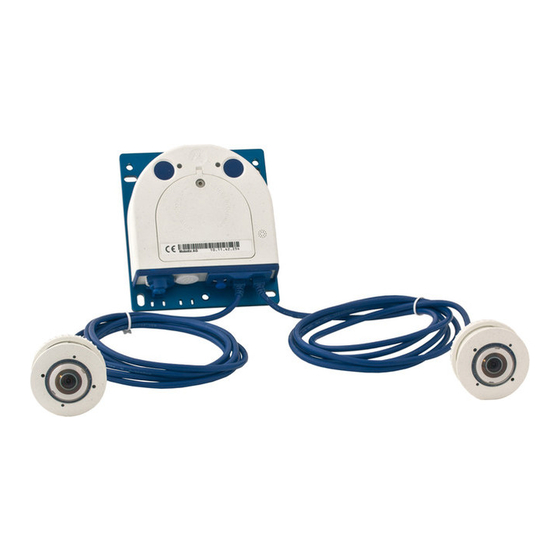
Mobotix S14 Manual (149 pages)
S14 Camera
Brand:
Mobotix
| Category:
Security Camera
| Size: 7 MB
Table of Contents
Table of Contents
3
Foreword
8
The MOBOTIX Concept
10
Innovative Hemispheric Technology
12
Superior Storage Solution
16
Added Security Value
18
Cost Benefits and Technical Advantages
20
1 An Overview of the S14 Flexmount
22
Versions and Product Characteristics
22
Hemispheric Image Views
26
Overview
26
Details (Sample Views for One Sensor)
28
Main Advantages of the S14 Flexmount
32
New Features Compared to M12-Devkit
33
General MOBOTIX Camera Functions
34
Lens Options
40
S14 Flexmount Hardware Features
42
Software Features for All Camera Modules
43
Technical Data
44
S14 Flexmount - Scope of Delivery
46
S14D Flexmount - Scope of Delivery
46
S14D Flexmount - Dimensions
50
L11 Sensor Module - Scope of Delivery
52
L11 Sensor Module - Dimensions
53
S14M Flexmount - Scope of Delivery
54
S14M Flexmount - Dimensions
58
Available Accessories
60
Extension for Sensor Module
60
Ceiling/Wall Installation Set
60
Connection Cable for Sensor Module
60
Miniusb Cable to Miniusb (Straight/Straight or Straight/Angled)
60
Miniusb Cable to USB a Socket
61
Ethernet Patch Cable for Bayonet Catch
61
NPA-Poe-Set
61
MOBOTIX AG • Security Vision Systems • Made in Germany
61
MX-Patch-Box
61
MX-NPA-Box
62
MX-GPS-Box
62
MX-232-IO-Box
62
Extio Function Expansion
63
Mx2Wire+ Media Converter
63
Product Preview
63
2 Installation
64
Determining the Installation Position
64
Positioning a Hemispheric Camera
65
S14D Flexmount Installation Options
70
S14M Flexmount Installation Options
75
Before Mounting
76
Overview of Cable Connections
76
Notes on Cable Lengths and Power Supply
78
Network Connection with MOBOTIX Patch Cable
79
Network Connection with Installation Cable
80
Using Sensor Modules (S14D Only)
80
Using the Miniusb Cable
80
Using Mxbus Modules
81
External Audio Support (Microphone/Speaker)
81
Replacing the Microsd Card
82
Tools Required for Installation
82
Preparatory Steps
83
Installing the S14D Flexmount
84
Attaching the S14D Base Module
84
Attaching and Connecting the S14D Sensor Modules
85
Plugging in and Lifting off Extensions
86
Connecting Network Cables and Additional S14D Cables
87
Installing the S14M Flexmount
88
Connecting Network Cables and Additional S14M Cables
88
Attaching the S14M Camera Housing
88
Network and Power Connection, Additional Cables
90
Network Cabling for S14 with Patch Cables
90
Network Cabling for S14 with Patch Cables
91
Connecting Additional Cables
93
Poe Variables
94
Power Supply Using a Switch
95
Power Supply When Connected Directly to a Computer
96
Power Supply with Power-Over-Ethernet Products
96
Camera Startup Sequence
97
MOBOTIX AG • Security Vision Systems • Made in Germany
97
3 Operating the Camera
98
Manual and Automatic Operation - Overview
98
Manually Using a Computer in the 10.X.X.X IP Address Range
99
Automatically Using Mxcontrolcenter or Mxeasy
100
Automatically Using DHCP
101
First Images and the most Important Settings
102
Manually Setting up the Network Parameters in a Browser
102
First Images and the most Important Settings in the Browser
104
First Images and Network Parameter Configuration in Mxcontrolcenter
106
First Images and Network Parameter Configuration in Mxeasy
111
Integrating and Displaying Cameras
112
Starting the Camera with the Factory IP Address
114
Starting the Camera with an Automatic IP Address (DHCP)
115
Virtual PTZ and Full Image Recording
116
Preparing the Virtual PTZ Function
116
Full Image Recording
118
Special S14 Configuration in the Browser
120
Microsd Card Recording
130
Introduction
130
Formatting the Microsd Card
132
Activate Recording
133
Accessing Camera Data
134
Deactivating the Card Memory
134
Using a Microsd Card in a Different MOBOTIX Camera
135
Limitations on Warranty When Using Flash Storage Media
135
Configuration in the Browser
136
Overview
136
General Browser Settings
136
Additional Configuration Options
139
Additional Notes
140
Do Not Sharply Bend the Connection Cables to the Sensor Modules
140
Password for the Administration Menu
140
Permanently Deactivating the Microphone
140
Starting the Camera with the Factory IP Address
140
Resetting the Camera to Factory Settings
141
Activate Event Control and Motion Detection
141
Deactivate Text and Logo Options
141
Deactivating the Camera Reboot
141
Browser
142
Cleaning the Camera and Lens
142
Safety Warnings
142
Online Help in the Browser
143
MOBOTIX AG • Security Vision Systems • Made in Germany
143
Advertisement
Advertisement
Related Products
Mobotix S15
Mobotix S26 Flex
Mobotix S74
Mobotix AllroundDual M16B
Mobotix Categories
Security Camera
Intercom System
IP Camera
Digital Camera
Security System
More Mobotix Manuals
Login
Sign In
OR
Sign in with Facebook
Sign in with Google
Upload manual
Upload from disk
Upload from URL