Sign In
Upload
Manuals
Brands
Mobotix Manuals
Security Camera
S15
Mobotix S15 Manuals
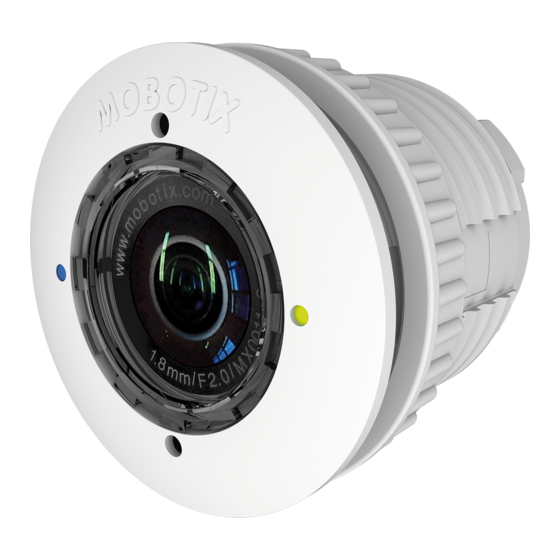
Manuals and User Guides for Mobotix S15. We have
2
Mobotix S15 manuals available for free PDF download: Manual
Mobotix S15 Manual (160 pages)
Brand:
Mobotix
| Category:
Security Camera
| Size: 11 MB
Table of Contents
Table of Contents
3
Product Overview
3
Operating the Camera
5
1 Product Overview
10
S15 Flexmount
10
S15M Flexmount Camera
12
S15D Flexmount Dual Camera
13
Advantages and New Features
16
Hemispheric Technology
18
Decentralized Video System
22
Green IP Video
24
Technical Specifications
25
S15 Lens Options
25
Camera Variants - Lenses, Hardware, Image Formats
28
Camera Variants - Software Features
29
Technical Data
30
Delivered Parts and Dimensions
34
S15D Core (Base Module)
34
L12 Sensor Module
40
Sensor Modules L23
42
Sensor Modules
44
Blockflexmounts L12, L23
46
Blockflexmount Csvario L24-54
48
Thermal Sensor Modules
50
S15M
54
Available Accessories
58
Extension for Sensor Module
58
Ceiling/Wall Installation Set
58
Connection Cable for Sensor Module
58
Miniusb Cable to Miniusb (Straight/Straight or Straight/Angled)
58
Miniusb Cable to USB a Socket
59
Ethernet Patch Cable for Bayonet Catch
59
NPA-Poe-Set
59
MX-Overvoltage-Protection-Box
59
MX-NPA-Box
60
MX-GPS-Box
60
MX-232-IO-Box
60
Extio Expansion Module
61
Mx2Wire+ Media Converter
61
Audiomount
61
Dualmount
62
Surroundmount
62
Halomount
62
Speakermount
63
Ptmount
63
Other Accessories
63
MOBOTIX AG • Security-Vision-Systems • Made in Germany
63
MOBOTIX Software
65
Integrated Camera Software (Firmware)
65
Mxcontrolcenter
66
Mxeasy
67
MOBOTIX App
68
2 Installation
70
Determining the Installation Position
70
Positioning a Hemispheric Camera
71
S15D Flexmount Installation Options
76
S15M Flexmount Installation Options
83
Before Mounting
84
Overview of Cable Connections
84
Notes on Cable Lengths and Power Supply
86
Network Connection with MOBOTIX Patch Cable
87
Network Connection with Installation Cable
88
Using Sensor Modules (S15D Only)
88
Using the Miniusb Cable
88
Using Mxbus Modules
89
External Audio Support (Microphone/Speaker)
89
Replacing the Microsd Card
90
Tools Required for Installation
90
Preparatory Steps
91
Installing the S15D Flexmount
92
Attaching the S15D Base Module
92
Attaching and Connecting the S15D Sensor Modules
93
Plugging in and Removing Extensions
94
Connecting Network Cables and Additional S15D Cables
95
Installing the S15M Flexmount
96
Connecting Network Cables and Additional S15M Cables
96
Attaching the S15M Camera Housing
96
Installing the S15M Flexmount
97
Network and Power Connection, Additional Cables
98
Network Cabling for S15 with Patch Cables
98
Network Cabling for S15 with Installation Cables
99
Connecting Additional Cables
101
Power Supply Using a Switch
102
Power Supply When Connected Directly to a Computer
103
Power Supply with Power-Over-Ethernet Products
103
Variable Poe
104
Camera Startup Sequence
105
3 Operating the Camera
106
Manual and Automatic Operation
106
Manually Using a Computer in the 10.X.X.X IP Address Range
107
Automatically Using Mxcontrolcenter or Mxeasy
108
Automatically Using DHCP
109
First Images and the most Important Settings
110
Manually Setting up the Network Parameters in a Browser
110
First Images and the most Important Settings in the Browser
112
First Images and Network Parameter Configuration in Mxcontrolcenter
114
First Images and Network Parameter Configuration in Mxeasy
119
Starting the Camera with the Factory IP Address
122
Starting the Camera with an Automatic IP Address (DHCP)
123
Adjusting Lens Focus and Inserting a Filter
124
Adjusting Lens Focus (L76/L160 Only)
124
Inserting a Filter
125
Virtual PTZ and Full Image Recording
126
Preparing the Virtual PTZ Function
126
Full Image Recording
128
Special S15 Configuration in the Browser
130
Microsd Card Recording
140
Introduction
140
Formatting the Microsd Card
142
Activating Microsd Card Recording
143
Accessing Data on the Microsd Card
144
Deactivating Card Recording
144
Using a Microsd Card in a Different MOBOTIX Camera
145
Limitations on Warranty When Using Flash Storage Media
145
Configuration in the Browser
146
Overview
146
Configuration in the Browser
147
General Browser Settings
148
Settings When Using Thermal Sensor Modules
149
Special Case: Setting up an S15 Flexmount as a Door Station
150
Installation
150
Execute Auto Configuration
151
Setting up an S15 as a Door Station
152
Additional Notes
153
Do Not Sharply Bend the Connection Cables to the Sensor Modules
153
Reduced Weather Protection When Installing Upside-Down
153
Password for the Admin Menu
153
Permanently Deactivating the Microphone
154
Starting the Camera with the Factory IP Address
154
MOBOTIX AG • Security-Vision-Systems • Made in Germany
154
Deactivating Text and Logo Options
155
Legal Notes
156
Online Help in the Browser
157
Disclaimer
158
Manufacturer
159
Advertisement
Mobotix S15 Manual (156 pages)
Brand:
Mobotix
| Category:
Security Camera
| Size: 11 MB
Table of Contents
Table of Contents
3
Contents
6
1 Product Overview
10
S15 Flexmount
10
S15M Flexmount Camera
12
S15D Flexmount Dual Camera
13
Advantages and New Features
16
Hemispheric Technology
18
Decentralized Video System
22
Technical Specifications
24
S15M Lens Options
24
S15D Lens Options
24
S15D with Thermal(-TR) Sensor Modules
27
Camera Variants - Lenses, Hardware, Image Formats
28
Camera Variants - Software Features
29
Technical Data
30
Delivered Parts and Dimensions
34
S15D Core (Base Module)
34
Sensor Modules
40
Sensor Modules
42
Sensor Modules L270-L320
44
Blockflexmounts
46
Blockflexmounts L10-L12, L20-L23, L22-L25, L32-L38, L43-L51, L65-L76, L135-L160 L270-L320
46
L270-L320
47
Blockflexmount CS Mount
48
Sensor Modules Thermal L43, L65, L135 and Thermal-TR079/119/237
50
S15M
54
Available Accessories
58
Extension for Sensor Module
58
Ceiling/Wall Installation Set
58
Connection Cable for Sensor Module
58
Miniusb Cable to Miniusb (Straight/Straight or Straight/Angled)
58
Miniusb Cable to USB a Socket
59
Ethernet Patch Cable for Bayonet Catch
59
NPA-Poe-Set
59
MX-Overvoltage-Protection-Box
59
MX-NPA-Box
60
MX-GPS-Box
60
MX-232-IO-Box
60
Extio Expansion Module
61
Mx2Wire+ Media Converter
61
Audiomount
61
Dualmount
62
Surroundmount
62
Halomount
62
Speakermount
63
Ptmount
63
MOBOTIX AG • Security-Vision-Systems • Made in Germany
63
Ptmount-Thermal(-TR)
63
Sealing Ring as Dome Replacement for Sensor Modules
64
Other Accessories
64
MOBOTIX Software
65
Integrated Camera Software (Firmware)
65
Mxmanagementcenter
66
MOBOTIX App
67
2 Installation
68
Determining the Installation Position
68
Positioning a Hemispheric Camera
69
S15D Flexmount Installation Options
74
S15M Flexmount Installation Options
81
Before Mounting
82
Overview of Cable Connections
82
Notes on Cable Lengths and Power Supply
84
Network Connection with MOBOTIX Patch Cable
85
Network Connection with Installation Cable
86
Using Sensor Modules (S15D Only)
86
Using the Miniusb Cable
86
Using Mxbus Modules
87
External Audio Support (Microphone/Speaker)
87
Replacing the Microsd Card
88
Tools Required for Installation
88
Preparatory Steps
89
Installing the S15D Flexmount
90
Attaching the S15D Base Module
90
Attaching and Connecting the S15D Sensor Modules
91
Plugging in and Removing Extensions
92
Connecting Network Cables and Additional S15D Cables
93
Installing the S15M Flexmount
94
Connecting Network Cables and Additional S15M Cables
94
Attaching the S15M Camera Housing
94
Network and Power Connection, Additional Cables
96
Network Cabling for S15 with Patch Cables
96
Network Cabling for S15 with Installation Cables
97
Connecting Additional Cables
99
Power Supply Using a Switch
100
Power Supply When Connected Directly to a Computer
101
Power Supply with Power-Over-Ethernet Products
101
Variable Poe
102
Camera Startup Sequence
103
MOBOTIX AG • Security-Vision-Systems • Made in Germany
103
3 Operating the Camera
104
Manual and Automatic Operation
104
First Images and the most Important Settings
106
Manually Setting up the Network Parameters in a Browser
106
First Images and the most Important Settings in the Browser
109
First Images and Network Parameter Configuration in MXMC
111
Starting the Camera with Factory (Network) Settings
114
Starting the Camera with an Automatic IP Address (DHCP)
115
Adjusting Lens Focus and Inserting a Filter
116
Adjusting Lens Focus (L65-L76/L135-L160 Only)
116
Inserting a Filter
117
Replacing the Dome against the Sealing Ring (Only Sensor Modules L10-L12)
118
Virtual PTZ and Full Image Recording
120
Preparing the Virtual PTZ Function
120
Full Image Recording
122
Special S15 Configuration in the Browser
124
Microsd Card Recording
134
Introduction
134
Formatting the Microsd Card
136
Activating Microsd Card Recording
137
Accessing Data on the Microsd Card
138
Deactivating Card Recording
138
Using a Microsd Card in a Different MOBOTIX Camera
139
Limitations on Warranty When Using Flash Storage Media
139
Configuration in the Browser
140
Overview
140
General Browser Settings
142
Configuring the S15D with Thermal(-TR) Sensor Modules in the Browser
143
Setting up an S15D/M Flexmount as Door Station
145
Installation
145
Execute Auto Configuration
146
Setting up an S15D/M as a Door Station
147
Additional Notes
148
Do Not Sharply Bend the Connection Cables to the Sensor Modules
148
Reduced Weather Protection When Installing Upside-Down
148
Password for the Admin Menu
148
Permanently Deactivating the Microphone
149
Starting the Camera with the Factory IP Address
149
Resetting the Camera to Factory Settings
149
Activating Event Control and Motion Detection
149
Deactivating Text and Logo Options
150
MOBOTIX AG • Security-Vision-Systems • Made in Germany
150
Advertisement
Related Products
Mobotix S14
Mobotix S26 Flex
Mobotix S74
Mobotix AllroundDual M16B
Mobotix Categories
Security Camera
Intercom System
IP Camera
Digital Camera
Security System
More Mobotix Manuals
Login
Sign In
OR
Sign in with Facebook
Sign in with Google
Upload manual
Upload from disk
Upload from URL