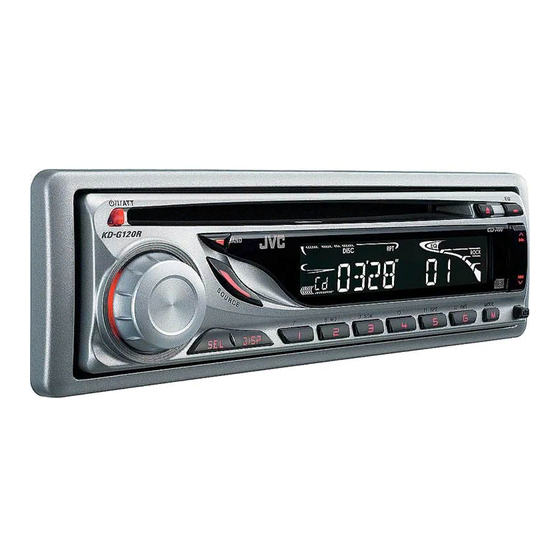
JVC KD-G120 Instructions Manual
Jvc cd receiver instructions
Hide thumbs
Also See for KD-G120:
- Service manual (63 pages) ,
- Schematic diagrams (14 pages) ,
- Instructions manual (39 pages)
Table of Contents
Advertisement
CD RECEIVER
RECEPTOR CON CD
RECEPTEUR CD
For canceling the display demonstration, see page 6.
Para cancelar la demostración en pantalla, consulte la página 6.
Pour annuler la démonstration des affichages, référez-vous à la page 6.
For installation and connections, refer to the separate manual.
Para la instalación y las conexiones, refiérase al manual separado.
Pour l'installation et les raccordements, se référer au manuel séparé.
INSTRUCTIONS
MANUAL DE INSTRUCCIONES
MANUEL D'INSTRUCTIONS
KD-G120R/KD-G120
KD-G120R/KD-G120
KD-G120R/KD-G120
For customer Use:
Enter below the Model
No. and Serial No. which
are located on the top or
bottom of the cabinet.
Retain this information
for future reference.
Model No.
Serial No.
GET0330-001A
KD-G120R
KD-G120
[J]
Advertisement
Table of Contents
Troubleshooting

Related Manuals for JVC KD-G120


Summary of Contents for JVC KD-G120
- Page 1 For installation and connections, refer to the separate manual. Para la instalación y las conexiones, refiérase al manual separado. Pour l’installation et les raccordements, se référer au manuel séparé. INSTRUCTIONS MANUAL DE INSTRUCCIONES MANUEL D’INSTRUCTIONS KD-G120R/KD-G120 KD-G120R/KD-G120 KD-G120R/KD-G120 KD-G120R KD-G120 For customer Use: Enter below the Model No.
-
Page 2: To Reset Unit
CAUTION: CAUTION: • Your preset adjustments will also be erased. • If a disc is loaded, it will eject. Be careful not to drop the disc. • If this does not work, reset your unit. • Be careful not to drop the disc when it ejects. Time countdown indicator To use these buttons for their original functions again after pressing M MODE,... - Page 3 Detaching... Attaching... CONTENTS Basic operations ... 6 Playing a disc in the unit ... 8...
-
Page 4: Control Panel
Control panel — • DO NOT expose the remote sensor to strong light (direct sunlight or artificial lighting). ¢ 4 KD-G120R and KD-G120... -
Page 5: Remote Controller
Remote controller — Aim the remote controller directly at the remote sensor on the unit. Make sure there is no obstacle in between. RM-RK50 ∞ ∞... -
Page 6: Basic Operations/Basic Settings
Getting started Turn on the power. Ÿ For FM/AM tuner ⁄ Adjust the volume. Volume level indicator Adjust the sound as you want. (See page 9.) 1 Canceling the display 2 Setting the clock Finish the procedure. Volume level appears demonstrations Ô... -
Page 7: Radio Operations
Radio operations Ÿ Lights up when receiving an FM stereo broadcast with sufficient signal strength. Selected band appears. Start searching for a station. To stop searching, 2 Select the desired station frequencies. Lights up when monaural mode is activated. To restore the stereo effect, Select the FM band (FM1 –... -
Page 8: Disc Operations
Preset number flashes for a while. Select the preset station (1 – 6) you want. Disc operations To cancel the prohibition Select your desired playback mode. 7 Repeat play TRK RPT RPT OFF 7 Random play DISC RND RND OFF... -
Page 9: Sound Adjustments
Sound adjustments (bass) (treble) (super bass) USER ROCK CLASSIC POPS HIP HOP JAZZ BAS* TRE* FAD* BAL* S.BS* SUB. W General settings — PSM Select a PSM item. Adjust the PSM item selected. Repeat steps to adjust other PSM items if necessary. Then press SEL to finish the procedure. -
Page 10: To Clean Connectors/Moisture Condensation
DEMO DEMO ON DEMO OFF CLOCK H [Initial: 1 (1:00)] CLOCK M [Initial: 00 (1:00)] L/O MODE REAR WOOFER AMP GAIN LOW PWR HIGH PWR AREA AREA US AREA EU AREA SA Maintenance Connector [Initial]; [Initial]; [Initial]; [Initial]; When removing a disc from its case, When storing a disc into its case, Center holder... -
Page 11: More About This Unit
Do not use the following discs: Sticker Stick-on label Sticker residue Warped disc Disc More about this unit To be continued... -
Page 12: Troubleshooting
Troubleshooting... -
Page 13: Specifications
Specifications ≤ Ω Ω Ω Ω Ω Ω Ω Ω Ω Design and specifications are subject to change without notice. Ω... - Page 14 Having TROUBLE with operation? Please reset your unit Refer to page of How to reset your unit Still having trouble?? USA ONLY Call 1-800-252-5722 http://www.jvc.com We can help you! EN, SP, FR © 2005 Victor Company of Japan, Limited 1005DTSMDTJEIN...
- Page 15 KD-G120R/KD-G120 Installation/Connection Manual Manual de instalación/conexión Manuel d’installation/raccordement GET0330-002A ENGLISH WARNINGS Ω Ω ESPAÑOL ADVERTENCIAS Ω Ω © 2005 Victor Company of Japan, Limited FRANÇAIS AVERTISSEMENTS Ω Ω × × × × × × 1005DTSMDTJEIN EN, SP, FR...
-
Page 16: Installation
INSTALLATION (IN-DASH MOUNTING) INSTALACION (MONTAJE EN EL TABLERO DE INSTRUMENTOS) × × × × × × INSTALLATION (MONTAGE DANS LE TABLEAU DE BORD) × × × × × ×... -
Page 17: Electrical Connections
ENGLISH ESPAÑOL FRANÇAIS... - Page 18 JVC Amplifier Amplificador de JVC JVC Amplificateur JVC Amplifier Amplificador de JVC JVC Amplificateur...
- Page 19 CD RECEIVER KD-G124/KD-G123 KD-G124 KD-G123 For canceling the display demonstration, see page 5. For installation and connections, refer to the separate manual. INSTRUCTIONS GET0332-001A [UI]...
- Page 20 CAUTION: CAUTION: • Your preset adjustments will also be erased. • If a disc is loaded, it will eject. Be careful not to drop the disc. • If this does not work, reset your unit. • Be careful not to drop the disc when it ejects. Time countdown indicator To use these buttons for their original functions again after pressing M MODE,...
- Page 21 Detaching... Attaching... CONTENTS Basic operations ... 5 Playing a disc in the unit ... 7...
- Page 22 Control panel — ¢ 4 KD-G124 and KD-G123...
-
Page 23: Getting Started
Getting started Turn on the power. Ÿ * You cannot select “DISC” as the playback source if there is no disc in the loading slot. For FM/AM tuner ⁄ Adjust the volume. Volume level appears. Volume level indicator Adjust the sound as you want. (See page 8.) 1 Canceling the display demonstrations... -
Page 24: Radio Operations
Radio operations Ÿ Lights up when receiving an FM stereo broadcast with sufficient signal strength. Selected band appears. Start searching for a station. To stop searching, To tune in to a station manually 2 Select the desired station frequencies. When an FM stereo broadcast is hard to receive Lights up when monaural mode is activated. -
Page 25: Disc Operations
Manual presetting Preset number flashes for a while. Listening to a preset station Select the preset station (1 – 6) you want. Disc operations Playing a disc in the unit To stop play and eject the disc To fast-forward or reverse the track To go to the next or previous tracks... -
Page 26: Sound Adjustments
Selecting the playback modes Select your desired playback mode. 7 Repeat play Mode Plays repeatedly TRK RPT RPT OFF 7 Random play Mode Plays at random DISC RND RND OFF Sound adjustments Preset values Indication (For) USER ROCK CLASSIC POPS HIP HOP JAZZ Indication, [Range]... -
Page 27: General Settings - Psm
General settings — PSM Select a PSM item. Indications Selectable settings, [reference page] DEMO DEMO ON DEMO OFF CLOCK H CLOCK M L/O MODE REAR WOOFER AMP GAIN LOW PWR HIGH PWR Adjust the PSM item selected. Repeat steps to adjust other PSM items if necessary. -
Page 28: Maintenance
Maintenance Connector Do not use the following discs: Warped disc Sticker Sticker residue When removing a disc from Center holder its case, Stick-on label Disc When storing a disc into its case,... -
Page 29: More About This Unit
More about this unit To be continued... -
Page 30: Troubleshooting
Troubleshooting... -
Page 31: Specifications
Specifications Ω Ω Ω Ω Ω Ω Ω Ω Ω Design and specifications are subject to change without notice. Ω... - Page 32 Having TROUBLE with operation? Please reset your unit Refer to page of How to reset your unit © 2005 Victor Company of Japan, Limited 1005DTSMDTJEIN...
- Page 33 KD-G124/KD-G123 Installation/Connection Manual GET0332-002A [UI] WARNINGS Parts list for installation and connection INSTALLATION (IN-DASH MOUNTING) Removing the unit When using the optional stay × When installing the unit without using the sleeve × © 2005 Victor Company of Japan, Limited Ω...
-
Page 34: Electrical Connections
ELECTRICAL CONNECTIONS Typical connections Connecting the external amplifi er or subwoofer Set “L/O MODE” to “REAR” (See page 9 of the INSTRUCTIONS.) Set “L/O MODE” to “WOOFER” (See page 9 of the INSTRUCTIONS.) TROUBLESHOOTING JVC Amplifier JVC Amplifier KD-G124 KD-G123... - Page 35 CD RECEIVER KD-G126/KD-G125 KD-G126/KD-G125 KD-G126 KD-G126 KD-G125 KD-G125 For canceling the display demonstration, see page 5. For installation and connections, refer to the separate manual. INSTRUCTIONS GET0331-001A [U/UH]...
- Page 36 CAUTION: CAUTION: • Your preset adjustments will also be erased. • If a disc is loaded, it will eject. Be careful not to drop the disc. • If this does not work, reset your unit. • Be careful not to drop the disc when it ejects. Time countdown indicator To use these buttons for their original functions again after pressing M MODE,...
- Page 37 Detaching... Attaching... CONTENTS Basic operations ... 5 Playing a disc in the unit ... 7...
- Page 38 Control panel — ¢ 4 KD-G126 and KD-G125...
- Page 39 Getting started Turn on the power. Ÿ * You cannot select “DISC” as the playback source if there is no disc in the loading slot. For FM/AM tuner ⁄ Adjust the volume. Volume level appears. Volume level indicator Adjust the sound as you want. (See page 8.) 1 Canceling the display demonstrations...
- Page 40 Radio operations Ÿ Lights up when receiving an FM stereo broadcast with sufficient signal strength. Selected band appears. Start searching for a station. To stop searching, To tune in to a station manually 2 Select the desired station frequencies. When an FM stereo broadcast is hard to receive Lights up when monaural mode is activated.
- Page 41 Manual presetting Preset number flashes for a while. Listening to a preset station Select the preset station (1 – 6) you want. Disc operations Playing a disc in the unit To stop play and eject the disc To fast-forward or reverse the track To go to the next or previous tracks...
- Page 42 Selecting the playback modes Select your desired playback mode. 7 Repeat play Mode Plays repeatedly TRK RPT RPT OFF 7 Random play Mode Plays at random DISC RND RND OFF Sound adjustments Preset values Indication (For) USER ROCK CLASSIC POPS HIP HOP JAZZ Indication, [Range]...
- Page 43 General settings — PSM Select a PSM item. Indications Selectable settings, [reference page] DEMO DEMO ON DEMO OFF CLOCK H CLOCK M L/O MODE REAR WOOFER AMP GAIN LOW PWR HIGH PWR Adjust the PSM item selected. Repeat steps to adjust other PSM items if necessary.
- Page 44 Maintenance Connector Do not use the following discs: Warped disc Sticker Sticker residue When removing a disc from Center holder its case, Stick-on label Disc When storing a disc into its case,...
- Page 45 More about this unit To be continued...
- Page 46 Troubleshooting...
- Page 47 Specifications Ω Ω Ω Ω Ω Ω Ω Ω Ω Design and specifications are subject to change without notice. Ω...
- Page 48 Having TROUBLE with operation? Please reset your unit Refer to page of How to reset your unit EN, TH © 2005 Victor Company of Japan, Limited 1005DTSMDTJEIN...
- Page 49 • Be sure to ground this unit to the car’s chassis again after installation. Notes: • Replace the fuse with one of the specified rating. If the fuse blows frequently, consult your JVC car audio dealer. • It is recommended to connect to the speakers with maximum power of more than 50 W (both at the rear and at the front, with an impedance of 4 Ω...
-
Page 50: Removing The Unit
The following illustration shows a typical installation. If you have any questions or require information regarding installation kits, consult your JVC car audio dealer or a company supplying kits. • If you are not sure how to install this unit correctly, have it installed by a qualified technician. - Page 51 ENGLISH ELECTRICAL CONNECTIONS Typical connections / °“√‡™◊ Ë Õ ¡µË Õ ·∫∫ª°µ Before connecting: Check the wiring in the vehicle carefully. Incorrect connection may cause serious damage to this unit. The leads of the power cord and those of the connector from the car body may be different in color. Connect the colored leads of the power cord in the order specified in the illustration below.
- Page 52 µ— È ß §Ë “ “L/O MODE” ‡ªÁ π “REAR” (¥Ÿ À πÈ “ §”·π–π”) You can connect a power amplifier for rear speakers. ∑Ë “ π “¡“√∂µË Õ ‡§√◊ Ë Õ ß¢¬“¬‡ ’ ¬ ߇ª Á π≈”‚æßÀ≈— ß ‰¥È JVC Amplifier ‡§√◊ Ë Õ ß¢¬“¬‡ ’ ¬ ß...
- Page 53 CD RECEIVER RECEPTEUR CD KD-G162/KD-G161 For canceling the display demonstration, see page 5. Pour annuler la démonstration des affichages, référez-vous à la page 5. For installation and connections, refer to the separate manual. Pour l’installation et les raccordements, se référer au manuel séparé. INSTRUCTIONS MANUEL D’INSTRUCTIONS KD-G162...
- Page 54 CAUTION: CAUTION: • Your preset adjustments will also be erased. • If this does not work, reset your unit. • Be careful not to drop the disc when it ejects. Detaching... Attaching...
- Page 55 Time countdown indicator To use these buttons for their original functions again after pressing M MODE, CONTENTS Basic operations ... 5 Searching for your favorite FM RDS programme ... 7 Playing a disc in the unit ... 9...
- Page 56 Control panel — Control panel — ¢ 4 KD-G612/KD-G611/KD-G511 KD-G162 and KD-G161...
- Page 57 Getting started Turn on the power. Ÿ * You cannot select “DISC” as the playback source if there is no disc in the unit. For FM/AM tuner ⁄ Adjust the volume. Volume level appears. Volume level indicator Adjust the sound as you want. (See page 10.) 1 Canceling the display demonstrations...
- Page 58 Radio operations Ÿ Lights up when receiving an FM stereo broadcast with sufficient signal strength. Selected band appears. Start searching for a station. To stop searching, 2 Select the desired station frequencies. Lights up when monaural mode is activated. To restore the stereo effect, Select the FM band (FM1 –...
-
Page 59: Fm Rds Operations
Preset number flashes for a while. Select the preset station (1 – 6) you want. FM RDS operations Ÿ Select one of your favorite programme types. Select one of the PTY codes (see page 15). - Page 60 Start searching for your favorite programme. Select a PTY code (see page 7). Select the preset number (1 – 6) you want to store into. Ex.: When “ROCK M” is selected Repeat steps 1 and 2 to store other PTY codes into other preset numbers. Finish the procedure.
- Page 61 To change the Network-Tracking Reception setting, Disc operations To cancel the prohibition, Select your desired playback mode. 7 Repeat play TRK RPT RPT OFF 7 Random play DISC RND RND OFF...
- Page 62 Sound adjustments Ex.: When “ROCK” is selected USER ROCK CLASSIC POPS HIP HOP JAZZ BAS* TRE* (bass) (treble) (loudness) FAD* LOUD*...
- Page 63 General settings — PSM Select a PSM item. DEMO DEMO ON : DEMO OFF : CLOCK H CLOCK M 24H/12H CLK ADJ AUTO AF-REG AF REG Adjust the PSM item selected. Repeat steps PSM items if necessary. Finish the procedure. to adjust other...
- Page 64 PTY-STBY TA VOL P-SEARCH AMP GAIN IF BAND * Depends on the amplifier gain control. OFF [Initial] = [Initial: VOL 15]; : [Initial]; MUTING 1/MUTING 2 : : [Initial]; LOW PWR : HIGH PWR : [Initial]; AUTO : [Initial]; WIDE...
- Page 65 Maintenance Do not use the following discs: When removing a disc from its case, When storing a disc into its case,...
- Page 66 More about this unit...
- Page 68 Troubleshooting...
-
Page 69: Audio Amplifier Section
Specifications AUDIO AMPLIFIER SECTION Ω Ω Ω Ω TUNER SECTION [FM Tuner] [MW Tuner] [LW Tuner] CD PLAYER SECTION Ω Ω GENERAL Ω Design and specifications are subject to change without notice. Ω Ω... - Page 70 Having TROUBLE with operation? Please reset your unit Refer to page of How to reset your unit Vous avez des PROBLÈMES de fonctionnement? Réinitialisez votre appareil Référez-vous à la page intitulée Comment réinitialiser votre appareil EN, FR 1005DTSMDTJEIN © 2005 Victor Company of Japan, Limited...
- Page 71 KD-G162/KD-G161 Installation/Connection Manual Manuel d’installation/raccordement GET0334-010A [EX/EU] ENGLISH WARNINGS Ω Ω × × FRANÇAIS AVERTISSEMENTS 1005DTSMDTJEIN EN, FR © 2005 Victor Company of Japan, Limited Ω Ω...
- Page 72 INSTALLATION (IN-DASH MOUNTING) INSTALLATION (MONTAGE DANS LE TABLEAU DE BORD) × × × ×...
- Page 73 ENGLISH FRANÇAIS...
-
Page 74: En Cas De Difficultes
Connecting the external amplifier / Connexion d’un amplificateur extérieur Disconnect the speakers from this unit, connect them to the amplifier. Leave the speaker leads of this unit unused. JVC Amplifier JVC Amplificateur TROUBLESHOOTING The fuse blows. Power cannot be turned on.
Need help?
Do you have a question about the KD-G120 and is the answer not in the manual?
Questions and answers