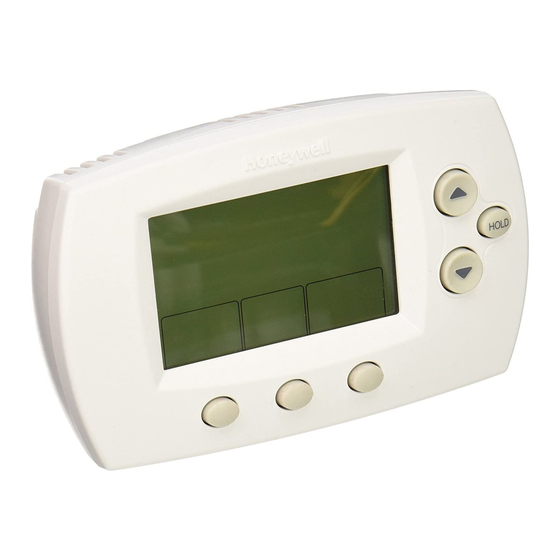
Honeywell FocusPRO 6000 Series User Manual

Honeywell FocusPRO 6000 Series User Manual

Programmable digital thermostat
Hide thumbs Also See for FocusPRO 6000 Series:
Table of Contents

Advertisement

Available languages

Available languages

Programmable
Digital
Thermostat
User Guide
Read and save these instructions.
For help please visit yourhome.honeywell.com

Thermostat controls

Function buttons
Press to select the
function displayed just
above each button.
(Functions change
depending on the task.)
FocusPRO
6000
Reference card
Battery holder
Hold Button
Press to override programmed
temperature control
Temperature buttons
Press to set preferred temperature.
Digital display
®
Series

Advertisement

Table of Contents
loading

Frequently Asked Questions (20)

  • How do I reset my Honeywell FocusPRO 6000 thermostat?

    To restore the default settings on your thermostat, follow these steps:

    1. Press SET CLOCK/DAY/SCHEDULE.
    2. Press SET SCHEDULE.
    3. Press DONE and NEXT at the same time for 4 seconds.

    For more information, see page 7 of the manual.
    Was this helpful?
  • How do I change the batteries in my Honeywell FocusPRO 6000 thermostat?

    To change the batteries:

    1. Press and pull to remove the battery holder.
    2. Insert fresh AA alkaline batteries.
    3. Reinstall the battery holder.

    Install fresh batteries immediately when the REPLACE BATTERY warning begins flashing. If batteries are inserted within two minutes, the time and day will not have to be reset. Even if the warning does not appear, you should replace batteries once a year or before leaving home for more than a month.


    For more information, see page 6 of the manual.
    Was this helpful?
  • Why is my Honeywell FocusPRO 6000 thermostat not working?

    If your thermostat is not working, consider the following:

    • If the display is blank:
      • Check the circuit breaker and reset if necessary.
      • Make sure the power switch at the heating & cooling system is on.
      • Make sure the furnace door is closed securely.
      • Make sure fresh AA alkaline batteries are correctly installed.
    • If the heating or cooling system does not respond:
      • Check the circuit breaker and reset if necessary.
      • Make sure the power switch at the heating & cooling system is on.
      • Make sure the furnace door is closed securely.
      • Wait 5 minutes for the system to respond.

    For more information, see page 7 of the manual.
    Was this helpful?
  • How do I program my Honeywell FocusPRO 6000 thermostat?

    To program your thermostat, follow these steps:

    1. Press SET CLOCK/DAY/SCHEDULE and then SET SCHEDULE.
    2. Press the up or down arrow to set your weekday Wake time (Mon-Fri), then press NEXT.
    3. Press the up or down arrow to set the temperature for this time period, then press NEXT.
    4. Set the time and temperature for the next time period (Leave). Repeat steps 2 and 3 for each weekday time period.
    5. Press NEXT to set weekend time periods (Sat-Sun), then press DONE to save and exit.

    Ensure the thermostat is set to the system you want to program (Heat or Cool). You can also press CANCEL PERIOD to eliminate unwanted time periods, except for Wake.


    For more information, see page 3 of the manual.
    Was this helpful?
  • How do I set the temperature on my Honeywell FocusPRO 6000 thermostat?

    You can set the preferred temperature using the Temperature buttons (up or down arrows).

    To temporarily adjust the temperature, press the up or down arrow. This will override the current program until the next programmed time period begins. To cancel this temporary setting, press RUN SCHEDULE.

    To permanently adjust the temperature, press HOLD. This will override the temperature settings for all time periods, maintaining the new temperature 24 hours a day until you manually change it or press RUN SCHEDULE to cancel "Hold" and resume the programmed schedule.

    Was this helpful?
  • What should I do if my Honeywell FocusPRO 6000 thermostat screen is blank?

    If your thermostat screen is blank, you should:

    • Check the circuit breaker and reset if necessary.
    • Make sure the power switch at the heating & cooling system is on.
    • Make sure the furnace door is closed securely.
    • Make sure fresh AA alkaline batteries are correctly installed.

    For more information, see page 7 of the manual.
    Was this helpful?
  • Why is my Honeywell FocusPRO 6000 thermostat not heating?

    If your thermostat is not heating, consider the following:

    • Press the SYSTEM button to set the system to Heat.
    • Make sure the temperature is set higher than the Inside temperature.
    • Check the circuit breaker and reset if necessary.
    • Make sure the power switch at the heating & cooling system is on.
    • Make sure the furnace door is closed securely.
    • Wait 5 minutes for the system to respond.

    For more information, see page 7 of the manual.
    Was this helpful?
  • Why is my Honeywell FocusPRO 6000 thermostat not cooling?

    If your thermostat is not cooling, consider the following:

    • Press the SYSTEM button to set the system to Cool.
    • Make sure the temperature is set lower than the Inside temperature.
    • Check the circuit breaker and reset if necessary.
    • Make sure the power switch at the heating & cooling system is on.
    • Make sure the furnace door is closed securely.
    • Wait 5 minutes for the system to respond.

    For more information, see page 7 of the manual.
    Was this helpful?
  • How do I switch between heating and cooling modes on my Honeywell FocusPRO 6000 thermostat?

    To switch between heating and cooling modes, press the SYSTEM button to select from Heat, Cool, Off, Auto, or Em Heat (for some models).

    Was this helpful?
  • How do I take my Honeywell FocusPRO 6000 thermostat off hold?

    To take your thermostat off hold and resume the programmed schedule, press RUN SCHEDULE.

    Was this helpful?
  • Why is my Honeywell FocusPRO 6000 thermostat not turning on?

    If your thermostat is not turning on, you should:

    • Check the circuit breaker and reset if necessary.
    • Make sure the power switch at the heating & cooling system is on.
    • Make sure the furnace door is closed securely.
    • Make sure fresh AA alkaline batteries are correctly installed.
    • Wait 5 minutes for the system to respond.

    For more information, see page 7 of the manual.
    Was this helpful?
  • Why does my Honeywell FocusPRO 6000 thermostat have no power?

    If your thermostat has no power, you should:

    • Check the circuit breaker and reset if necessary.
    • Make sure the power switch at the heating & cooling system is on.
    • Make sure the furnace door is closed securely.
    • Make sure fresh AA alkaline batteries are correctly installed.

    For more information, see page 7 of the manual.
    Was this helpful?
  • Why is my Honeywell FocusPRO 6000 thermostat not following its schedule?

    Your thermostat might not be following its schedule because the "Hold" feature has been activated. When HOLD is pressed, it permanently adjusts the temperature and turns off the program schedule. The thermostat will maintain the set temperature 24 hours a day until you manually change it or press RUN SCHEDULE to cancel "Hold" and resume the programmed schedule.


    For more information, see page 4 of the manual.
    Was this helpful?
  • What is the 'Fan' setting on the Honeywell FocusPRO 6000 thermostat and how do I use it?

    The 'Fan' setting controls the fan operation. You can press the FAN button to select:

    • Auto: The fan runs only when the heating or cooling system is on.
    • On: The fan runs continuously.

    For more information, see page 2 of the manual.
    Was this helpful?
  • How do I turn off the schedule on my Honeywell FocusPRO 6000 thermostat?

    To turn off the schedule, press the HOLD button. This will permanently adjust the temperature and override the programmed schedule, maintaining the new temperature 24 hours a day. To resume the schedule, press RUN SCHEDULE.

    Was this helpful?
  • Why is my Honeywell FocusPRO 6000 thermostat blinking 'Cool On'?

    If your thermostat is blinking 'Cool On', it indicates that the built-in compressor protection feature is engaged. This feature forces the compressor to wait for a few minutes before restarting to prevent damage. The message will flash until the safe wait time has elapsed, and then the compressor will turn on.

    Was this helpful?
  • Why is my Honeywell FocusPRO 6000 thermostat blinking 'Heat On'?

    If your thermostat is blinking 'Heat On', it indicates that the built-in compressor protection feature is engaged. This feature forces the compressor to wait for a few minutes before restarting to prevent damage. The message will flash until the safe wait time has elapsed, and then the compressor will turn on.

    Was this helpful?
  • How long do batteries last in the Honeywell FocusPRO 6000 thermostat?

    The thermostat will display a REPLACE BATTERY warning approximately two months before the batteries are depleted. Regardless of the warning, you should replace batteries once a year, or before leaving home for more than a month.


    For more information, see page 6 of the manual.
    Was this helpful?
  • Does the Honeywell FocusPRO 6000 thermostat support multiple stages of heating or cooling?

    Yes, the thermostat supports systems with Auxiliary heat for heat pumps.

    Was this helpful?
  • Can I use the Honeywell FocusPRO 6000 thermostat with a heat pump system?

    Yes, the Honeywell FocusPRO 6000 thermostat can be used with heat pump systems that have auxiliary heat. It also supports Emergency & Auxiliary Heat control (on select models).


    For more information, see page 2 of the manual.
    Was this helpful?
Need help?

Need help?

Do you have a question about the FocusPRO 6000 Series and is the answer not in the manual?

Questions and answers

Doris J Popovich
October 9, 2025

What does the symbol that looks like a champaign glass with an X next to it mean?

User image 68e7a68ab5479
Rosalie Heffernan
May 6, 2025

How to change from Celsius to Fahrenheit

Summary of Contents for Honeywell FocusPRO 6000 Series

  • Page 1: Thermostat Controls

    FocusPRO Programmable ® 6000 Digital Thermostat Series User Guide Read and save these instructions. For help please visit yourhome.honeywell.com Thermostat controls Reference card Battery holder Hold Button Press to override programmed temperature control Temperature buttons Press to set preferred temperature.
  • Page 2: Display Screen

    Display screen Low battery Auxiliary heat (Only Temperature setting warning for heat pumps with auxiliary heat) System Status Current inside Heat Inside Cool On: Cooling system Replace Battery Setting temperature is on. In Recovery Heat On: Heating system 6 : 30 Press the SET is on.
  • Page 3: To Adjust Program Schedules

    To adjust program schedules 1. Press SET CLOCK/DAY/SCHEDULE, System then SET SCHEDULE. Set Clock/Day/ Auto Cool Schedule 2. Press to set your weekday Wake time (Mon–Fri), then press NEXT. 3. Press to set the temperature Done for this time period, then press NEXT. Set Day Set Schedule 4.
  • Page 4: Program Schedule Override

    Program schedule override (permanent) Press HOLD to permanently adjust Heat the temperature. This will override Inside Setting Hold the temperature settings for all time periods. 6 : 30 The “Hold” feature turns off the program schedule and allows you to adjust the System Run Schedule thermostat manually, as needed.
  • Page 5: Built-In Compressor Protection

    Built-in compressor protection Damage can occur if the compressor is Cool Inside Setting restarted too soon after shutdown. This feature forces the compressor to wait for 6 : 30 a few minutes before restarting. During the wait time, the display will Cool On flash the message Cool On (or Heat On System...
  • Page 6: Battery Replacement

    Customer assistance Press and pull to remove. For assistance with this product, please visit yourhome.honeywell.com. Or call Honeywell Customer Care toll- free at 1-800-468-1502. Turn thermostat over to find model number and date code. xxxxxxx xxxxxxx...
  • Page 7: Troubleshooting

    Troubleshooting If you have difficulty with your thermostat, please try the following suggestions. Most problems can be corrected quickly and easily. Display is • Check circuit breaker and reset if necessary. blank • Make sure power switch at heating & cooling system is • Make sure furnace door is closed securely.
  • Page 8: Year Limited Warranty

    This warranty does not cover removal or reinstallation costs. This warranty shall not apply if it is shown by Honeywell that the defect or malfunction was caused by damage which occurred while the product was in the possession of a consumer.
  • Page 9 6000 numérique programmable Série Guide de l’utilisateur Veuillez lire le mode d’emploi et le conserver en lieu sûr. Pour obtenir de l’aide veuillez visiter yourhome.honeywell.com Commandes de thermostat Carte de référence Porte-piles Bouton de retenue Appuyez pour supplanter la commande de température programmée...
  • Page 10: Écran D'affichage

    Écran d’affichage Chauffage auxiliaire Réglage Avertissement (Seulement pour thermopompes de température de piles faibles avec chauffage auxiliaire) Température État du système intérieure Cool On : Le système de Heat Inside Replace Battery Setting refroidissement est en marche. actuelle Heat On : Le système de In Recovery 6 : 30 Appuyez sur le...
  • Page 11: Dérogation (Temporaire) Au Programme

    Pour régler les horaires programmés 1. Appuyez sur SET CLOCK/DAY/ System SCHEDULE, puis SET SCHEDULE. Set Clock/Day/ Auto Cool 2. Appuyez sur pour régler Schedule l’heure du lever en semaine Heure du lever (lun.–ven.), puis appuyez sur NEXT. Done 3. Appuyez sur pour régler la Set Day Set Schedule...
  • Page 12: Dérogation (Permanente) Au Programme

    Dérogation (permanente) au programme Appuyez sur HOLD pour régler la Heat température de façon permanente. Cela Inside Setting Hold dérogera les réglages de température pour toutes les périodes. 6 : 30 La fonction de retenue (Hold) interrompt l’horaire programmé et vous permet de Run Schedule System régler le thermostat manuellement, au...
  • Page 13: Protection Du Compresseur Intégrée

    Protection du compresseur intégrée Des dommages peuvent survenir si Cool Inside on redémarre le compresseur trop Setting rapidement après une interruption. La fonction contraint le compresseur à 6 : 30 attendre quelques minutes avant de redémarrer. Cool On System Durant l’attente, le message Cool On Set Clock/Day/ Auto Cool...
  • Page 14: Remplacement Des Piles

    Pour obtenir de l’aide avec ce produit, Saisissez et tirez pour enlever consultez le http://yourhome.honeywell.com Ou téléphonez sans frais au Centre de service à la clientèle de Honeywell au 1 800 468-1502. Retournez le thermostat pour trouver le numéro de modèle et le code de date.
  • Page 15: En Cas De Problème

    En cas de problème Si le thermostat cause des ennuis, essayez l’une de ces suggestions. La plupart des problèmes peuvent être réglés rapidement et facilement. L’écran est vide • Vérifiez le disjoncteur et réinitialisez si nécessaire. • Assurez-vous que l’interrupteur d’alimentation du système de chauffage et de climatisation est en marche.
  • Page 16: Garantie Limitée De 5 Ans

    (i) le retourner, avec le reçu d’achat ou une autre preuve d’achat datée, à l’endroit où il a été acheté, ou (ii) téléphoner au Centre de service à la clientèle de Honeywell au 1 800 468-1502. Le Centre décidera alors s’il faut retourner le produit à l’adresse suivante : Honeywell Return Goods, Dock 4 MN10-3860, 1885 Douglas Dr.
  • Page 17: Controles Del Termostato

    Termostato ® 6000 digital programable Serie Guía del usuario Lea y guarde estas instrucciones. Para obtener ayuda, visite yourhome.honeywell.com Controles del termostato Tarjeta de referencia Soporte de la batería Botón “Hold” Presiónelo para anular el control de temperatura programada Botones de la temperatura...
  • Page 18: Pantalla De Visualización

    Pantalla de visualización Función “Auxiliary heat” Configuración Aviso de (solamente (calor auxiliar) de temperatura batería baja para bombas de calor con calor auxiliar) Estado del sistema Temperatura Cool On: El sistema de Heat Inside Replace Battery interior actual Setting refrigeración está encendido. Heat On: El sistema de In Recovery 6 : 30...
  • Page 19: Para Ajustar Los Cronogramas Del Programa

    Para ajustar los cronogramas del programa 1. Presione “SET CLOCK/DAY/SCHEDULE”, System luego, “SET SCHEDULE”. Set Clock/Day/ Auto Cool Schedule 2. Presione para configurar la hora en que se despierta los días de semana (de lunes a viernes), luego presione “NEXT”. Done para configurar la 3.
  • Page 20: Conversión Automática (Calor/Frío)

    Programe la anulación del cronograma (permanente) Presione “HOLD” para ajustar Heat Inside Setting permanentemente la temperatura. Hold Esto anulará las configuraciones de la 6 : 30 temperatura para todos los períodos de tiempo. Run Schedule System La función “Hold” apaga el cronograma Auto Heat del programa y le permite ajustar el...
  • Page 21: Protección Del Compresor Incorporado

    Protección del compresor incorporado El compresor puede dañarse si se Cool Inside Setting vuelve a iniciar inmediatamente después de ser apagado. Esta 6 : 30 característica hace que el compresor demore unos minutos antes de volver a Cool On iniciarse. System Durante el tiempo de espera, el Set Clock/Day/...
  • Page 22: Reemplazo De La Batería

    Presione y tire para quitar. Para obtener asistencia relacionada con este producto, visite http://yourhome.honeywell.com O comuníquese con el número gratuito de Atención al cliente de Honeywell 1-800-468-1502. Gire el termostato para ver el número de modelo y el código de fecha. xxxxxxx...
  • Page 23: En Caso De Inconvenientes

    En caso de inconvenientes Si tiene dificultades con el termostato, intente seguir las sugerencias que se indican a continuación. La mayoría de los problemas pueden corregirse rápida y fácilmente. La pantalla • Controle el interruptor de circuito y, si es necesario, está...
  • Page 24: Garantía Limitada De 5 Años

    Garantía limitada de 5 años Honeywell garantiza este producto, a excepción de la batería, por el término de cinco (5) años contra cualquier defecto de fabricación o de los materiales, a partir de la fecha de compra por parte del consumidor, en condiciones normales de uso y servicio.

Table of Contents

Save PDF