Advertisement
Quick Links
DIGITAL CAMERA
Instruction
Manual
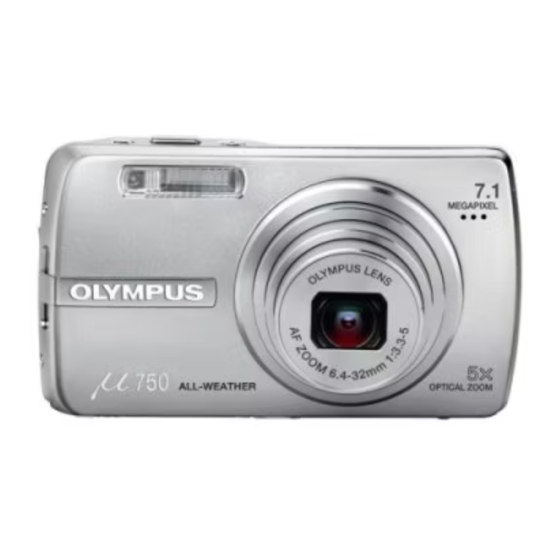
Thank you for purchasing an Olympus digital camera. Before you start to use your new camera, please
read these instructions carefully to enjoy optimum performance and a longer service life. Keep this manual
in a safe place for future reference.
We recommend that you take test shots to get accustomed to your camera before taking important photographs.
In the interest of continually improving products, Olympus reserves the right to update or modify information
contained in this manual.
The screen and camera illustrations shown in this manual were produced during the development
stages and may differ from the actual product. Unless otherwise specified, the explanation about
these illustrations is provided in Stylus750/µ750.
/
/
Quick Start Guide
Button operations
Menu operations
Printing pictures
Using OLYMPUS Master
Getting to know your
camera better
Miscellaneous
Get started using your camera
right away.
Advertisement

Related Manuals for Olympus MJU-750


Summarization of Contents
Quick Start Guide
Box Contents and Strap Attachment
Lists items included in the box and how to attach the camera strap.
Battery Preparation and Charging
Instructions for charging the battery and inserting it into the camera.
Powering On and Setting Date/Time
Guides on powering on the camera and setting the date and time.
Shooting Basics: Focus and Capture
Covers holding the camera, focusing, and the shooting process.
Viewing and Erasing Pictures
Instructions for viewing captured images and deleting unwanted ones.
Button Operations
Power and Shutter Buttons
Details on using the power and shutter buttons for camera operation.
Mode Dial and Shooting Modes
Explains switching between shooting modes like P, SCN, and GUIDE.
Navigation and Control Buttons
Covers arrow pad, OK/FUNC, MENU, and zoom button functionalities.
Flash and Macro Functions
How to select flash modes and macro shooting modes.
Shooting Enhancements: Self-Timer, Exposure, Stabilization
Details on using self-timer, adjusting exposure, and image stabilization.
Display Information and Menu Guide
How to change display information and access the menu guide.
Menu Operations
Navigating Camera Menus
Explains how to access and use the camera's menu system.
Shooting Mode Menus
Details on camera settings and options available in shooting modes.
Image Quality and Resetting Settings
Covers adjusting image quality and restoring default camera settings.
Scene Modes and White Balance
How to use scene modes and adjust white balance for different lighting.
ISO, Drive, ESP, and Digital Zoom
Adjusting sensitivity, shooting speed, metering, and zoom magnification.
Focus, Panorama, and Silent Mode
Configuring focus area, creating panoramas, and disabling operational sounds.
Playback Menu and Slideshows
Options for managing playback and creating automatic picture slideshows.
Movie Playback, Calendar, and Albums
Playing movies, viewing pictures by date, and organizing them into albums.
Picture Editing and Management
Editing tools like red-eye fix, color changes, and index creation.
Playback Protection and Audio
Protecting images, rotating them, and adding sound recordings.
Album Management and Erasing
Adding pictures to albums and deleting unwanted images.
Setup Menu Options
Configuration settings for memory, display, sound, and more.
Memory, Backup, and Display Settings
Formatting memory, backing up data, and customizing display and sound.
Camera Customization: Date, Time, Power
Setting date/time, dual time, alarms, video output, and power saving.
Printing Pictures
Direct Printing with PictBridge
Connecting to a printer to print images directly using PictBridge.
Custom Print Settings
Configuring print modes and settings for custom prints.
Selecting Pictures and Print Options
Choosing images, print modes, paper size, and borderless options.
Print Reservations (DPOF)
Making print reservations using DPOF for easy printing at photo stores.
Using OLYMPUS Master
Introduction to OLYMPUS Master
Overview of the OLYMPUS Master software and its capabilities.
Installing OLYMPUS Master Software
Step-by-step guide for installing the OLYMPUS Master software.
Connecting Camera to Computer
Instructions for connecting the camera to a computer via USB.
Launching OLYMPUS Master
How to start the OLYMPUS Master application and register.
Downloading and Disconnecting Images
Transferring images to a computer and safely disconnecting the camera.
Viewing Pictures and Movies on PC
How to view still pictures and movies using the software.
Getting to know your camera better
Initial Shooting Tips and Troubleshooting
Addresses common issues like camera not turning on or no picture taken.
Focusing Techniques and Blur Prevention
Guides on focusing on subjects and preventing blur with image stabilization.
Advanced Shooting Tips and Color Correction
Covers flash-free shots, graininess, white balance, and scene-specific shots.
Backlight Shooting and Picture Capacity
Tips for backlight photography and information on storage capacity.
Lamp Indicators and Battery Life
Understanding camera status lamps and maximizing battery usage.
Menu Functions, Record Modes, Exposure
Details on selectable functions, optimal recording modes, and exposure confirmation.
Playback Help and Troubleshooting
Assistance with playback issues and common troubleshooting scenarios.
Camera Error Messages and Solutions
Lists common error messages, their causes, and corrective actions.
Shooting Mode Function Availability
Table showing function availability across different shooting modes.
Miscellaneous
Camera Care and Maintenance
Instructions for cleaning the camera, monitor, lens, and battery/charger.
Using Storage Media: Card and Internal Memory
Information on the xD-Picture Card and internal memory usage.
Inserting and Removing the Card
Step-by-step guide for handling the camera's memory card.
Safety Precautions and Weatherproofing
Guidelines for safe operation, AC adapter use, and the camera's weatherproof design.
General Operating Precautions
Important safety and handling instructions for product use.
Handling, Battery, and Environment Cautions
Warnings and precautions for camera handling, batteries, and environmental conditions.
FCC Notice
FCC Compliance Information
Details on radio and television interference and FCC rules compliance.
European Compliance and Warranty
European CE Mark and Warranty Provisions
Explanation of CE mark, WEEE symbol, and warranty terms.
Warranty Maintenance and Trademarks
Information on warranty validity, service, and registered trademarks.
Specifications
Camera Specifications
Technical details including product type, memory, lens, and dimensions.
Battery and Charger Specifications
Technical details for the lithium ion battery and charger.
Camera Diagram
Camera Component Identification
Diagram identifying all external buttons, ports, and features of the camera.
Monitor Symbols and Icons
Shooting Mode Monitor Icons
Explanation of symbols and indicators displayed in shooting mode.
Playback Mode Monitor Icons
Explanation of symbols and indicators displayed in playback mode.
Need help?
Do you have a question about the MJU-750 and is the answer not in the manual?
Questions and answers