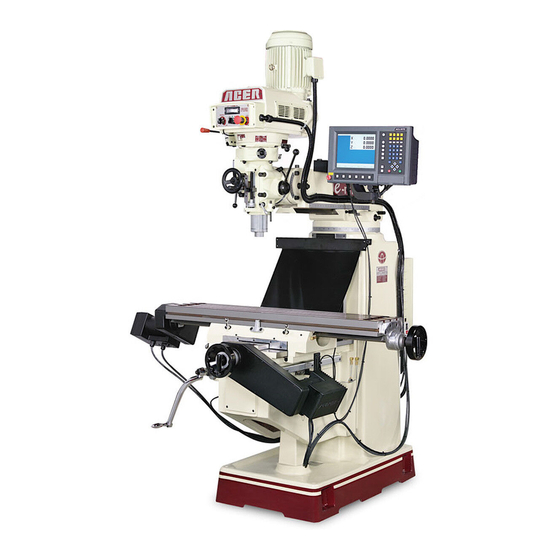
Acer e-mill 3VKH Operation Manual

Acer e-mill 3VKH Operation Manual

Vertical turret w/ toshiba & fuji inverter
Table of Contents

Advertisement

OPERATION MANUAL
Vertical Turret Milling Machine
Model: e-mill 3VS & 3VSII, e-mill 3VK
e-mill 3VKH, e-mill 5VK, e-mill 6VK
Taiwan: Ya-Gin Machine Tool Manufacturing Inc.
No. 101, 506 Lane, Seng-Tso Road,
Seng Karng District, Taichung City, Taiwan
Tel: 886-4-2520-4120
CA: Springwood Industrial, Inc.
2320 E. Valencia Drive
Fullerton, CA 92831
Tel: 714-871-5558
NJ: Klim Industrial, Inc.
244 N. Randolphville Rd.
Piscataway, NJ 08854
Tel: 732-752-9100
Revised: 4/18/19
ACER
w/ Toshiba & Fuji Inverter
Fax: 886-4-2520-4123
Fax: 714-871-5554
Fax: 732-752-9101
- 0 -

Advertisement

Table of Contents
loading

Frequently Asked Questions (12)

  • What safety precautions should I take when operating an Acer e-mill 3VSII?

    When operating an Acer e-mill 3VSII, it is crucial to follow these safety precautions:

    • General Operation:
      • Always be alert and understand what each machine function does before initiating it.
      • Never operate the machine with any cover or shield opened or removed.
      • Never reach into the work area when the spindle is rotating or the machine is running.
      • Be particularly aware of dangerous areas such as spindle rotation, electric cabinet and power source, and table and saddle movement.
      • Keep the machine and surrounding area clean and well-lighted. Do not leave chips, coolant, or oil on the floor.
      • Do not leave loose objects on or around the machine.
      • Do not bump or accidentally touch machine controls to avoid unintended movement.
      • Report any loose, worn, or broken parts or unusual noise/machine action to your supervisor.
      • Never operate the machine under the influence of medication, drugs, or alcohol.
      • Do not use a water hose to clean the machine or electrical components.
      • Never touch a machine control device or electrical component with wet hands.
      • Keep flammable liquids and materials away from the work area.
      • Never clean up chips while the machine is running or in automatic mode.
      • Do not file workpieces while the spindle is still rotating under power.
      • Place the machine in “power off” mode at the end of the work day.
      • Always assume the machine has been tampered with when restarting; recheck all job phases.
      • Never switch on the spindle until hands, feet, and body are well clear of the work area.
      • Do not work with long hair that can be caught; tie it up.
      • Do not operate switches with gloves.
      • Ensure workpieces are gripped securely and tightly.
      • Stop the machine before adjusting the coolant nozzle (6VK only).
      • Never touch a cutting workpiece or spindle with bare hands.
      • Stop the machine before removing chips; use a brush or sweeper.
      • Stop the machine whenever installing or removing a tool.
      • Wear a protective mask when machining magnesium alloy parts.
      • When performing heavy-duty machining, prevent chips from accumulating to avoid fire.
      • Keep cutting tools tight during operation.
    • Personal Protective Equipment (PPE):
      • Wear safety glasses with eye shields at all times.
      • Never wear loose fitting clothing, jewelry (rings, watches, necklaces), or gloves near moving parts.
      • Always wear safety shoes with steel toes and oil-resistant soles.
      • Wear a safety helmet near overhead hazards.
      • If you have long hair, it should be tucked under a cap or tied back up.
      • Use safety shoes, goggles, and safe clothes before powering on.
    • Work Holding:
      • Ensure the workpiece is held securely to withstand centrifugal force and cutting forces.
      • When using a power vise, check hydraulic or air pressure to ensure proper jaw-gripping force.
      • Oil the vise at the beginning of every shift with the manufacturer's recommended lubricant.
      • Weekly, examine the vise condition, including measuring jaw clamping force with a jaw-force gage.
      • Never operate spindle-mounted accessories over their rated speed.
      • Ensure the tool holder or accessory is correctly located on the spindle taper and securely pulled to the face of the spindle.
      • Any item bolted or clamped to a vise or fixture must be securely fastened before starting the spindle.
      • Use proper lifting equipment for heavy vises, fixtures, and workpieces.
      • Be aware that closing vise jaws may trap fingers or hands.
      • When using a manual vise, use spring-loaded, self-ejecting type safety wrenches. Never use an extension bar or hammer on a vise wrench.
      • Slightly tap the workpiece after clamping to ensure it is securely tightened.
      • Do not extend an unsupported workpiece more than 3 to 4 times its capacity.
    • Maintenance:
      • Only authorized electricians should service electrical component failures.
      • Disconnect main power and lock it in the off position before any repair. Tag the disconnect switch “DO NOT START”.
      • Know all points where high voltages are present.
      • Be aware that residual voltages can exist in electrical cabinets after power is turned off; check with a voltmeter.
      • Do not proceed with maintenance unless instructed by the foreman.
      • Thoroughly read and understand the safety precautions in the instruction manual and the entire maintenance manual.
      • Those not engaged in maintenance should not operate the main circuit breaker or control power switch; mark switches with “Do not touch the switch, maintenance operation in progress”.
      • In principle, the main circuit breaker should be turned off throughout the maintenance procedure.
      • Maintenance should be done by qualified personnel with close communication.
      • Over-travel limit and interlock mechanisms should not be removed or modified.
      • Use steps or ladders when working at height.
      • Ensure fuses, cables, etc., are made by qualified manufacturers.
      • Arrange tools and items in order and clean the working environment after maintenance.
      • Remove all parts and waste oil and place them away from the machine.

    For more information, see pages 6, 7, 8, 9, 11, 12, 13, 15, 17, 18 and 93 of the manual.
    Was this helpful?
  • Why is my Acer e-mill 3VSII making excessive noise during operation?

    Excessive noise during operation of your Acer e-mill 3VSII can be caused by:

    • Loose, worn, or broken parts within the machine. If you notice any, report them to your supervisor.
    • If the clutch teeth rub each other in the neutral position after an extended period of use, it can cause noise. This can be corrected by loosening set screw (#43, page 111) and reversing the position of the detent plate (#44, page 111).
    • If the clutch is not meshed tightly in high speed (Direct Drive), you may hear clutch rattle. This can be corrected by moving the detent plate upward as the clutch wears, though this may cause loss of neutral, requiring reversal of the detent plate.

    During weekly maintenance, it is recommended to pay particular attention to unusual noise from the head housing, spindle, and fan.

    Was this helpful?
  • How do I properly set up an Acer e-mill 3VSII?

    To properly set up your Acer e-mill 3VSII, follow these steps:

    Was this helpful?
  • What type of tooling is compatible with the Acer e-mill 3VSII?

    For the Acer e-mill 3VSII, the tooling should conform to the machine specification and dimensions' types. The spindle taper for the e-mill 3VS and 3VSII models is R8. For general milling, it is recommended to use 2, 3, or 4 flute end mills. Seriously worn-out tools should be replaced with new ones before operation.

    Was this helpful?
  • How do I achieve accurate cuts with the Acer e-mill 3VSII?

    To achieve accurate cuts with your Acer e-mill 3VSII, consider the following:

    • Ensure the workpiece is securely held to withstand centrifugal and cutting forces. If a workpiece extends too far from the vise without support, it can lead to poor cutting finish.
    • Always warm up the machine, especially the spindle and lubrication pump, by running them for 10 to 20 minutes at about half or one-third of the maximum speed. This prevents thermal expansion of components from jeopardizing machining accuracy.
    • For precision work, ensure the milling head is perfectly square with the table. The table is designed to be slightly higher in front (about .0005").
    • Regularly check the taper run-out of the spindle to ensure it remains within accuracy specifications.
    • Re-level the machine with precision engineering levels periodically to ensure it is still within specification, especially during the first three months after installation.
    • After any maintenance, check leveling and adjust the machine to maintain its accuracy.
    Was this helpful?
  • How do I adjust the spindle speed on an Acer e-mill 3VSII?

    The spindle speeds on your Acer e-mill 3VSII are adjusted by turning the variable resistor located on the front of the belt housing. There are two ranges:

    • Low Range: 60 to 500 RPM. To engage this range, move the HI-NEUTRAL-LO lever on the right side of the head to the “LO” position.
    • High Range: 500 to 4500 RPM. To select this range, set the HI-NEUTRAL-LO lever to the “HI” position.

    If the V belt shows wear, it may cause a slight difference between the actual speeds and those displayed on the dial windows. To correct this, turn the variable resistor knob clockwise until it stops (which should be near the 4500 reading on the counter). Then, use a tachometer to determine the actual spindle speed and adjust the parameter value inside the inverter until the spindle speed registers 4500 on the tachometer.


    For more information, see pages 101 and 102 of the manual.
    Was this helpful?
  • What are the common causes of vibration in an Acer e-mill 3VSII and how can I fix them?

    Common causes of vibration in an Acer e-mill 3VSII include:

    • Environmental conditions such as external vibrations affecting the milling machine. It is recommended to avoid exposing the machine to abnormal vibration.
    • Using a V belt of a different specification from other manufacturers can lead to vibration and heat. Ensure you use a V belt of the same specification when replacing it.
    Was this helpful?
  • How do I align the milling head on an Acer e-mill 3VSII for precise work?

    To align the milling head on your Acer e-mill 3VSII for precise work, follow these steps:

    • Loosen the four locknuts in front of the milling head out to the detent.
    • Rotate the head to the vertical position.
    • Proceed with the alignment of the head as described in the manual.
    • To set the head square to the table, adjust the Ram Adapter through the vertical adjusting worm shaft.
    • Loosen the four locknuts but leave some drag for fine adjustment.
    • To square the head to the table in the longitudinal axis, mount an indicator as shown in Figure 13.
    • Tighten all nuts evenly to 25 ft-lbs torque, then repeat the procedure to 50 ft-lbs. Care must be taken to avoid excessive tightening, which can cause distortion in the quill.

    Note that when setting head alignment, the table is designed to be slightly higher in front, usually by about .0005".

    Was this helpful?
  • What are the recommended lubrication points for the Acer e-mill 3VSII?

    The recommended lubrication points and schedules for the Acer e-mill 3VSII are as follows:

    • Daily:
      • Way surfaces and lead screws (X & Y Lead Screws) should be lubricated with Sunoco waylube #80 or equivalent using the centralized lubrication pump. Continue pumping until oil is visibly seen.
      • Saddle table ways should be lubricated with "SUNOCO" WAY LUBE #80 or MOBIL VACTRA #2 using the centralized lubrication pump. Continue pumping until oil is visibly seen.
      • Saddle ways should be lubricated with "SUNOCO" WAY LUBE #80 or MOBIL VACTRA #2 using the centralized lubrication pump. Continue pumping until oil is visibly seen.
      • Knee column ways should be lubricated with "SUNOCO" WAY LUBE #80 or MOBIL VACTRA #2 using the centralized lubrication pump. Continue pumping until oil is visibly seen.
      • Oil cups on head housing should receive a few drops of ISO VG#10 daily.
    • Weekly:
      • Milling head and spindle bearings should be lubricated with S.A.E. 10 or 10W light oil.
    • Twice Weekly:
      • Elevation screw (Shell Carnea Oil 41) should be lubricated.
    • Once a Week:
      • Grease nipples should receive a few pumps of silicone base grease.

    For more information, see pages 80 and 84 of the manual.
    Was this helpful?
  • What kind of maintenance schedule should I follow for my Acer e-mill 3VSII?

    To maintain your Acer e-mill 3VSII, follow this recommended schedule:

    • Daily Maintenance:
      • Check the oil level of the lubrication pump and add if below low level.
      • Check all lubrication points for oil presence.
      • Check if the coolant pump (6VK only) is operational.
      • Remove all movable items from the machine.
      • After each day's work, clean the machine's table, surfaces, and lubricate all moving parts.
      • Ensure the spindle taper is clean and lubricated.
    • Weekly Maintenance:
      • Clean the halogen light, operation panel, and control panel with clean rugs or paper towels.
      • Clean the air filter within the cooling fan unit.
      • Ensure the spindle taper is smooth and chip-less.
      • Check all lubrication points and the lubrication pump for normal function.
      • Check and add coolant if necessary (6VK only).
      • Listen for and pay attention to unusual noise from the head housing, spindle, and fan.
      • Re-level the machine with precision engineering levels to ensure it is within specification (do this for the first three months after installation).
    • Six Month Maintenance:
      • Check the taper run-out of the spindle for accuracy.
      • Check all machine screws and nuts for tightness.
      • Check the tightness of the gibs.
      • Inspect all electrical terminals and wires for normal function and clean dust from the electric cabinet.
      • Check the tension of the V-belt on the top housing and adjust if necessary.
      • Re-level the machine with precision engineering levels again to ensure accuracy.
      • Inspect surrounding areas, clean, and remove unused items.
    • Yearly Maintenance:
      • Check all components on the operation and control panel for sensitivity.
      • Remove all carbon deposit on all magnetic contactors.
      • Replace coolant liquid with new ones.
      • Clean and replace the lubrication pump's oil reservoir with new waylube oil.

    All scheduled maintenance must be exercised and recorded. During mechanical maintenance, all power supply must be shut-off to prevent accidental injury. When opening electrical cabinets or control panels, power sources must be turned off. If unable to perform maintenance, contact an authorized distributor or manufacturer. Always observe safety precautions during maintenance.


    For more information, see pages 84, 113 and 114 of the manual.
    Was this helpful?
  • How do I replace the drive belt on an Acer e-mill 3VSII?

    To replace the drive belt (Vari-drive Belt—the V Belt) on your Acer e-mill 3VSII, follow these steps:

    • First, remove the motor. This involves running the head at the lowest speed, shutting off the motor, disconnecting power, removing the limit switch, removing the motor shaft cover, lifting out the top bearing cap, and then removing the screws fastening the motor to the belt housing. Lift and tilt the motor to loosen the V belt.
    • Once the motor is removed, remove the three screws (A) and lift out the top bearing cap (B).
    • Next, remove the six screws (D) and detach the belt housing (E) from the base.
    • Remove the old belt and replace it with a new belt. Ensure you use a V belt of the same specification from other manufacturers to prevent vibration and heat issues.

    To replace the Timing Belt:

    • Complete the operation for removing the motor.
    • Put the HI-NEUTRAL-LO lever in the “LO” position.
    • Remove the drawbar (A) and lower the spindle.
    • Remove the six screws holding the upper and lower belt housings together, including the two lower screws (C) in the speed changer housing just below the switches.
    • A slight blow under the speed change housing may be needed to separate the upper belt housing (D) from its base.
    • As the housings separate, the timing belt (E) will still be connected to both. Gently push the belt off the large pulley as the upper housing is raised to assist separation.
    • Remove the old belt and replace with a new belt.
    Was this helpful?
  • How do I clean the cutting fluid system on an Acer e-mill 3VSII?

    To clean the cutting fluid system on your Acer e-mill 3VSII, you should:

    Was this helpful?
Need help?

Need help?

Do you have a question about the e-mill 3VKH and is the answer not in the manual?

Questions and answers

Summarization of Contents

SAFETY INSTRUCTIONS
General Safety Instructions
General safety guidelines for operating the milling machine and operator precautions.
Maintenance Safety Instruction
Safety precautions specifically for performing maintenance on the machine.
Installation Precautions
Essential precautions to ensure safe installation of the milling machine, including grounding and environmental conditions.
Safety Precaution
Detailed safety measures and precautions for machine operation and handling.
Warning Signs On The Machine
Identification and explanation of various warning signs present on the machine.
SPECIFICATION
Machine Specification
Detailed specifications and principal dimensions for various milling machine models.
Milling Head Specification
Technical specifications for the milling head across different machine models.
Features & Description of Machines
Exploded views and component lists for milling machine models.
INSTALLATION
Lifting Machine
Guidelines and illustrations for safely lifting the milling machine.
Solid Foundation
Requirements and methods for ensuring a stable and solid foundation for installation.
Leveling Machine
Instructions on how to properly level the machine using precision levels.
Handles
Information on adjusting or reversing the machine's crank handles.
Connecting Power Supply
Steps for safely connecting the machine to the plant's power source.
Wiring Diagram
Electrical wiring diagrams for different machine models and inverter types.
LUBRICATION
Lubrication System of e-mill 3VS and 3VSII
Diagram and part list for the lubrication system of specific e-mill models.
Lubrication System of e-mill 3VK
Diagram and part list for the lubrication system of the e-mill 3VK model.
Lubrication System of e-mill 3VKH & 5VK
Lubrication system diagrams and parts for e-mill 3VKH and 5VK models.
Lubrication System of e-mill 6VK
Diagram and component list for the lubrication system of the e-mill 6VK.
Lubrication Schedule for All e-mills
Recommended lubrication schedule based on area, lubricant, frequency, and quantity.
MSDS for Lubricant in Lubrication Pump
Material Safety Data Sheet for lubricants used in the lubrication pump.
OPERATION
Nomenclature
Labeled diagrams identifying controls and parts of the milling machine.
Draw Bar
Instructions on using the drawbar for collet operation and tightening.
Spindle Brake
Information on the spindle brake operation and replacement.
Forward-Reverse Switch
Explanation of the motor reversing switch and its function in different ranges.
Hi-Neutral-Lo Lever
How to use the Hi-Neutral-Lo lever for direct drive or back gear selection.
Power Feed Engagement Crank
Instructions for engaging and disengaging the power feed mechanism.
Quill Feed Selector
How to select feed rates using the quill feed selector.
Feed Reverse Knob
Operation of the feed reverse knob and neutral position recommendation.
Manual Feed Handwheel
Instructions for using the manual feed handwheel for quill movement.
Feed Control Lever
Operation of the feed control lever for engaging the overload clutch.
Quill Feed Handle
Information on removing and using the quill feed handle.
Quill Stop Knob
Function of the quill stop knob for depth control and power feed disengagement.
Micrometer Adjusting Nut
Usage of the micrometer adjusting nut for setting precise depths.
Quill Lock
How to use the quill lock for stationary positioning.
Ram Position
Procedures for moving and locking the ram into the desired position.
Clamping Table, Saddle and Knee
Methods for clamping table, saddle, and knee for rigidity during milling.
Operation Recommendations
Best practices and recommendations for milling operations, tool selection, and speed.
Safety Accessories for All Models
Illustrations and identification of safety accessories like chip pans and guards.
MAINTENANCE
Adjustment of Table Gib
How to adjust the table gib for proper fit and movement.
Adjustment of Saddle and Knee Gibs
Procedures for adjusting saddle and knee gibs for optimal performance.
Removing Table & Saddle
Steps for disassembling and removing the table and saddle components.
Leadscrew Backlash Adjustment
Method for adjusting leadscrew backlash to reduce play in axes.
Removing the Motor
Step-by-step guide on how to safely remove the machine's motor.
Changing the Vari-drive Belt—the V Belt
Instructions for replacing the vari-drive belt (V-belt) on the machine.
Changing Timing Belt
Procedure for changing the timing belt for the speed changer mechanism.
Returning Spring Replacement
Steps for replacing the returning spring mechanism in the quill housing.
Recommended Spare Part List
Lists of recommended spare parts for various milling machine models.
Recommended Maintenance Schedule
Scheduled maintenance tasks including daily, weekly, six-month, and yearly checks.
Tables for Material Cutting Information
Tables providing general speed recommendations for cutting different materials.
MECHANICAL DRAWING & PARTS BREAKDOWN LIST
3HP (Milling Head)
Exploded view and parts list for the 3HP milling head.
3HP Head Top Housing
Exploded view and parts breakdown for the 3HP milling head top housing.
3HP Head Back Gear
Exploded view and parts list for the 3HP milling head back gear assembly.
5HP (Milling Head) Hand Feed Ass’y
Exploded view and parts breakdown for the 5HP milling head hand feed assembly.
5HP (Milling Head) Spindle Ass’y
Exploded view and parts list for the 5HP milling head spindle assembly.
5HP (Milling Head) Auto Feed Ass’y
Exploded view and parts breakdown for the 5HP milling head auto feed assembly.
5HP E-mill Head Top Housing
Exploded view and parts list for the 5HP e-mill head top housing.
5HP E-mill Head Back Gear
Exploded view and parts breakdown for the 5HP e-mill head back gear.
3VS & 3VSII Basic Machine
Exploded view and parts list for the 3VS & 3VSII basic milling machine.
3VK Basic Machine
Exploded view and parts list for the 3VK basic milling machine.
3VKH Basic Machine
Exploded view and parts list for the 3VKH basic milling machine.
5VK Basic Machine
Exploded view and parts list for the 5VK basic milling machine.
6VK Basic Machine
Exploded view and parts list for the 6VK basic milling machine.
3VS, 3VSII, 3VK, 3VKH & 5VK Leadscrew Assembly
Exploded view and parts list for the leadscrew assembly of multiple models.
6VK Leadscrew Assembly
Exploded view and parts list for the 6VK leadscrew assembly.
Electric Cabinet
Exploded view and parts list for the electric cabinet components.
Safety Accessories for All Models
Illustrations and part numbers for safety accessories like chip pans and guards.

Table of Contents

Save PDF