Advertisement
Advertisement
Table of Contents

Subscribe to Our Youtube Channel
Related Manuals for Dell MS5320W


Summary of Contents for Dell MS5320W
- Page 1 Dell Multi-device Wireless Mouse MS5320W User’s Guide Regulatory model: MS5320Wc/RG-1216...
- Page 2 WARNING: A WARNING indicates a potential for property damage, personal injury, or death. Copyright © 2020 Dell Inc. All rights reserved. Dell, EMC, and other trademarks are trademarks of Dell Inc. or its subsidiaries. Other trademarks may be trademarks of their respective owners.
-
Page 3: Table Of Contents
Contents What’s in the box ......4 Features ........5 Mouse . -
Page 4: What's In The Box
What’s in the box Wireless mouse Dongle 2 Documents AA-type battery │ What’s in the box... -
Page 5: Features
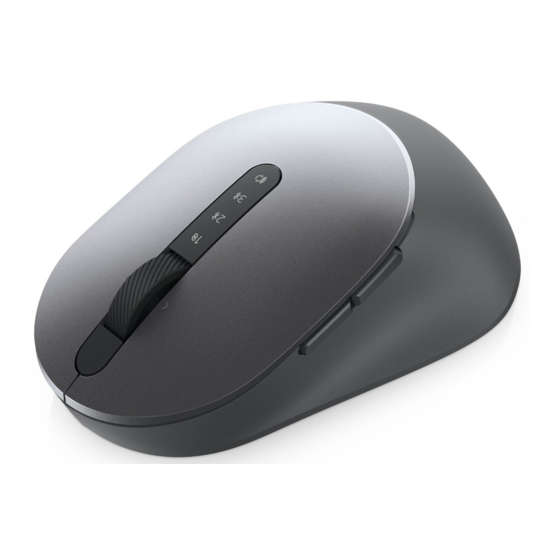
Features Mouse Top view Left button Connection-mode lights • White LED Blinking: Device is not connected to computer Right button • LED Lighting Solid White: Device is connected to computer Scroll wheel • Amber LED Blinking: Device battery is low Forward button Backward button Connection-mode button... -
Page 6: Bottom View
Features Mouse Bottom view Optical sensor Power switch │ Features... -
Page 7: Setting Up Your Wireless Mouse
Setting up your wireless mouse Installing the battery 1. Locate the slot on the side of the mouse cover. Using your fingertip, pry open the cover. 2. Remove the USB dongle from its compartment. 3. Install the AA battery into the battery compartment. │... - Page 8 Setting up your wireless mouse 4. Replace the mouse cover. 5. Slide the power switch down to turn on the mouse. NOTE: Ensure that the distance between your computer and mouse is within ten meters. │ Setting up your wireless mouse...
-
Page 9: Pairing Your Wireless Mouse
You can pair and switch between a laptop, desktop, and a compatible mobile device. Pairing with a USB dongle NOTE: You can connect a device to your wireless mouse using the Dell Universal pairing. 1. Install the Dell Universal USB dongle to the USB port on your computer. -
Page 10: Pairing Your Mouse Using Bluetooth
In Windows Search, type Bluetooth. b. Click Bluetooth and other devices settings. The Settings window appears. c. Click Bluetooth & other devices. Ensure that the Bluetooth is turned on. d. From the list of devices, click Dell Mouse. │ Pairing your wireless mouse... - Page 11 NOTE: If Mouse MS5320W is not listed, ensure that the pairing mode is enabled on the mouse. 4. Confirm that the pairing process on both mouse and device. The second-Bluetooth connection light turns solid white for 3 seconds to confirm the connection is established, and then turns off.
-
Page 12: Pairing Device Three Using Bluetooth
In Windows Search, type Bluetooth. b. Click Bluetooth and other devices settings. The Settings window appears. c. Click Bluetooth & other devices. Ensure that the Bluetooth is turned on. d. From the list of devices, click Dell Mouse. │ Pairing your wireless mouse... - Page 13 NOTE: If Mouse MS5320W is not listed, ensure that the pairing mode is enabled on the mouse. The third-Bluetooth connection light turns solid white for 3 seconds to confirm the connection is established then dims off. After the mouse and a device are paired, they connect automatically when Bluetooth is enabled and they are within the Bluetooth range.
-
Page 14: Specifications
Specifications General Mouse model number MS5320W Connection type 2.4 GHz Wireless & Bluetooth dual mode technology Supported operating systems • Windows 10/8/7/XP (2.4 GHz) • Server 2008/Server 2012 • Linux 6.x, Ubuntu, Free DOS • Chrome and Android • MAC OS Supported operating systems •... -
Page 15: Troubleshooting
Troubleshooting Problems Possible causes Possible solutions Unable to use the The white LED indicator 1. Check if the battery is inserted correctly. mouse at top of the mouse Battery “+” and “-“ ends does not light up when should follow those indicated the mouse is turned on on the battery compartment label. - Page 16 Problems Possible causes Possible solutions Unable to pair The Bluetooth icon on 1. Check the battery level. the mouse to the the computer does not • If the mouse uses a computer using light up when connecting rechargeable battery, Bluetooth the mouse to the ensure that the battery computer.
- Page 17 Problems Possible causes Possible solutions Mouse pointer The mouse pointer is not 1. Check the battery level. does not move responding • If the mouse uses a rechargeable battery, ensure that the battery Left/right buttons No response when the is fully charged. does not work left or right mouse button •...
- Page 18 Problems Possible causes Possible solutions Unable to pair the Wireless pairing error 2.Turn the mouse off, and then turn it on again. mouse with the message is received while computer pairing the mouse with Check if the battery-status the computer light is flashing amber ten times, indicating that the battery power is low.
-
Page 19: Statutory Information
Dell system, it will follow the system warranty. For U.S. customers: This purchase and your use of this product are subject to Dell’s end user agreement, which you can find at Dell.com/terms. This document contains a binding arbitration clause.
Need help?
Do you have a question about the MS5320W and is the answer not in the manual?
Questions and answers