Table of Contents
Advertisement
Advertisement
Table of Contents

Related Manuals for I.E.M. Tel-O-Graph GSM


Summary of Contents for I.E.M. Tel-O-Graph GSM
- Page 1 ® Tel-O-Graph Operating instructions...
- Page 2 ® Tel-O-Graph Blood pressure monitor I.E.M. Industrielle Entwicklung Medizintechnik und Vertriebsgesellschaft mbH (I.E.M GmbH) Cockerillstr. 69 52222 Stolberg Germany Telephone: +49 2402 9500-0 Fax: +49 2402 9500-11 E-mail: info@iem.de Website: www.iem.de The content of this operating manual must not be reproduced or published without the written approval of I.E.M. GmbH.
- Page 3 Table of contents Table of contents Measuring blood pressure and pulse ..21 Before measuring ........... 21 Table of contents ............3 Putting the blood pressure cuff on ....21 Introduction ............4 Correct posture ..........23 Clinical validation ..........4 Measuring ............
-
Page 4: Introduction
Introduction Introduction Clinical validation The accuracy of the device's measurements has been ® Thank you for choosing the Tel-O-Graph GSM upper- certified in accordance with ISO 81060-2:2013. arm blood pressure monitor. Read this operating manual carefully before use and keep it in a suitable place so that the information is CE Mark available when required. -
Page 5: Contents
Instructions for use Contents Contents ▪ Blood pressure monitor ▪ Blood pressure cuff "M" (Arm circumference: 24-32 cm (9.5-12.6 in)) ▪ Operating manual ▪ Batteries (4x, AA, alkaline) Optional accessories ▪ Blood pressure cuff "S" (Arm circumference:20-24 cm (7.9-9,5 in)) ▪... -
Page 6: Instructions For Use
Instructions for use Instructions for use Improper use Intended use The blood pressure monitor must not be used for ® newborns, during operations, in the vicinity of MRI The Tel-O-Graph GSM is intended for the home scanners or other strong magnetic fields, or for clinical measurement of blood pressure and pulse on the upper arm in adults. -
Page 7: Essential Performance
Instructions for use the cuff. The cuff is not automatically pressurised, to Essential Performance do so, the device must be initiated manually. The essential performance features are defined as See IEC 81060-1 201.4.3.101, IEC 60601-1, sect. 4.2 blood pressure measurement with: and IEC 60601-1-2, sect. -
Page 8: Safety
Safety Safety ATTENTION This section explains all the safety information for the Short description of the danger device. This warning symbol, in connection with the signal Read this section carefully before using the blood word ATTENTION, indicates possible material pressure monitor. damage. -
Page 9: Important Patient Information
Safety Important patient information WARNING WARNING Danger of tissue bleeding or haematoma. ▪ Danger as a result of self-diagnosis When using the blood pressure monitor, make sure it does not impede the blood circulation in ▪ Do not undertake any changes to your your arm. - Page 10 Safety WARNING WARNING Danger of a temporary loss of function of a Danger of injury as a result of using unapproved present electrical medical device as a result of accessories putting on or pumping up a cuff if you are wearing a further electrical medical device for ▪...
- Page 11 Safety supervision or instruction by a responsible WARNING person. ▪ Danger of blood flow interruptions as a result of The blood pressure monitor may not be used steady cuff pressure or too frequent measuring by those with limited mental competencies. (Keep out of reach.) ▪...
-
Page 12: Important Device Instructions
Safety Important device instructions protect the device against the effects of discharging a defibrillator. In the event of discharging a defibrillator, the device itself ATTENTION must not touch the patient since the device Equipment failure can be damaged as a result of such a discharging and can result in the incorrect ▪... - Page 13 Safety ATTENTION ATTENTION Batteries Electric fields ▪ ▪ Remove the batteries from the battery Measurements may be faulty if the device is compartment when they no longer have any operated in the vicinity of strong electrical charge or if you do not expect to use the blood fields.
- Page 14 Safety ATTENTION Fluid damage to the blood pressure monitor ▪ Liquid must not penetrate the device. If you believe that liquid has penetrated the device during cleaning or use of the blood pressure monitor, the device must no longer be used. ▪...
-
Page 15: Description Of Device
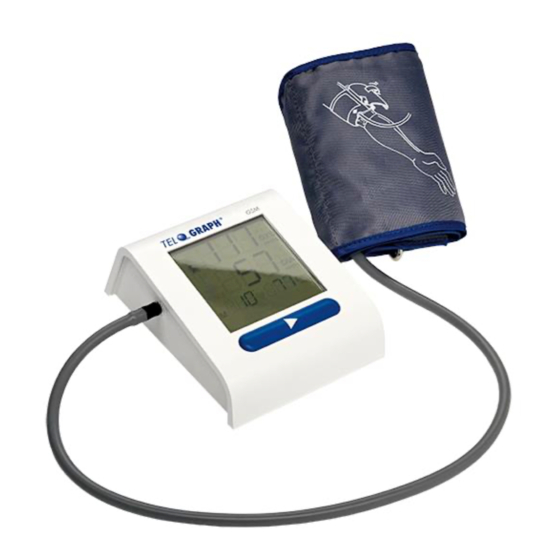
Description of device Description of device Blood pressure monitor Fig. 1: Blood pressure monitor Display Battery cover Infrared interface (for service) Air hose socket button... -
Page 16: Blood Pressure Cuff
Description of device Blood pressure cuff Fig. 2: Blood pressure cuff Blood pressure cuff Air hose Air hose connection... -
Page 17: Display
Description of device Display Fig. 3: Display When this appears: Battery empty Infra-red communication Display of systolic (upper) value Number of pulse beats per minutes Mobile network communication Pulse detected Signal strength of the mobile network Number of measurement values Data transmission Display of diastolic (lower) value... -
Page 18: Ambient Conditions
Description of device Ambient conditions ATTENTION Extreme temperatures, humidity or air pressure can influence measurement accuracy. Please follow the operating instructions. ▪ Never store the blood pressure monitor outside a temperature range of -25 °C to +70 °C. ▪ Never use the blood pressure monitor outside a temperature range of +5 °C to +40 °C. ▪... -
Page 19: Preparing The Measurement
Preparing the measurement Preparing the measurement Keep the packaging so that it can be safely packaged at a later date. Unpacking Inserting the batteries Note All parts included in delivery package have been properly packed and checked for completeness and functionality. -
Page 20: Switching The Blood Pressure Monitor On/Off
Preparing the measurement Open the battery cover on the underside of the Switching the blood pressure monitor blood pressure monitor. on/off Insert four batteries (AA, alkaline), with the poles Switching on aligned correctly. Close the battery cover. The blood pressure monitor switches on automatically, carries out a display test and displays the start screen. -
Page 21: Measuring Blood Pressure And Pulse
Measuring blood pressure and pulse Measuring blood pressure and pulse Putting the blood pressure cuff on Before measuring WARNING ▪ Choose the right cuff size. The blood pressure cuff Risk of injury due to incorrectly connected air hose! size is printed on the cuff. ▪... - Page 22 Measuring blood pressure and pulse Fig. 8: Correct position of blood pressure cuff Fig. 7: Insert air hose Position the blood pressure cuff correctly (see Insert the air hose connection into the air hose Fig. 8): socket on the left-hand side of the blood ▪...
-
Page 23: Correct Posture
Measuring blood pressure and pulse Once the blood pressure cuff is positioned Correct posture correctly, fasten the end with the Velcro. After positioning the blood pressure cuff, assume the correct posture to take the measurements (Fig. 9). Note Place the blood pressure cuff so that there is enough room to insert your index and middle fingers between the skin and the material of the blood pressure cuff. -
Page 24: Measuring
Measuring blood pressure and pulse Hold your arm so that the blood pressure cuff is Measuring at the same height as your heart. Relax your arm and turn the palm of your hand WARNING to face upwards. Risk of injuries during measurement! Place your feet flat on the floor and leave your ▪... -
Page 25: Stopping The Measurement
Measuring blood pressure and pulse ♥ monitor detects a pulse, the icon appears. The Stopping the measurement reading is taken as the air is let out. The blood If the measurement causes you pain, press the pressure monitor confirms the end of the button during the measurement. -
Page 26: Transferring The Measured Values Via Mobile Communications Network
Transferring the measured values via mobile communications network Transferring the measured values via mobile communications network If the blood pressure monitor is set up for transmission your measurement values mobile communications network, the measurement values will be automatically transferred to the database. If previous measurement transmissions have not yet been transferred, all data not yet sent will be sent together. -
Page 27: Memory
Memory Memory The number of readings is shown on the display (Fig. 10). Saving readings Deleting readings from the blood pressure monitor To clear the memory on your blood pressure monitor, proceed as follows: Fig. 10: Number of readings The blood pressure monitor can save 15 blood pressure readings and 15 pulse rate readings. - Page 28 Memory The measurements are deleted. The device returns to Note standby mode displays start screen (see Fig. 6). The display automatically shows each menu entry for 3 seconds. The display order is: Mobile network transmission (IP) Infra-red transmission (IR) ...
-
Page 29: Cleaning And Disinfection
Cleaning and disinfection Cleaning and disinfection Note WARNING Always observe the manufacturer's instructions on the disinfection and cleaning of these products. ▪ When putting the blood pressure monitor on, there must no longer be any disinfectants on the blood pressure cuff! Cleaning ▪... -
Page 30: Disinfection
Cleaning and disinfection Disinfection Ask your doctor if and when the cuff needs to be disinfected for hygienic reasons. I.E.M. GmbH has tested the following means for the disinfection: ▪ Isopropanol (70%) ▪ Terralin Liquid (Manufacturer: Schülke & Mayr) When using other disinfectants not checked by I.E.M. GmbH, the user is responsible for the proof of use without damage. -
Page 31: Maintenance
Maintenance Maintenance The monitor and the cuff are calibrated by the manufacturer for a period of two years. Maintenance (metrological check) must be carried out in accordance with Directive 93/42/EEC every two years at the latest if the device is used professionally. In certain countries, this requirement may be regulated by national laws or regulations. -
Page 32: Disposal
Disposal Batteries Disposal Batteries must not be disposed of with domestic Blood pressure monitor waste. As a consumer you are legally bound to return used batteries. You can return your old batteries to official collection points within your community or everywhere batteries of that type are sold. -
Page 33: Error Messages
Error messages Error messages 12.1 Blood pressure measurement errors The blood pressure monitor indicates blood pressure measurement errors and communication errors by emitting 12 short acoustic signals. Error Cause Remedy description Arm moved during Keep your arm still during the measurement ( Chapter 6.3). - Page 34 Error messages Error Cause Remedy description If this error occurs repeatedly, send the blood pressure monitor to your healthcare provider or directly to the manufacturer for checking. Power pack or battery Change the batteries ( Chapter 5.2). voltage too low. Err 5 Battery contacts are Clean the battery contacts with a cotton cloth and a little alcohol.
- Page 35 Error messages Error Cause Remedy description If this error occurs repeatedly, send the blood pressure monitor to Err 10 Internal error your healthcare provider or directly to the manufacturer for checking.
-
Page 36: Communication Error
Error messages 12.2 Communication error Error Cause Remedy description Registration with mobile Move to a location with better mobile network reception. Cod 1 network not possible If this error occurs repeatedly, contact your healthcare provider. Move to a location with better mobile network reception. Cod 2 No GSM connection If this error occurs repeatedly, contact your healthcare provider. -
Page 37: Technical Data And Symbols
Technical data and symbols Technical data and symbols Technical data The blood pressure monitor complies with the EMC directives. The blood pressure cuff and air hose are made of a non-conductive material. This makes the device defibrillator- safe. Specification Value Unit Measuring method Oscillometric... - Page 38 Technical data and symbols Specification Value Unit Material (cuff) Polyester Operating temperature +5 to +40 °C Ambient pressure 700 to 1060 Transport temperature -25 to +70 °C Storage temperature -25 to +70 °C Air humidity, not condensing (operation, 15 to 93 transport and storage) Battery capacity c.
- Page 39 Technical data and symbols Symbols Symbol Meaning 4 x LR6 or HR6, AA with 1.5 V Manufacturer Date of manufacture YYYY-MM-DD Designation of the FCC radio authorisation CE 0044: Labelling of a medical device in accordance with directive 93/42/EEC It may not be possible to use the device everywhere in Europe. Protect from rain and moisture Comply with the operating manual...
- Page 40 Technical data and symbols Symbol Meaning The symbol on the product or packaging means that this product should not be treated as normal domestic waste, but should be taken to a recycling point for electric and electronic devices. You can find out more about this from your local authority, the communal disposal companies or the shop in which you bought the product.
-
Page 41: Warranty And Repairs
Warranty and repairs ▪ Liability for direct or indirect consequential damages Warranty and repairs caused by the device is excluded even in the event Warranty information that the damage to the device is acknowledged as a ▪ I.E.M. GmbH provides a two-year warranty on the warranty case. -
Page 42: Manufacturer's Emc Guidelines
Manufacturer’s EMC guidelines Manufacturer’s EMC guidelines Electromagnetic interference emissions ® The Tel-O-Graph GSM is intended to be operated in the electromagnetic environment specified below. Only use ® the Tel-O-Graph GSM in such an environment. Measurement of – Compliance Electromagnetic environment guidelines interference emissions ®... - Page 43 Manufacturer’s EMC guidelines Electromagnetic immunity ® The Tel-O-Graph GSM is intended to be operated in the electromagnetic environment specified below. Only use ® the Tel-O-Graph GSM in such an environment. – Measurement of IEC 60601-1 test Electromagnetic environment Compliance level interference emissions level guidelines...
- Page 44 Manufacturer’s EMC guidelines – Measurement of IEC 60601-1 test Electromagnetic environment Compliance level interference emissions level guidelines IEC 61000-4-3 80 MHz to 2.5 GHz used no closer to the ® Tel-O-Graph GSM (including wires) than the recommended safety distance calculated using the equation that applies to the transmission frequency.
- Page 45 Manufacturer’s EMC guidelines NOTE 1: The higher frequency range applies for 80 MHz and 800 MHz. NOTE 2: These guidelines may not apply in all cases. The distribution of electromagnetic variables is influenced by the absorption and reflection of buildings, objects and people. The field intensity of stationary transmitters such as base stations of mobile telephones and mobile terrestrial radios, amateur radio stations, AM and FM radio and TV transmitters, cannot, theoretically, be accurately determined in advance.
- Page 46 Manufacturer’s EMC guidelines Recommended safety distances between portable and mobile HF telecommunication devices and the Tel- ® O-Graph ® The Tel-O-Graph GSM is designed for operation in an electromagnetic environment in which disturbance variables are controlled. Maintain the minimum distances between portable and mobile telecommunication devices (transmitters) and the measuring device as specified below, depending on the output of the communication device.
-
Page 47: Frequency Bands
Frequency bands Frequency bands ® The Tel-O-Graph GSM uses the following frequency bands: Band designation Range Transmission performance Class 4 (+33dBm 2dB) E-GSM 880 MHz to 915 MHz Class 1 (+30dBm 2dB) 1710 MHz to 1785 MHz FDD I 1920 MHz to 1980 MHz Class 3 (+24dBm +1/-3dB) FDD VIII 880 MHz to 915 MHz...
Need help?
Do you have a question about the Tel-O-Graph GSM and is the answer not in the manual?
Questions and answers