Sign In
Upload
Manuals
Brands
Risco Manuals
Touch Panel
RisControl RP432KPT
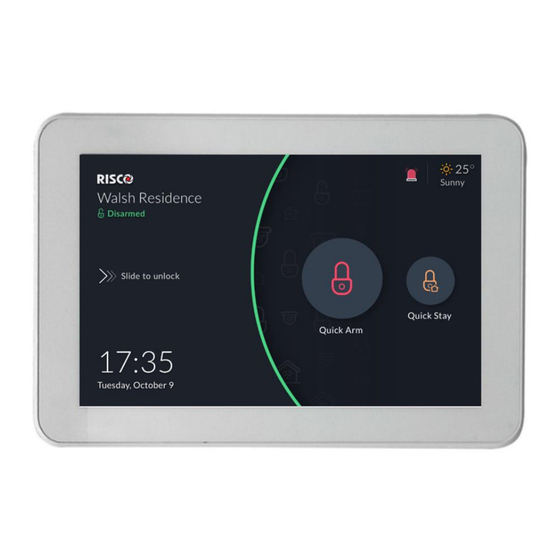
Risco RisControl RP432KPT Manuals
Manuals and User Guides for Risco RisControl RP432KPT. We have
2
Risco RisControl RP432KPT manuals available for free PDF download: User Manual
Risco RisControl RP432KPT User Manual (82 pages)
Brand:
Risco
| Category:
Control Unit
| Size: 4 MB
Table of Contents
Table of Contents
2
Introduction
5
Installing the Riscontrol
6
Mounting the Riscontrol
6
Riscontrol Setup
10
Step 1: Selecting the Language for the Riscontrol
10
Step 2: Setting the Bus Address (Virtual DIP Switch)
11
Step 3: Setting the Wi-Fi Connection (Optional)
12
Step 4: Synchronizing the Riscontrol with the Security Setup
14
Operating the Riscontrol
15
Entering Riscontrol
15
Riscontrol Session
15
Riscontrol Main Menu
15
Riscontrol Top Bar
16
Troubles Management
19
Communication Troubles
19
Confirm Troubles
21
Notifications Management
21
Software Update Notification
22
Confirm Alarms
22
Screen Saver
24
Exit/Entry Screen Saver Mode
24
Screen Saver During Alarm
24
Lock Screen
25
About the Lock Screen
25
Lock Screen with Quick Arm And/Or Quick Stay
26
Lock Screen with Undefined Quick Buttons
27
The Lock Screen During Incoming Alarm
28
Blank Display Mode
29
Overview Screen
30
Using the Overview Screen
30
Empty Overview Screen
31
Editing the Overview Screen
31
Adding Shortcut Buttons to the Overview Screen
32
Removing Shortcut Buttons from the Overview Screen
34
Using the Shortcut Buttons from the Overview Screen
34
Incoming Alarm on the Overview Screen
35
Security
36
Partitions
36
Arming and Disarming
37
Exit/Entry Delay
38
Final Exit Zone
38
One Click Activation of All Partitions
39
Arming/Disarming Selected or All Partitions
40
Groups
40
Detectors
42
Utility Outputs
44
Cameras
45
Cameras Screen
45
Pir Cam
46
Video Cameras
47
The Cameras Screen
48
Quick Buttons
49
Using Quick Buttons
49
Quick Buttons Tray
49
Editing the Quick Buttons Tray
49
Adding/Removing Quick Buttons from the Tray
50
Adding/Removing Multiple Quick Buttons To/From the Quick Buttons Tray
50
Video Recorder
52
Video Recorder Live Gallery
52
Camera Video Playback
53
Time Slider
54
Playback Controls
55
Date Selection
55
Switch Back to Live
55
Smart Home
56
History
57
Searching Events
57
Media Events
58
Settings
59
General
60
Wi-Fi Connection
60
Screen Brightness
60
Session Timeout
61
Screen Saver
61
Language
62
System Information
62
Software Update
62
Software Version
64
IP Address & MAC
64
Security System SW Version
64
Security System IP Address
64
Users and Permission Settings
64
Add a User
65
Edit or Delete a User
66
Edit a User's Own Details
66
Login to the RISCO Cloud
67
Date & Time
68
Date & Time Settings
69
Maintenance
69
The Maintenance Menu
69
Walk Test
70
Sounder Test
71
Service Mode
71
Anti-Code
72
Sounds
73
Follow Me
74
Adding a Follow Me Recipient
74
Test or Edit a Follow Me
75
Service Info
75
Emergency
77
Emergency Button Position in Lock Screen/Main Menu
77
Emergency Type Selection
77
Specifications
78
RED Compliance Statement
78
Fcc ID:je4Rp432Kpt
79
FCC Note
79
Standard Limited Product Warranty
80
Important Notice
81
Contacting RISCO Group
82
Advertisement
Risco RisControl RP432KPT User Manual (73 pages)
Brand:
Risco
| Category:
Touch Panel
| Size: 3 MB
Table of Contents
Table of Contents
2
Introduction
5
Installing the Riscontrol
6
Mounting the Riscontrol
6
Riscontrol Setup
10
Step 1: Selecting the Language for the Riscontrol
10
Step 2: Setting the Bus Address (Virtual DIP Switch)
11
Step 3: Setting the Wi-Fi Connection (Optional)
12
Step 4: Synchronizing the Riscontrol with the Security Setup
13
Operating the Riscontrol
14
Entering Riscontrol
14
Riscontrol Session
14
Riscontrol Main Menu
14
Riscontrol Top Bar
15
Troubles Management
17
Communication Troubles
17
Confirm Troubles
19
Notifications Management
19
Software Update Notification
20
Confirm Alarms
20
Screen Saver
22
Exit/Entry Screen Saver Mode
22
Screen Saver During Alarm
22
Lock Screen
23
About the Lock Screen
23
Lock Screen with Quick Arm And/Or Quick Stay
24
Lock Screen with Undefined Quick Buttons
25
The Lock Screen During Incoming Alarm
25
Blank Display Mode
26
Overview Screen
28
Using the Overview Screen
28
Empty Overview Screen
29
Editing the Overview Screen
29
Adding Shortcut Buttons to the Overview Screen
30
Removing Shortcut Buttons from the Overview Screen
32
Using the Shortcut Buttons from the Overview Screen
32
Incoming Alarm on the Overview Screen
33
Security
34
Partitions
34
Arming and Disarming
35
Exit/Entry Delay
35
One Click Activation of All Partitions
36
Arming/Disarming Selected or All Partitions
36
Devices
37
Utility Outputs
38
Cameras
39
Cameras Screen
39
Pir Cam
40
Video Cameras
40
The Cameras Screen
41
Quick Buttons
42
Using Quick Buttons
42
Quick Buttons Tray
43
Editing the Quick Buttons Tray
43
Adding/Removing Quick Buttons from the Tray
43
Adding/Removing Multiple Quick Buttons To/From the Quick Buttons Tray
44
Video Recorder
45
Video Recorder Live Gallery
45
Camera Video Playback
46
Time Slider
47
Playback Controls
48
Date Selection
48
Switch Back to Live
48
Smart Home
49
History
50
Searching Events
50
Media Events
51
Settings
52
General
53
Wi-Fi Connection
53
Screen Brightness
53
Session Timeout
54
Screen Saver
54
Language
55
System Information
55
Software Update
55
Software Version
56
IP Address & MAC
56
Factory Reset
57
Security System SW Version
57
Security System IP Address
57
Users and Permission Settings
57
Add a User
58
Edit or Delete a User
59
Edit a User's Own Details
60
Login to the RISCO Cloud
61
Date & Time
61
Date & Time Settings
62
Maintenance
62
The Maintenance Menu
62
Walk Test
63
Sounder Test
64
Service Mode
64
Anti-Code
64
Sounds
65
Follow Me
66
Adding a Follow Me Recipient
66
Test or Edit a Follow Me
68
Emergency
69
Emergency Button Position in Lock Screen/Main Menu
69
Emergency Type Selection
69
Specifications
70
Advertisement
Related Products
Risco RP432KPT000A
Risco RisControl
Risco lightsys RP432KP
Risco lightsys RP432KPP
Risco RP432KPP2
Risco RP432KP02
Risco Panda RP432KPP200D
Risco RP432KPTZ
Risco RP432KPP200B
Risco RP432KPTZAUA
Risco Categories
Security Sensors
Security System
Keypad
Security Camera
Control Panel
More Risco Manuals
Login
Sign In
OR
Sign in with Facebook
Sign in with Google
Upload manual
Upload from disk
Upload from URL