Sign In
Upload
Manuals
Brands
Edwards Manuals
Monitor
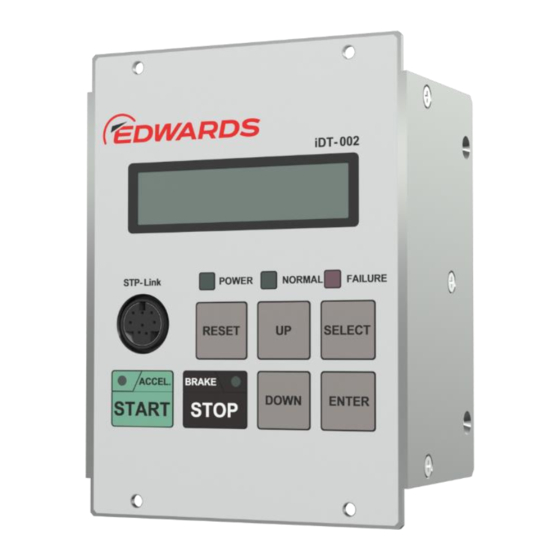
iDT-002
Edwards iDT-002 Manuals
Manuals and User Guides for Edwards iDT-002. We have
1
Edwards iDT-002 manual available for free PDF download: Instruction Manual
Edwards iDT-002 Instruction Manual (67 pages)
Turbomolecular Pumps Display unit
Brand:
Edwards
| Category:
Monitor
| Size: 1 MB
Table of Contents
Table of Contents
3
1 Introduction
9
Scope and Definitions
9
Limited Warranty
10
Item Warranted
10
Disclaimer
10
2 Technical Data
11
Display Unit Idt-002 Specifications
11
Display Unit Idt-002 Dimensions
12
3 Installation of the Display Unit Idt-002
13
Unpackaging
13
Connectable Display Unit Idt-002
13
Front Panel
14
Idt-002 Front Panel Function
15
Idt-002 Front Panel Function (Continued)
16
Side Panel and Rear Panel
17
Precautions before Installation
18
Operating Environment
18
Installation
19
Connecting to the STP Pump
20
Connecting to the STP Pump (STP-Is1607/Is2207 Series)
20
(STP-Ixa2206/Ixa3306/Ixa4506/Ix3006 Series)
20
Connecting to the STP Pump (STP-Ixa3307/Ixa4507 Series)
21
Communication Cable
22
STP-Ix457/Ixu457 Series (Using the Power Supply Unit Ipd-240-24V)
23
(STP-Ix457/Ixu457 Series [Using Ipd-240-24V])
23
STP-Ix457/Ixu457 Series (Not Using the Power Supply Unit Ipd-240-24V)
24
(STP-Ix457/Ixu457 Series [Not Using Ipd-240-24V])
24
9 Connecting to the STP Pump
25
Attaching the Display Unit to a Rack
25
Screw Holes Position for Securing to the Rack
25
Idt-002 X3 Connector Pin Layout
25
4 Operation
27
Power on
27
LCD Indication in Power on State
27
Example of LCD Indication in Power on State
27
Power off
28
STP Pump Operation
28
STP Pump Setting
28
Setting for "PORT SELECT IN" Input
28
STP Pump Starting Operation
29
STP Pump Stopping Operation
29
Failure Reset Operation
29
Operation Mode of Display Unit
30
Idt-002 Operation Mode
30
Operation Mode
31
Operation State
31
LCD Line
31
Error Contents
32
Example of Error Message Indication
32
Warning Contents
33
Example of Warning Indication
33
Confirmation Mode
34
Confirmation Mode Items (1/2)
34
Confirmation Mode Items (2/2)
35
Operation Method
36
Confirmation Mode Operation Method (1/2)
37
Confirmation Mode Operation Method (2/2)
38
Error Record
39
Example of Error Record
39
Parameter Set Mode
40
Input Operation Port Setting
41
Rotational Speed Setting
41
TMS Function Setting
41
TMS Temperature Setting
42
Second Speed Option Setting
42
Second Speed Setting
42
Second Damage Limit Function Setting
42
Vent Valve Option Setting (Air-Cooling Fan Function)
42
Vent Valve Open Speed Setting
43
4.7.10 Vent Valve Operating Time Setting
43
4.7.11 Warning Function Setting
44
4.7.12 Serial Communication Timeout Setting
45
4.7.13 Serial Port COM1/COM2 Setting
45
4.7.14 Date / Time Setting
46
4.7.15 Factory Setting of the STP Pump
46
4.7.16 Setting Procedure
47
Setting Method (1/6)
48
Setting Method (2/6)
49
Setting Method (3/6)
50
Setting Method (4/6)
51
Setting Method (5/6)
52
Setting Method (6/6)
53
Manual Operation Setting
54
TMS Function Setting and Vent Valve Function Setting
54
Operating Method
54
Manual Operation Mode Operation Method
55
Input Operation Port Set Mode
56
Input Operation Port Setting
56
Setting Procedure
56
Input Operation Port Setting Mode Operation Method
57
5 Troubleshooting
59
Specific Error Messages of the Display Unit Idt-002
59
Idt-002 Error Message
59
FAILURE" LED Illuminates or "W" Is Displayed in the Upper Left-Hand Corner of the LCD
60
Cleaning
60
Transport for Repair or Overhaul
60
6 Stp-Link
61
Functions of STP-Link
61
7 Storage and Disposal
63
Storage of the STP Pump
63
Disposal
63
Advertisement
Advertisement
Related Products
Edwards IDX1000
Edwards IDX1300
Edwards iH160
Edwards iXH1220HTX
Edwards iXL500Q
Edwards iXH3050H
Edwards iGX100N
Edwards iXL1000
Edwards IBV40MS
Edwards IBV50MS
Edwards Categories
Water Pump
Control Unit
Industrial Equipment
Measuring Instruments
Controller
More Edwards Manuals
Login
Sign In
OR
Sign in with Facebook
Sign in with Google
Upload manual
Upload from disk
Upload from URL