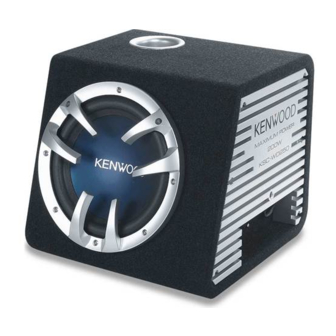
Kenwood KSC-WD250 Instruction Manual

Kenwood KSC-WD250 Instruction Manual

Compact powered subwoofer
Table of Contents
loading

Frequently Asked Questions (14)

  • How do I install the Kenwood KSC-WD250 subwoofer?

    To install the Kenwood KSC-WD250 subwoofer, use the provided brackets and tap screws (Ø5 x 22mm). Secure the unit to an installation board or other suitable surface, ensuring the board has a thickness of 25 mm or more.


    For more information, see page 3 of the manual.
    Was this helpful?
  • How do I connect the Kenwood KSC-WD250 subwoofer to a car stereo?

    There are two primary ways to connect the subwoofer to a car stereo:

    • General connection: Connect the subwoofer to the car stereo's front and rear speaker outputs. Ensure the power control terminal (blue/white wire) is connected to the accessory line (ignition key switch ACC position line) if your center unit lacks a power control terminal. The black ground lead should be connected directly with a screw to an unpainted metal part of the vehicle.
    • Connection to center unit with non-fader (subwoofer control): Use an RCA cord (commercially available) to connect the subwoofer's LINE IN terminal to the car stereo's SUBWOOFER OUT. Similar to the general connection, ensure the power control terminal (blue/white wire) is connected to the accessory line if needed, and the black ground lead is secured to an unpainted metal part of the vehicle. Cover any unused terminals with insulation tape to prevent short circuits.

    In both cases, if buzzing noise is heard when the engine is running, attach a line noise filter (sold separately) to the power lead. Do not connect cables and leads to both RCA cable input jacks and the speaker input terminals simultaneously, as this may cause malfunction or damage.

    Was this helpful?
  • What should I do if my Kenwood KSC-WD250 subwoofer is not working?

    If your Kenwood KSC-WD250 subwoofer is not working, consult the troubleshooting guide:

    • Power cannot be turned on: Check if the fuse is blown; replace it with a fuse of the rated capacity (5A x 2). Ensure the power supply pin (yellow), power control pin (blue), and grounding pin (black) of the 10-pin connection cord are correctly connected and that the 10-pin connector is fully plugged in. Also, verify the negative (-) cable of the car battery is connected.
    • No sound: Check if the attenuator of the center unit is set to ON (switch it OFF) or if the LEVEL control is set to MIN (increase the volume). Ensure speaker cords and connection terminals are connected properly.
    • Unable control: Verify that the remote control cord is connected to the remote control terminal.

    Always refer to the connection examples for correct wiring.


    For more information, see page 6 of the manual.
    Was this helpful?
  • Where can I find the wiring diagram for the Kenwood KSC-WD250?

    Wiring diagrams for the Kenwood KSC-WD250 can be found under the "Examples of Connections" section, specifically illustrating "General connection" and "Connection to center unit with non-fader (subwoofer control)".


    For more information, see page 4 of the manual.
    Was this helpful?
  • How do I adjust the audio settings on the Kenwood KSC-WD250?

    To adjust the audio settings:

    1. Set the crossover frequency: Turn the LOW PASS FREQUENCY control knob to balance the bass from the rear speakers and the unit. Available frequencies are 50Hz, 80Hz, 100Hz, 150Hz.
    2. Adjust the low frequency level: Turn the LEVEL knob to the desired level.
    3. Adjust the low frequency phase: Change the position of the PHASE switch (0° or 180°) according to your preference, as the low frequency tone may vary depending on the unit's position, orientation, or crossover frequency.

    For more information, see page 5 of the manual.
    Was this helpful?
  • How do I turn on the Kenwood KSC-WD250 subwoofer?

    To turn on the Kenwood KSC-WD250 subwoofer, ensure the power control pin (blue/white wire) of the 10-pin connection cord is properly connected. If your center unit does not have a power control terminal, connect the blue/white wire to the accessory line (ignition key switch ACC position line). Additionally, make sure the power supply pin (yellow) and the grounding pin (black) of the 10-pin connection cord are correctly connected.


    For more information, see pages 4 and 6 of the manual.
    Was this helpful?
  • How do I use the remote control for the Kenwood KSC-WD250?

    The remote control unit is used to adjust the low frequency level. To use it, connect the remote control unit by aligning the jacks as shown in the diagram. When installing, place the remote control unit on the vehicle using the provided Velcro tape. Ensure it is installed in a position that does not interfere with driving operations, is not exposed to direct sunlight or hot wind from the heater, and that the installation surface is clean before attaching the Velcro tape.


    For more information, see page 5 of the manual.
    Was this helpful?
  • Is the Kenwood KSC-WD250 a powered subwoofer?

    Yes, the Kenwood KSC-WD250 is a compact powered subwoofer.

    Was this helpful?
  • Why is my Kenwood KSC-WD250 subwoofer producing distorted sound?

    If your Kenwood KSC-WD250 subwoofer is producing distorted sound, it could be due to the LEVEL control being set to the MAX position. To resolve this, set the volume to an optimum level.


    For more information, see page 6 of the manual.
    Was this helpful?
  • What are the dimensions of the Kenwood KSC-WD250 subwoofer?

    The external dimensions of the Kenwood KSC-WD250 subwoofer (amp unit + speaker unit) are Width 353mm × height 327.5mm × depth 371.7mm (13-7/8" x 12-7/8" x 14-5/8"). The amp unit alone has external dimensions of Width 195mm × height 30mm × depth 155mm (7-11/16" x 1-3/16" x 6-1/8").


    For more information, see page 6 of the manual.
    Was this helpful?
  • What kind of audio input does the Kenwood KSC-WD250 accept?

    The Kenwood KSC-WD250 accepts audio input via a LINE IN terminal (RCA pin jack) and speaker input terminals. The sensitivity for the RCA pin jack is 210mV / 10kΩ, and for the speaker input, it is 4.2V / 1KΩ.

    Was this helpful?
  • How do I properly mount the Kenwood KSC-WD250 in my vehicle?

    To properly mount the Kenwood KSC-WD250 in your vehicle:

    • Use the provided brackets and tap screws (Ø5 x 22mm) to secure the unit.
    • Mount the unit in a place that will not interfere with driving or be dangerous to passengers during sudden braking.
    • When making holes, ensure there is nothing hazardous on the opposite side, such as a gasoline tank, brake pipe, or wiring harness, and be careful not to cause scratches.
    • Do not fasten ground wire mounting to an airbag, steering, or brake line system, or other critical safety unit bolts or nuts.
    • Avoid installing the speaker in a spot exposed to direct sunlight or excessive heat or humidity.
    • Do not install the speakers in locations subject to water or moisture or in unstable locations or locations subject to dust.
    Was this helpful?
  • What type of wiring harness does the Kenwood KSC-WD250 use?

    The Kenwood KSC-WD250 uses a 10-pin connector cord for its main connections, including power supply, power control, and ground.

    Was this helpful?
  • Does the Kenwood KSC-WD250 require an external amplifier?

    No, the Kenwood KSC-WD250 is a compact powered subwoofer, meaning it has a built-in amplifier. It should not be connected to other amplifiers, as this could cause damage.


    For more information, see pages 1 and 3 of the manual.
    Was this helpful?
Need help?

Need help?

Do you have a question about the KSC-WD250 and is the answer not in the manual?

Questions and answers

Table of Contents