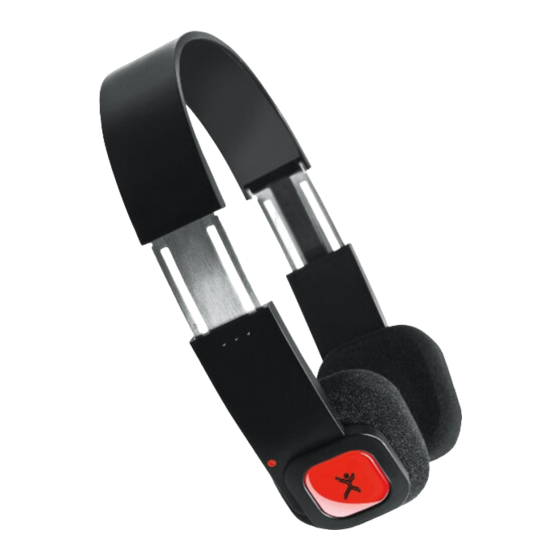

Related Manuals for Perfect Choice PC-217237


Summary of Contents for Perfect Choice PC-217237
- Page 1 Welcome to the PERFECT CHOICE Design’s world Before using this product it is important to read the manual.
- Page 2 Bluetooth® Foldable Headphones PC-217237 V.PCD 1.3...
-
Page 3: Before Using
Content • Bluetooth® headset 1 piece • USB power cable 1 piece • Carry on bag 1 piece • User’s manual 1 piece Features • Headset compatible with the following profiles: A2DP (Advanced Audio Distribution Profile), HSP (Headset Profile), HFP (Hands-Free Profile), AVRCP (Audio/Video Remote Control Profile). -
Page 4: Battery Charge
Battery charge 1. Connect one end of the USB cable that comes in the package to your headset, connect the other end to a computer or an USB power adapter. 2. While the battery is charging, the red LED will turn on, when the battery is fully charged the red LED will turn off. -
Page 5: Making A Call With The Headset
2. Make sure both devices goes into pairing mode. 3. Once your Bluetooth® device finds the headset (the headset is identified with the legend: PC-217237) and if a passkey is required just enter the following: 0000 (four times zero). 4. After the pairing is successfully completed, the blue light will start blinking two or three times every 4 seconds. -
Page 6: Music Playback
Three-way call Function Headset Status Operation End a call and answer and incoming call. During a call with an incoming call. Press the multi-function button once. Put a call on hold and answer an incoming call. During a call with an incoming call. Press the multi-function button twice. -
Page 7: Troubleshooting
LED status Headset Status Blue and red light blinking alternately. Pairing mode. Blue light blinks every 3 seconds. Not paired to any device. Blue light blinks twice every 5 seconds. Paired to a HFP or A2DP profile device. Blue light blinks 3 times every 5 seconds. Paired to a HFP and A2DP profile device. -
Page 8: Safety And Care Information
The headset is not recognized by the device you’re to pair with. • In order for the devices to pair each other it’s necessary to have both devices in pairing mode. Calls or music can’t be heard on the headset. •... -
Page 9: Regulatory Information
Regulatory Information Federal Communication Commission Interference Statement This equipment has been tested and found to comply with the limits for a Class B digital device, pursuant to Part 15 of the FCC Rules. These limits are designed to provide reasonable protection against harmful interference in a residential installation. This equipment generates, uses and can radiate radio frequency energy and, if not in- stalled and used in accordance with the instructions, may cause harmful interference to radio communications. -
Page 10: Technical Specifications
The product comply with the FCC portable RF exposure limit set forth for an uncon- trolled environment and are safe for intended operation as described in this manual. The further RF exposure reduction can be achieved if the product can be kept as far as possible from the user body. - Page 11 Bienvenidos al mundo PERFECT CHOICE Design Antes de comenzar a usar el producto es importante que leas este manual.
- Page 13 Audífonos Plegables Bluetooth® PC-217237...
-
Page 14: Antes De Usar
Contenido • Auriculares Bluetooth® 1 pieza • Cable USB de carga 1 pieza • Bolsa de viaje 1 pieza • Manual de usuario 1 pieza Características • Diadema compatible con los perfiles: A2DP (Perfil Avanzado de Distribución de Audio Avanzado), HSP (Perfil de Auriculares), HFP (Perfil Manos Libres), AVRCP (Perfil de Control Remoto de Audio y Video). -
Page 15: Carga De La Batería
Carga de la batería 1. Conecta un extremo del cable USB incluido tu empaque y el otro extremo a una computadora o un adaptador de corriente con salida USB. 2. Mientras la batería se está cargando se encenderá el LED en el auricular derecho en color rojo, cuando termine de cargarse se apagará. - Page 16 2. Haz que ambos dispositivos entren en modo de sincronización. 3. Una vez que tu dispositivo Bluetooth® encuentre la diadema (la diadema se identifica con la leyenda PC-217237) y si te pide contraseña ingresa la siguiente: 0000 (cuatro veces cero).
-
Page 17: Llamada Tripartita
Llamada tripartita Función Estatus de los auriculares Operación Terminar una llamada y responder una llamada entrante. En llamada con llamada entrante. Presiona el botón multifunción una vez. Poner llamada en espera y contestar una llamada entrante. En llamada con llamada entrante. Presiona el botón multifunción 2 veces. -
Page 18: Solución De Problemas
Señales luminosas y su significado. LED Indicador Estatus de auriculares Luces azul y roja parpadeando alternadamente. Modo de sincronización. La luz azul parpadea cada 3 segundos. No conectado a ningún dispositivo. La luz azul parpadea 2 veces cada 5 segundos. Conectado a un dispositivo con los perfiles HFP o A2DP. -
Page 19: Información Sobre Normativas
No se escucha música o las llamadas en la diadema. • Asegúrate que la diadema estén encendidos y sincronizados con tu aparato. • Verifica que el volumen no está muy bajo o al mínimo. • Asegúrate estar a menos de 10 metros sin interferencia. No se puede controlar la reproducción de música o video con los diadema •... - Page 20 Este equipo ha sido probado y cumple con los límites para un dispositivo digital de Clase B, de conformidad con la Parte 15 de las Reglas FCC. Estos límites están dis- eñados para proporcionar una protección razonable contra interferencias perjudicia- les en una instalación residencial.
-
Page 21: Especificaciones Técnicas
El producto cumple con el límite de la FCC para exposición portable a RF establecido para un entorno no controlado y es seguros para la operación que se describe en este manual. La mayor reducción de la exposición a RF se puede lograr si el produc- to puede mantenerse lo más lejos posible del cuerpo del usuario. - Page 22 Si tuvieras alguna duda o comentario, estamos a tus órdenes: Soporte Técnico Guadalajara, México y Monterrey 47 77 08 53 Resto del País 01 800 PCHOICE (724-6423) 1 800 PCHOICE (724-6423) desde EE.UU. soporte@perfectchoice.com.mx Producto Importado por: Master Choice S.A. de C.V. Magallanes # 1 155 Col.
-
Page 23: Warranty Policy
WARRANTY POLICY Master Choice, S.A. of C.V. warrants this product by the term of three years (36 months) in all parts and manpower against any defect of manufacture and operation as of the date of acquisition and becomes person in charge of the expenses of the transportation of the product that derived... - Page 24 2.Master Choice, S.A. de C.V. se compromete a reparar o cambiar todo aquel producto que os- ® tente nuestra marca Perfect Choice sin ningún cargo para el consumidor. 3.El tiempo de respuesta no será mayor a 30 días naturales a partir de la fecha de recepción del producto en nuestro departamento de Soporte Técnico en las instalaciones de Master Choice,...
Need help?
Do you have a question about the PC-217237 and is the answer not in the manual?
Questions and answers