
Related Manuals for Renogy DCCR50L

Summary of Contents for Renogy DCCR50L
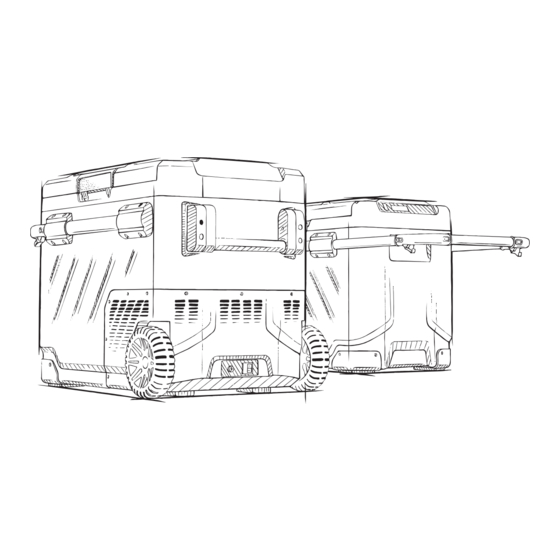
- Page 1 Portable Refrigerator Dual-Zone Cooling | 53 QT/50 L Capacity | Powered by LG Compressor VERSION A0 DCCR50L USER MANUAL...
-
Page 2: Table Of Contents
Table of Contents Important Safety Information ....................... 02 Symbols Used ......................... 02 General Safety Information ..................... 02 ..........................05 Introduction Key Features ..........................05 ........................... 06 Product Overview ........................06 Package Contents ........................07 How to Reverse the Door Opening Direction .......................... -
Page 3: Important Safety Information
Important Safety Information Symbols Used General Safety Information Important Safety Information The User Manual provides important installation, operation, and maintenance instructions for this Portable Refrigerator. Please read the User Manual carefully before installation and operation and save it for future reference. Failure to observe the instructions or precautions in the User Manual can result in electrical shock, serious injury, or death, or can damage the refrigerator, potentially rendering it inoperable. - Page 4 Important Safety Information Symbols Used General Safety Information Make sure that the appliance stays horizontal when it is running. The tilt angle must be less than 5 degrees for long time running and less than 45 degrees for short time running. Keep the ventilation openings in the unit casing or in the built-in structure free of obstacles.
- Page 5 Important Safety Information Symbols Used General Safety Information Information, illustrations, and specifications in this manual reflect the most current available at the time of publication, and are subject to change without prior notice. Please comply with local regulations regarding disposal of the appliance for its flammable refrigerant and blowing gas.
-
Page 6: Introduction
Introduction Key Features Product Overview Key Features Powered by a high-efficiency LG compressor. CFC-free, excellent heat insulation. Dual-zone cooling with individual temperature control systems. An intelligent battery protection system prevents your vehicle from running out of battery. App remote control. LED display control panel for temperature settings. -
Page 7: Package Contents
Introduction Package Contents How to Reverse the Door Opening Direction Package Contents 1 x Portable Refrigerator 1 x 12V/24V DC Power Cord 1 x 100V-240V AC Power Cord 1 x Removable Basket 1 x Cutting Board 1 x User Manual How to Reverse the Door Opening Direction Open the door at a Take off the door... - Page 8 Introduction Function and Operation Function and Operation LED Display Temperature + / - Left Cooling Zone Right Cooling Zone ON/OFF NOTE: The Right Cooling Zone is on the side where the compressor is located (the smaller side). When selecting a function, if the panel is not operated, it will be automatically confirmed after 3 seconds.
-
Page 9: Function And Operation
Introduction Function and Operation Temperature +/- Settings Temperature setting range: -4~68 ℉ (-20~20℃) Adjust temperature for the Left cooling zone: When both the Left and Right cooling zones are in a running state, press to turn up and to turn down the temperature. Adjust temperature for the Right cooling zone: Press button. - Page 10 Introduction Function and Operation Voltage reference: DC 12V DC 24V Input Mode Cut Out Cut In Cut Out Cut In 8.5V 10.9V 20.3V 22.7V 10.1V 11.4V 21.3V 23.7V 11.1V 12.4V 23.3V 25.7V Important Notice: The voltage is a theoretical value, and may vary due to different usage conditions. H mode should be set when the appliance is connected to car power supply.
-
Page 11: Remote Control App Download And Connect
Remote Control App Download and Connect Download the App How to Connect and Pair Download the App Scan the QR code below or search for "Car Fridge Freezer" to download the app. Android How to Connect and Pair Turn on Bluetooth on your smart device. Open the app and tap "Start scanning fridge"... -
Page 12: Main Interface
Remote Control App Download and Connect Main Interface Main Interface Menu Current Temperature Current Voltage Target Temperature Switch Left/Right Cooling Zone Power ON/OFF Current Battery Temperature Control ECO (Energy Saving Mode) / MAX (Fast Cooling Mode) Lock* / Unlock* Celsius / Fahrenheit Unpair the device and return to search Battery Protection System: High / Medium / Low *Tap the Lock icon on the app to lock or unlock the control panel on the refrigerator. -
Page 13: Care And Maintenance
Care and Maintenance Cleaning Storage Defrosting Cleaning Turn off and unplug the appliance first to avoid the electric shock. Remove the drain plug and drain out through the hole at the bottom of the device. Use a wet cloth to clean the appliance and then dry it. Do not soak the appliance in water and do not wash it directly under flowing water. -
Page 14: Specifications And Troubleshooting
Specifications and Troubleshooting Technical Specifications Troubleshooting Technical Specifications Model ZG51 Rated Voltage DC 12V/24V, or AC 120V (Using the included adapters) Rated Power Capacity 50 L/1.76 cu. ft. Noise Level ≤45 dB Temperature Setting Range -4~68℉/-20~20℃ Climate Class T/ST/N/SN Dimensions 27 x 18 x 20 in/692 x 453 x 515 mm (L x W x H) Net Weight 39 lbs/17.5 kg... - Page 15 Specifications and Troubleshooting Technical Specifications Troubleshooting Issues Possible Causes & Solutions There is a "water flow" noise coming from inside It's a normal phenomenon, caused by the flow of refrigerant. the refrigerator. There are waterdrops It's a normal phenomenon. The moisture will condense water when it around the refrigerator touches the cold surface of the refrigerator.
-
Page 16: Warranty
Damage from inappropriate use or violation of this instruction. Damage or malfunction caused by disassembling. Technical Support For additional support, contact the Renogy technical support team through renogy.com/contact-us. Have the following information available when contacting Renogy: Owner name Contact information... -
Page 17: Recommended Portable/Back-Up Battery
Recommended Portable/Back-up Battery For a better usage experience outdoors where there's no electricity, we recommend our Renogy 72000mAh power bank to power this portable refrigerator. Battery Life for Powering Your Refrigerator Use Time Lab Testing Conditions (At 68 ℉ ℃... - Page 18 RENOGY.COM Renogy reserves the right to change the contents of this manual without prior notice. Renogy | renogy.com | renogy.com/contact-us FCC ID: 2A908-ZGW...
Need help?
Do you have a question about the DCCR50L and is the answer not in the manual?
Questions and answers