Table of Contents
Advertisement
Quick Links
Advertisement
Table of Contents

Related Manuals for Teltonika TELTOHEART

Summary of Contents for Teltonika TELTOHEART
- Page 1 QUICK START GUIDE version v1.0...
- Page 2 THANK YOU FOR CHOOSING TELTOHEART SMARTWATCH...
- Page 3 CONTENTS OF THE BOX 1x charging dock 1x TeltoHeart watch...
- Page 4 HOW TO WEAR 1 CM TELTOHEART For optimal wearing the wristband should be worn on the left hand, fit snugly yet comfortably and be positioned at a distance of 1 cm from the wrist bone.
- Page 5 HOW TO CHARGE TELTOHEART To recharge, use charging dock that is included in the packaging. Insert a Type-C cable into the charging dock. The battery life can last for a maximum of 24 hours.
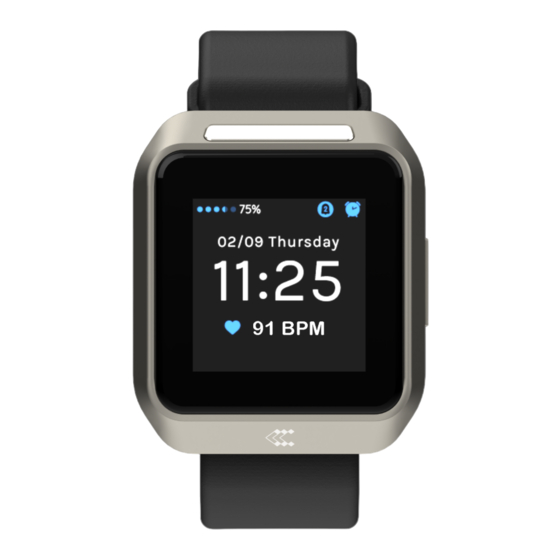
- Page 6 OVERVIEW Band Finger Charging electrode magnet Wrist Screen Button electrodes Abdomen electrode...
-
Page 7: Quick Start
QUICK START Visit Scan QR code to download teltonika-telemedic.com/products/ MyHealth application teltoheart to download the app or scan the QR code below. -
Page 8: Installation
INSTALLATION Login to your MyHealth profile and pair your TeltoHeart. After installing the app, tap to open the app. If it is your first time using the app, sign in by entering e-mail address and password, which is sent to... - Page 9 Select Reset password option.
- Page 10 MyHealth app will prompt you to change the default password to a personal preferred password of your choice.
- Page 11 Enter the code received in e-mail. After a successful password change, you will be asked to accept Terms and Conditions. After a successful sign-in, MyHealth application will ask for Bluetooth permissions. Tap Allow to proceed further with onboarding process.
- Page 12 HOW TO PAIR TELTOHEART After a successful sign-in, MyHealth application will tap the Pair device button. initiate a nearby device search.
- Page 13 Select your watch by After successful pairing, tapping on it. Connected indication will appear.
- Page 14 HOW TO VIEW ECG DATA IN TELTOCARE Open a web browser and go to the URL https://www.teltocare.com Enter your password in the login field. Note: MyHealth application and TeltoCare share the same password. Click the Login button to access your TeltoCare account.
-
Page 15: Recording An Ecg
(PPG) and Look for the Electrocardiogram electrocardiogram (ECG). section. – To transmit ECG data, ensure that TeltoHeart and MyHealth are paired Review the ECG recordings with iOS 14 or later and Android 10 or displayed in the Patient Dashboard later. - Page 16 RECORDING AN ECG How to take ECG recording Please sit down and make sure TeltoHeart is on your left wrist and strapped tightly but comfortably. Place and hold the abdomen electrode on the left abdomen. While holding the electrode on the left abdomen, put your right hand finger on the finger electrode...
- Page 17 The recording lasts for 60 seconds. Note: Please keep the MyHealth Once the recording is finished, application running in the you will see the message background to allow ECG Recording completed displayed data transfer. on the TeltoHeart screen.
- Page 18 Technical specifications BODY TELTOHEART MEMORY Dimensions (Width x 40.5 (1.6") x 47 (1.9") Capacity (Mb) Length x Height) in mm: x 14.7 (0.6") CONNECTIVITY Weight (g): Bluetooth: Chip: nRF5340 Remote access: Cloud 2x ARM Cortex M33 cores for application FEATURES and network –...
-
Page 19: Power Supply
POWER SUPPLY BUTTONS Build-in One (Turn on, Restart, Back) rechargeable 1.56 Li-Po battery (not replaceable by the STRAPS user) (mAh, Wh): The wristband with an electrode is made of Charging voltage USB-C, 5 TPE rubber with an integrated stainless-steel (V ): electrode Extreme low: Operating voltage... -
Page 20: Supported Peripherals
Bluetooth v5.0 in 2.4 GHz forceful impact. (2.402 – 2.480 GHz) band – Do not use a damaged TeltoHeart and SMP protocol are compatible with the watch, if device has a cracked case or device... - Page 21 – Avoid heavy exposure to sand or dust. Usage and Maintenance: – Do not disassemble the device. – The device is not intended to be put – Do not handle a damaged or leaking in any bodily orifice. battery. For safe disposal of your –...
- Page 22 – Due to excess heat battery might be observed. damaged. If device starts heating, stop – If TeltoHeart watch is damaged or using the device immediately! has malfunctions, contact Teltonika – If you start feeling nauseous or Telemedic Service Provider.
- Page 23 Environmental and Safety forums, etc. Installing unverified Precautions: firmware will result in a warranty void. – Avoid using the watch in sandy Connectivity and Data environments. Management: – Do not submerge the device in salty – For correct functioning of the system, water or any other electrically Bluetooth connection must be conductive liquid.
- Page 24 Storage and Usage: – Never dispose of the battery or – If watch storage is full newest records device in a fire. Never place the battery will be written on top of the oldest. or device on or in heating devices, such –...
- Page 25 of the docking station is clean of surface defects. metallic bodies. – Patients with diseases, which manifest as skin photosensitivity Device Usage and Limitations: should not use the device. – The watch is not supposed to be worn – Use of the device may harm patients in situations where the watch would be with exaggerated emotional instability exposed to strong vibrations, for...
- Page 26 – Do NOT short-circuit the charging – Do NOT use the device in close contacts. proximity with flammable anesthetics, – The Li-Po battery in TeltoHeart watch drugs, pressurized oxygen, gasoline or should be serviced only by Teltonika other flammable substances.
- Page 27 For your safety operational temperature range. and the safety of others, use your common sense. Cleaning Instructions: Wipe your TeltoHeart watch clean with Charger Safety: nonabrasive, microfiber cloth. If Chargers and accessories shall comply necessary, lightly dampen the cloth according to compatibility with fresh water and clean the watch.
-
Page 28: Warranty
initiating any firmware updates. manual) and terms and conditions – ECG recordings cannot be performed provided by the manufacturer. Failure if battery charge is too low. to adhere to these guidelines may – Please keep the MyHealth application result in malfunctions or damage to the running in the background to allow ECG. -
Page 29: Equipment Symbols
EQUIPMENT SYMBOLS Consult Manufacturer instructions for use TELTONIKA TELEMEDIC UAB hereby declares that the device TeltoHeart is in conformity with the essential requirements and other relevant requirements of Directive 2014/53/EU IP67 Protection against Temperature ingress of water or limit particulate matter. - Page 30 Quickly access the full Scan QR code to manual by scanning the download MyHealth QR code.
Need help?
Do you have a question about the TELTOHEART and is the answer not in the manual?
Questions and answers