Table of Contents
Advertisement
Copyright
This publication, including all photographs, illustrations and software, is protected
under international copyright laws, with all rights reserved. Neither this manual, nor
any of the material contained herein, may be reproduced without written consent of
the author.
Version 1.0C
Disclaimer
The information in this document is subject to change without notice. The manufac-
turer makes no representations or warranties with respect to the contents hereof and
specifically disclaims any implied warranties of merchantability or fitness for any
particular purpose. The manufacturer reserves the right to revise this publication and
to make changes from time to time in the content hereof without obligation of the
manufacturer to notify any person of such revision or changes.
Trademark Recognition
Microsoft, MS-DOS and Windows are registered trademarks of Microsoft Corp.
MMX, Pentium, Pentium-II, Pentium-III, Celeron are registered trademarks of Intel
Corporation.
Other product names used in this manual are the properties of their respective
owners and are acknowledged.
Federal Communications Commission (FCC)
This equipment has been tested and found to comply with the limits for a Class B
digital device, pursuant to Part 15 of the FCC Rules. These limits are designed to
provide reasonable protection against harmful interference in a residential installa-
tion. This equipment generates, uses, and can radiate radio frequency energy and, if
not installed and used in accordance with the instructions, may cause harmful inter-
ference to radio communications. However, there is no guarantee that interference
will not occur in a particular installation. If this equipment does cause harmful
interference to radio or television reception, which can be determined by turning the
equipment off and on, the user is encouraged to try to correct the interference by one
or more of the following measures:
•
Reorient or relocate the receiving antenna
•
Increase the separation between the equipment and the receiver
•
Connect the equipment onto an outlet on a circuit different from that to
which the receiver is connected
•
Consult the dealer or an experienced radio/TV technician for help
Shielded interconnect cables and a shielded AC power cable must be employed with
this equipment to ensure compliance with the pertinent RF emission limits governing
this device. Changes or modifications not expressly approved by the system's manu-
facturer could void the user's authority to operate the equipment.
Preface
Preface
Advertisement
Table of Contents

Related Manuals for ECS H61H2-M13


Summary of Contents for ECS H61H2-M13
- Page 1 Preface Copyright This publication, including all photographs, illustrations and software, is protected under international copyright laws, with all rights reserved. Neither this manual, nor any of the material contained herein, may be reproduced without written consent of the author. Version 1.0C Disclaimer The information in this document is subject to change without notice.
-
Page 2: Declaration Of Conformity
Declaration of Conformity This device complies with part 15 of the FCC rules. Operation is subject to the following conditions: • This device may not cause harmful interference. • This device must accept any interference received, including interfer- ence that may cause undesired operation. Canadian Department of Communications This class B digital apparatus meets all requirements of the Canadian Interference- causing Equipment Regulations. -
Page 3: Table Of Contents
T T T T T ABLE OF CONTENTS ABLE OF CONTENTS ABLE OF CONTENTS ABLE OF CONTENTS ABLE OF CONTENTS Preface Chapter 1 Introducing the Motherboard Introduction...................1 Feature....................2 Specifications................4 Motherboard Components............6 Chapter 2 7 7 7 7 7 Installing the Motherboard Safety Precautions................7 Choosing a Computer Case.............7 Installing the Motherboard in a Case..........7... - Page 4 Using the Motherboard Software Auto-installing under Windows XP/7/8........61 ..Running Setup..............61 Manual Installation................63 ECS Utility Software ..............63 Chapter 5 Trouble Shooting Start up problems during assembly..........65 Start up problems after prolong use..........66 Maintenance and care tips..............66 Basic Troubleshooting Flowchart...........67...
-
Page 5: Introducing The Motherboard
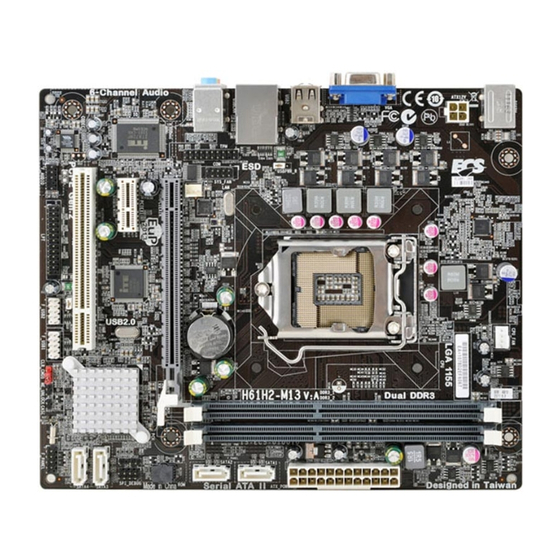
Chapter 1 Introducing the Motherboard Introduction Thank you for choosing the H61H2-M13 motherboard. This motherboard is a high performance, enhanced function motherboard designed to support the LGA1155 ® ® ® socket for the latest Intel Core Family/Pentium /Celeron processors* for high- end business or personal desktop markets. -
Page 6: Feature
Feature Processor The motherboard uses an LGA1155 type of socket that carries the following features: ® ® ® • Accommodates the latest Intel Core Family /Pentium /Celeron pro- cessors in LGA1155 socket • Supports “Hyper-Threading” technology CPU • Supports 22nm & 32nm Intel Core micro-architecture. -
Page 7: Bios Firmware
Onboard LAN (Optional) The onboard LAN provides the following features: • Supports PCI Express • Integrated 10/100/1000 transceiver • Wake-on-LAN and remote wake-up support • Supports PCI Express • Integrated 10/100 transceiver • Wake-on-LAN and remote wake-up support Expansion Options The motherboard comes with the following expansion options: •... -
Page 8: Specifications
• 1 x Clear CMOS header • AMI BIOS with 32Mb SPI Flash ROM System BIOS • Supports ECS M.I.B III Utility AP Support • Supports eBLU/eDLU (Warning: Microsoft .NET Frame- work 3.5 is required) • Micro ATX Size, 225mm x 190mm... - Page 9 Motherboard Components Introducing the Motherboard...
-
Page 10: Motherboard Components
Table of Motherboard Components LABEL COMPONENTS ® ™ ® ® The latest Intel Core Family/Pentium /Celeron 1. CPU Socket processors in the LGA1155 socket 2. CPU_FAN 4-pin CPU cooling fan connector 3. DDR3_1~2 240-pin DDR3 SDRAM slots 4. ATX_POWER Standard 24-pin ATX power connector 5. -
Page 11: Installing The Motherboard
Chapter 2 Installing the Motherboard Safety Precautions • Follow these safety precautions when installing the motherboard • Wear a grounding strap attached to a grounded device to avoid dam- age from static electricity • Discharge static electricity by touching the metal case of a safely grounded object before working on the motherboard •... -
Page 12: Checking Jumper Settings
Do not over-tighten the screws as this can stress the motherboard. Checking Jumper Settings This section explains how to set jumpers for correct configuration of the motherboard. Setting Jumpers Use the motherboard jumpers to set system configuration options. Jumpers with more than one pin are numbered. -
Page 13: Checking Jumper Settings
Checking Jumper Settings The following illustration shows the location of the motherboard jumpers. Pin 1 is labeled. Jumper Settings Jumper Type Description Setting (default) 1-2: NORMAL 2-3: CLEAR CLR_CMOS 3-pin Clear CMOS Before clearing the CLR_CMOS CMOS, make sure to turn off the system. -
Page 14: Installing Hardware
Installing Hardware Installing the Processor Caution: When installing a CPU heatsink and cooling fan make sure that you DO NOT scratch the motherboard or any of the surface-mount resis- tors with the clip of the cooling fan. If the clip of the cooling fan scrapes across the motherboard, you may cause serious damage to the motherboard or its components. -
Page 15: Cpu Installation Procedure
CPU Installation Procedure The following illustration shows CPU installation components. A. Disengaging of the Load Lever · Press the hook of lever down and pull it to the right side to release it from retention tab. B. Opening of the Load Plate ·... -
Page 16: Installing Memory Modules
1. To achieve better airflow rates and heat dissipation, we suggest that you use a high quality fan with 3800 rpm at least. CPU fan and heatsink installation procedures may vary with the type of CPU fan/ heatsink supplied. The form and size of fan/heatsink may also vary. 2. -
Page 17: Installation Procedure
Installation Procedure Refer to the following to install the memory modules. This motherboard supports unbuffered DDR3 SDRAM . Push the latches on each side of the DIMM slot down. Align the memory module with the slot. The DIMM slots are keyed with notches and the DIMMs are keyed with cutouts so that they can only be installed correctly. -
Page 18: Expansion Slots
Expansion Slots Installing Add-on Cards The slots on this motherboard are designed to hold expansion cards and connect them to the system bus. Expansion slots are a means of adding or enhancing the motherboard’s features and capabilities. With these efficient facilities, you can in- crease the motherboard’s capabilities by adding hardware that performs tasks that are not part of the basic system. - Page 19 Follow these instructions to install an add-on card: Remove a blanking plate from the system case corresponding to the slot you are going to use. Install the edge connector of the add-on card into the expansion slot. Ensure that the edge connector is correctly seated in the slot. Secure the metal bracket of the card to the system case with a screw.
-
Page 20: Connecting Optional Devices
Connecting Optional Devices Refer to the following for information on connecting the motherboard’s optional devices: F_AUDIO: Front Panel Audio header This header allows the user to install auxiliary front-oriented microphone and line- out ports for easier access. Signal Name Signal Name PORT 1L AUD_GND PORT 1R... - Page 21 F_USB1~2: Front Panel USB headers The motherboard has two USB 2.0 headers supporting four USB 2.0 ports. Addition- ally, some computer cases have USB ports at the front of the case. If you have this kind of case, use auxiliary USB connector to connect the front-mounted ports to the motherboard.
- Page 22 CASE: Chassis Intrusion Detect Header This detects if the chassis cover has been removed. This function needs a chassis equipped with intrusion detection switch and needs to be enabled in BIOS. Pin 1-2 Function Short Chassis cover is removed Open Chassis cover is closed TPM: TPM module header Trusted Platform Module (TPM) is a published specification detailing a microntroller that can store secured information, and implementations of that specification.
-
Page 23: Installing A Sata Hard Drive
Installing a SATA Hard Drive This section describes how to install a SATA Hard Drive. About SATA Connectors Your motherboard features four SATA connectors supporting a total of four drives. SATA refers to Serial ATA (Advanced Technology Attachment) is the standard inter- face for the IDE hard drives which are currently used in most PCs. -
Page 24: Connecting I/O Devices
Connecting I/O Devices The backplane of the motherboard has the following I/O ports: PS2 Mouse Use the upper PS/2 port to connect a PS/2 pointing device. PS2 Keyboard Use the lower PS/2 port to connect a PS/2 keyboard. VGA Port Connect your monitor to the VGA port. -
Page 25: Connecting Case Components
Connecting Case Components After you have installed the motherboard into a case, you can begin connecting the motherboard components. Refer to the following: Connect the CPU cooling fan cable to CPU_FAN. Connect the standard power supply connector to ATX_POWER. Connect the case switches and indicator LEDs to the F_PANEL. Connect the system cooling fan connector to SYS_FAN. - Page 26 Connecting 4-pin power cable The ATX12V4P power connector is used to provide power to the CPU. When installing 4-pin power cable, the latches of power cable and the ATX12V4P match perfectly. 4-pin power cable CPU_FAN: CPU cooling FAN Power Connector Signal Name Function System Ground...
- Page 27 ATX12V: ATX 12V Power Connector Signal Name Ground Ground +12V +12V SPK: Speaker Header Signal Name Signal Installing the Motherboard...
-
Page 28: Front Panel Header
Front Panel Header The front panel header (F_PANEL) provides a standard set of switch and LED headers commonly found on ATX or Micro ATX cases. Refer to the table below for information: Signal Function Signal Function HD_LED_P Hard disk LED(+) 2 FP PWR/SLP *MSG LED(+) HD_LED_N Hard disk LED(- ) FP PWR/SLP *MSG LED(-) -
Page 29: Using Bios
Chapter 3 Using BIOS About the Setup Utility The computer uses the latest “American Megatrends Inc.” BIOS with support for Windows Plug and Play. The CMOS chip on the motherboard contains the ROM setup instructions for configuring the motherboard BIOS. The BIOS (Basic Input and Output System) Setup Utility displays the system’s configuration status and provides you with options to set system parameters. -
Page 30: Resetting The Default Cmos Values
Press the delete key to access BIOS Setup Utility. Aptio Setup Utility - Copyright (C) 2012 American Megatrends, Inc. Main Advanced Chipset M.I.B III Boot Security Exit Choose the system default BIOS Information language. System Language [English] System Date [ Mon 09/10/2012] :Select Screen System Time [21:54:45]... -
Page 31: Bios Navigation Key
In this manual, default values are enclosed in parenthesis. Submenu items are denoted by a triangle The default BIOS setting for this motherboard apply for most conditions with optimum performance. We do not suggest users change the default values in the BIOS setup and take no responsibility to any damage caused by changing the BIOS settings. -
Page 32: Main Menu
Main Menu When you enter the BIOS Setup program, the main menu appears, giving you an overview of the basic system information. Select an item and press <Enter> to display the submenu. Aptio Setup Utility - Copyright (C) 2012 American Megatrends, Inc. Main Advanced Chipset... -
Page 33: Advanced Menu
Advanced Menu The Advanced menu items allow you to change the settings for the CPU and other system. Aptio Setup Utility - Copyright (C) 2012 American Megatrends, Inc. Main Advanced Chipset M.I.B III Boot Security Exit LAN Configuration Parameters LAN Configuration PC Health Status Power Management Setup ACPI Settings... -
Page 34: Pc Health Status
PC Health Status On motherboards support hardware monitoring, this item lets you monitor the parameters for critical voltages, temperatures and fan speeds. Aptio Setup Utility - Copyright (C) 2012 American Megatrends, Inc. Main Advanced Chipset M.I.B III Boot Security Exit Smart Fan Function PC Health Status Smart Fan Function... - Page 35 SMART Fan start PWM value (180) This item is used to set the start PWM value of the smart fan. SMART Fan start TEMP(-) (30) This item is used to set the start temperature of the smart fan. DeltaT (+3) This item specifies the range that controls CPU temperature and keeps it from going so high or so low when smart fan works.
-
Page 36: Power Management Setup
Power Management Setup This page sets up some parameters for system power management operation. Aptio Setup Utility - Copyright (C) 2012 American Megatrends, Inc. Main Advanced Chipset M.I.B III Boot Security Exit Power Management Setup About Resume by Ring Resume By RING [Disabled] Resume By PME [Disabled]... -
Page 37: Acpi Setting
ACPI Setting The item in the menu shows the highest ACPI sleep state when the system enters suspend. Aptio Setup Utility - Copyright (C) 2012 American Megatrends, Inc. Main Advanced Chipset M.I.B III Boot Security Exit ACPI Settings Select the highest ACPI sleep state the system will enter ACPI Sleep State [S3 (Suspend to RAM)]... - Page 38 Intel(R) Core(TM) i7-2600 CPU @ 3.40GHz This is display-only field and diaplays the information of the CPU installed in your computer. EMT64 (Supported) This item shows the computer supports EMT64. Processor Speed (3400MHz) This item shows the current processor speed. Processor Stepping (206a7) This item shows the processor stepping version.
-
Page 39: Sata Configuration
SATA Configuration Use this item to show the mode of serial SATA configuration options. Aptio Setup Utility - Copyright (C) 2012 American Megatrends, Inc. Main Advanced Chipset M.I.B III Boot Security Exit (1) IDE Mode. (2) AHCI Mode. SATA Configuration SATA Mode [IDE Mode] Serial-ATA Controller 0... -
Page 40: Usb Configuration
USB Configuration Scroll to this item and press <Enter> to view the following screen: Aptio Setup Utility - Copyright (C) 2012 American Megatrends, Inc. Main Advanced Chipset M.I.B III Boot Security Exit USB Configuration Enabled/Disabled All USB Devices All USB Devices [Enabled] Legacy USB Support [Enabled]... -
Page 41: Super Io Configuration
Super IO Configuration Use this item to show the information of the Super IO Configuration. Aptio Setup Utility - Copyright (C) 2012 American Megatrends, Inc. Main Advanced Chipset M.I.B III Boot Security Exit Set Parameters of Serial Port Super IO Configuration 0 (COMA) Super IO Chip IT8728... - Page 42 Parallel Port Configuration Scroll to this item and press <Enter> to view the following screen: Aptio Setup Utility - Copyright (C) 2012 American Megatrends, Inc. Main Advanced Chipset M.I.B III Boot Security Exit Parallel Port Configuration Enable or Disable Parallel Port (LPT/LPTE) Parallel Port [Enabled]...
-
Page 43: Intel Smart Connect Technology
Intel(R) Smart Connect Technology Use this item to show the information of Intel(R) Smart Connect Technology. Aptio Setup Utility - Copyright (C) 2012 American Megatrends, Inc. Main Advanced Chipset M.I.B III Boot Security Exit Enabled/Disabled ISCT Configura- ISCT Configuration [Enabled] tion ISCT Notification Control [Enabled]... -
Page 44: Trusted Computing
Trusted Computing Use this item to show the information of trusted computing configuration. Aptio Setup Utility - Copyright (C) 2012 American Megatrends, Inc. Main Advanced Chipset M.I.B III Boot Security Exit Enables or Disables TPM TPM Configuration support. O.S. will not show TPM Support [Enabled] TPM. -
Page 45: Chipset Menu
Chipset Menu The chipset menu items allow you to change the settings for the North Bridge chipset, South Bridge chipset and other system. Aptio Setup Utility - Copyright (C) 2012 American Megatrends, Inc. Main Advanced Chipset M.I.B III Boot Security Exit System Agent (SA) Parameters System Agent Configuration... - Page 46 Intel integrated Graphics and one or two PCI-Express graphics devices under Windows 7/8. Step 1. Insert ECS drives DVD to run Auto setup or browse the DVD to install Intel chipset drivers, VGA and sound drivers.(If you want know the detail information, please refer to chapter 4.)
- Page 47 Step 2. Install all the drivers of PCI-Express graphic cards. Click the Browse CD item, then appears the following screen. Select the driver you want to install(e.g NVIDIA GeForce 8400 GS(Microsoft Corporation-WDDM v1.1)) and double click Step 3. Enable IGD Multi-Monitor from BIOS. In the following BIOS screen, please set IGD Multi-Monitor to [Enabled].
- Page 48 Step 4. Change the appearance of your displays under Windows 7/8. 1. Enter the Control Panel menu, select the Display in the All Control Panel Items and click the Screen Resolution, then appears the following screen. Show the path of the setting location Display devices Search Control Panel Control Panel...
- Page 49 Search Control Panel Control Panel All Control Panel Items Display Screen Resolution Change the aprearance of your displays Detect Identify Display: 4. AL1717 Resolution: 1920 x 1200 (recommended) Orientation: Landscape Multiple displays: Disconnect this display You must select Apply before making additional changes. Make this my main display Advance settings Make text and other items larger or smaller...
- Page 50 PCH Configuration Scroll to this item and press <Enter> to view the following screen: Aptio Setup Utility - Copyright (C) 2012 American Megatrends, Inc. Main Advanced Chipset M.I.B III Boot Security Exit PCH Configuration Specify what state to go to when power is re-applied Restore AC Power Loss [Power Off]...
- Page 51 ME Configuration Scroll to this item and press <Enter> to view the following screen: Aptio Setup Utility - Copyright (C) 2012 American Megatrends, Inc. Main Advanced Chipset M.I.B III Boot Security Exit Management Engine Technology Configuration ME FW Version 8. 1. 0.1248 :Select Screen :Select Item Enter : Select...
-
Page 52: M.i.b.iii(Mb Intelligent Bios Iii) Menu
M.I.B III (MB Intelligent BIOS III) Menu This page enables you to set the clock speed and system bus for your system. The clock speed and system bus are determined by the kind of processor you have installed in your system. Aptio Setup Utility - Copyright (C) 2012 American Megatrends, Inc. - Page 53 Current ICC Profiles Index (N/A) This item shows current ICC profiles index. ICC Enable (Disabled) This item allows you to enable or disable current ICC. Press <Esc> to return to the M.I.B III menu page. Memory Voltage Control Scroll to this item to view the following screen: Aptio Setup Utility - Copyright (C) 2012 American Megatrends, Inc.
- Page 54 Performance Tunning Scroll to this item to view the following screen: Aptio Setup Utility - Copyright (C) 2012 American Megatrends, Inc. Main Advanced Chipset M.I.B III Boot Security Exit CPU Configuration Performance Tuning CPU Configuration Chipset Configuration :Select Screen :Select Item Enter : Select +/- : Change Opt.
- Page 55 Power Limit 2 Value (118) Use this item to control Power Limit 2. PL2 provides an upper limit of the TDP excursions. This is for Turbo mode. Long Duration Maintainded (1) Use this item to control the time window over PL1 value should be maintained. This is for Turbo mode.
- Page 56 Memory Multiplier (10.67) This item shows the information of Memory Multiplier. Memory Timing Configuration This item shows the information of Memory Timing Configuration. CAS# Latency(tcl) (7) This item determines the operation of DDR SDRAM memory CAS (column address strobe). It is recommended that you leave this item at the default value. The 2T setting requires faster memory that specifically supports this mode.
- Page 57 B.O.M.P Technology (Enabled) This item allows users to enable or disable B.O.M.P technology. This function can run safe setting to setup menu when system boot fail 3 times. Auto Detect DIMM/PCI Clk (Enabled) When this item is enabled, BIOS will disable the clock signal of free DIMM/PCI slots. Spread Spectrum (Enabled) If you enable spread spectrum, it can significantly reduce the EMI (Electro-Magnetic Interference) generated by the system.
-
Page 58: Boot Menu
Boot Menu This page enables you to set the keyboard NumLock state. Aptio Setup Utility - Copyright (C) 2012 American Megatrends, Inc. Main Advanced Chipset M.I.B III Boot Security Exit Windows 7 or other OS: Boot Configuration Boot policy for Legacy OS Operation System Select [Windows7 or other OS] Launch PXE OpROM... - Page 59 Hard Disk / CD/DVD ROM / USB Floppy / USB CD/DVD ROM / USB HardDisk / USB Flash / Network Boot Drive Priorities These items enable you to specify the sequence of loading the operating system. Press <Enter> to see the submenu. CSM parameters OpROM execution, boot options filter,etc.
-
Page 60: Security Menu
Security Menu This page enables you to set setup administrator password and user password. Aptio Setup Utility - Copyright (C) 2012 American Megatrends, Inc. Main Advanced Chipset M.I.B III Boot Security Exit Secure Boot mode selector. ‘Stan- Administrator Password Status Not Install dard’... - Page 61 Image Execution Policy Scroll to this item to view the following screen: Aptio Setup Utility - Copyright (C) 2012 American Megatrends, Inc. Main Advanced Chipset M.I.B III Boot Security Exit Image Execution Policy per device Internal FV [Always Execute] path on Security Violation. Note: Option ROM [Deny Execute] Only users logged with...
- Page 62 Key Management Scroll to this item to view the following screen: Aptio Setup Utility - Copyright (C) 2012 American Megatrends, Inc. Main Advanced Chipset M.I.B III Boot Security Exit Force OEM default Secure Default Key Provisioning [Disabled] Boot Keys if System is in Manage All Factory Keys (PK, KEK, DB, DBX) Setup Mode.
-
Page 63: Exit Menu
Exit Menu This page enables you to exit system setup after saving or without saving the changes. Aptio Setup Utility - Copyright (C) 2012 American Megatrends, Inc. Main Advanced Chipset M.I.B III Boot Security Exit Save Changes and Exit Exit system setup after saving Discard Changes and Exit the changes. -
Page 64: Updating The Bios
Updating the BIOS You can download and install updated BIOS for this motherboard from the manufacturer’s Web site. New BIOS provides support for new peripherals, improve- ments in performance, or fixes for known bugs. Install new BIOS as follows: If your motherboard has a BIOS protection jumper, change the setting to allow BIOS flashing. -
Page 65: Using The Motherboard Software
C l i c k t h e “Setup” Click the “ Utilities” button to select and button to select and software install ECS Intelligent installation program. Utility. Running Setup Follow these instructions to install device drivers and software for the motherboard: Click Setup. - Page 66 Click Next. The following screen appears: Check the box next to the items you want to install. The default options are recommended. Click Next to run the Installation Wizard. An item installation screen appears: Follow the instructions on the screen to install the items. Drivers and software are automatically installed in sequence.
-
Page 67: Manual Installation
README.DOC) for information on installing the driver or software for your oper- ating system. ECS Utility Software (Intelligent EZ Utility) ECS Intelligent EZ Utility provides friendly interfaces under Windows O.S, which makes your computing more easily and conveniently. These software(s) are subject to change at anytime without prior notice. Please refer to the support disk for available software. - Page 68 Just select the one you prefer and start to download and install the drivers. eBLU ECS eBLU utility makes BIOS update faster and easier. eBLU will list the latest BIOS with a default check-mark. Click”install” button to install. Microsoft .NET Framework 3.5 is required.
-
Page 69: Trouble Shooting
Chapter 5 Trouble Shooting Start up problems during assembly After assembling the PC for the first time you may experience some start up problems. Before calling for technical support or returning for warranty, this chapter may help to address some of the common questions using some basic troubleshooting tips. -
Page 70: Start Up Problems After Prolong Use
2. From the BIOS setting, try to disable the Smartfan function to let the fan run at default speed. Doing a Load Optimised Default will also disable the Smartfan. Start up problems after prolong use After a prolong period of use your PC may experience start up problems again. This may be caused by breakdown of devices connected to the motherboard such as HDD, CPU fan, etc. - Page 72 Memo Trouble Shooting...
Need help?
Do you have a question about the H61H2-M13 and is the answer not in the manual?
Questions and answers