Table of Contents
Advertisement
Advertisement
Table of Contents

Summary of Contents for IXSEA Rovins
- Page 1 Quick Start Quick Start Guide Guide Rovins gyro to ins...
- Page 2 ROVINS qUIck StaRt GUIde Objective This guide describes how to install the ROVINS, and the basic configurations required before beginning the positioning Contents OBJECTIVE......................................01 CONTENTS......................................01 CONVENTIONS.....................................02 ROVINS SYSTEM OVERVIEW.................................03 VERIFICATION OF PACK CONTENTS ..............................03 BASIC INSTALLATION..................................03 STEP 1 - INSTALLING ROVINS................................05 STEP 2 - ACTIVATING THE PRODUCT LICENSE............................10...
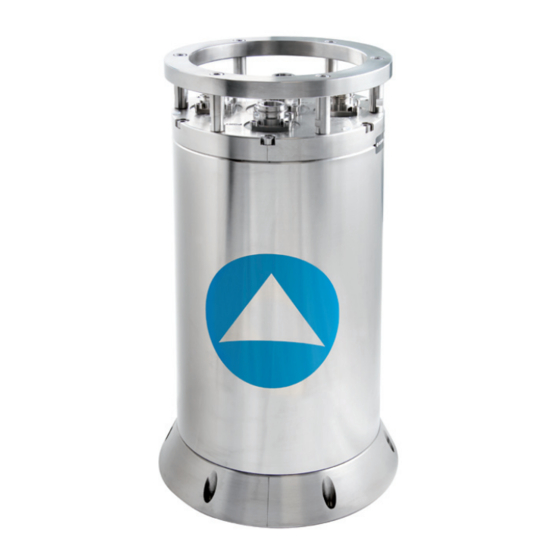
- Page 3 It can receive data from other sensors to improve its accuracy. The ROVINS system can also be used as a gyrocompass. The core of ROVINS is an inertial measurement unit (IMU). The IMU...
- Page 4 Step 3: Configuring Step 1: Installing ROVINS + GPS To define the ROVINS orientation, lever arms, and the PC-ROVINS communication parameters To configure the GPS: serial or Ethernet input parameters, lever arm To define the Time Synchronisation system To define the initial position...
- Page 5 STEP 1- INSTALLING ROVINS ROVINS is fixed onboard using six CHC M6 screws. It can be installed with any orientation with respect to the vessel (see the definition of the vessel reference frame hereafter). The alignment of the unit is performed by means of the two cen- tering pins located on the bottom plate of the ROVINS.
- Page 6 External sensor connected to the ethernet stream A of ROVINS: GPS Output protocol on stream A: GPS like PPS time synchronization pulse from the GPS cabled on the Pulse input B of ROVINS in the horizontal plane pointing towards geographical North...
- Page 7 PPS time synchronization pulse from the GPS cabled on the Pulse input A of ROVINS In this case the workstation establishes a PPP connection with ROVINS Refer to the ROVINS User Manual to know how to configure this PPP connection...
- Page 8 Central connector As soon as ROVINS is powered up it starts its alignment phase starting with the manually input position stored into RO- VINS PROM. It is required that a valid initial position is input manually (see Step 3) or is given by the GPS. The alignment sequence is detailed in Step 4.
- Page 9 IXSEA logo handling Firmware upgrades, system restaring, factory settings reset, support contact. Menu Bar A click on the IXSEA logo opens the detailed status/activation pop-up window and the compass disappears. The menu is blue when selected options page : This window:...
- Page 10 The color code applies for the indicators and text labels displayed in this pop-up window. When a problem occurs, the color of the IXSEA logo changes and the detailed status pop-up automatically appears showing immediately which equipment has raised the problem.
- Page 11 On “mouse over” action, orange color may surround a button to indicate that the action performed by clicking on the button has consequences. Examples of such action: ROVINS restart (the alignment process is repeated) Ask for the activation code: click on maintenance menu •...
- Page 12 (parity, baud rate, standard (RS232 or RS422) and stop bit)or Ethernet (transport layer, IP ad- Define the ROVINS orientation, possible dress, Port number) parameters, the pulse roll, pitch and heading misalignments, output to output the envelop, the heave fil-...
- Page 13 As ROVINS can be installed with any orientation with respect to the vehicle, ROVINS axes orientation can be different from vehicle axes orientation, with 90 degrees rotations of any of the ROVINS axis with respect to the vehicle axes. Choose MECHANICAL PARAMETERS...
- Page 14 Define the GPS lever arms: • LV1 is the signed distance from the ROVINS center of measurements to the GPS along axis 1 of the illustration LV2 is the signed distance from the ROVINS center of measurements to the GPS •...
- Page 15 Select the Physical Link and configure its Pulse A for Synchro In and the desired protocol. parameters if needed. Step 4: Click OK to validate and save your choices. Step 5: Click OK to validate and save your choices. 2010-05/MU/ROVINS-001-B 2010-05/MU/ROVINS-001-B...
- Page 16 ENTERING THE INITIAL POSITION Entering the initial position is only necessary if no GPS is available upon starting ROVINS. Once saved by clicking on Step 3: Enter the initial position: OK button, the entered position is used at next ROVINS start.
- Page 17 ROVINS measures heading and attitude with respect to its reference frame defined by the 3 axes X1, X2 and X3 (see Figure 1). ROVINS reference frame may not be parallel to the vehicle reference frame. In such case, heading and attitude outputs After the first fine minutes long coarse alignment phase, ROVINS switches to the “fine alignment”...
- Page 18 Part 4 of the ROVINS User Guide. Observing the input data flow coming from any input stream. For more details refer to Part 4 of ROVINS User Guide. System Information: to accede to the serial number and firmware version of your ROVINS unit, click on maintenance menu of the WEB-based User Interface.
- Page 19 ROVINS zERO VELOCITY UPDATE (zUPT) MODES CUSTOMER SUPPORT These modes have been designed to use ROVINS for specific applications when no external sensor is connected. THE WORLDWIDE 24/7 TELEPHONE SUPPORT LINE NUMBERS ARE: For more details about zUPT mode, refer to part 4 of the ROVINS User Guide.
- Page 20 IXSEA CONTACT PERSONAL NOTES To obtain information on any IXSEA products, a general mail box is available with the following address: info@ixsea.com You can also contact IXSEA headquarters in France, or one of its representatives around the Contact Phone IXSEA SAS...
- Page 21 PERSONAL NOTES PERSONAL NOTES 2010-05/MU/ROVINS-001-B 2010-05/MU/ROVINS-001-B...
Need help?
Do you have a question about the Rovins and is the answer not in the manual?
Questions and answers