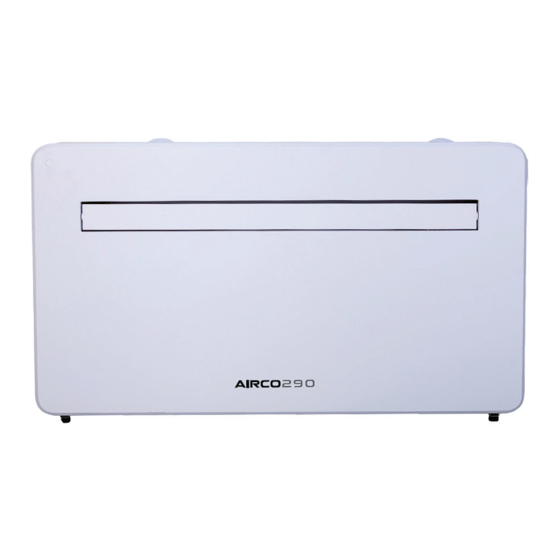

Summary of Contents for Powermatic AIRCO290
- Page 1 Doc Ref: M631 Issue 1.0 June 2021 ® AIRCO290 Installation & Servicing Manual Issue 1.0 July 2022 w w w . p o w r m a t i c . c o . u k...
-
Page 2: Certificate Of Guarantee
Powrmatic Ltd, Hort Bridge, Ilminster, Somerset, TA19 9PS Tel: 01460 53535 Fax: 01460 52341 Web: www.powrmatic.co.uk e-mail: warranty@powrmatic.co.uk Important: This certificate must be retained AIRCO290 Installation & User Instructions Doc Ref M631 issue 1.0 July 2022 page no. 2 of 36... -
Page 3: Safety Instructions
R290 refrigerant gas complies with European environmental directives. AIRCO290 Installation & User Instructions Doc Ref M631 issue 1.0 July 2022 page no. 3 of 36 page no. 2 of 28 Vision User Instructions Doc Ref M605 issue 1.1 Sept 2020. - Page 4 35℃. NOTE : Some pictures and information may vary from the final product . This is due to continual product improvement. AIRCO290 Installation & User Instructions Doc Ref M631 issue 1.0 July 2022 page no. 4 of 36...
-
Page 5: Product Overview
PRODUCT OVERVIEW PRODUCT DIAGRAM FRONT AIR INLET CONTROL PANEL LOUVER FRONT PANEL BACK WALL HANGING MOUNTS BACK PANEL AIR INLET AIR OUTLET DRAINAGE PIPE AIRCO290 Installation & User Instructions Doc Ref M631 issue 1.0 July 2022 page no. 5 of 36... -
Page 6: What's Included
(CHAIN, INDOOR RING AND OUTDOOR COVER) PLASTIC DUCTING WALL BRACKET SHEET (X2) REMOTE CONTROL 2PCS TAPPING SCREW FIXED PLATE (4x10mm) DIAGRAMS FOR ILLUSTRATIVE PURPOSES ONLY AIRCO290 Installation & User Instructions Doc Ref M631 issue 1.0 July 2022 page no. 6 of 36... -
Page 7: Tools Required
SUITABLE, AND THAT THERE ARE NO CABLES AND PIPES INSIDE THE WALL, AND NO OTHER OBSTRUCTIONS FIXED ON THE WALL, WHICH WOULD PRESENT A DANGER AND/OR PREVENT COMPLETION OF INSTALLATION. AIRCO290 Installation & User Instructions Doc Ref M631 issue 1.0 July 2022 page no. 7 of 36... -
Page 8: Installation
Ensure that the hanging rail is securely fastened onto the wall, and that there is no risk of the unit tipping or falling. AIRCO290 Installation & User Instructions Doc Ref M631 issue 1.0 July 2022 page no. 8 of 36... - Page 9 Expand the external cover, before tightly fixing the chains by hooking onto the indoor fixing ring. This will hold the external cover firmly in position. Repeat for the second vent. AIRCO290 Installation & User Instructions Doc Ref M631 issue 1.0 July 2022 page no. 9 of 36...
- Page 10 : The end of the external water pipe must be placed in an open space or drain. Avoid damage or constriction to the drainage pipe to ensure the unit drains. Fixed plate 4x10 tapping screw AIRCO290 Installation & User Instructions Doc Ref M631 issue 1.0 July 2022 page no. 10 of 36...
-
Page 11: Operation
Press to turn the louver swing function on and off SWING (only activated by the remote control & APP) Press the TIMER button to set the automatic switch TIMER on/off. AIRCO290 Installation & User Instructions Doc Ref M631 issue 1.0 July 2022 page no. 11 of 36... -
Page 12: Shutdown Timer
Swing mode can only be adjusted from the remote, and will initially be turned on by default. the louver will close automatic once switch OFF the product. AIRCO290 Installation & User Instructions Doc Ref M631 issue 1.0 July 2022 page no. 12 of 36... -
Page 13: Connection Methods Available For Setup
Connection Type Frequency of Flashes Quick Connection Flashes twice per second AP Connection (Access Point) Flashes once per three seconds AIRCO290 Installation & User Instructions Doc Ref M631 issue 1.0 July 2022 page no. 13 of 36... -
Page 14: Changing Between Connection Types
3. Enter the code into the app. needs to be 6-20 characters, following registration. with letters and numbers. AIRCO290 Installation & User Instructions Doc Ref M631 issue 1.0 July 2022 page no. 14 of 36... -
Page 15: Creating Rooms
When the symbol in the top is in the approximate right location of your corner. home, press the confirm button in the top right corner. AIRCO290 Installation & User Instructions Doc Ref M631 issue 1.0 July 2022 page no. 15 of 36... - Page 16 NEXT Please retry if this fails. button to enter the next please review the setting. troubleshooting section for further help if still unsuccessful AIRCO290 Installation & User Instructions Doc Ref M631 issue 1.0 July 2022 page no. 16 of 36...
-
Page 17: Connecting Using Ap Mode (Alternative Method)
Once the connection process has completed, go back to the network settings on your phone to ensure your phone has reconnected to your WIFI router. AIRCO290 Installation & User Instructions Doc Ref M631 issue 1.0 July 2022 page no. 17 of 36... -
Page 18: The Home Screen
ON / OFF Button: Name of Air Conditioner: Click to quickly turn on or Click to enter the Device Screen. off the device. AIRCO290 Installation & User Instructions Doc Ref M631 issue 1.0 July 2022 page no. 18 of 36... - Page 19 SILENT mode off. *Due to continuous development of the app, the layout and available features may be subject to change. AIRCO290 Installation & User Instructions Doc Ref M631 issue 1.0 July 2022 page no. 19 of 36...
- Page 20 Press on the Launch at the bottom of the Home right corner to add a smart Tap-to-Run to create a new screen. scene. Scene. AIRCO290 Installation & User Instructions Doc Ref M631 issue 1.0 July 2022 page no. 20 of 36...
- Page 21 2. Press on the Plus in the top right to create a new Scene. the bottom of the Home screen. corner to add a smart scene. AIRCO290 Installation & User Instructions Doc Ref M631 issue 1.0 July 2022 page no. 21 of 36...
- Page 22 “Living Room Air Conditioner”. Within the menu, you also have the option of setting up a pattern lock or change your password. AIRCO290 Installation & User Instructions Doc Ref M631 issue 1.0 July 2022 page no. 22 of 36...
-
Page 23: Device Sharing
This allows the unit to be integrated with your favourite home automation hardware such as Google Home and the Amazon Echo. Select “More Services”, you could integrate with third-party voice services, pls refer to the left picture. AIRCO290 Installation & User Instructions Doc Ref M631 issue 1.0 July 2022 page no. 23 of 36... -
Page 24: Troubleshooting
Batteries poor. Replace batteries. If problems not listed in the table occur or recommended solutions do not work, please contact the service centre. AIRCO290 Installation & User Instructions Doc Ref M631 issue 1.0 July 2022 page no. 24 of 36... -
Page 25: Error Codes
Dc bus voltage Undervoltage protection Water-splash motor error AC Input voltage protection Fan feedback fault AC over-current protection EE error AC undervoltage protection AIRCO290 Installation & User Instructions Doc Ref M631 issue 1.0 July 2022 page no. 25 of 36... - Page 26 Service and Operation for the Flammable Refrigerants R290 Please read this user’s manual carefully to ensure proper use, maintenance and installation AIRCO290 Installation & User Instructions Doc Ref M631 issue 1.0 July 2022 page no. 26 of 36...
-
Page 27: General Safety Instruction
Do not operate or stop the unit by inserting or pulling out Die power plug, it may cause electric shock or fire due to heat generation . AIRCO290 Installation & User Instructions Doc Ref M631 issue 1.0 July 2022 page no. 27 of 36... - Page 28 CO2 fire extinguisher adjacent to the charging area. 6. No ignition sources No person carrying out work in relation to a refrigerating system which involves exposing AIRCO290 Installation & User Instructions Doc Ref M631 issue 1.0 July 2022 page no. 28 of 36...
- Page 29 • that no live electrical components and wiring are exposed while charging, recovering or purging the system; • that there is continuity of earth bonding. AIRCO290 Installation & User Instructions Doc Ref M631 issue 1.0 July 2022 page no. 29 of 36...
- Page 30 Leak detection equipment shall be set at a percentage of the LFL of the refrigerant and shall be calibrated AIRCO290 Installation & User Instructions Doc Ref M631 issue 1.0 July 2022 page no. 30 of 36...
- Page 31 • Ensure that the refrigerating system is earthed prior to charging the system with refrigerant. • Label the system when charging is complete (if not already). AIRCO290 Installation & User Instructions Doc Ref M631 issue 1.0 July 2022 page no. 31 of 36...
- Page 32 All cylinders to be used are designated for the recovered refrigerant and labelled for that refrigerant (i.e. special cylinders for the recovery AIRCO290 Installation & User Instructions Doc Ref M631 issue 1.0 July 2022 page no. 32 of 36...
- Page 33 Only electric heating to the compressor body shall be employed to accelerate this process. When oil is drained from a system, it shall be carried out safely. AIRCO290 Installation & User Instructions Doc Ref M631 issue 1.0 July 2022 page no. 33 of 36...
- Page 34 Notes AIRCO290 Installation & User Instructions Doc Ref M631 issue 1.0 July 2022 page no. 34 of 36...
- Page 35 Notes AIRCO290 Installation & User Instructions Doc Ref M631 issue 1.0 July 2022 page no. 35 of 36...
-
Page 36: Getting In Touch
Getting In Touch Powrmatic Ireland Powrmatic Limited 45 Broomhill Close Hort Bridge, Ilminster Tallaght Somerset Stamm International HQ Dublin 24 TA19 9PS tel: +353 (0) 1452 1533 tel: +44 (0) 1460 53535 Stamm International Corporation fax: +353 (0) 1452 1764 fax: +44 (0) 1460 52341 PO Box 1929 e-mail: info@powrmatic.ie...
Need help?
Do you have a question about the AIRCO290 and is the answer not in the manual?
Questions and answers