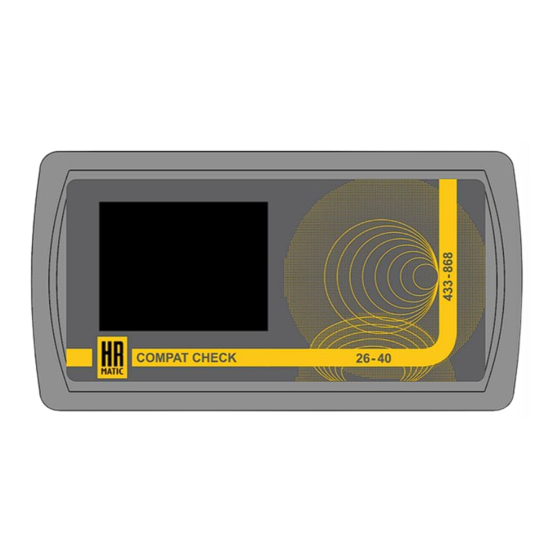

Summary of Contents for HR Matic COMPAT CHECK
- Page 1 Remote control analyzer and programmer instruction manual COMPAT CHECK www.hrmatic.es...
- Page 2 INDEX: 1- TECHNICAL FEATURES 2- GENERAL CONDITIONS 3- WARRANTY 4- DESCRIPTION OF THE PROGRAMMER 5- IDENTIFICATION 6- GENERATION 7- COPY 8- VERIFY 9- PLANT 10- FREQUENCYMETER 11- ANTENNA TUNING 12- SETTINGS 12.1- PROGRAMMER UPDATE 14- BATTERIES 15- WEEE DISPOSAL 16- DECLARATION OF CONFORMITY...
- Page 3 1- TECHNICAL FEATURES 4,8V with rechargeable batteries Operating voltage 5V from external power supply with Micro-USB cable Batteries 4X1,2V - 2100mA/h Ni/Mh type AA (included) Absorbed current 0.6A Absorbed power (26/41 – 433/868) MHz Frequencies Dimensions 200 x 110 x 38 mm Weight 400g (including batteries) Degree of protection...
- Page 4 3- WARRANTY The product is guaranteed for a period of 24 months from the date of construction or from the date of documented installation. This guarantee is void in the event of lack of the appropriate label, in the case of tampering or improper use, in the case of damage caused by atmospheric events and in any case not dependent on the construction and quality of the product.
- Page 5 5- IDENTIFICATION This function allows you to identify the characteristics of compatible remote controls and to verify the correct duplication of an original remote control in a copier remote control. Position the original remote control in the programming area according to its frequency. Select the band to which the remote control belongs.
- Page 6 6- GENERATION This function allows you to create a remote control using the library present in the programmer. In fact, several original remote control codes are saved in it, so it is possible to duplicate without using the original remote control. Position the Artmatic M2 remote control* in the programming area according to its frequency, then click the "Folder"...
- Page 7 7- COPY This function allows you to copy the codes of your original remote controls inside the programmer to create new duplicate remote controls quickly and easily. Position the original remote control in the programming area according to its frequency, then click on the display the number of the key of the copier remote control to which you wish to assign the original code.
- Page 8 8- VERIFY This function allows you to verify that an original remote control has been correctly duplicated in a Artmatic M2 remote control. Position the original remote control in the programming area according to its frequency. Select the band to which the remote control belongs. If the transmission frequency is not known, leave it on AUTO.
- Page 9 This function allows you to reprogram your receivers* in the place of installation without using a PC and also allows you to read the remote controls inside them. *Compatible only with Compat Check receivers. For further information regarding the management of the plants, consult the instruction manual of the software.
- Page 10 10- FREQUECYMETER This function allows you to detect the frequency of your remote controls. NOTE: the detectable frequencies are (433 ÷ 868) MHz and (26 ÷ 41) MHz. Position the remote control in the programming area. Press and hold the key on the remote control until the programmer detects the frequency, then release the key.
- Page 11 12- SETTINGS This function allows you to change the programmer language, view system info and update the receiver firmware. Select language: enter the menu, repeatedly click the ▼ or ▲ arrows to select the desired language, then click OK. Available languages: Italian, English, Spanish, Portuguese and French.
- Page 12 13- BATTERIES Recharge batteries The programmer is supplied with four 1,2V - 2100mAh Ni/Mh type AA rechargeable batteries. The remaining charge is indicated in the icon at the top right of the display. To recharge the device, connect it to a USB 3.0 port of the PC with a micro-USB cable or to a USB power supply with an output voltage of 5V - 1A.
- Page 13 Manuale d’istruzioni analizzatore e programmatore per radiocomandi COMPAT CHECK www.hrmatic.es...
-
Page 14: Table Of Contents
INDICE: 1- CARATTERISTICHE TECNICHE 2- CONDIZIONI GENERALI 3- GARANZIA 4- DESCRIZIONE DEL PROGRAMMATORE 5- IDENTIFICAZIONE 6- GENERA 7- COPIA 8- VERIFICA 9- IMPIANTO 10- FREQUENZIMETRO 11- TUNING ANTENNA 12- IMPOSTAZIONI 12.1- AGGIORNAMENTO DEL PROGRAMMATORE 13- BATTERIE 14- SMALTIMENTO RAEE 15- DICHIARAZIONE DI CONFORMITA’... -
Page 15: 1- Caratteristiche Tecniche
1- CARATTERISTICHE TECNICHE 4,8V con batterie ricaricabili Tensione di funzionamento 5V da alimentazione esterna con cavo Micro-USB Batterie 4X1,2V - Batterie tipo AA al Ni/Mh - 2100mA/h (incluse) Corrente assorbita 0.6A Potenza assorbita Frequenze (26/41 - 280/868) MHz Dimensioni 200 x 110 x 38 mm Peso 400g (batterie incluse) Grado di protezione... -
Page 16: 3- Garanzia
3- GARANZIA Il prodotto è garantito per la durata di 24 mesi dalla data di costruzione o dalla data d’installazione documentata. Tale garanzia decade nel caso di mancanza dell’apposita etichetta, nel caso di manomissione od uso improprio, nel caso di danni causati da eventi atmosferici e comunque non dipendenti dalla costruzione e dalla qualità... -
Page 17: 5- Identificazione
5- IDENTIFICAZIONE Questa funzione permette di identificare le caratteristiche dei radiocomandi compatibili e di verificare la corretta duplicazione di un radiocomando originale in un radiocomando copiatore. Posizionare radiocomando originale nell’area programmazione a seconda della sua frequenza. Selezionare la banda a cui appartiene il radiocomando. Nel caso in cui la frequenza di trasmissione non sia nota lasciare su AUTO. -
Page 18: 6- Genera
6- GENERA Questa funzione consente di creare un radiocomando sfruttando la libreria presente all’interno del programmatore. In esso infatti sono salvati diversi codici di radiocomandi originali, perciò è possibile effettuare la duplicazione senza avvalersi del radiocomando originale. Posizionare il radiocomando Artmatic M2* nell’area di programmazione a seconda della sua frequenza, successivamente cliccare l’icona “Cartella”. -
Page 19: 7- Copia
7- COPIA Questa funzione consente di copiare all’interno del programmatore i codici dei propri comandi originali per creare nuovi radiocomandi duplicati in modo semplice e veloce. Posizionare il radiocomando originale nell’area di programmazione a seconda della sua frequenza, successivamente cliccare nel display il numero del tasto del radiocomando copiatore in cui si desidera destinare il codice originale. -
Page 20: 8- Verifica
8- VERIFICA Questa funzione permette di verificare che un radiocomando originale sia stato correttamente duplicato in un radiocomando Artmatic M2. Posizionare il radiocomando originale nell’area di programmazione a seconda della sua frequenza. Selezionare la banda a cui appartiene il radiocomando. Nel caso in cui la frequenza di trasmissione non sia nota lasciare su AUTO. -
Page 21: 9- Impianto
Questa funzione permette di riprogrammare le proprie riceventi* nel luogo di installazione senza l’impiego del PC e consente inoltre di leggere i radiocomandi presenti al loro interno. *Compatibile solo con riceventi Compat Check. Per ulteriori informazioni riguardanti la gestione degli impianti consultare il manuale d’istruzioni del software. -
Page 22: 10- Frequenzimetro
10- FREQUENZIMETRO Questa funzione permette di rilevare la frequenza dei propri radiocomandi. NOTA: le frequenze rilevabili sono (433 ÷ 868) MHz e (26 ÷ 41) MHz. Posizionare il radiocomando nell’area di programmazione. Premere e tenere premuto il tasto del radiocomando fino al rilevamento della frequenza da parte del programmatore quindi rilasciare il tasto. -
Page 23: 12- Impostazioni
12- IMPOSTAZIONI Questa funzione consente di modificare la lingua del programmatore, visualizzare le informazioni del sistema e di aggiornare il firmware della ricevente. Seleziona lingua: entrare nel menù, cliccare ripetutamente le frecce ▼ o ▲ per selezionare la lingua desiderata, quindi cliccare OK. -
Page 24: 13- Batterie
Lo smaltimento dei materiali va fatto rispettando le normative vigenti ed è opportuno separarli per tipologia (cartone, plastica, parti elettriche). 15- DICHIARAZIONE DI CONFORMITA’ Con la presente ANPRIN TRADERS S.L. dichiara che il programmatore COMPAT CHECK è conforme ai requisiti essenziali stabiliti dalla direttiva 2014/53/EU. V.1.1.0... - Page 25 Manual de instrucciones Analizador y programador de mandos de garaje www.hrmatic.es...
- Page 26 INDICE: 1- CARACTERÍSTICAS TÉCNICAS 2- CONDICIONES GENERALES 3- GARANTIA 4- DESCRIPCIÓN DEL PROGRAMADOR 5- IDENTIFICACIÓN 6- GENERAR 7- COPIAR 8- VERIFICAR 9- SISTEMA 10- FRECUENCÍMETRO 11- TUNING ANTENA 12- AJUSTES 12.1- ACTUALIZACIÓN DEL PROGRAMADOR 13- BATERIA 14- DESECHO RAEE 15- DECLARACIÓN DE CONFORDAD...
-
Page 27: 1- Características Técnicas
1- CARACTERÍSTICAS TÉCNICAS 4,8V con batería recargable Tensión de funcionamiento 5V alimentación externa con cable Micro-USB Batería 4X1,2V - Batería tipo AA de Ni/Mh - 2100mA/h (incluida) Consumo 0.6A Potencia absorbida Frecuencia (26/41 - 280/868) MHz Dimensiones 200 x 110 x 38 mm Peso 400g (batería incluida) Grado de protección... -
Page 28: 3- Garantia
3- GARANTIA El producto está garantizado por un período de 24 meses desde la fecha de construcción o desde la fecha de instalación documentada. Esta garantía se anula en caso de falta de la etiqueta adecuada, en caso de manipulación o uso indebido, en caso de daños causados por eventos atmosféricos y en cualquier caso que no dependan de la construcción y calidad del producto. -
Page 29: 5- Identificación
5- IDENTIFICACIÓN Esta función le permite identificar las características de los emisores compatibles y verificar la correcta duplicación de un emisor original en uno de copia. Coloque el emisor original en el área de programación de acuerdo con su frecuencia. Seleccione la banda a la que pertenece el mando a distancia. - Page 30 6- GENERACIÓN TX Esta función le permite crear un emisor utilizando la biblioteca presente en el programador. De hecho, en él se guardan varios códigos de mando a distancia originales, por lo que es posible duplicarlos sin utilizar el mando a distancia original. Coloque el emisor sobre el analizador* en el área de programación según su frecuencia, luego haga clic en el icono "Carpeta".
- Page 31 Para eliminar un código de la lista, haga clic en el número. Retire el mando original y coloque el emisor exclusivo del analizador COMPAT CHECK* en el área de programación, luego haga clic en el ícono TX en la parte inferior izquierda.
- Page 32 8- VERIFICACIÓN DE COPIA (VERIFICA DE COPIA) Esta función le permite verificar que un mando a distancia original se ha duplicado correctamente en un emisor Artmatic M2 Coloque el emisor original en el área de programación de acuerdo con su frecuencia. Seleccione la banda a la que pertenece el mando a distancia.
- Page 33 PC y también le permite leer los emisores dados de alta dentro de ellos. * Compatible solo con receptores Compat Check. Para más información sobre la gestión de los sistemas consultar el manual de instrucciones del software para PC .
-
Page 34: 10- Frecuencímetro
10- FRECUENCÍMETRO Esta función le permite detectar la frecuencia de sus emisores. NOTA: las frecuencias detectables son (433 ÷ 868) MHz y (26 ÷ 41) MHz. Coloque el emisor en el área de programación. Mantenga presionada la tecla del emisor hasta que el programador detecte la frecuencia, luego suelte la tecla. -
Page 35: 12- Ajustes
12- AJUSTES Esta función le permite cambiar el idioma del programador, ver la información del sistema y actualizar el firmware del analizador. Seleccionar idioma: Entre menú, haga clic repetidamente en las flechas ▼ o ▲ para seleccionar el idioma deseado, luego haga clic en OK. Idiomas disponibles: italiano, inglés, español, portugués y francés. -
Page 36: 13- Bateria
La eliminación de los materiales debe realizarse respetando la normativa vigente y es recomendable separarlos por tipo (cartón, plástico, piezas eléctricas). 15- DECLARACIÓN DE CONFORMIDAD Por la presente, Anprin Traders S.L. declara que el programador Compat Check cumple con los requisitos esenciales establecidos por la directiva 2014/53/UE. V.2.1.0...
Need help?
Do you have a question about the COMPAT CHECK and is the answer not in the manual?
Questions and answers