
Summary of Contents for King Pigeon D224
- Page 1 Serial Device Server D224 RS232/485/TTL To TCP/IP User Manual Ver 1.0 D224 Date Issued: 2019-07-08 All rights reserved by King Pigeon Hi-Tech. Co., Ltd. www.IOT-Solution.com...
-
Page 2: Table Of Contents
9.Upgrade Firmware................................ 0 10.Warranty..................................0 This handbook has been designed as a guide to the installation and operation of Serial Server D224. Statements contained in the handbook are general guidelines only and in no way are designed to supersede the instructions contained with other products. -
Page 3: Brief Introduction
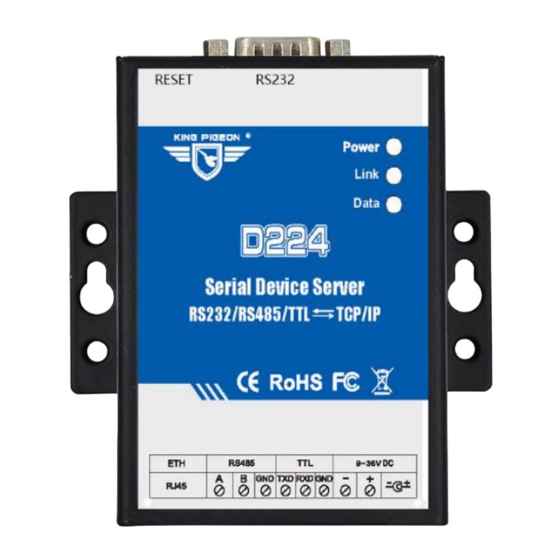
1. Brief introduction The D224 Serial Device Server is a useful device to convert RS485/232/TTL data to TCP/IP network, it also can be used as converting Modbus RTU to Modbus TCP, and performs as a serial port converter to create the communication from RS485 to RS232 or TTL, moreover, it can be used as a repeater for two serial device communication directly, e.g.: PLC to PLC. -
Page 4: Safety Directions
Use Qualified Maintenance Service Maintenance can be carried out only by qualified maintainer. 3. Standard Packing List Serial device server D224 unit X1; AC/DC Adaptor X1; Network cable(0.5m) X1; RS232 cable X1. Optional: 35mm Standard DIN rail fixed Bracket 4. Mainly Features Wide working voltage, support 9-36V DC power supply, interface is DC Q2.1 jack and terminal block, and with... -
Page 5: Physical Layout And Installation Diagram
Serial Device Server D224 RS232/485/TTL To TCP/IP Supports up to 5 TCP/UDP Clients and 5 TCP/UDP Servers connections simultaneously; Supports definition login message and heartbeat package function, can facilitate cloud platform for ID identification and data communication; Support automatically connect and reconnect the server after disconnection;... - Page 6 Serial Device Server D224 RS232/485/TTL To TCP/IP 5.2 Interface Instructions for installation LED Status Description Power Power Indicator: Power on the module will always on. On stands for TCP connection;otherwise, it is off. Link Data When transmitting data by Ethernet port, the LED will be on, otherwise, it is off.
-
Page 7: Programming And Operation
RS232/485/TTL To TCP/IP 6. Programming and Operation The D224 Serial Device Server can be configured by host software,through the direct cable or crossover cable connect to the local area network, can also through the crossover cable connect to PC. Below are the steps to setup the parameters by PC Configuration, please follow it step by step. - Page 8 Serial Device Server D224 RS232/485/TTL To TCP/IP Search Device Button Instruction Default Device IP address in the LAN Model Device model Name Device name,can customize after connecting successfully MY_D224 Version Device firmware version Dual-click device list,will appear below: Enter password (default 1234),click “Confirm” prompts success,then will read device configuration parameter automatically.
- Page 9 Serial Device Server D224 RS232/485/TTL To TCP/IP Basic Settings Basic Function Button Description Default Restore to factory settings(need click save after default) Change PWD Modify device password Read Read all current configuration parameters of the device Save Save all configuration parameters to the device...
- Page 10 Serial Device Server D224 RS232/485/TTL To TCP/IP 3) Click “Restart” or power off ,the device,then restart the device,then modify successfully. Ethernet Settings Network Setting Button Description Default The mode to get IP: IP Model Dynamic address:get IP automatically from DHCP server Dynamic address ●...
- Page 11 Serial Device Server D224 RS232/485/TTL To TCP/IP Serial Port Setting Button Description Default Channel Select and view the currently used serial channel,includes:TTL,RS232,RS485 RS485 Baud Rate 4800/9600/14400/5600/57600/19200/38400/115200/128000 optional 115200 Data Bits 5Bit/6Bit/7Bit/8 Bit optional 8 Bit Parity Bits NONE,EVEN,ODD optional NONE Stop Bits 1Bit,1.5 Bit,2Bit optional...
- Page 12 Save configuration parameter Server Settings This part is for connecting the device to internet platform.D224 supports 5 different target servers at the same time,every server supports rich automatic handshake login message, self defined heartbeat message, data transparent transmission, and Modbus RTU to Modbus TCP,device can be quickly compatible with multiple third-party cloud platform systems.
-
Page 13: Reset
Serial Device Server D224 RS232/485/TTL To TCP/IP The response data returned by the target server after Empty Register ACK Message receiving the registration message After the target server sends the content to the device, Empty Offline Message the device will go offline. -
Page 14: Application
(2 D224 must be connected by crossover cable) One D224 works as TCP Server,another D224 works as TCP Client. D224 as server the IP needs to be set to static,and the IP address should be in the same network segment with another D224,as below: Page 14 of 19 King Pigeon Hi-Tech. - Page 15 Serial Device Server D224 RS232/485/TTL To TCP/IP Serial strategy add a path”RS232-Client” Client parameter settings are as follows: Page 15 of 19 King Pigeon Hi-Tech. Co., Ltd. www.iot-solution.com Ver 1.0 File No.:D224 V1.0...
- Page 16 8.2 Multi-device connect to cloud platform D224 supports RS232, RS485 and TTL type devices to connect the cloud platform at the same time. The following figure shows the D224 connecting two serial devices to the cloud platform at the same time: Page 16 of 19 King Pigeon Hi-Tech.
- Page 17 8.3 Connect multiple servers Simultaneously As a TCP client, D224 can connect 5 servers at the same time.If the serial device (RTU device) used as master and server 1-5 (Modbus TCP device) as the slave,at the same time, there are multiple network port slave devices (up to 5).
- Page 18 8.4 Local configuration and connect to the cloud platform The D224 used as server and supports client functions,For RS232 devices (Modbus slaves), local configuration can be implemented, allowing the computer in the LAN (Modbus master) to initiate commands and simultaneously receive commands from the cloud platform (Modbus master).
-
Page 19: Upgrade Firmware
Serial Device Server D224 RS232/485/TTL To TCP/IP 9.Upgrade Firmware The Modem supports upgrade firmware via USB port directly. If we upgraded the firmware functions of the data loggers, we will inform you to upgrade the firmware if you required. If there any new requirements of the present functions caused it should update the firmware, the user can upgrade them directly by USB port.
Need help?
Do you have a question about the D224 and is the answer not in the manual?
Questions and answers