Advertisement
1. Power LED
2. Status LED
3. Output LED
4. Input LED
5. Address selector switch
Use the following wiring diagram when input voltage of the Wiegand Reader is equal to 12V DC and
input current is lower than or equal to 100mA.
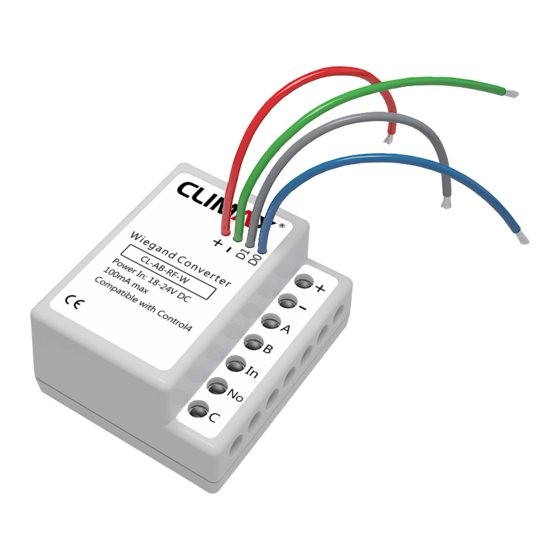
Wiegand Converter
CL-AB-RF-W
Power In: 18-24V DC
100mA max
12V / 100mA
Before wiring the device, always unplug the main power.
In case of using capaciv e or inducv e loads, permissible current is less than normal mode (resisv e load)
depending on load condion.
1
2
Out
In
3
4
ON
1
2
3
4
5
5
3
To Next Module
+
-
From Previous
GND
A
Module
B
In
In
No
C
MODE
MODE
MODE
MODE
MODE
MODE
MODE
Circut
Circut
Circut
Circut
Circut
Circut
Circut
Breaker
Breaker
Breaker
Breaker
Breaker
Breaker
Breaker
N
Magnec
L
Door Lock
4
INSTALLATION GUIDE
Input Voltage
Input Current
I/O Connecons
11
10
9
8
Wiegand Converter
CL-AB-RF-W
MODE
Power In: 18-24V DC
Circut
Breaker
100mA max
version 1.0.1
Wiegand Converter
(CL-AB-RF-W)
18V-24V DC (24V DC is recommended)
100mA
C-Bus
4 X screw terminals
Output
1 X 5A relay channel (screw terminal)
1 X digital dry contact input (screw terminal)
Input
1 X 4-wire wiegand input
1
1
2
+
3
-
4
A
5
B
6
In
7
No
C
2
1. VCC
2. GND
3. A (Data+)
4. B (Data-)
5. Contact input
6. Normal open contact
7. COM
8. VCC (12V DC)
9. GND
10. Data 1 (Wiegand)
11. Data 0 (Wiegand)
Advertisement
Table of Contents

Summary of Contents for Climax CL-AB-RF-W
- Page 1 INSTALLATION GUIDE version 1.0.1 1. Power LED 2. Status LED 3. Output LED Wiegand Converter (CL-AB-RF-W) 4. Input LED 5. Address selector switch Input Voltage 18V-24V DC (24V DC is recommended) Input Current 100mA C-Bus 4 X screw terminals Output...
- Page 2 From Previous Module External Wiegand Converter Power Supply CL-AB-RF-W Power In: 18-24V DC 100mA max Never set the address “0” and “1” as “0” is not valid in C-Bus protocol and “1” is always dedicated for RS-232 GatewayPro module. MODE...
Need help?
Do you have a question about the CL-AB-RF-W and is the answer not in the manual?
Questions and answers