Table of Contents
Advertisement
Quick Links
Advertisement
Table of Contents

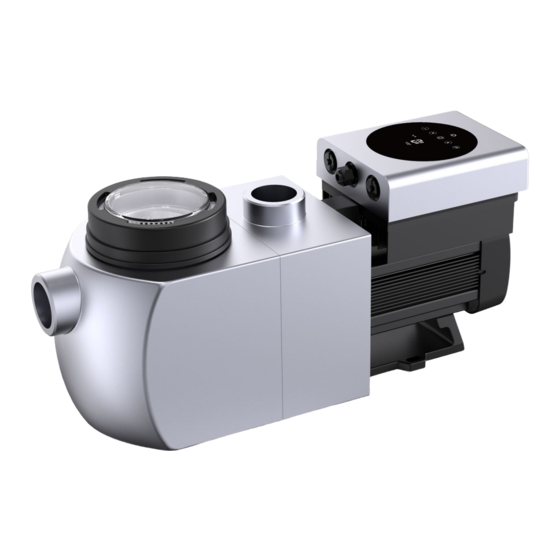
Summary of Contents for welldana IH20
-
Page 2: Table Of Contents
CONTENTS IMPORTANT SAFETY INSTRUCTIONS ..............1 2. TECHNICAL SPECIFICATIONS ..................2 3. OVERALL DIMENSION ....................2 4. INSTALLATION ........................ 3 5. SETTING AND OPERATION ................... 5 6. WIFI OPERATION ......................17 7. EXTERNAL CONTROL ....................17 8. PROTECTION AND FAILURE ..................18 9. -
Page 3: Important Safety Instructions
IMPORTANT SAFETY INSTRUCTIONS This guide provides installation and operation instructions for this pump. If you have any other questions about this equipment, please consult your supplier. 1.1 When installing and using this electrical equipment, basic safety precautions should always be followed, including the following: •RISK OF ELECTRICAL SHOCK. -
Page 4: Technical Specifications
2. TECHNICAL SPECIFICATIONS Model Advised Voltage Qmax Hmax Circulation (m³/h) Pool (V/Hz) (m³/h) At 8m At 10m Volume (m³) 220~240/ 30~50 0.07~0.77 24.3 12.1 6.0~19.9 4.4~14.6 IH20 50/60 IH24 40~70 0.08~1.05 26.7 14.6 7.4~24.8 6.4~21.3 3. OVERALL DIMENSION (mm) Figure 1... -
Page 5: Installation
4. INSTALLATION 4.1. Pump Location 1) Install the pump as close to the pool as possible, to reduce friction loss and improve efficiency, use short, direct suction and return piping. 2) To avoid direct sunshine, heat or rain, it is recommended to place the pump indoors or in the shade. - Page 6 Elbow Return to pool 63mm 350m Suction 63mm Figure 2 * The pump inlet/outlet union size: optional with metric (50 or 63mm) or imperial (1.5” or 2”) 2) Flooded suction systems should have gate valves installed on suction and return line for maintenance;...
-
Page 7: Setting And Operation
4.5 Application conditions Ambient temperature Indoor installation, temperature range: -10~42℃ Water temperature 5℃~50℃ Salt pools Salt concentration up to 0.5%, i.e 5g/l Humidity ≤90% RH, (20℃±2℃) Altitude Not exceed 1000m above sea level Installation The pump can be installed max. 2m above water level Insulation Class F, IP55 5. - Page 8 InverHero IH24 is 5-25 m³/h, after self-learning, the range may be redefined to 7-22 m³/h. The default flow range for InverHero is as below: Model Default flow rate range IH20 5~20 m³/h IH24 5~25 m³/h Remark: The pump is delivered with self-priming enabled.
- Page 9 5.4 Backwash User can start the backwash or fast re-circulation in any running state by pressing Default Setting range Time 180s Press to adjust from 0 to 1500s with 30 seconds for each step Running capacity 100% 80~100%, enter the parameter setting (see 5.8) If backwash is completed or disabled, press and hold for 3 seconds, the pump will return to the normal operating state before backwash.
- Page 10 5.6 Manual-Inverter Mode Unlock the screen, press to shift from the Auto-Inverter mode to Manual-Inverter mode. Press to set the running capacity between 30%~100%, each step by 5% Press again to switch to Auto-Inverter mode. 5.7 Timer mode The pump’s on/off and running capacity could be commanded by timer, which could be programmed daily as needed.
- Page 11 5.8 Parameter Setting Restore factory setting Under off mode, hold both for 3 seconds Check software Under off mode, hold both for 3 seconds version Boost mode of priming for 3 seconds Under on mode hold both Enter parameter Under off mode, hold both for 3 seconds;...
- Page 12 6. WIFI OPERATION InverFlow Download Account registration Register by e-mail or third-party application Android a. Email Registration...
- Page 13 b. Third-party application registration Create Home Please set home name and choose the location of the device. (It is recommended to set the location so the weather can be shown in the App for your convenience)
- Page 14 App pairing Please make sure your pump is turned on before you start. Option 1 (Recomended): With Wifi and Bluetooth (Network requirement: 2.4GHz; 2.4Ghz and 5GHz into one SSID; but no seperate 5GHz network) 1) Please confirm that your phone is connected to Wifi and your Bluetooth is on. 2) Press for 3 seconds until hearing “Beep”...
- Page 15 Option 2: With Wifi (Network requirement: 2.4GHz only) 1) Please confirm that your phone is connected to Wifi 2) Press for 3 seconds until hearing “Beep” to unlock the screen. Press for 5 seconds until hearing “Beep” then release. Will flash. 3) Click “Add Device”, and then follow the instructions to pair device.
- Page 16 Operation 1) Using Auto Inverter mode: Change flow rate units Error code list Real-time power Real-time running capacity consumption Turn the control dial to set the flow rate Auto Inverter mode Data Timer On/off Backwash 2) Using Manual Inverter mode: Real-time power consumption Real-time flow rate...
- Page 17 Sharing Devices with your family members After pairing, if your family members also want to control the device, please let your family members register “InverFlow” first, and then the adminstrator can operate as below:...
- Page 18 FAQ and Feedback If you have any problem while using, welcome to send feedback. Notice: 1) Weather forecast is just for reference; 2) The power consumption data is for reference only, as it may be affected by network problems and imprecision of the calculation. 3) App is subject to updates without notice.
-
Page 19: Wifi Operation
7. EXTERNAL CONTROL External control can be enabled via following contacts. If more than one external control is enabled, the priority is as below: Digital Input >Analog Input > RS485 > Panel control 7 PINs connector for configurable user inputs, including Digital Input and RS485 AC Power input Relay output... -
Page 20: Protection And Failure
Name Color Description PIN 1 Digital Input 4 PIN 2 Black Digital Input 3 PIN 3 White Digital Input 2 PIN 4 Grey Digital Input 1 PIN 5 Yellow Digital Ground PIN 6 Green RS485 A PIN 7 Brown RS485 B a. - Page 21 temperature warning release threshold (78℃), the high temperature warning state is released. The display area alternately displays AL01 and running speed or flow 1) If AL01 displayed for the first time, the running capacity will be automatically reduced as below: If current operating capacity is higher than 85%, the running capacity will be automatically reduced by 15%;...
- Page 22 • Basket full of debris. • Inadequate water level in pool. Pump being noisy • Air leak in suction piping, cavitation caused by restricted or undersized suction line or leak at any joint, low water level in pool, and unrestricted discharge return lines.
-
Page 23: Maintenance
9. MAINTENANCE Empty the strainer basket frequently. The basket should be inspected through the transparent lid and emptied when there is an evident stack of rubbish inside. The following instructions should be followed: 1). Disconnected the power supply. 2). Unscrew the strainer basket lid anti-clockwise and remove. 3).
Need help?
Do you have a question about the IH20 and is the answer not in the manual?
Questions and answers