Advertisement
Table of Contents
- 1 Table of Contents
- 2 Introduction
- 3 Primary Controls
- 4 Secondary Controls
- 5 Footswitch Controls
- 6 Tap Tempo
- 7 Infinite Hold Feature
- 8 Trails or True Bypass
- 9 All Wet / Dry Mode
- 10 Changing and Saving Presets
- 11 Expression Pedal Use
- 12 Factory Reset
- 13 Factory Presets
- 14 User Presets
- 15 Quick Start Guide
- 16 Technical Specifications
- Download this manual
Advertisement
Table of Contents

Related Manuals for Keeley HALO


Summary of Contents for Keeley HALO
- Page 1 INSTRUCTION MANUAL...
-
Page 2: Table Of Contents
Secondary Controls................5 Footswitch Controls................6 Tap Tempo....................7 Infinite Hold Feature................7 Trails or True Bypass................7 All Wet / Dry Mode................7 Changing and Saving Presets............8 Expression Pedal Use.................9 Factory Reset..................9 Factory Presets..................10 User Presets....................11 Quick Start Guide................12 Technical Specifications..............12 Keeley Electronics, Inc. 2022... -
Page 3: Introduction
Andy spent decades combining and crafting the sounds you can now get from the HALO. Notes from the HALO dance rhythmically, almost creating a reverb diffusion. Those notes are held together with tape-style effects like modulation, saturation and compression. -
Page 4: Primary Controls
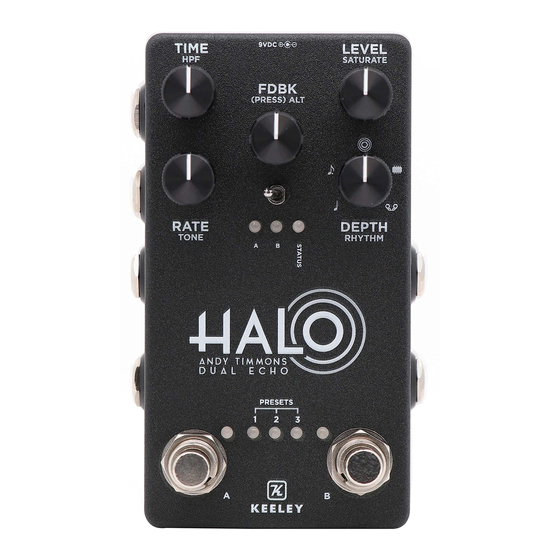
TOGGLE SWITCH - Push to the right to advance through the HALO’s 4 Preset Banks. STOMP SWITCH A - Turns on or off Side A of the HALO. STOMP SWITCH B - Turns on or off Side B of the HALO. -
Page 5: Secondary Controls
1000Hz at full CCW to 8750Hz at full CW. RHYTHM - Sets the subdivision of delay. Subdivisions from CCW to CW: Quarter, dotted eighth, Halo, Bucket Brigade (BBD), Multi-Tap Tape Delay. RHYTHM MODES: Hold down the FDBK knob while... -
Page 6: Footswitch Controls
SIDE A / B - Tap the A or B footswitch to activate each side of the HALO. Tap the alternate While in latching mode, the bypass switches footswitch to use the alternate sound stored in on the unit will behave differently than when in each Preset Bank. -
Page 7: Tap Tempo
. When trails is active, the HALO features a ‘spillover’ effect, meaning when changing from Side A to Side B within a Preset Bank, the previous Side’s effect will carry over to the other side. Note: The HALO comes with trails engaged as default. -
Page 8: Changing And Saving Presets
1. Tap the FDBK knob to enter ‘Preset Mode’ 2. Cursor left or right through Preset Banks 1-4 by The three lights in the middle of the HALO are Preset Bank indicators, which will correspond with the then tapping either the A or B Side stomp switch. -
Page 9: Expression Pedal Use
EXPRESSION PEDAL USE AND FACTORY RESET The HALO allows you to set control parameters with an optional expression pedal ASSIGN A PARAMETER TO AN EXPRESSION PEDAL EXPRESSION PEDAL INPUT You must use a TRS (stereo) expression pedal 1. Hold FDBK knob for 1 second to enter Expression Mode. -
Page 10: Factory Presets
FACTORY PRESET HALO SETTINGS Getting started with the HALO - Andy Timmons Dual Echo TIP: HOLD DOWN THE FDBK KNOB TO ADJUST THE ALT CONTROLS PRESET BANK 1 - SIDE A PRESET BANK 1 - SIDE B PRESET BANK 2 - SIDE A PRESET BANK 2 - SIDE B ANDY’S HALO... -
Page 11: User Presets
YOUR HALO SETTINGS Write in your favorite settings for the HALO - Andy Timmons Dual Echo TIP: HOLD DOWN THE FDBK KNOB TO ADJUST THE ALT CONTROLS HALO - ANDY TIMMONS DUAL ECHO... -
Page 12: Quick Start Guide
HALO QUICK START GUIDE Jump right in to the HALO - Andy Timmons Dual Echo PRIMARY CONTROLS PRESET BANKS SELECT PRESET BANK - Briefly hold both Stomp A and B TIME - Sets the length of the delay (or push mini toggle to the right)
Need help?
Do you have a question about the HALO and is the answer not in the manual?
Questions and answers