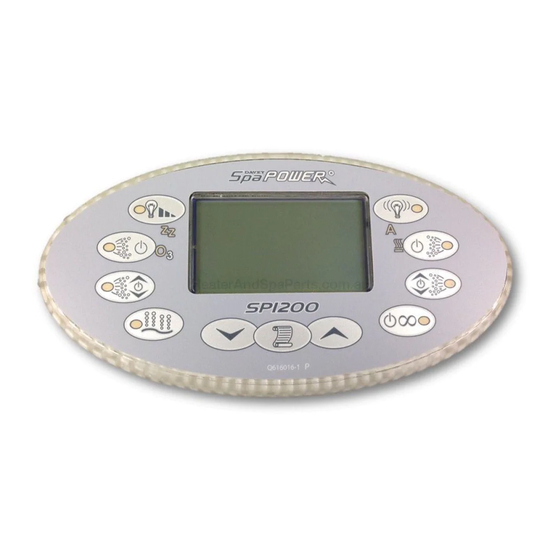
Table of Contents
Advertisement
Quick Links
Spa Water Treatment
Recommended Chemical Values
Chlorine......................... 1.5 - 3.0 PPM ( Parts Per Million )
pH.................................. 7.4 - 7.6
Total alkalinity ................ 100 - 120 PPM
I
t is important to maintain your spa water chemistry to the above values to ensure a
healthy experience both for you as bathers and for your spa pool equipment.
PH
This is a measure of how acid or alkaline the spa water is (below 7.0 is acid, above 7.0 is alkaline).
Low pH will cause corrosion of any metalwork in the water (element, thermostat pockets). High
pH will cause scale formation and cloudy water.
Total Alkalinity
This is a measure of how resistant your spa water is to change of pH. A low TA (0 - 80 ppm) will
allow the pH to fluctuate rapidly normally to the acid end and will make it very hard to correct the
pH back to the ideal range.
Chlorine
Levels of sanitiser are important to prevent the build up of bacteria, and algae in the pool water.
Chlorine is not the only sanitiser available to do this. Other sanitisers are Bromine, Ozone.
Damage to the element, thermostat pockets and associated metalwork due to the poor
maintenance of water chemistry is not covered by warranty.
N376
Davey Water Products Pty Ltd
Member of the GUD Group
Interstate Offices
ABN 18 066 327 517
Sydney • Brisbane • Adelaide
Perth • Townsville
Head Office and Manufacturing
6 Lakeview Drive,
Scoresby, Australia 3179
Ph:
+61 3 9730 9222
Davey Water Products
Fax:
+61 3 9753 4100
– New Zealand
7 Rockridge Avenue,
Website:
davey.com.au
Penrose, Auckland 1061
Ph:
Customer Service Centre
Fax:
Ph:
1300 2 DAVEY (1300 232 839)
Fax:
1300 304 850
Website: daveynz.co.nz
E-mail:
sales@davey.com.au
E-mail: sales@daveynz.co.nz
Pb RoHS
COMPLIANT
International
6 Lakeview Drive,
Scoresby, Australia 3179
Ph:
+61 3 9730 9121
Fax:
+61 3 9753 4248
E-mail: export@davey.com.au
Davey Spa – New Zealand
2 Rothwell Avenue,
North Harbour, Auckland 0632
+64 9 570 9135
Ph:
+64 9 415 8622
+64 9 527 7654
Fax:
+64 9 415 8621
Website: daveyspa.co.nz
E-mail:
service@daveyspa.co.nz
User's Guide
Models:
SP1200-35 (1ph / 3ph)
SP1200-45, SP1200-60
(1ph only)
Advertisement
Table of Contents

Summary of Contents for Davey Water Products SPI200 Series
- Page 1 Models: N376 SP1200-35 (1ph / 3ph) Pb RoHS COMPLIANT SP1200-45, SP1200-60 Davey Water Products Pty Ltd Member of the GUD Group (1ph only) International Interstate Offices ABN 18 066 327 517 6 Lakeview Drive, Sydney •...
-
Page 2: Table Of Contents
Contents Error 5 (“OVER TEMP”) Over Temperature This error indicates that one of the digital temperature sensors in either the heater or pool has detected a Basic Operation............................Pg 1 temperature of 45ºC or more. This may not be a problem with the SP1200. It may be caused by excessive - Basic Operation........................ -
Page 3: Basic Operation
9 Self-Diagnostic Error Codes 1 Introduction Congratulations on choosing Spa-Quip’s top of the line Spa Power control system. The Spa Power 1200 controller has extensive self diagnostic capabilities. In the event of a This controller offers a large range of possible accessories, a user friendly touchpad and superior components. It problem it will indicate a warning or error according to the nature of the problem. -
Page 4: Led Indicators
1.3 LED Indicators 8.5 Display Reversing The display can be reversed so it can be read from inside or outside of the spa pool, the display will Auto (Non-24HR circ model) This LED is green when automatic control is enabled and off when pump 1 is under manual control. revert back to default state after 30 minutes of inactivity. -
Page 5: Pump Selection Page
8 Additional Features 1.4 Pump Selection Page 8.1 Touch Pad Key Lock Before reading the following user guide please take note of your pump type then refer to the page stated to learn The SP1200 touch pad buttons can be locked to prevent unauthorised people from using the spa or modifying set up how to operate your spa pool controller. -
Page 6: User Guide Quick Reference
Section 2.0 7.10 Load Factory Default Settings The load defaults option provides a way of restoring all factory default settings. These include obvious set up User’s Guide parameters such as set temperature and sleep times but also settings such as preferred light mode, light effect Quick Reference speeds and blower speed will be restored to their factory defaults. - Page 7 7.9.4 Changing The High Heat Offset Setting 1) Select the ADV. OPTIONS submenu from the main menu. 2) Select the HIGH HT OFFS menu item. 2.4 Variable Speed Blower Operation 3) Press the Scroll button to begin high heat offset modification. 4) Use the UP and DOWN buttons to adjust the offset as required.
-
Page 8: Pump Operation
3 Pump Operation 7.9.1 Heat Control 3.1 Pump 1 In addition to set temp the user may also select one of four heat control settings. The set temp determines the (Two speed, no 24HR circulation pump fitted) maximum temperature before the spa will stop heating the water, whereas the heat control setting determines how Pump 1 is controlled via two touch pad buttons - one to turn the pump on/off and another to change its speed. -
Page 9: Pump 1 (Two Speed, 24Hr Circulation Pump Fitted)
7.8.7 Panel And Pool Light Synchronisation (on/off) 3.3 Pump 1 (Two speed, 24HR circulation pump fitted) The SP1200 touch pad backlight has the ability to mirror the colour and intensity of the in-pool Spa Power Variable This pump is controlled via two touch pad buttons - one to turn the pump on/off and another to change its speed. Colour Light (SPVCL). -
Page 10: Pump 1A & 1B (Single Speed Pumps, No 24Hr Circulation Pump Fitted)
3.4 Pump 1A & 1B 7.8.2 Main Display (Single speed pumps, no 24hr circulation pump fitted) Three pushes of the Pump 1A button cycles the pump as follows: The SP1200 touch pad LCD consists of two lines of text and four numerical digits. The display typically shows three quantities - pool temperature, set temperature and the clock (weekday and time). -
Page 11: Auxillary On/Off
7.8 Miscellaneous Options Submenu 3.6 24Hr Circulation Pump On/Off If a circulation pump has been fitted the spa manufacturer may have assigned an on/off button on the touch pad to The miscellaneous options menu contains convenience options that primarily allow you to customise the look of the turn the circulation pump on and off. -
Page 12: Spa Power Variable Colour Light (Spvcl)
2) Pressing the Air button while the blower is running will only cycle through the available options when the LCD is displaying the current selection. This allows you to set the function of the UP and DOWN buttons and to view - - - - the current Blower setting without changing it. -
Page 13: Light Effect Mode
6.2 Light Effect Mode 7.7.1 Maintenance Timer Configuration In addition to being able to change the light colour, the SP1200 also has the ability to produce various lighting effects The installer, serviceman or owner can fill in the table below to help keep track of what while cycling through each of the available colours. -
Page 14: Menu Structure
7 Menu Structure 7.6.2 Disabling a sleep time period If you want to disable a sleep period follow the procedure outlined in Configuring a sleep time until you reach step 4. At this point use the UP and DOWN buttons to adjust the weekday setting until no days are selected (see pic below). Press the SCROLL button to save the new setting and return to the sleep time submenu. -
Page 15: Main Menu
Navigating The Menu System 4) Use the UP and DOWN buttons to select the desired weekdays that the sleep period will operate. There are 15 possible weekday settings to choose from - Monday to Sunday and various combinations of each. 5) Press the SCROLL button to confirm the current setting and move to the next field. -
Page 16: Set Temp
7.2 Set Temp (Temperature Control) 7.6 Sleep Timer Sleep is a very handy feature that is used to silence the spa pool during your hours of sleep. While the SP1200 is Select MAIN menu then push UP button once asleep no automatic heating or filtration maintenance will occur, however the spa can still be used in manual mode 1. -
Page 17: User Timer
7.3 User Timer - - - - The user timer is a general-purpose count down minute timer that can be preset to start at anywhere between 1 and 99 minutes. You can set it when you get into the spa to have it remind you when its time to get out. MTWTFSS 1. -
Page 18: Setting The Clock
7.4.1 Setting The Clock 7.5 User Alarms 1) Select the clock menu item from within the main menu. The SP1200 controller has nine user programmable alarms that you can configure to go off at a preset time while you are using the spa. These alarms function similarly to a regular clock alarm but with the additional benefit that you can also specify which days the alarm should operate.
Need help?
Do you have a question about the SPI200 Series and is the answer not in the manual?
Questions and answers