Table of Contents
Advertisement
Quick Links
FreezeAlarm Dialer
CNPREC001
Installation and Operations Manual
Table of contents
Cautions and warnings................................ 4
Description .................................................... 5
Physical description ................................... 5
General description .................................... 6
LEDs ........................................................... 6
Operation ....................................................... 6
FA-700 normal operation ........................... 6
How the FA-700 receives power ............... 6
Alarm operation .......................................... 6
How the FA-700 handles an alarm
condition ................................................. 7
DIP switch functions and settings .............. 7
Initial setup .................................................... 8
Connecting to AC power ........................ 8
Power up sequence ............................... 8
Batteries ..................................................... 9
Battery handling and safety ................... 9
Battery life .............................................. 9
Installing the batteries .......................... 10
Connecting to the standard
phone line ............................................. 10
Connecting the FA-700 and another
device to the same phone jack ............ 10
Phone services and your FA-700 ............ 11
DSL and other digital phone services . 11
Calls using a calling card or pager
phone number ..................................... 12
Creating pauses ................................... 12
Calling a long distance phone number 12
Programming (entering a
phone number) ........................................... 12
Before you enter a phone number ........... 12
Entering a phone number .................... 12
Changing the call-to phone number .... 13
Installation considerations ....................... 13
FA-700 assembled ................................... 13
Phone test ................................................ 14
Testing your FA-700 ............................ 14
Testing for a specific alarm condition . 14
Ring count timer ...................................... 14
Calling the FA-700 during an
alarm event .......................................... 14
An in-phone line answering
machine/voice mail with the FA-700 ....... 15
How this works .................................... 15
Calling the FA-700 during an alarm
event .................................................... 15
Canceling an alarm call-out while
listening to an alarm message ............ 15
Canceling an alarm call-out by calling
the FA-700 ........................................... 16
Canceling an alarm call-out with an
answer machine/voice mail device on
the same phone line
16
Remote status check ............................... 16
Troubleshooting ........................................ 17
Technical information ............................... 18
Technical specification ............................ 18
FCC statement ...................................... 18
Plug and jack use ................................ 18
Ring equivalence number (REN) ........ 18
Telephone network interferences ....... 18
Contact us ................................................ 19
Technical support .................................... 19
Warranty...................................................... 20
Warrantor: Dealer, Distributor,
Retailer, Manufacturer ............................. 20
Warranty and remedy .......................... 20
Causes for termination of
this warranty ........................................ 20
Warrantors' liability .............................. 20
Procedures for obtaining
performance for warranty .................... 21
To return a product to
Protected
Home ................................................... 21
How to request an RGA number......... 21
2
Advertisement
Table of Contents

Summary of Contents for TEMPerature Products FreezeAlarm Dialer CNPREC001
- Page 1 Table of contents Cautions and warnings........ 4 Testing for a specific alarm condition . 14 Description ............ 5 Ring count timer ........14 Physical description ........5 Calling the FA-700 during an alarm event .......... 14 General description ........6 An in-phone line answering LEDs ............
- Page 2 Trademark Cautions and warnings All trademarks and registered trademarks are the property of their respective owners. The FA-700 FreezeAlarm is a trademark of Protected Home. Touch Tone® is a registered Cautions indicate the possibility of poor equipment performance or potential damage to the trademark of AT&T.
-
Page 3: Operation
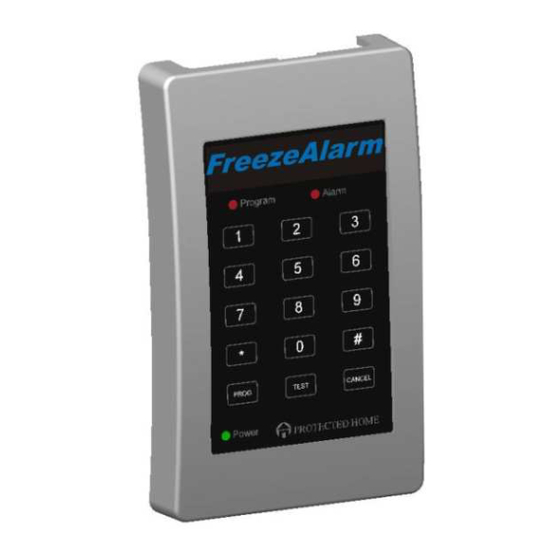
General description Description The FA-700 monitors your home for a variety of alarm conditions. When an alarm event occurs, the FA-700 calls the programmed phone number for the following alarms: Physical description • Temperature drops below 45ºF (7ºC) or temperature rises above 85ºF (34ºC) DIP switch Figure 1 identifies the parts of the FA-700. -
Page 4: Initial Setup
Table 3: DIP switch settings and functions • If the unit encounters a low battery condition Switch Function (switch in UP position is the default) Temperature low or high: How the FA-700 handles an alarm condition • UP, when the monitored environment temp falls below 45ºF (7.2ºC) an alarm message is sent. - Page 5 Installing the batteries Note: To avoid a false low battery alarm, please connect the AC power adapter to the FA-700 and the wall outlet before inserting batteries. To install the batteries, follow the Steps shown in Figure 4. Figure 3: Connecting the AC Power Adapter Figure 4: Battery Installation Connections Batteries Battery handling and safety...
- Page 6 Calls using a calling card or pager phone number Step Action Plug the line splitter into the wall jack as shown in Figure 6. When using a calling card or pager system, you often need to include pauses to ensure that Plug one phone card into one jack on the line splitter, as shown in Figure 6.
-
Page 7: Installation Considerations
Enter the phone number (up to 60 digits)—beeps with each key press. Phone test Press the PROGRAM key—a beep and the program LED go out. The After entering the call-to phone number, it is crucial that you test your FA-700 to verify that number was entered successfully. - Page 8 An in-phone line answering machine/voice mail with the Step Action FA-700 Pick up the phone. When it is necessary to connect an answering machine or voice mail device to the same Listen to the alarm message. phone line as the FA-700, you can still use all the features of these devices, along with being When told, press the number “1”...
-
Page 9: Troubleshooting
Troubleshooting Technical information Problem Solution Technical specification Power on LED is not lit • Power LED does not turn ON while running on batteries. Specification Description • Is the barrel connector end of the AC adapter plugged Power requirements Two power sources: into the power jack on the FA-700, with the other end of •... -
Page 10: Warranty
maintain uninterrupted service. If the equipment is causing harm to the telephone network, the telephone company may request that you disconnect the equipment until the problem is Warranty resolved. Warrantor: Dealer, Distributor, Retailer, Manufacturer If your home has specially wired alarm equipment connected to the telephone line ensure the Warranty and remedy installation of your FA-700 does not disable your alarm equipment. - Page 11 Index Procedures for obtaining performance for warranty Alarm program ............ 6 In the event that the product does not conform to this warranty, the product should be shipped or delivered freight prepaid to warrantor with evidence of original purchase. If in any way you’re not beep sequence ..........
Need help?
Do you have a question about the FreezeAlarm Dialer CNPREC001 and is the answer not in the manual?
Questions and answers