Advertisement
Advertisement
Table of Contents

Summary of Contents for Honic HN-IA60E200FS
- Page 1 USER MANUAL HN-IA60E200FS 1080P AHD/CVI/TVI/1200TVL Varifocal Outdoor Camera...
-
Page 2: Product Description
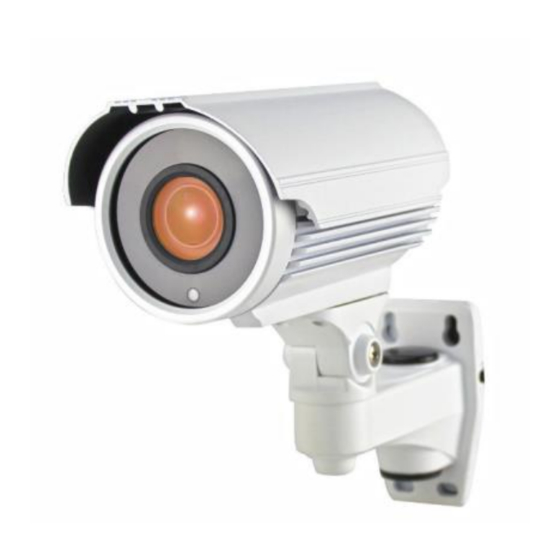
Product Description The HN-IA60E200FS is a high-definition camera designed around a 1/2.9" Sony IMX323 2.19MP image sensor, 42µ x 4pcs IR LEDs providing infrared capability up to 130 feet, and a 2.8-12mm manual zoom lens for 26-90 degrees horizontal angle of view. The... -
Page 3: Notice Before Using
Notice Before Using Default Mode: 1080P AHD Video Output. If your DVR is TVI, CVI or Analog DVR, please take the OSD cap off and switch the OSD joystick to the corresponding video output mode. POWER ON the camera, switch the OSD joystick: ... - Page 4 Mechanical Inspection Inspect the front and rear of the equipment for shipping damage. Make sure the equipment is clean, and no connectors are broken, damaged, or loose. If equipment appears to be damaged or defective please contact us for assistance. Special Attention (i) The installer must comply with electrical safety standards.
- Page 5 (vii) Only qualified installers are allowed to install, test and disassemble the camera. (viii) The camera is a low voltage product. If installed outdoors, proper safety and lightening grounding are required. Wiring Connections (i) Connect the power supply's DC plug to the camera's power outlet.
- Page 6 Note: It can be difficult to know what the right zoom and focus settings are and these adjustments are best made when the camera is at its intended location. There are several methods one can use to ensure proper adjustments: 1.
- Page 7 Detailed Lens Chart Detailed Lens Chart 5 feet 10 feet 25 feet 2.8mm 6.4 * 8.6 12.9 * 17.1 32.1 * 42.9 4.0mm 4.5 * 6.0 9.0 * 12.0 22.5 * 30.0 6.0mm 3.0 * 4.0 6.0 * 8.0 15.0 * 20.0 8.0mm 2.3 * 3.0 4.5 * 6.0...
- Page 8 OSD Functions and Options MAIN MENU BRIGHTNESS GLOBE EXPOSURE SHUTTE AUTO/M ADVAN MODE GAIN AUTO/M R CTRL -CED RETURN CTRL RETURN MODE RGAIN BGAIN RETURN SMART DAY- MODE COLOR NIGHT RETURN CONTRAST AUTO/MANUAL SHARPNES AUTO/MANUAL IMAGE COLOR AUTO/MANUAL ENHANCE 3DNR AUTO/MANUAL GAIN RETURN...
- Page 9 (Back Light Compensation): In images where a bright light source is behind the subject of interest, the subject would normally appear in silhouette. BLC allows the camera to adjust the exposure of the entire image to properly expose the subject in the foreground. SHUTTER Control (Shutter Speed): Could be adjusted in manual mode from 1/30-1/10000 based on...
- Page 10 between dark and bright, making shadows darker and highlights brighter. Decrease contrast and you bring the shadows up and the highlights down to make them closer to one another. Sharpness: Sharpness can be defined as edge contrast, that is, the contrast along edges in a photo. When we increase sharpness, we increase the contrast only along/near edges in the photo while leaving smooth areas of the image alone.
-
Page 11: Specifications
Specifications Model No. HN-IA60E200FS Video Output Mode AHD/CVI/TVI/CVBS Camera Image Sensor 1/2.9" Sony CMOS Image Sensor Image Resolution 1080P / 1200TVL Effective Pixels 1920*1080 in HD mode TV System PAL/NTSC Electronic Shutter 1/30s~1/10,000s ≥50dB S/N Ratio Scanning System Progressive Scan... -
Page 12: Troubleshooting
DWDR OSD Support (HD Mode Only) General Housing Metal, IP66 Bracket IR Cut Filter Operation Temperature 14F ~ 122F RH95% Max Storage Temperature -4F ~ 140F RH95% Max Power Source DC12V± 10%, 1000mA Dimension 200(W) x 171(H) x 83(D)mm Weight 1400g *Stated maximum IR range is based on ideal conditions in typical outdoor environment. - Page 13 (i) Check to see if the power supply is experiencing AC ripple, if so a filter may be required. (ii) Determine if the monitor is faulty. (iii) Determine if other peripheral equipment is causing ripple and if so make the necessary adjustments. c.
-
Page 14: Frequently Asked Questions
Frequently Asked Questions Q: Does this camera work with 720P DVR system? A: No, the video signal is 2MP 1080P, it could not work with 720P DVR. Q: How should I switch the video mode? A: Please check notice before using above. Q: Will the OSD switch stay in same mode if camera is powered off, or do you have to reset mode each time you power it back up? -
Page 15: Warranty And Customer Service
24-Month Warranty for Quality-Related Issues Honic warrants this product against defects in workmanship and material for a period of 2 years from its original purchase date. The warranty does not cover any incidental, accidental or consequential damages arising from the use of or the inability to use this product.
Need help?
Do you have a question about the HN-IA60E200FS and is the answer not in the manual?
Questions and answers