Advertisement
Available languages
Available languages
Quick Links
Advertisement

Related Manuals for BSL BeethoSOL

Summary of Contents for BSL BeethoSOL
- Page 1 사용설명서 取扱説明書 Instruction Manual EM-V100...
- Page 2 목 차 1. 사용시 주의사항 2. 제품구성품 3. 사용방법 4. 규격 및 특성 5. 어플리케이션...
- Page 3 사용시 주의사항 ‘사용시 주의사항’과 ‘사용방법’을 잘 읽고 사용하십시오. 무선장치 해당 무선설비는 운용 중 전파 혼신의 가능성이 있습니다. 따라서 인명 안전과 관련된 서비스는 할 수 없습니다. 비행기에 탑승하거나 공항 검색대를 거치는 화물에 무선 장치를 넣기 전에 제품 전원을 꺼주십시오. 이어버드 장치 오랫동안...
- Page 4 사용시 주의사항 ‘사용시 주의사항’과 ‘사용방법’을 잘 읽고 사용하십시오. 주 의 1. 화재 또는 감전 위험을 예방하려면 제품을 비나 습기 또는 수분에 노출되지 않도록 주의하십시오. 2. 제품을 직접 수리하려고 하지 마십시오. 장치를 분리, 분해, 수리 또는 변경할 경우 감전 등으로 다칠 위험이 있고 제품 고장을 일으킬 수 있습니다. 3.
- Page 5 사용시 주의사항 ‘사용시 주의사항’과 ‘사용방법’을 잘 읽고 사용하십시오. 주 의 8. 제품을 청결하게 유지하십시오. 먼지가 많은 환경에서 사용할 경우 제품 고장이 발생할 수 있습니다. 9. 이어버드의 이어팁은 가능한 한 깨끗하고 건조된 상태로 보관하십시오. 10. 배터리를 절약하기 위해 사용하지 않을 때에는 제품을 꺼두십시오. 11.
- Page 6 제품구성품 제품본체 이어버드 충전케이스 여분이어팁 충전 케이블 퀵사용설명서 Small...
- Page 7 사용방법 전원 켜고 끄기 충전케이스에서 이어버드를 꺼내면 전원이 켜지고 충전 케이스에 이어버드를 삽입하고 뚜껑을 닫으면 전원이 꺼집니다. * 처음 제품 개봉시에는 이어버드를 충전케이스에 넣어 뚜껑을 닫았다 열고, 꺼내면 켜집니다. * 충전케이스의 배터리가 방전된 경우에는 정상적인 전 원 켜고 끄기 동작이 실행되지 않을 수 있으니, 이 경우 충전케이스를...
- Page 8 사용방법 증폭모드 양쪽 이어버드의 버튼을 길게(1초 이상) 누르면 증폭 모 드를 켜고 끌 수 있습니다. * 이어버드가 켜져도 증폭 모드는 자동으로 켜지지 않습 니다. 버튼을 눌러 증폭 모드를 켠 후 사용하세요. * 증폭 모드 사용중 휴대폰에서 음악을 재생하면 휴대폰 스피커로 음악이 재생됩니다. 이어버드로 음악감상을 원할...
- Page 9 사용방법 블루투스 연결 1) 충전케이스에 이어버드를 넣고 뚜껑을 닫은후 다시 열어 놓으면 블루투스 페어링 모드로 진입합니다. 2) 휴대폰에서 블루투스 장치를 검색하여 EM-V100_L을 선택합니다. 3) 이때, EM-V100_R을 추가로 연결할 것인지 묻는 안내문구가 뜨면 ‘확인(쌍으로 연결)' 을 누릅니다. 4) 휴대폰과 EM-V100_L이 블루투스로 연결되고, EM-V100_R이 추가로 등록됩니다. (휴대폰의...
- Page 10 사용방법 전화 통화 *휴대폰과 블루투스로 연결하여 이용 전화가 걸려왔을 때 이어버드의 스위치를 짧게 한번 누르면 전화 받기 전화를 받을 수 있습니다. 통화중 이어버드의 스위치를 짧게 한번 누르면 전화를 전화 끊기 끊을 수 있습니다. 통화 모드가 종료되면 통화하기 이전(음악 감상/증폭) 모드로 자동 전환됩니다. 음악...
- Page 11 사용방법 충전 주 의 이어버드 충전시 L과 R의 모양이 다르므로 잘 확인하고 맞추어서 연결하세요. • 이어버드의 배터리가 부족하면 음성 안내와 함께 종료 됩니다. 이 경우 제품을 충전하 여 사용해 주십시오. • 충전케이스의 배터리가 충분한 경우 이어버드를 각각 정위치에 삽입한 뒤 커버를 닫으 면...
- Page 12 사용방법 1. 이어버드 충전 이어버드 충전 시 LED색은 아래와 같습니다. (L채널 R채널 각각 표시) 배터리상태 이어버드 충전 중 이어버드 충전 완료 상태표시등 빨간색 파란색 → Off 전원 ON 시 배터리 잔량을 음성으로 확인할 수 있습니다. 2. 충전케이스 충전 충전케이스 충전 중 LED 표시는 아래와 같습니다. 배터리상태...
- Page 13 규격 및 특성 품목명 BeethoSOL 제조사 / 제조국가 EM-Tech Vietnam Co., Ltd. / 베트남 제조사주소 Yenphong District, Bacninh Province, Vietnam 동작환경 10~40℃ / 30~75%R.H / 70~106kPa 보관환경 10~40℃ / 30~85%R.H / 70~106kPa 연속 증폭 시간 최대 약 14시간 사용시간 연속 통화 / 연속 재생 시간...
- Page 14 어플리케이션 다운로드 BeethoSOL 1) 안드로이드 : Play Store를 실행하세요. iOS : App Store를 실행하세요. 2) 검색창에 ‘BeethoSOL’를 검색합니다. 3) BSL에서 배포한 BeethoSOL 앱을 선택하여 휴대폰에 설치합니다.
- Page 15 어플리케이션 실행 제품과 휴대폰을 블루투스로 연결 휴대폰의 앱 목록에서 후 앱을 실행 합니다. ‘BeethoSOL’를 선택하여 앱을 실행 합니다.
- Page 17 어플리케이션 간편검사 왼쪽 귀부터 오른쪽 귀까지 검사를 ‘비프’음 재생 속도는 하단의 ‘느리 진행하고, 검사가 완료되면 제품에 게’ / ‘빠르게’ 버튼으로 조절 하실 검사 결과가 적용됩니다. 수 있습니다.
- Page 19 어플리케이션 상세검사 왼쪽 귀부터 오른쪽 귀까지 모두 조절 완료 후 ‘적용’을 누르면 검사 조절 해주세요. 결과가 제품에 적용됩니다.
- Page 22 어플리케이션 모드 ‘기본’모드는 실내/조용한 곳에서 ‘대중교통’모드는 대중교통 이용시 청취하기에 적합하게 설정됩니다. 청취하기에 적합하게 설정됩니다.
- Page 23 어플리케이션 모드 ‘식당’모드는 혼잡한 식당 등에서 청 ‘TV’모드는 TV시청에 적합하게 설 취하기에 적합하게 설정됩니다. 정됩니다.
- Page 24 어플리케이션 소리조절 볼륨 조절 바를 이용하여 전체적인 증폭도를 조절 할 수 있습니다. 모드 변경후 볼륨 & 고음/저 음은 편안하게 조정하십시오. 4가지 모드별로 저장됩니다. 저음, 고음 조절바를 이용하여 본인에게 가장 편안한 청취 환경을 만들 수 있습니다. * ‘울리는 소리’ 또는 ‘ 왕왕 거리는 소리’가 불편할 경우 저음을 줄이세요. *...
- Page 26 어플리케이션 환경설정 듣고 싶은 언어를 선택 하면 제품의 안내 음성이 변경 됩니다.
- Page 27 제품 보증서 • 제품 보증기간 (유/무상 서비스 1년) • 유/무상 처리기간 상관없이 이어팁, 기타 모든 A/S된 제품 등의 우편 발송은 개인 부담으로 합니다. • 반품, 환불은 음성증폭기에 한하여 실시하며, 아래와 같은 규정에 의하여 처리합니다. 제품 구매 후 14일 내에 제품 하자에 의한 문제 제기 시 교환이나 환불이 가능합니다. 구매...
-
Page 28: Table Of Contents
Contents 1. Safety Instruction 2. Component 3. How to Use 4. Specifications and Characteristics 5. Application... -
Page 29: Safety Instruction
Safety Instruction Please read the ‘Safety Instruction’ and ‘How to use’ carefully before use. Wireless Device This wireless equipment may cause radio interference during operation. Therefore, we can not provide services related to personal safety. Before boarding any aircraft or packing a wireless device in the luggage that will be checked, turn the wireless device off. - Page 30 Safety Instruction Please read the ‘Safety Instruction’ and ‘How to use’ carefully before use. Caution To reduce the risk of fire or electric shock, do not expose this device to rain or moisture. Do not attempt to take apart, open, service, or modify the device, doing so could present the risk of electric shock or other hazard.
- Page 31 Safety Instruction Please read the ‘Safety Instruction’ and ‘How to use’ carefully before use. Caution 10. To conserve battery power, turn off the product when not in use. 11. If there is a change in sound quality, remove the ear tip and check the earbud nozzle.
-
Page 32: Component
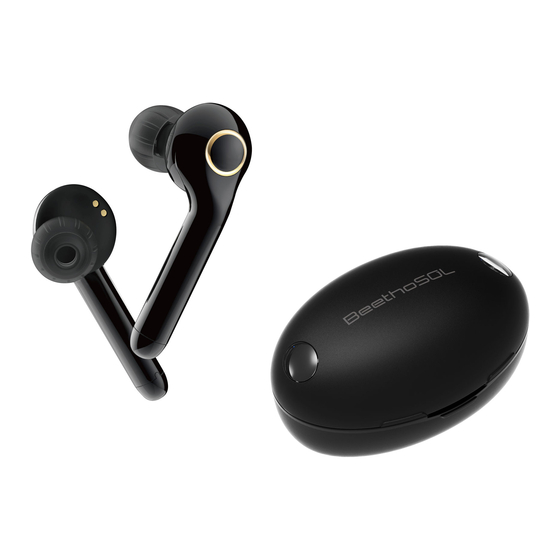
Component Product Earbuds Cradle Extra Eartip Charging Cable Quick Manual Small... -
Page 33: How To Use
How to Use Power On/Off When the Earbud is removed from the Cradle, the power is turned on. When the Earbud is inserted into the Cradle and lid is closed, the power is turned off. * When opening the package box for the first time, put the Earbud into the Cradle, close the lid and open to turn the power on. - Page 34 How to Use Hearing Enhancer Mode You can turn the enhancer mode on and off by pressing the button on both earbuds for longer than one second. * The enhancer mode does not turn on automatically when the earbud is turned on. Press and hold the button for 1 second to turn on the enhancer mode.
- Page 35 How to Use Bluetooth Connectivity 1) Put the Earbud in the Cradle, Close and reopen the lid to enter the Bluetooth pairing mode. 2) Search for Bluetooth setting in your phone and select EM-V100_L. 3) At this time, click ‘OK (Pair)’ when pop-up shows to connect additional EM-V100_R.
- Page 36 How to Use Phone Call *Connect to Bluetooth on your smartphone first before use. When a call comes in, you can press the button on the earbud to Answer Call answer the call. To hang up the call, you can press the button on the earbud End Call again to end the call.
- Page 37 How to Use Charging Caution The left and right side of the Cradle charger is different. Please insert the earbuds properly when charging. • If there is no battery in the earbuds, enhancer mode will automatically turn off with a voice guidance. In this case, please charge the device before use. •...
- Page 38 How to Use 1. Earbuds Charging The LED colors of the cradle during charging are as follows Earbud Charging Earbud Charging Complete Battery Status Blue → Off When the power is ON, the remaining battery level can be confirmed by voice. 2.
-
Page 39: Specifications And Characteristics
Specifications and Characteristics BeethoSOL Product Name EM-Tech Vietnam Co., Ltd. / Vietnam Manufacture / Country Yenphong District, Bacninh Province, Vietnam Manufacture Address 10~40℃ / 30~75%R.H / 70~106kPa Operating Environment 10~40℃ / 30~85%R.H / 70~106kPa Storage Environment Hearing Enhancer Time Max. 14 hrs... - Page 40 Application Download BeethoSOL 1) Android : Download on Play Store. iOS : Download on App Store. 2) Search for ‘BeethoSOL’ in the search box. 3) Select the BeethoSOL app distributed by BSL and install it on your smartphone.
- Page 41 Application connect the product to the phone In the list of apps on your phone, with Bluetooth to use the app. find ‘BeethoSOL’ and select to launch the app...
- Page 43 Application Simple Fitting The test is performed left and right ‘Beep’ play speed can be adjusted ear. When the test is done, the test to ‘Slow’ / ‘Fast’ button at the results will be implemented to the bottom. product.
-
Page 45: Application
Application Precise Fitting Both Left ear and Right ear should After the adjustment is completed, be adjusted. press ‘Apply’ and the test results will be implemented to the product. - Page 48 Application Mode 'Basic' mode is set up to be ‘Traffic’ mode is set up to be suitable for indoor / quiet suitable for public transits. listening.
- Page 49 Application Mode 'Restaurant' mode is set up to be 'TV' mode is set up to be suitable suitable for listening in crowded for watching TV. restaurants.
- Page 50 Application Volume Control 1. Use the volume control bar to adjust the overall gain. Adjust volume & treble / bass comfortably after the mode has changed. It can be saved for 4 individual modes. 2. Using the Bass(Low frequency), Treble(High frequency) control bar, you can create the most comfortable listening environment.
- Page 52 Application Preference Select the preference language and it will be applied to the product.
- Page 53 Product Warranty • Warranty Period (Free of Charge/cost of charge service) is 1 year. • Rather if it free of cost of charge, every A/S product including ear tip, and others will be at personal expense when mailing the product •...
- Page 54 目 次 1. 使用時の注意事項 2. 製品構成品 3. 使用方法 4. 規格及び特性 5. アプリケーション...
- Page 55 使用時の注意事項 ’使用時の注意事項’と使用方法 をよくご覧 ください。 ワイヤレスデバイス その無線設備は、運用中電波混信の可能性があります。したがって人命安全に関 するサービスはできません。 飛行機に搭乗したり、空港のを経る貨物にワイヤレスデバイスを入れる前に、製 品の電源を切ってください。 イヤフォン装 置 長い間、イヤーピースの音量を上げて音声を聞く場合、一時的または永続的に聴 力を失うことができます。 イヤフォンが破損しないように、強い衝撃に注意していただき、踏んだり、その 上に座らないでください。 バッテリ電源の使用装 置 バッテリーを誤って使用すると、バッテリーの液が漏れ、発熱、爆発することが できます。製品を熱気球の近くに置いたり、中に入れないでください。爆発や火 災の原因になります。過熱したり、火災が発生することがありますので、バッテ リーの端子に金属物が触れないようにしてください。 使用装前の準備事項 使用方法および取扱説明書をお読みください。 耳に傷や異物があることを確認してください。 製品に異物が付着している場合には、異物を除去して使用してください。...
- Page 56 使用上の注意事項 ’使用時の注意事項’と使用方法 をよくご覧ください。 注 意 1.火災や感電の危険を防ぐために、製品を雨や湿気や水分にさらされないよ うに注意してください。 2.製品を自分で修理しようとしないでください。デバイスを取り外し、分 解、修理、または変更する場合、感電などでけがをする危険があり、製品の 故障を引き起こす可能性があります。 3.この製品は、温度、湿度の高いところやほこりが多いところでは使用を控 えるし、医療機関などで放射線撮影と治療を受けるときには着用しないでく ださい。 4.製品に水や汗が入ると内部の部品が破損し、故障の原因になることがあり ますので、水が入ったときには、乾いた布で速やかに拭いた後のサービスセ ンターにお問い合わせください。 5.製品の任意の装飾を付けたり、彩色をする場合には、製品の外観と表面が 変質して、体質に応じて過剰反応を引き起こす可能性があります。これら の反応が現れた場合には、製品の着用を中止し、専門医にご相談してくださ い。 6.アプリケーションを介して音を調整する場合は、アプリケーションの使用 方法を熟知して使用してください。 7.過度に音量を上げ使用すると、一時的または永続的に聴力が損傷すること があります。...
- Page 57 使用上の注意事項 「使用上の注意」と「使用方法」をよく んでご覧使用ください。 注 意 8.製品を清潔に保ってください。ほこりの多い環境で使用する場合は、製品 の故障が発生する可能性があります。 9.イヤーピースのイヤーチップは、可能な限りきれいにし、乾燥した状態で 保管してください。 10.バッテリーを節約するために使用していない場合は、製品を切ってくだ さい。 11.音質に変化がある時にイヤーチップを抜いて、イヤーバッドの状態をチ ェックしてください。問題がある時にサービスセンターにお問い合わせくだ さい。 12.リチウムイオン電池は、製造元の許可を受けた者が直接交換する必要が あります。許可されていない人が、バッテリーを交換する際のリスクをもた らすことができます。 13.周辺の他の機器に混乱が発生することがあるので、メーカーが推奨する 環境で製品を操作してください。 14.メーカーが推奨する部品を使用しない場合はEMC性能に影響を与える可 能性があります。また、指定されていない部品を使用して、破損した場合 は、製造元は、部品の損傷については保証しません。 15.高いところから製品が落下し破損することができるので、製品を慎重に 取り扱ってください。...
- Page 58 製品コンポーネント 製品本体 イヤフォン クレードル 余分イヤーチップ 充電ケーブル クイックガイド Small...
- Page 59 使用方法 電源のオンオフ 充電ケースでイヤホンを取り出す電源が点灯し、 充電ケースにイヤホンを挿入して蓋を閉じると、 電源が切れます。 *最初のプロダクト開封時には、イヤーピースを充 電ケースに入れて蓋を閉めた開いて、取り出す点 灯します。 *充電ケースに十分な充電がされていない場合は,正 常に電源のON・OFFが実行されない場合がありま す。この場合は充電ケースに充電をしてからご使 用ください。 イヤーバッドのキーを5秒押すと電源を切ることが でき、電源が切れた状態から再度キーを1回押すと 電源を入れることができます。 * 充電ケースにイヤーパッドが正常装着時は,RED LED(充電) → BLUE LED(緩衝)が表示されます。 引き続き, イヤーパッドを充電する際にBLUE LEDが 点灯すると正常に充電されていない状況ですので, イヤバードを再度装着し直して、LEDの点灯(RED (充電) → BLUE LED(緩衝))を確認してください。...
- Page 60 使用方法 増幅モード 増幅モード 両方イヤーピースのボタンを長く(1秒以上)押す と、増幅モードをオンまたはオフにすることができ ます。 *イヤフォンがオンになっても増幅モードは自動的 に入らない。ボタンを押して増幅モードをオンにし て使用して下さい。 *増幅モードで使用中に音楽を再生するとデバイス 側のスピーカーから音楽が再生されます。 イヤー パッドで音楽を再生したい場合は,増幅モードを終 了してからご使用ください。...
- Page 61 使用装方法 Bluetooth接続 充電ケースにイヤホンを入れて蓋を閉じてから再度開いておくと、Bluetoothペアリン グモードに入ります。 携帯電話でのBluetoothデバイスを検出してEM-V100_Lを選択します。 このとき、EM-V100_Rを追加で接続するかどうか確認案内フレーズが表示されたら'OK (ペアリング)'をクリックします。 携帯電話とEM-V100_Lは、Bluetoothで接続され、EM-V100_Rが追加で登録されます。(携 帯電話のBluetoothの画面には、EM-V100_Lが接続されたことが示されます。) * Bluetooth接続時、上記のすべての処理が完了するまで、両方のイヤーピースを充電 ケースから抜かないでください。 * 現在接続しているデバイスを別のデバイスへ接続を変更する場合、現在接続された デバイスで(EM-V100_L)との接続を解除した後、新たに接続させたいデバイスで(EM- V100_R)を選択すると、接続を変更することができます。 * 特定Media Playerを使用して音楽再生中に別のデバイスへ変更,もしくは増幅モード On/Off時,一時的にデバイス側のスピーカーから音が出る場合があります。 *最初にEM-V100_Lが機器と接続しておけば、その後は、製品の効率的使用のためにバ ッテリー残量が多いイヤーバッドがデバイスと接続されます。 * 主に使用するデバイス:通話時マイクが有効になっているデバイス 注意事項 * この製品は,他の電波を生じる機器と電波干渉する可能性があり,AP混在地域等で は音切れが発生する可能性があります。...
- Page 62 使用装方法 電話 *携帯 電話とBluetoothで接続 して利用 電話がかかってきたとき、イヤーバッドのスイッチを短く一度 電話を受ける 押すと電話を受けることができます。 通話中イヤホンのボタンを短く1回押すと、電話を切ることが 電話を切る できます。 通話モードが終了すると、通話以前(音楽 / 幅)へ自動的に切り替わります。 音楽 *携帯 電話とBluetoothで接続 して利用 Bluetooth接続状態でイヤーピースのスイッチを一度押すと、音 開始 楽を再生します。 音楽再生中イヤーピースのスイッチを一度押すと、音楽を停止 停止 します。 右イヤバードのボタンを2回連続押すと、次の曲を再生します。 停止次の曲 *両イヤーバードを着用した場合のみ実行できます。 左のイヤーバードのボタンを2回連続押すと、 前の曲を再生しま 停止前の曲 す。 *両イヤーバードを着用した場合のみ実行できます。...
- Page 63 使用方法 充電 注 意 イヤフォン、充電時LとRの形状が異なりますので、よく確認して合わせて接 続します。 • イヤーピースの電池が不足すると、音声案内と一緒に終了します。この場合、 製品を充電して使用してください。 • クレードルのバッテリーが十分にある場合、イヤーバッドをそれぞれ所定の位 置に挿入した後、カバーを閉じると、イヤフォンが充電されます。 • クレードルのバッテリーが不足している場合、イヤーバッドの充電が制限され ることがありますので、背面にあるUSBポートを電源に接続すると、製品を充 電することができます。...
- Page 64 使用方法 1. イヤフォン充電 イヤフォン、充電時のLEDの色は以下の通りです。 (LチャンネルRチャンネルそれぞれ表示) バッテリーの状態 イヤフォン充電中 イヤフォン、 充電完了 ステータスインジ 赤 青 → Off ケータ 電源ON時のバッテリ残量を音声またはTONEで確認することができます。 2. クレードル充電 クレードル充電中のLED表示は以下の通りです。 バッテリーの状態 クレードル充電中 クレードル充電完了 ステータスインジ 赤 青 ケータ 3. 携帯のクレードルバッテリーチェック クレードル携帯のカバーを開けて閉じると、 電池の残量を確認することができます。 バッテリーの状態 不足 通常 十分 (1回の充電が可能) (2~3回の充電が可能) (4回の充電が可能) ステータスインジ 赤 青 ケータ...
- Page 65 規格と特徴 品目名 BeethoSOL メーカー/製造国 EM-Tech Vietnam Co., Ltd. / Vietnam メーカーアドレス Yenphong District, Bacninh Province, Vietnam 動作環境 10~40℃ / 30~75%R.H / 70~106kPa 保管環境 10~40℃ / 30~85%R.H / 70~106kPa 連続増幅時間 最大約 14時間 使用時間 連続通話/連続再生時間 最大約 4時間 充電時間 イヤフォン 1.5時間 / クレードル 2.5時間...
- Page 66 ダウンロード アプリケーション装 BeethoSOL 1) アンドロイド:Play Storeを実行します。 iOS:App Storeを実行します。 2) 索窓に「BeethoSOL」を検索します。 3) BSLで配布したBeethoSOLアプリを選択して、携帯電話にインストールします。...
- Page 67 実行 アプリケーション装 製品と携帯電話をBluetoothを接続 携帯電話のアプリ一覧から した後アプリを実行します。 「BeethoSOL」を選択して、アプリ を起動します。...
- Page 69 簡単検査 アプリケーション装 左耳から右耳まで検査を行い、検査 「ビープ」音の再生速度は、下部の が完了すると、製品のフィッティン 「遅いのが'/'高速」ボタンで調節す グ結果が適用されます。 ることができます。...
- Page 71 詳細検査 アプリケーション装 左耳から右耳まですべて調整してく 調節完了後、「適用」をクリック ださい。 すると、検査の結果が製品に適用 されます。...
- Page 74 モード アプリケーション装 '基本モード'は一般的な環境で使用 'バス・電車モード'は、電車やバ するときのモードです。 スなどの公共交通機関で使用する ときに適したモードです。...
- Page 75 モード アプリケーション装 '公共施設モード'は、役場や飲食店 'TVモード'は、テレビやオーディ などの人が多い室内で適したモード オなどを視聴するとき適したモー です。 ドです。...
- Page 76 音の調節 アプリケーション装 1. ボリューム調節バーを利用して全体的な増幅度の調節ができます。モードの変更後、ボリューム& 高音/低音を適切に調節してください。4つのモードごとに保存できます。 2. 低音、高音の調整バーを利用して、本人に最も快適なリスニング環境を作成することができます。 *「響く音」または「往々に音」が不便場合低音を与えるですか。 *「ボウルにぶつかっ音」または「紙めくる音」が不便場合高音を与えるですか。...
- Page 78 環境設定 アプリケーション装 聞きたい言語を選択すると、製品 のご案内音声が変更されます。...
- Page 79 製品保証書 • 製品保証期間(有/無償サービス1年) • 有/無償処理期間に関係なくイヤーチップ、 その他のすべてのA/ Sの製品などの郵送は個人負担とします。 • 返品、返金は補聴器に限り実施し、以下のような規定により処理します。 - 製品購入後14日以内に製品欠陥による問題提起時の交換や返金が可能です。 - 領収書の確認が不可能な場合には、製品の無償保証期間は製造日から算定されます。 - 保証期間内に正常な使用中に発生した故障に対して、無償で修理いたします。 無償保証期間内であっても、次のような場合には、修理費用が発生する可能性があります。 - ユーザーの取り扱い不注意あるいは誤った使用方法による故障および損傷 - ユーザー任意の製品の修理、改造、分解、清掃などによる故障および損傷 - 火災、地震、洪水、落雷などの自然災害に起因する故障および損傷 - 落下、衝撃、加圧、ほこり、泥、砂、浸水など保管上の誤りによる故障や損傷 - 保管上の不注意(高温多湿な場所、酷寒)による故障および損傷 - 正規品以外の消耗品や製品によって発生した故障や損傷 - 確認が不可能な場合 故障発 生時販売 店または下記のサービスセンターにご覧確認ください。 修理のお問い合わせ +82-33-243-8384 江原道春川市シンブクウプ新北で61-14江原テクノパーク春川ベン 訪問お問い合わせ チャー2工場 104号 *電話での問い合わせの後どうぞ。 モデル...
- Page 80 BSL Co., Ltd. 강원도 춘천시 신북읍 신북로 61-14 강원테크노파크 춘천벤처 2공장 104호 TEL : 033-243-8384 江原道春川市シンブクウプ新北で61-14江原テクノパーク春川ベンチャー2工場 104 Suite 104 GangwonTechnoPark ChuncheonVenture 2nd Factory, Sinbuk- ro 61-14, Shinbuk-eup, Chuncheon-si, Gangwon-do, Korea...
Need help?
Do you have a question about the BeethoSOL and is the answer not in the manual?
Questions and answers