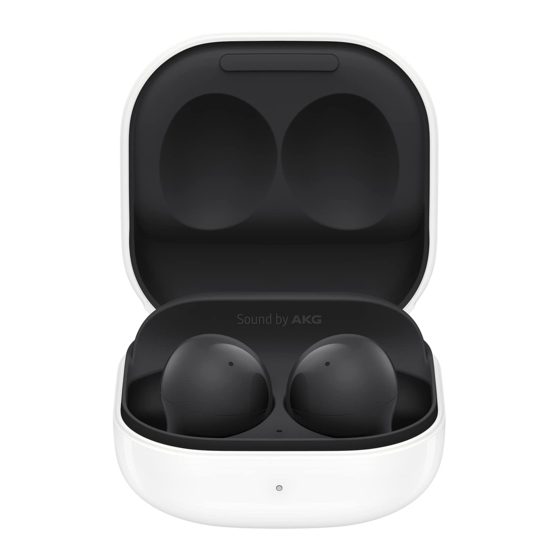
Samsung Galaxy Buds2 User Manual
Hide thumbs
Also See for Galaxy Buds2:
- Quick start manual (2 pages) ,
- User manual ,
- Instructions manual (6 pages)
Table of Contents
Advertisement
Advertisement
Table of Contents

Related Manuals for Samsung Galaxy Buds2


Summary of Contents for Samsung Galaxy Buds2
- Page 1 User manual...
- Page 2 Contents Getting started Device Layout: Galaxy Buds2 Set up your device Start using your device Galaxy Wearable app Earbuds settings Find my earbuds Tips and user manual Learn More Videos Tips Samsung Care Talk to an agent Legal information Samsung Knox Legal information Restricting children’s access to your mobile...
- Page 3 Getting started Galaxy Buds2 Set up your device Start using your device...
- Page 4 Getting started Galaxy Buds2 Ear tip Microphone Touch pad Touch-sensitive sensor Microphone Charging contacts Devices and software are constantly evolving — the illustrations you see here are for reference only.
- Page 5 Getting started Set up your device Learn more about your device hardware, assembling and charging, and how to get started using your new device. Charge the battery Check the charge status Wireless PowerShare Attach the ear tip Wear the earbuds Coupling earbuds Charge the battery Your device case is also the charger.
- Page 6 CAUTION The charging head for plugging the USB cable into a wall outlet is not included. Use only Samsung charging devices rated with an output voltage of 5v and an output current of over 150mA (sold separately). Samsung accessories are designed for your device to maximize battery life.
- Page 7 Red: Charging. Flashing Red: Charging error. Reconnect the case and earbuds. If the error occurs again, contact a Samsung Service Center for service support. NOTE You can check the battery level for the case and earbuds in the Galaxy Wearable app. For more information, see Battery level.
- Page 8 Getting started Wireless PowerShare Wirelessly charge your device using a supported Samsung smartphone. Some features are not available while sharing power. 1. From your phone, enable the Wireless PowerShare feature. 2. With the phone face down, place the compatible device on the back of the phone to charge.
- Page 9 Getting started Call reception or data services may be affected, depending on your network • environment. Charging speed or efficiency can vary depending on device condition or • surrounding environment. Do not use headphones. •...
- Page 10 Getting started Attach the ear tip Before wearing the earbuds, be sure to attach the ear tips. Wearing the earbuds without ear tips may hurt your ears. 1. Select the ear tip size that best fits your ear. 2. Hook the ear tip's groove to the earbud's fixation hook on one side and gently pull the ear tip to cover the earbud.
- Page 11 Getting started Wear the earbuds Place the earbuds in your ears correctly for a comfortable fit. 1. Insert the earbuds into your ears with the ear tips facing the bottom of your ears. 2. Check the direction of each earbud and insert them into your ears by holding them so that you see the imprinted direction marks.
- Page 12 Galaxy Wearable is compatible with select devices using Android 7.0 and later with at least 1.5 GB RAM. Supported devices may vary by carrier and device. Some features may not be available. For best results, connect with compatible Samsung Galaxy devices. Visit samsung.com/us/support/owners/app/galaxy-wearable-watch for a list of compatible smartphones.
- Page 13 Getting started Use touch controls Use the touch area on the earbuds to control your music, phone calls, and other useful shortcuts without getting out your phone. NOTE The earbuds’ touch actions are set to single tap and tap and hold by default.
- Page 14 Getting started Triple tap Quickly tap the touch pad three times for the following options: Play previous track. Start the current track over at the beginning. Touch and hold Touch and hold the touch pad for the following options: Activate a custom shortcut. See Customize touch controls for more information.
- Page 15 Getting started Call features Answer and control calls using your earbuds. Incoming calls When you receive a call while wearing the earbuds, the ringtone will play in the earbuds. You can also configure your earbuds say the phone number or name that is saved in your contacts of the incoming call.
- Page 16 Getting started Active noise canceling Quiet unwanted background noise and ambient sounds. This feature is only available when wearing both earbuds. ◌ From Galaxy Wearable, tap Active noise canceling. Wear Turn off noise controls Disable all noise canceling and ambient sound features. ◌...
- Page 17 Galaxy Wearable app Earbuds settings Find my earbuds Tips and user manual...
- Page 18 Galaxy Wearable app Earbuds settings Learn more about your device's features and options. Battery level Customize touch controls Equalizer Read notifications aloud Bixby voice wake-up Seamless earbud connection Earbud fit test Labs Reset Accessibility Earbuds software update About earbuds Devices and software are constantly evolving — the illustrations you see here are for reference only.
- Page 19 Galaxy Wearable app Battery level The Galaxy Wearable app displays the battery level for the earbuds at the top of the screen. When the battery is low a notification will display on your phone. ◌ Open Galaxy Wearable to view the battery percentage for the earbuds. Wear Battery level Customize touch controls...
- Page 20 Galaxy Wearable app Block touch controls Prevent unintended actions by turning off the touch controls. ◌ From Galaxy Wearable , tap Touch controls > Block touches to disable the Wear touch control feature. Touch and hold Set the shortcuts for each earbud. 1.
- Page 21 Seamless earbud connection Switch quickly to nearby devices without disconnecting your earbuds or turning on pairing mode. This works with any nearby device that's signed in to your Samsung account, even if it has never paired with your earbuds before.
- Page 22 Gaming mode Minimize the audio delay for vivid, synchronized gaming sound. For the best experience, keep your earbuds near your phone. This feature is only available when connecting with a Samsung mobile device. 1. From Galaxy Wearable, tap Earbuds settings >...
- Page 23 Galaxy Wearable app About earbuds View information about the earbuds. ◌ From Galaxy Wearable, tap Earbuds settings > About earbuds for the Wear following information: • Device name, model, and serial number • Legal information • Software information • Battery information Find my earbuds If you misplace your earbuds, your phone can help you find it.
- Page 24 Learn more Videos youtube.com/samsungcare Tips samsung.com/us/support/tips Samsung Care samsung.com/us/support Talk to an agent Contact us on Facebook Messenger Find us on Facebook Follow us on Twitter...
- Page 25 Samsung Knox Samsung Knox is Samsung’s security platform and is a mark for a Samsung device tested for security with enterprise use in mind. Additional licensing fee may be required. For more information about Knox, please refer to: samsung.com/us/knox.
- Page 26 Legal information Follow these tips carefully to prevent damage to the device and maintain dust and water resistance performance: Water resistant based on 5ATM rating, which means submersion up to 50 meters per ISO standard 22810:2010. Not intended for scuba diving. Avoid excessive, sudden temperature changes, and high velocity activities.
- Page 27 New Jersey 07660 Phone: 1-800-SAMSUNG (726-7864) Internet: samsung.com ©2021 Samsung Electronics America, Inc. Samsung, Samsung Galaxy, and Samsung Health are all trademarks of Samsung Electronics Co., Ltd. Other marks are the property of their respective owners. Some multimedia (audio/video) files contain Digital Rights Management (DRM) technology to verify you have the right to use the files.
Need help?
Do you have a question about the Galaxy Buds2 and is the answer not in the manual?
Questions and answers